

Scope template project management graphics ppt icon




Try Before you Buy Download Free Sample Product
 Impress Your
 Audience
 100%
100% Editable
 Save Hours
 of Time


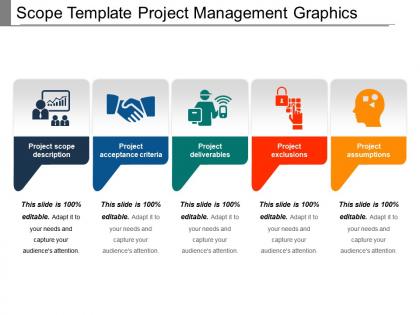
Our scope template project management graphics PPT icon is a valuable tool for communicating the project’s vision, plans, goals, etc. Using the project scope PowerPoint template, you will be able to better define the strategic mission or objective behind the execution of a particular project to the managers, shareholders, creditors, etc. This project management essentials PPT presentation graphic can easily assist an entrepreneur who’s planning to launch a new product or service or bring around some revolutionary change in the organization, to present the same before a large set of audience in a very smooth manner. Our project management graphics PPT model can be accessed to deliver subtopics like project scope description, project acceptance criteria, project deliverables, project exclusion, and project assumptions. Using the project scope PowerPoint template, one can format all his ideas, plans and strategies related to the project in a systematic format. By use of this template, managers can communicate the project deliverables and can set deadlines for each stage. It provides the viewer with an overview of the successful activities behind the project execution. Deal them a good hand with our Scope Template Project Management Graphics Ppt Icon. They will get the best cards available.
People who downloaded this PowerPoint presentation also viewed the following :
Scope template project management graphics ppt icon with all 5 slides:
Our Scope Template Project Management Graphics Ppt Icon will bring you glory. The audience will extol your achievements.

FAQs for Scope template project management
Start with your project objectives and deliverables - be super specific here. Then map out what's in scope versus what's definitely not, because trust me, scope creep will eat you alive if you're vague. Include your assumptions, constraints, and how you'll know when stuff is actually "done" (acceptance criteria). Stakeholder roles are huge too - I've watched projects crash and burn when nobody knows who's responsible for what. Oh, and don't forget timelines and budget limits. The whole thing is basically your insurance policy, so get everyone to sign off before you start. When things go sideways later, you'll be glad you did.
Look, scope templates are honestly a lifesaver because they give everyone the same roadmap to follow. No more confusion about who's doing what or when things are due. Templates make you think through all the messy details upfront instead of scrambling later - trust me on this one. You'll want sections for objectives, deliverables, what's NOT included (super important), and how you'll know if you actually succeeded. The whole point is avoiding those cringe moments where someone goes "wait, wasn't that your job?" Start simple, then tweak it based on what your team actually struggles with.
So basically, scope template = what you're delivering. Project plan = how you're gonna get there. Scope is like your "what are we even building?" document - it sets boundaries and keeps everyone from randomly adding stuff later. Been burned by that too many times! Your project plan takes all that scope stuff and turns it into actual steps with deadlines and who's doing what. I'd definitely nail down the scope first to get everyone on the same page. Then you can build out your timeline and task breakdown from there. Way easier than doing it backwards, trust me.
So basically these templates save you tons of time because you're not reinventing the wheel every project. Healthcare stuff needs all those compliance boxes checked and safety protocols built in. Construction? You're dealing with permits and inspections and coordinating material deliveries - totally different beast. Tech milestones look nothing like manufacturing ones, which is pretty obvious when you think about it. I'd start by figuring out what 3-4 things make your industry weird or complicated, then bake those right into your standard template. Way easier than starting fresh each time.
So basically, a scope template is like your project insurance policy. You set clear boundaries right from the start - what's in, what's out. That way when people start asking for extra stuff (and they always do), you can point to the document and say "nope, that wasn't part of the deal." It also helps you catch potential problems early on, like when requirements are super vague or someone has totally unrealistic expectations. I've seen too many projects go sideways because nobody bothered with this step. Keep checking back against it while you're working - you'll spot issues way faster.
Honestly, throw in some flowcharts and diagrams - they'll save your life when explaining scope to stakeholders. Color-code different project phases so people aren't squinting at boring text blocks. Even basic PowerPoint shapes work way better than paragraphs (I learned this the hard way). Dependencies and deliverables become super obvious with simple charts. My go-to move? Stick a timeline graphic right at the top. People love having that visual roadmap, plus it stops those "wait, I thought we were doing X first" conversations later. Visual elements make the whole in-scope vs out-of-scope thing click instantly.
Oh man, the biggest trap is being way too vague with your deliverables. Like don't write "improve user experience" - be specific! Say "redesign checkout flow and cut cart abandonment by 15%." Everyone skips the exclusions part but trust me, that's what saves you from endless scope creep later. I learned that the hard way on my last project lol. Dependencies matter too - if you're waiting on another team's API, mention it upfront. Start with clear success criteria so there's no confusion about what "finished" actually means.
Start with broad categories, not super specific line items - trust me on this one. Always throw in sections for assumptions and dependencies too. Those become lifesavers when stuff inevitably changes. I used to go way too detailed upfront and it just made updates a nightmare later. Build in some "TBD" spots and set up clear approval workflows for changes. Oh, and make sure everyone knows the template isn't set in stone - people get weird about touching documents they think are "final." The whole thing should feel flexible, not like some contract nobody wants to mess with.
Every 3-4 projects, take a hard look at your scope template. I keep this weird running doc of "stuff I should've included" during projects - sounds dorky but it actually helps a ton. Compare your last few finished projects against what you originally scoped. The gaps will jump out at you immediately. Short sentences work here. Heavy edits in the same sections? That's your template telling you something's off. Get your team together quarterly to hash out what's working and what sucks. Templates aren't set-it-and-forget-it things - they need to grow with how you actually work and what clients are asking for these days.
Honestly, scope templates are game-changers for budgeting. Instead of wild guessing, you'll know exactly what each deliverable needs upfront - which people, how long, what it'll cost. I always start by listing everything we need to deliver, then work backwards figuring out resources. The best part? You can catch problems early, like when Sarah's needed for two different things at once (happens all the time). Plus it becomes your tracker later - you can see where you're blowing the budget versus what you planned. Way better than crossing your fingers and hoping the numbers work out.
So basically, scope templates are lifesavers for keeping everyone on the same page. They map out who needs to know what and when - super helpful for avoiding those awkward "wait, I thought YOU were handling that" moments later. You'll want to outline communication schedules, decision points, and review cycles upfront. Gets everyone clear on their role from the start. Oh, and definitely don't just email it around - actually sit down with stakeholders and walk through it together. Trust me, that face-to-face review catches so many potential issues before they become headaches.
Do a workshop first - go through the whole template using a real project example. Everyone fills it out together so they can bug you with questions right away. Acceptance criteria always trips people up at first, but they'll figure it out with practice. After that, review their first attempts one-on-one and tell them exactly what's missing. Honestly, the biggest thing is just forcing them to use it every single time, even for tiny projects. Otherwise they'll skip it when things get busy. Repetition is what makes it stick - took my team maybe 3-4 projects before it felt natural.
Dude, a crappy scope template will totally mess up your timeline. Trust me on this one. Your team won't know what they're supposed to deliver, stakeholders will keep adding random stuff, and you'll be stuck in endless meetings trying to figure out what's actually part of the project. I watched one project literally double its timeline because of this exact issue - it was painful to witness. The worst thing? Having to redo work when someone finally clarifies requirements halfway through. Honestly just spend the extra time up front building a decent template. You'll thank yourself later when you're not drowning in confusion and scope creep.
Dude, you gotta try automating those scope templates - it's a game changer. Instead of filling out the same boring fields every time, set up workflows that auto-populate client info and calculate timelines based on how complex the project is. Smart forms are where it's at honestly. Your templates basically start thinking for themselves, which sounds weird but trust me on this. Real-time collaboration is huge too since everyone stays on the same page. Oh and version control - no more "wait which draft are we using??" Start with whatever template you use most. Add one automated thing at a time so you don't overwhelm yourself.
Track your budget variance first - that's the obvious one. Schedule milestones matter too, but honestly scope creep percentage is what'll really tell you if things went sideways. Did the project balloon way beyond what you originally planned? Quality metrics should match whatever acceptance criteria you had upfront. Oh, and don't sleep on stakeholder satisfaction surveys - they're kinda awkward to do but they'll show you if people actually got what they wanted. Resource utilization rates help too since you probably made staffing assumptions in your template. Start measuring this stuff early though, not when everything's already done.
-
Unique design & color.
-
Attractive design and informative presentation.