


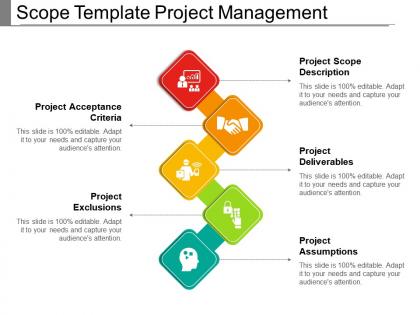
Scope template project management powerpoint slide template




Try Before you Buy Download Free Sample Product
 Impress Your
 Audience
 100%
100% Editable
 Save Hours
 of Time


Introduce changes with our Scope Template Project Management Powerpoint Slide Template. Generate interest in a better approach.
People who downloaded this PowerPoint presentation also viewed the following :
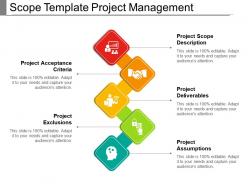
Scope template project management powerpoint slide template with all 5 slides:
Discredit discord creating acts with our Scope Template Project Management Powerpoint Slide Template. Ensure goodwill continues to exist.


FAQs for Scope template project management
Look, you need the basics first: objectives, deliverables, timeline with milestones, and resources. But honestly? The most important thing is spelling out what you're NOT doing - I can't tell you how many times I've watched projects blow up because someone assumed X was included when it totally wasn't. Also throw in acceptance criteria for each deliverable, who's responsible for what, your assumptions, and any constraints. Oh and definitely add a change process because scope creep will happen. I always forget dependencies too but those matter. Just adapt this stuff to whatever type of project you're running.
Honestly, scope templates are lifesavers. They stop all that "wait, I thought we were including X" drama before it starts. When stakeholders get those random mid-project ideas (and they always do), you just point back to the doc. Super simple. The real magic happens upfront though - writing everything down forces you to actually think through the details instead of just winging it. I swear, most project headaches come from people assuming stuff that was never discussed. Your stakeholder meetings become way smoother once everyone's working from the same playbook. Try it on your next project - you'll see the difference immediately.
Honestly, software development and consulting companies see the biggest wins from scope templates. Construction too. You know how clients always want to add "just one more thing" halfway through? Templates help shut that down early by setting clear boundaries. Marketing agencies love them since they're constantly doing similar campaigns with different twists. Professional services firms too - they've got repetitive project structures but every client thinks they're special. The templates give you a solid starting point while still letting you customize for each client's weird little requirements.
Honestly, scope templates are lifesavers for catching problems before they wreck your project. You're forced to map out boundaries, deliverables, all that stuff - which naturally reveals where things could go sideways. It's way better than scrambling later when issues pop up (and they always do). Plus you'll have something solid to point to when scope creep starts happening. I always throw in a risks section now - catches so much more than I expected. Worth trying on your next project for sure.
The worst thing you can do is be vague about what you're delivering - scope creep will destroy you later. Different projects need different templates, so don't try to cram everything into one. I learned this the hard way on a marketing project once. Always list what you're NOT doing (exclusions are huge), spell out your assumptions, and build in buffer time. People constantly forget the approval section and then nobody knows who's supposed to sign off. Oh, and definitely include what happens when they inevitably change requirements halfway through.
You want to capture the actual risks and weird stuff that comes up in YOUR projects, not just fill in generic blanks. Look at your last few projects - what scope problems happened that a basic template would've totally missed? Add sections for things like compliance headaches, how your stakeholders actually make decisions, or those technical dependencies that always bite you. Honestly, most standard templates are pretty useless anyway. The trick is matching the language and milestones to how your team really works. Don't just copy-paste success criteria either - make them fit your client's world.
Think of it like a contract but way less scary - you're just getting crystal clear on what you're actually building and when it'll be done. Honestly, half the drama in projects comes from people having totally different ideas about what "finished" means. The template makes you spell out your deliverables, deadlines, and what counts as success before anyone touches code. Sure, it feels like extra paperwork at first, but trust me - it's way better than having your client randomly decide they also need a mobile app three weeks in. Get everyone to sign off on the scope doc early and you'll dodge so many headaches later.
So basically, scope templates are your best friend for handling change requests. You get a standard way to document everything and figure out how new requests mess with your timeline and budget. Honestly, I've seen too many projects go sideways without this kind of structure. The template stops scope creep from completely wrecking your plans. Plus it creates this nice paper trail - super handy when stakeholders suddenly "don't remember" what they originally wanted. Just use it as your checkpoint for any changes. Keeps everyone honest and your decisions organized.
Honestly, it comes down to how locked-in your requirements are from the start. Waterfall makes you nail down every detail upfront - features, timelines, the whole nine yards. Changes later? Pain in the ass and expensive. Agile's totally different though. You work with high-level goals and user stories instead of massive spec docs. The scope's gonna shift as you figure stuff out each sprint, and that's actually a good thing. I'd say start with whatever your team already uses (less friction that way), but tweak the template format so it actually fits how you work.
Honestly, the easiest way is comparing your final project to that original scope doc line by line - kinda tedious but worth it. Check your scope creep percentage first (how much stuff got added). Budget variance tells you a lot too since scope changes always mess with costs. Timeline stuff is obvious - did scope issues derail your schedule? I'd also look at stakeholder satisfaction versus what they expected initially. Oh, and count how many change requests you dealt with throughout. That number alone can be pretty telling about how well you nailed the scope upfront.
Charts and bullet points are your friend here - they make scope docs so much easier to skim through. I always throw in flowcharts for project phases and use icons to call out the big deliverables. Color coding different work streams helps too. Nobody wants to stare at pages of dense paragraphs (been there, done that). Tables work really well for breaking down who's doing what. The whole point is helping stakeholders find their stuff fast. Oh, and timelines are clutch for keeping everyone on the same page. Add 2-3 visual elements and you'll actually see people engage with your scope doc.
Honestly? Just use whatever your team already knows - Word or Google Docs work perfectly fine for basic scope stuff. Everyone can jump in and leave comments without learning something new. If you need more workflow features, Asana or Monday are decent options. I've literally watched teams waste weeks picking the "perfect" tool when a shared doc would've solved everything. For bigger projects, Smartsheet gives you those database vibes while keeping templates neat. But seriously, start with what you've got. Only upgrade if you're actually stuck - most people never hit those limits anyway.
Honestly, legal stuff has to be baked into your template from day one - can't just slap it on later. Start with clear sections for deliverables, timelines, and who's responsible for what. Document your change processes too because scope creep turns into legal nightmares fast (learned this the hard way). Don't forget liability clauses and IP ownership - boring but necessary. Oh, and whatever regulatory boxes your industry needs checked. The trick is making it flow naturally so people actually follow it instead of skipping the "legal junk."
Get that scope template out to everyone ASAP - seriously, don't perfectionist your way into trouble. I've watched so many projects crash because people had totally different ideas about what was happening. During drafting, grab input from different team angles instead of just sending the final version around for rubber stamps. Email chains for feedback are the worst, so use something where people can comment directly on sections. Oh, and once you're done? Walk everyone through it in a quick meeting. Trust me, what feels obvious to you might not click for others.
Past project feedback is pure gold for fixing your scope templates. I dig into where scope creep hit hardest, which deliverables confused everyone, and what assumptions totally flopped. Those disasters teach you way more than the smooth projects ever will - trust me on this one. I beef up language around problem areas and add buffer sections for stuff that always gets added later anyway. Also throw in clearer definitions for terms stakeholders constantly misunderstood. Keep notes from each project and update your template as you go. Pull up your last 3-5 projects this week to spot the patterns.
-
Top Quality presentations that are easily editable.
-
Really like the color and design of the presentation.