

Scope Management Powerpoint Presentation Slides






Try Before you Buy Download Free Sample Product
 Impress Your
 Audience
 100%
100% Editable
 Save Hours
 of Time


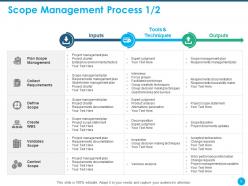
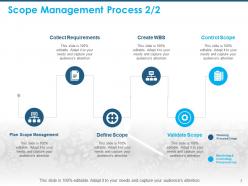
Plan and execute your work to achieve all the project goals appropriately by using the Scope Management PowerPoint Presentation Slides. By taking advantage of our content-ready cost overrun PPT presentation, you can mention the project, its objectives, and final expected outcomes. Showcase the six processes in scope management including planning, collecting requirements, defining scope, creating WBS, validating scope, and controlling scope. Outline your project’s activities, budget, task duration, development, and project scope using our program management PowerPoint templates. Determine how the scope is explained, developed, structured, and verified with the help of these professionally designed scope management plan PPT slideshow. Monitor the status of the project and the product scope in order to maintain the scope baseline during the project lifecycle. Steps to manage the scope changes can be easily depicted with the help of our readily available project management PowerPoint template. Hence ensure the success of your project by downloading our ready-to-use scope statement PowerPoint presentation.
People who downloaded this PowerPoint presentation also viewed the following :
Content of this Powerpoint Presentation
Slide 1: This slide introduces Scope Management. State your Company name and begin.
Slide 2: This slide displays Agenda.
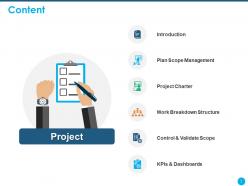
Slide 3: This slide shows Content of the presentation
Slide 4: This slide presents Introduction.
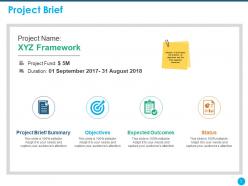
Slide 5: This slide gives Project Brief. Mention in brief about the projects, its objectives and the final expected outcomes
Slide 6: This slide shows Scope Management Process.
Slide 7: This slide depicts Scope Management Process.
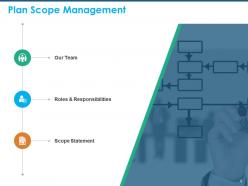
Slide 8: This slide shows Plan Scope Management
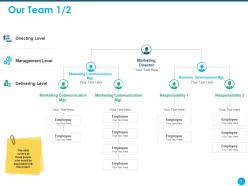
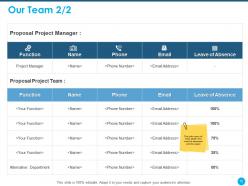
Slide 9: This is Our Team slide with Names and Designations. This slide covers all those people who would be associated with this project
Slide 10: This slide covers all those people who would be associated with this project
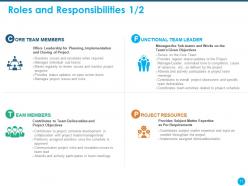
Slide 11: This slide shows Roles and Responsibilities of team members.
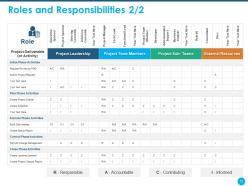
Slide 12: This slide also shows Roles and Responsibilities
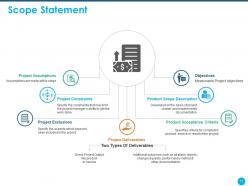
Slide 13: This slide displays Scope Statement
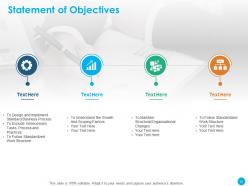
Slide 14: This slide depicts Statement of Objectives
Slide 15: This slide displays Statement of Objectives
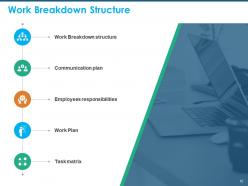
Slide 16: This slide shows Work Breakdown Structure containing- Communication plan, Employees responsibilities, Task matrix, Work Breakdown structure, Work Plan, etc.
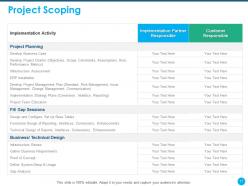
Slide 17: This slide describes Project Scoping
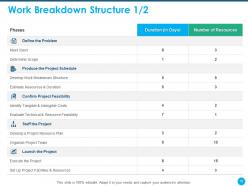
Slide 18: This slide depicts Work Breakdown Structure.
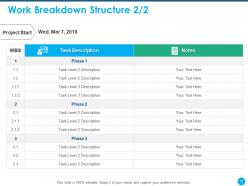
Slide 19: This slide shows Work Breakdown Structure.
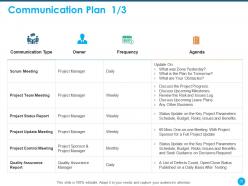
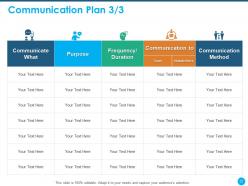
Slide 20: This slide displays Communication Plan.
Slide 21: This slide highlights Communication Plan.
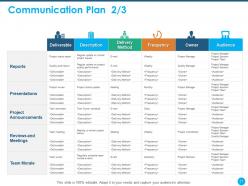
Slide 22: This slide also showcases Communication Plan.
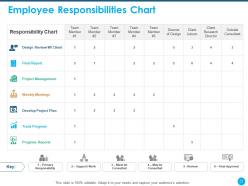
Slide 23: This slide shows Employee Responsibilities Chart
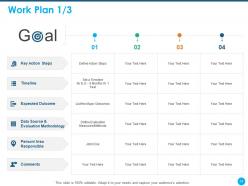
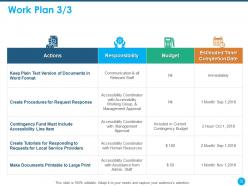
Slide 24: This slide shows Work Plan.
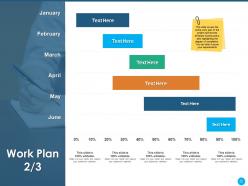
Slide 25: This slide covers the entire work plan of the project split across different months and is also highlighting the degree of completion. You can alter it as per your requirements
Slide 26: This slide displays Work Plan.
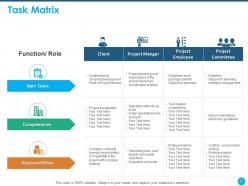
Slide 27: This slide showcases Task Matrix.
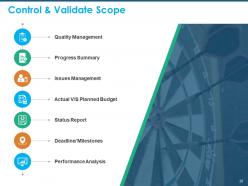
Slide 28: This slide displays Control & Validate Scope.
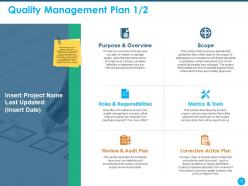
Slide 29: This slide provides an overview of the process you plan to employ to manage quality, describing the items below at a high level. Include a problem definition or statement and any relevant background information.
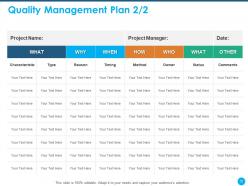
Slide 30: This slide displays Quality Management Plan.
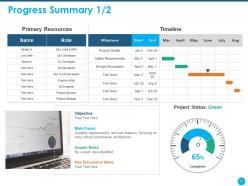
Slide 31: This slide showcases Progress Summary.
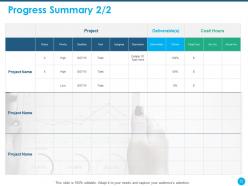
Slide 32: This slide displays Progress Summary.
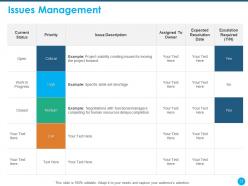
Slide 33: This slide describes Issues Management.
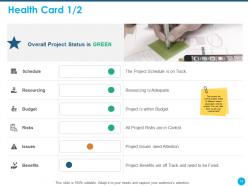
Slide 34: This covers the overall project status of different factors associated with the project. You can alter them as per your requirements
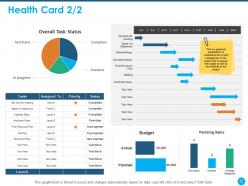
Slide 35: This is a graphical presentation to understand the overall management of the project and to analyze the budget as well as the timelines of the project
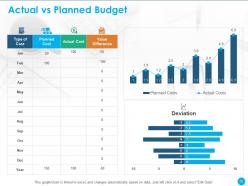
Slide 36: This slide shows Actual vs Planned Budget
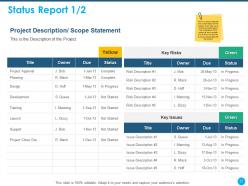
Slide 37: This slide shows Description of the Project.
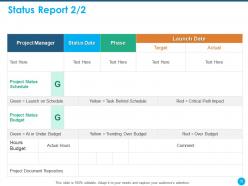
Slide 38: This slide depcits Status Report.
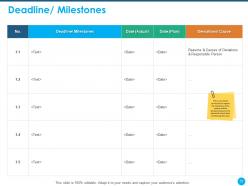
Slide 39: This slide shows analysis carried out to capture the milestones of the project and the deviation between the planned & actual dates of achieving the same
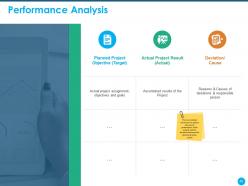
Slide 40: This slide depicts Performance Analysis
Slide 41: This slide shows KPIs and Dashboards.
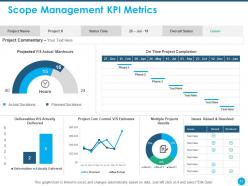
Slide 42: This slide represents Scope Management KPI Metrics.
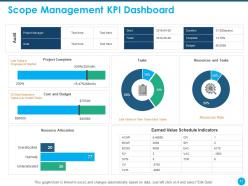
Slide 43: This slide showcases Scope Management KPI Dashboard
Slide 44: This is Scope Management Icons Slide.
Slide 45: This slide is titled as Additional Slides for moving forward.
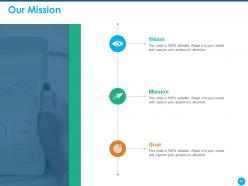
Slide 46: This slide displays Mission, Vision and Goals of the Company.
Slide 47: This is Our Team slide with Names and Designations.
Slide 48: This is About Us slide to showcase Company specifications.
Slide 49: This slide depicts Comparison between different social media users.
Slide 50: This slide is titled as Post it Notes. Post your important notes.
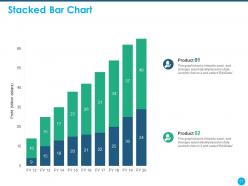
Slide 51: This slide displays Stacked Bar Chart for products Comparison.
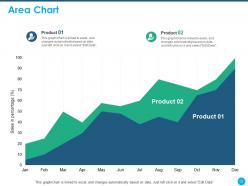
Slide 52: This slide displays Area Chart for Comparison of products.
Slide 53: This slide displays Quotes
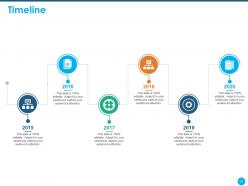
Slide 54: This slide shows Timeline process.
Slide 55: This is Thank You slide with Contact details.
Scope Management Powerpoint Presentation Slides with all 55 slides:
Use our Scope Management Powerpoint Presentation Slides to effectively help you save your valuable time. They are readymade to fit into any presentation structure.





FAQs for Scope Management
Start with your scope statement - seriously, don't skip this step. Break everything down into a work breakdown structure so you're not drowning in chaos later. Yeah, it's boring as hell but trust me on this one. Set up change control processes from day one because scope creep will destroy your timeline faster than you think. I'd also schedule regular check-ins with stakeholders to make sure you're still aligned. The WBS feels like overkill at first, but when things get crazy (and they will), you'll thank yourself for having clear work packages to reference.
Dude, stakeholder engagement is everything for scope management. You'll catch scope creep way earlier when people are actually involved from the start. Clear requirements upfront = fewer "wait, I thought it would do this other thing too" disasters down the road. Honestly, I've watched projects completely fall apart when stakeholders got left out of the loop - it's painful. Keep checking in with them regularly. Document what they're saying. Most importantly, get actual written approval before changing anything scope-wise, because people love to assume stuff will just magically get added without asking.
So for defining scope, start with a work breakdown structure - basically chop your deliverables into bite-sized pieces. Do interviews and workshops to gather requirements too. Change control is where things get messy though, like seriously most projects die here because scope creep sneaks up on you. Set up regular scope reviews and use earned value management to track how you're doing against the plan. Variance analysis helps catch problems early. Document everything upfront (I can't stress this enough) and make sure your change approval process actually works in practice.
Dude, scope creep will kill your project if you don't catch it fast. Regular check-ins help, but honestly the real trick is having everyone sign off on a rock-solid scope doc upfront. When stakeholders ask for "just one tiny addition" (and they always will), document it and show them exactly how it affects the timeline. Don't just say yes to be nice - I learned that the hard way. Present the trade-off clearly: sure, we can add that feature, but delivery gets pushed back two weeks. Make them pick between extra stuff or hitting the deadline. Takes the pressure off you.
Okay so WBS is basically how you break down all your project work into smaller, manageable pieces. It's like a family tree but for tasks instead of people (weird analogy but it works). You'll use it to figure out what's in scope, estimate how much work everything takes, and assign who does what. Honestly, if you skip this step, scope creep will destroy you because nobody knows what they're actually supposed to be doing. Build it early and get your whole team to look it over together. Trust me - finding missing stuff now beats scrambling later when you're already behind schedule.
Honestly, good communication is your best defense against scope creep. Document everything upfront - like, write it all down so there's no confusion later. Regular check-ins with stakeholders help you spot problems early before they blow up. I can't tell you how many projects I've watched crash because everyone had different ideas about what was "obviously" included. When someone asks for extras later (and they will), you can point back to what you all agreed on originally. Set up your communication early and actually stick to it. Sounds boring but it'll save your sanity.
Honestly, scope management is what saves your project from becoming a total disaster. Define what you're actually doing upfront - otherwise you'll get hit with scope creep that destroys your timeline and budget. Stakeholders won't randomly demand crazy stuff if you've already agreed on realistic deliverables. Your team stays focused too instead of getting distracted by every random idea that pops up. Oh and seriously - get everything in writing with actual signatures. I learned this the hard way when clients inevitably go "wait, I thought we were also building that other thing." Trust me, document everything.
Product scope is what you're actually building - the app features, buttons, all that stuff. Project scope? That's everything your team has to do to make it happen. Coding, meetings, testing, documentation, the whole shebiz. So if you're making an app, product scope = what the app does. Project scope includes building it plus all the annoying overhead work. Sprint planning, user research, deployment... honestly, probably too many Slack notifications too. Just make sure everyone knows which one you're talking about when writing requirements. Trust me, it saves headaches later.
Ugh, so legal stuff is basically set in stone - you can't just ignore it because it's annoying or costs too much. Regulations will force you to add audits, extra documentation, training modules, all sorts of things you didn't plan for originally. Here's the worst part: rules can literally change while you're mid-project. Happened to my coworker last year and it was a nightmare. Build in extra time and budget from day one. Also get someone to watch for regulatory updates throughout the project - trust me on this one.
Honestly, scope management in agile is all about rolling with the punches. Sprint planning helps you figure out what's actually doable each iteration - don't pack too much in there. Your product owner needs to be brutal about prioritizing by business value (some of them struggle with this, not gonna lie). Daily standups catch scope creep before it gets crazy. When requirements change, sprint reviews let you pivot. I'd say keep your backlog clean and have solid acceptance criteria written out. The whole point is accepting that scope will shift instead of pretending it won't.
Look, scope management is basically your roadmap for resources and budget. Clear boundaries let you figure out who you need, what skills matter, and realistic timelines. Otherwise you're just guessing with your money - never fun to explain to the boss later. Here's the thing: scope creep will destroy your budget faster than anything. Those "tiny" additions everyone asks for? They add up quick. I learned this the hard way on a project last year. Get everyone to agree on scope upfront, then make sure any changes go through proper budget talks. Don't let people treat changes like casual favors.
Start with a basic change log spreadsheet - track who asked for what and when. Version control is huge for your scope docs too. Most people totally blow off the documentation piece and then hate themselves later (been there!). Impact analysis templates will save your butt during stakeholder meetings. Keep comparing everything back to your original baseline so you can show exactly how things shifted. Your change control board will want to see all this stuff anyway. Project management software works great, but honestly? Even a simple spreadsheet gets the job done. You can always get fancier once you've got the process down.
Dude, past project lessons are seriously your best friend here. Dig through old retrospectives and you'll spot the same scope creep BS happening over and over - like when clients say "tiny change" but it's actually massive. I swear, that phrase should be a red flag by now. Also check what actually worked though! Remember that mobile project where change control was bulletproof? Steal those tactics. Make a quick checklist from your wins and disasters, then share it at kickoffs. Trust me, your sanity depends on keeping scope locked down from day one.
Honestly, remote teams mess up scope because everyone's talking in different Slack channels and nobody knows what's actually decided. Time zones make it worse - by the time you wake up, three people have already changed the requirements in some thread you missed. Without bumping into people at the coffee machine, assumptions just snowball until you're building completely different things. Virtual meetings are terrible for catching that "wait, what?" look on someone's face. My advice? Pick ONE place where scope lives (not scattered across emails and Slack) and do weekly check-ins that are just about scope, not your usual status updates. Trust me on this one.
Oh man, scope management gets SO tricky with different cultures. Some teams want everything written down in painful detail, others just shake hands and call it good. I've seen Japanese colleagues quietly take on extra work rather than push back - totally different from how we'd handle it. Deadlines? Ha, good luck with that depending on where your team is based. What really helped me was being super explicit about scope from day one (boring but necessary) and checking in constantly. Otherwise you'll be three weeks in wondering why half your team thinks the project includes features you never agreed to. Trust me on this one.
-
Innovative and attractive designs.
-
Nice and innovative design.