

Scrum Framework Powerpoint Presentation Slides





Try Before you Buy Download Free Sample Product
 Impress Your
 Audience
 100%
100% Editable
 Save Hours
 of Time


Scrum framework enables an iterative and incremental process for development wherein each step is called a sprint. Grab our efficiently designed Scrum Framework template that focuses on the scrum overview, the scope of lifecycles, and the phases of the scrum model. In the scrum overview, we have covered the scrum design and features, advantages and disadvantages of scrum software development methodology, Scrum roles, and benefits of implementing the model. In the scope of lifecycles, we have focused on scrum construction lifecycle, agile system development, disciplined agile delivery, continuous lifecycle, and agile software development lifecycle. Steps involved in scrum model software, scrum product backlog creation, sprint planning, daily scrum meeting, the follow up process, product increment and sprint review, retrospective and next sprint planning and daily tracking are covered in phases of the scrum model. This PowerPoint template ensures the possibility of continually increasing product value by maintaining flexibility in further iterations. Customize this 100 percent editable template now.
People who downloaded this PowerPoint presentation also viewed the following :
Content of this Powerpoint Presentation
Slide 1: This slide introduces Scrum Framework. State Your Company Name and begin.
Slide 2: This is an Agenda slide. State your agendas here.
Slide 3: This slide presents Table of Content for the presentation.
Slide 4: This slide shows title for topics that are to be covered next in the template.
Slide 5: This slide presents scrum design and features which focuses on steps such as plan, build, test, etc.
Slide 6: This slide displays advantages and disadvantages about the scrum development methodology.
Slide 7: This slide represents various scrum roles such as product owner, scrum master and scrum team members.
Slide 8: This slide represents benefits which are implemented due to scrum method such as tasks estimation, quality, quality control, etc.
Slide 9: This slide shows title for topics that are to be covered next in the template.
Slide 10: This slide showcases scrum construction lifecycle which focuses on product backlog, priority requirements, etc.
Slide 11: This slide displays agile system development lifecycle which focuses on iteration, inception, construction iterations, etc.
Slide 12: This slide represents disciplined agile delivery lifecycle which focuses on inception, construction and transition.
Slide 13: This slide showcases continuous DAD lifecycle which focuses on new features, work, learning, etc.
Slide 14: This slide shows agile software development lifecycle which focuses on concept, inception, etc.
Slide 15: This slide shows title for topics that are to be covered next in the template.
Slide 16: This slide represents steps involved in scrum model SDLC which focuses on product backlog, sprint planning, sprint backlog, etc.
Slide 17: This slide showcases scrum product backlog creation which focuses on daily scrum, sprint review, retrospective, etc.
Slide 18: This slide shows scrum sprint planning and backlog creation which focuses on tasks in progress, completed and closed.
Slide 19: This slide presents sprint daily scrum meeting which focuses on story, to do, in progress, to verify and done tasks.
Slide 20: This slide displays Follow-up Progress by Using Burn-Down Chart.
Slide 21: This slide provides the glimpse about the product increment and sprint review flowchart.
Slide 22: This slide provides the glimpse about the sprint review, team retrospective and overall retrospective of the scrum team.
Slide 23: This slide represents next sprint planning and tracking which focuses on task name, owner, estimated time, etc.
Slide 24: This slide displays Icons for Scrum Framework.
Slide 25: This slide is titled as Additional Slides for moving forward.
Slide 26: This slide shows Scrum Agile Software Development Software Development Process.
Slide 27: This is Our Mission slide with related imagery and text.
Slide 28: This is Our Team slide with names and designation.
Slide 29: This slide provides Clustered Column chart with two products comparison.
Slide 30: This is About Us slide to show company specifications etc.
Slide 31: This is Our Target slide. State your targets here.
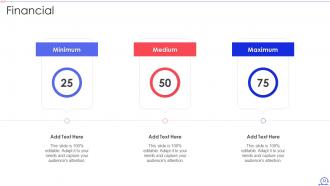
Slide 32: This is a Financial slide. Show your finance related stuff here.
Slide 33: This slide depicts Venn diagram with text boxes.
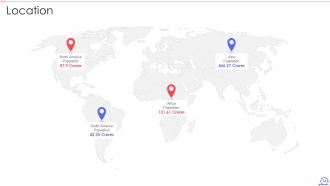
Slide 34: This is a Location slide with maps to show data related with different locations.
Slide 35: This slide shows Post It Notes. Post your important notes here.
Slide 36: This slide contains Puzzle with related icons and text.
Slide 37: This is a Timeline slide. Show data related to time intervals here.
Slide 38: This is a Thank You slide with address, contact numbers and email address.
Scrum Framework Powerpoint Presentation Slides with all 43 slides:
Use our Scrum Framework Powerpoint Presentation Slides to effectively help you save your valuable time. They are readymade to fit into any presentation structure.
-

Scrum Framework
-
Agenda of Scrum Framework
-
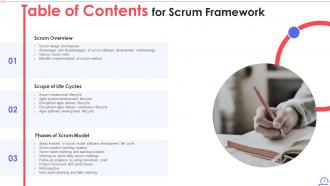
Table of Contents for Scrum Framework
-
Table of Contents for Scrum Framework
-
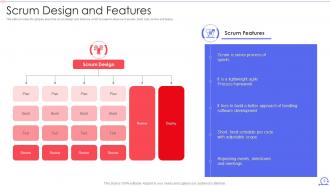
Scrum Design and Features
-
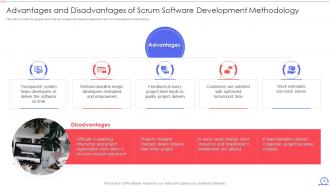
Advantages and Disadvantages of Scrum Software Development Methodology
-
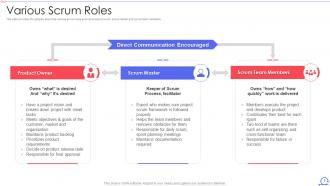
Various Scrum Roles
-
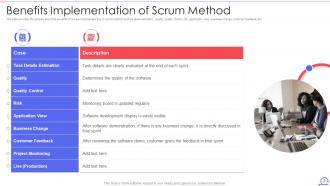
Benefits Implementation of Scrum Method
-
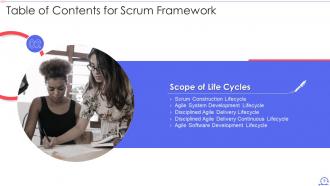
Table of Contents for Scrum Framework
-
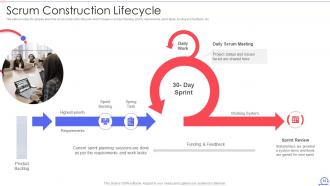
Scrum Construction Lifecycle
-
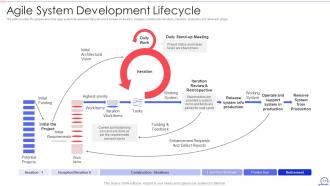
Agile System Development Lifecycle
-
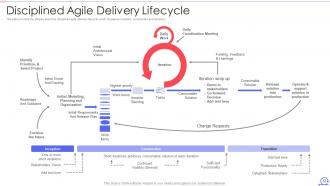
Disciplined Agile Delivery Lifecycle
-
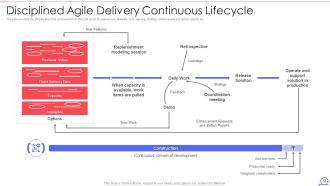
Disciplined Agile Delivery Continuous Lifecycle
-
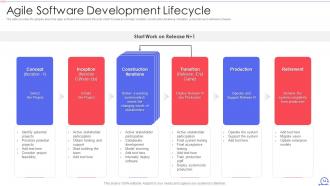
Agile Software Development Lifecycle
-
Table of Contents for Scrum Framework
-
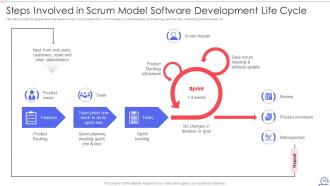
Steps Involved in Scrum Model Software Development Life Cycle
-
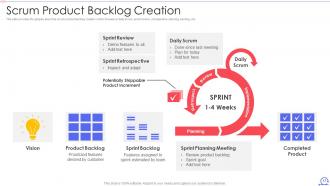
Scrum Product Backlog Creation
-
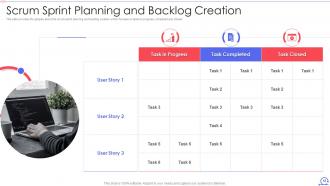
Scrum Sprint Planning and Backlog Creation
-
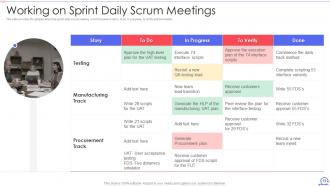
Working on Sprint Daily Scrum Meetings
-
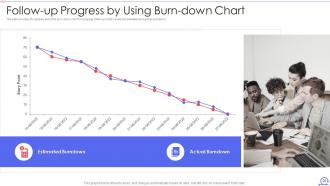
Follow up Progress by Using Burn down Chart
-
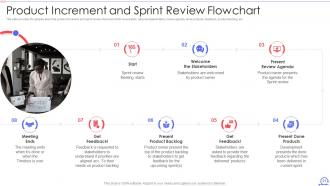
Product Increment and Sprint Review Flowchart
-
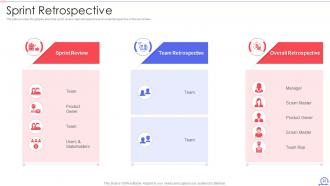
Sprint Retrospective
-
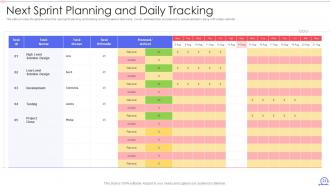
Next Sprint Planning and Daily Tracking
-
Icons Slide for Scrum Framework
-

Additional Slides
-
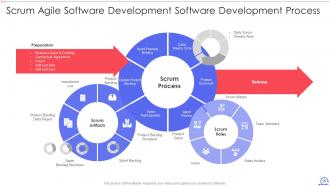
Scrum Agile Software Development Software Development Process
-
Our Mission
-
Our Awesome Team
-
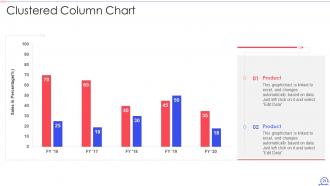
Clustered Column Chart
-
About Us
-
Target
-
Financial
-
Venn
-
Location
-
Post it Notes
-
Puzzle
-
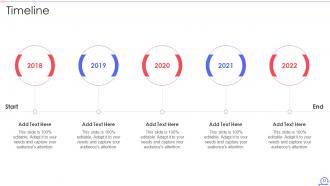
Timeline
-

Thanks for Watching
-

-

-

-

-

FAQs for Scrum Framework
Look, it's basically about being flexible and working with real data instead of some fantasy plan. Your team figures out how to organize itself, you prioritize the stuff that actually matters, and everything happens in these fixed chunks called sprints. Oh and you're constantly checking what's working and what isn't - way better than the old school approach if you ask me. Collaboration is huge too. Start small though - just be more transparent about what you're doing and get feedback faster. The whole inspect-and-adapt thing becomes second nature once you try it.
So basically, traditional project management is super linear - you plan everything upfront then follow that timeline no matter what. Scrum's totally different though. You work in these short 2-week sprints and actually adapt when you learn new stuff. Honestly, the old way feels like you're stuck following some ancient recipe even when it's clearly not working. With Scrum you've got these regular check-ins where your team can actually pivot if needed. Way less soul-crushing when requirements change (and they always do). Just try breaking your next project into 2-week chunks instead of one massive timeline.
So there's three main roles in Scrum you gotta understand. Product Owner handles the backlog and decides what features to build - they're like the customer's voice on the team. Development Team does the actual coding and building stuff (they work pretty independently, which is cool). Then the Scrum Master keeps everything moving smoothly and clears roadblocks - more like a coach than a manager, honestly. Everyone needs to know their lane though. I've seen teams crash and burn when people don't get who's supposed to do what. The roles work together but stay in their own areas.
Honestly, the ceremonies are lifesavers for keeping everyone on the same page. Daily standups beat those annoying "where are we at?" Slack pings by miles. You'll surface blockers way faster too. Sprint planning helps set realistic expectations about what you can actually pull off - and retrospectives? Pure gold for figuring out what's broken in your process. Just don't let them turn into soul-crushing status meetings. Timebox everything strictly (seriously, be ruthless about this) and rotate who runs them. Keeps people engaged and prevents that glazed-over look everyone gets when meetings drag on forever.
The three Scrum artifacts are honestly pretty straightforward - you've got your Product Backlog (the master wishlist), Sprint Backlog (what you're doing right now), and the Product Increment (actual working features you ship). They're lifesavers when stakeholders inevitably ask "so... where exactly are we?" Everything stays transparent. No more guesswork about priorities or what the team's building. I've seen too many projects go sideways because people weren't looking at the same stuff. Next planning session, just watch how much smoother decisions get when everyone's staring at identical backlog items. Game changer.
So your Product Owner basically owns all the priority calls - they're looking at business value, what users actually need, ROI, that stuff. MoSCoW method is pretty common (Must have, Should have, etc), or those value vs effort grids. Some teams do these elaborate weighted scoring things but honestly? Usually overkill. Your PO should be shifting priorities as new info drops or when the market changes. Oh and definitely do regular backlog sessions with the whole team - when everyone can weigh in on effort and dependencies, the prioritization just works better. Way less "wait, that's gonna take HOW long?" moments.
Honestly? People hate change, so you'll get tons of pushback. Teams love cherry-picking the "fun" parts of Scrum while ignoring the rest - classic move. Stakeholders can't help themselves from micromanaging either, which defeats the whole point. Your standups become these painful status reports, sprint planning gets rushed because everyone's "too busy," and don't even get me started on skipped retrospectives. Product owners suck at prioritizing (sorry, but it's true), and developers will fight you on estimation every single time. Start small though - get everyone properly trained and make sure leadership actually backs the culture change, not just talks about it.
Think of sprints as mini-projects that run 1-4 weeks max. Your team picks what to build, does daily check-ins, codes like crazy, then shows off what you made. Rinse and repeat. The cool part? You're not building in a vacuum for months only to find out it sucks. Stakeholders see progress every few weeks and can tell you "nah, go left instead." Fixed deadlines force you to actually finish stuff too - which honestly keeps everyone from overthinking every little detail. Each sprint has the same rhythm: plan, build, demo, figure out what went wrong. Pretty straightforward once you get the hang of it.
Daily standups are your bread and butter - focus on blockers and what's coming next. Sprint planning gives you space for the bigger picture stuff. But honestly? The casual conversations matter way more than people think. Pair programming sessions, quick Slack messages, even grabbing coffee together. Visual stuff like burndown charts keeps everyone on the same page without constant meetings. Retrospectives are good for team dynamics too, though some teams skip them (mistake IMO). You want that mix of structured check-ins plus random organic communication. Nobody should feel like they're working in a vacuum.
So you've got a few routes here - SAFe, LeSS, and Scrum@Scale are the big ones. SAFe's popular but honestly it's kind of a beast. These frameworks basically help multiple Scrum teams work together on the same stuff. You'll need some new roles like Release Train Engineers to keep everyone aligned. Oh, and "Scrum of Scrums" meetings where team reps check in with each other regularly. My advice? Don't go crazy right away. Try it with just 2-3 teams first and see how messy it gets before adding more teams to the mix.
Dude, focus on velocity first - how many story points you're knocking out each sprint. Burndown charts are clutch too, plus cycle time from start to finish. Sprint goal achievement is obvious but track it anyway. Honestly? Team happiness scores are where it's at - nobody talks about this enough but it tells you everything about whether your team's actually functioning. Skip the BS vanity stuff like hours logged or individual metrics. That misses the whole point of working together. Look at trends, not just single sprints. Always dig into the "why" during retros.
Oh totally! Scrum works great outside software. Marketing teams I know use sprints to test campaign ideas - way smarter than planning everything upfront. Even saw a facilities team manage office renovations with Scrum boards which was actually pretty brilliant. The magic happens anywhere you need quick adaptation based on feedback. HR initiatives, product launches, whatever. Just figure out what valuable thing your team can ship every week or two (that's your "product increment" in Scrum speak). Then build from there. Those iterative cycles and self-organizing teams translate surprisingly well to most projects with uncertain outcomes.
Most teams go with Jira, Azure DevOps, or Trello for backlog stuff and sprint tracking. Slack or Teams work great for standups between actual meetings. Since everyone went remote, those whiteboard tools like Miro became super popular - honestly they're pretty solid for retros and planning sessions. But here's the thing: you really don't need expensive tools to make Scrum work. Just use whatever your team already has and only upgrade when something's actually slowing you down. We started with basic spreadsheets for like six months before switching to anything fancy.
Honestly, most retros are just box-checking exercises that waste everyone's time. Your team needs to feel safe actually speaking up about problems without getting thrown under the bus later. I've watched so many turn into pointless venting sessions! The magic happens when you actually follow through on those action items and track if they worked. Give your team room to experiment mid-sprint and don't punish them when stuff doesn't pan out - that's how you learn. Leadership has to visibly back the changes coming from your team level, otherwise people stop caring pretty fast.
Honestly, psychological safety is everything - if people don't feel safe speaking up, you'll get nothing useful. Mix up your formats each time... "Start/Stop/Continue" one week, "Mad/Sad/Glad" the next. I cannot tell you how many retros I've sat through that just became whining sessions with zero outcomes. Always end with actual action items - who's doing what by when. Don't let the same three people dominate every conversation either. Here's the thing though: you HAVE to follow up on last sprint's commitments first thing, or people will think it's all just theater. Oh, and timebox everything or discussions drag forever.
-
Excellent Designs.
-
Easily Editable.