


Seven Step Process For Youtube Channel Growth Strategy




Try Before you Buy Download Free Sample Product
 Impress Your
 Audience
 100%
100% Editable
 Save Hours
 of Time


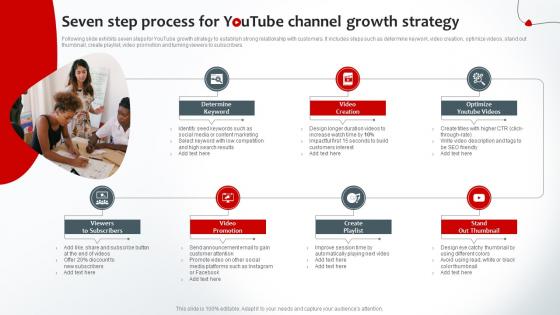
Following slide exhibits seven steps for YouTube growth strategy to establish strong relationship with customers. It includes steps such as determine keywork, video creation, optimize videos, stand out thumbnail, create playlist, video promotion and turning viewers to subscribers.
People who downloaded this PowerPoint presentation also viewed the following :
Seven Step Process For Youtube Channel Growth Strategy with all 6 slides:
Use our Seven Step Process For Youtube Channel Growth Strategy to effectively help you save your valuable time. They are readymade to fit into any presentation structure.





FAQs for Seven Step Process For Youtube
Honestly, it's all about showing up consistently and picking one thing to focus on. Your thumbnails and titles matter way more than you think - they're what get people to actually click. Don't try to post daily if you can't keep up; weekly or even monthly works if you stick to it. YouTube's algorithm is weird but it definitely rewards consistency over trying to be perfect every time. Engage with your comments too, and maybe throw in questions during your videos. Oh, and check your analytics regularly - sounds boring but you'll figure out what type of content actually hits. Once you find that sweet spot, just make more of whatever's working.
Honestly, just dive into your YouTube Analytics first - check who's actually watching your stuff and how long they're sticking around. Your most popular videos are gold mines for this. Read the comments there (people are surprisingly honest about what they want). I also creep on similar channels' comment sections... feels weird but you learn so much about what viewers are thinking. Demographics matter too - age, location, all that. Once you've gathered this info, sketch out a basic viewer profile. What problems do you solve for them? This becomes your guide for everything moving forward.
Dude, YouTube SEO is seriously game-changing for getting views. Research what keywords your audience actually types in - then work those into your titles and the first couple lines of your description. The algorithm needs to understand what your video's about so it can show it to the right people. Without good SEO, you're basically screaming into an empty room. I learned this the hard way lol. But when you nail it? Your videos start showing up in search results and suggested feeds. That's where the magic happens - organic traffic you didn't have to beg for.
Dude, thumbnails and titles are SO important for YouTube growth. They're literally the first thing people see - like within seconds they're deciding whether to click or scroll past. Your title needs to grab attention and be searchable. Make your thumbnail pop with clear text that's easy to read. Here's the thing though - I've seen terrible videos with amazing thumbnails get way more views than quality content with boring ones. It's kinda frustrating but that's just how it works. Try A/B testing different thumbnail styles and see what clicks with your audience. The numbers don't lie!
Hook people in those first 15 seconds - ask a question or jump straight into the good stuff. Your thumbnails need to be clear and titles should make people curious (but don't be clickbait-y, that's just annoying). Ask viewers direct questions throughout and actually pause so they can think. I always forget about this one, but cards and end screens really help keep people watching more videos. Respond to comments fast - the algorithm eats that up. Oh, and try one strategy at a time so you can actually tell what's working for your specific audience.
Dude, posting schedules are seriously a game changer! YouTube's algorithm actually rewards consistency - like if you post every Tuesday and Friday, it starts pushing your videos more because it knows fresh content's coming. Your subscribers get into habits too and show up expecting new stuff. I made this mistake for months just posting whenever I felt like it... total disaster lol. Watch time goes up because people aren't just randomly finding you anymore. They're literally waiting for your next video. Just pick something realistic you can stick to and tell your audience when to expect content.
Okay so here's what's worked for me - pick like 2-3 platforms you actually use regularly first. Instagram Stories are perfect for quick video previews, and those carousel posts with key moments get decent engagement. Twitter's honestly where a lot of YouTubers hang out anyway, so it's great for behind-the-scenes stuff and just chatting with people. TikTok's tricky though - you need clips that actually work on their own, not just boring trailers. If your videos have any work/business angle, LinkedIn's surprisingly good too. The main thing is making content that fits each platform naturally instead of just copy-pasting everywhere.
Collabs are genius because you're literally sharing audiences. Your subscribers see their content, theirs see yours - way better than starting from zero with random people. YouTube's algorithm eats up the extra engagement too, which is honestly pretty sweet for getting more reach. Just don't aim too high at first - if you've got 500 subs, maybe skip DMing MrBeast lol. Find creators around your size in similar niches. I'd start by actually commenting on their stuff first, then pitch something simple that helps you both out. Works way better than random cold messages.
Honestly, watch time and audience retention are what you should track first - YouTube's algorithm lives for that stuff. Your click-through rate shows if thumbnails are working, but average view duration tells the real story about whether people actually stick around. I used to get way too caught up in subscriber numbers (such a rookie mistake), but engaged viewers beat vanity metrics every time. Traffic sources matter too - see where your best audience comes from, whether it's search or suggested videos. Pull these weekly and you'll start noticing patterns in your top videos that you can actually replicate.
Dude, storytelling is a game changer for YouTube. Our brains literally can't resist a good story - we remember them like 6x better than boring facts and data. Here's what works: give every video a beginning, middle, and end. Even if you're teaching Excel (ugh, Excel). Start with a problem people actually face, walk them through fixing it, then show the payoff. I swear this structure keeps people watching way longer. You don't need some epic Hollywood plot either. Just frame whatever you're teaching as a mini journey with stakes that matter to your audience.
Honestly, YouTube's going crazy for AI tools and Gen Z finance content right now. Those "day in my life" videos are everywhere too – plus anything about minimalism or decluttering (which makes sense, we all have too much stuff). The trick isn't copying everyone else though. Check YouTube's trending page weekly and find where your skills meet what's popular. Like if you're decent with budgeting, make content for people your age instead of generic advice. I'd pick one trend and just start messing around with it this week. Worst case, you'll learn something new about what works.
Honestly, community features are crazy good for growth - they basically tell YouTube's algorithm that people actually care about your stuff. Polls work great for asking what videos to make next (free research, right?). I'd definitely respond to comments super fast, like within a few hours of posting since that's when it matters most for visibility. Oh, and ask real questions in your videos, not just generic "what do you think?" stuff. The algorithm pushes videos that keep people hooked, so more interaction means YouTube shows your content to way more people.
Dude, live streaming is seriously worth trying! Your current subscribers get hooked on that real-time chat experience - way more engaging than regular uploads. YouTube's algorithm also pushes live content harder, which is nice. New people discover you organically during streams too, and honestly those viewers often convert to subscribers better than typical video watchers. I'd start small though - maybe 30-60 minutes weekly? See what clicks with your audience first. The whole "stumbling across a live stream" thing feels more genuine to viewers than finding a random video, if that makes sense.
Dude, YouTube ads are honestly a game changer if you do them right. Target people based on their interests or who watch similar channels - the targeting gets crazy specific. I'd definitely go with TrueView ads since you only pay when someone actually watches (not when they skip after 2 seconds). Start with like $5-10 daily on your best video first. See what hits. Then you can bump up the budget once you figure out what's working. Oh and don't blow your whole budget right away - I learned that one the hard way lol. It's wild how fast you'll start seeing new subscribers roll in.
Honestly, most people mess up by posting randomly instead of sticking to a schedule. Pick one niche and stay there - jumping around will just confuse your audience and exhaust you. Your thumbnails matter way more than you think! I see creators spend forever editing but slap together terrible thumbnails last minute. That's backwards. Also reply to comments quickly after uploading, especially early ones. YouTube notices that stuff. Oh and don't chase every trend - it's tempting but you'll lose your voice. Focus on consistent posting, make thumbnails that actually pop, and engage with people who comment first.
-
Well-designed and informative templates. Absolutely brilliant!
-
You know what? I'm so glad I opted for this PPT design. It has been a total game-changer for me and my presentations. Thank you!