

Shipping KPI Dashboard With Vessel Tracking




Try Before you Buy Download Free Sample Product
 Impress Your
 Audience
 100%
100% Editable
 Save Hours
 of Time


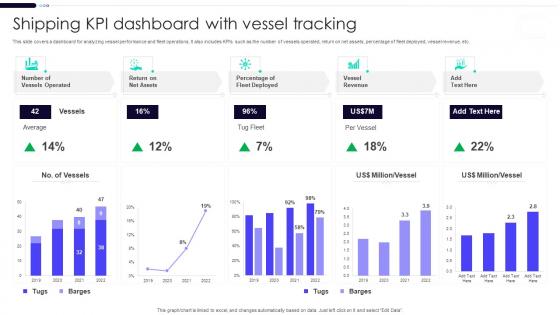
This slide covers a dashboard for analyzing vessel performance and fleet operations. It also includes KPIs such as the number of vessels operated, return on net assets, percentage of fleet deployed, vessel revenue, etc.
People who downloaded this PowerPoint presentation also viewed the following :
Shipping KPI Dashboard With Vessel Tracking with all 7 slides:
Use our Shipping KPI Dashboard With Vessel Tracking to effectively help you save your valuable time. They are readymade to fit into any presentation structure.





FAQs for Shipping KPI Dashboard
For your shipping dashboard, start with on-time delivery rate and shipping cost per unit - those are must-haves. Average delivery time matters too. Order accuracy is huge, and honestly? Damage rates will probably shock you once you actually start measuring them consistently. Customer satisfaction scores tie directly to your bottom line, so don't skip those. Oh, and carrier performance if you use multiple shipping companies. I'd stick to maybe 5 KPIs at first though - you can always add more later. Focus on whichever ones actually move the needle for your specific business goals.
Honestly, tracking your shipping KPIs is like having a GPS for finding bottlenecks. Transit times spike? Your carriers are slowing you down. Processing delays jump but shipping stays normal? That's an internal warehouse issue right there. I always tell people to watch several metrics at once though - looking at just one number is pretty useless. Like, if warehouse-to-dispatch time suddenly goes crazy, you immediately know it's not a carrier problem. The data basically tells you exactly where things are getting stuck, which saves you from guessing and wasting time fixing the wrong stuff.
Tableau, Power BI, or Google Data Studio are your best bets for shipping dashboards. Power BI's probably the way to go since it connects with most logistics software pretty easily. You could even stick with Excel if you don't want to get fancy right away - works better than people think. Main thing is making sure whatever you pick talks to your WMS and carrier APIs without being a total pain. Oh, and focus on the basics first: delivery times, costs, tracking accuracy. Once those are dialed in, you can add the fancy stuff later.
Check your shipping numbers daily so you can catch problems fast - delayed deliveries, carrier issues, whatever. But do your real analysis weekly. I usually block Friday afternoons for this stuff. Daily tracking stops small problems from becoming disasters, you know? Weekly reviews help you see patterns and actually fix things. Don't be like some teams who obsess over hourly updates - that's just creating chaos for yourself. Set up automated daily pulls through your dashboard, then spend maybe 30 minutes each week digging into what's really happening. Monthly deep dives work great for bigger picture planning too.
Okay so for shipping benchmarks - you'll want 95%+ on-time delivery (customers get pissed below 90%, trust me). Order accuracy needs to be above 99%. Shipping costs should run 6-10% of order value, though it varies by what you're selling. Most people expect 2-3 day delivery now, and if you're in a big city, same-day is basically expected. Keep damage under 1% and returns from shipping problems under 2-3%. Honestly, I'd worry less about industry averages and more about what your competitors are doing - that's what customers actually compare you to.
Honestly, charts and graphs are a game changer for shipping data. You'll spot trends instantly instead of getting lost in spreadsheet hell. Line charts work great for tracking stuff over time, bar charts for comparing different carriers. I'm obsessed with color-coding problem areas - makes issues jump right out at you. Gauges are perfect for real-time metrics like delivery rates. Don't overthink it though. Start with your biggest KPIs and build from there. Way better than staring at endless rows of numbers trying to figure out why November was such a disaster.
Dude, you definitely need real-time data for that dashboard. Yesterday's shipping delays don't help when customers are already pissed off today, you know? Live feeds let you catch warehouse bottlenecks and carrier issues as they're happening. Then you can actually reach out to customers before they realize anything's wrong - which honestly feels pretty good when you pull it off. Way better than playing defense all the time. Oh, and set up alerts for the big stuff so you're not glued to your computer screen every five minutes checking everything manually.
So basically you want different views for different people. Executives just want the big picture stuff - delivery rates, shipping costs, customer happiness scores. They definitely don't care about random truck breakdowns. Operations folks need all the messy details though - live tracking, which carriers suck on certain routes, alerts when things go wrong, capacity numbers. Same data underneath, just filtered differently. Start with the exec dashboard first since it's way easier, then build out the operational stuff. Oh and set up automatic logins so everyone lands on their own view without having to click around.
Ugh, data integration is such a pain - you've got shipping info spread across like 5 different systems that hate talking to each other. Carriers, warehouses, order stuff, it's all over the place. Plus everyone wants to track literally everything which just makes it impossible to see what actually matters. Oh and the real-time thing? Total headache when people expect instant updates on every shipment. Honestly I'd start with maybe 5 key metrics that actually move the needle on customer happiness and costs. Once that's working smoothly you can always add more later. Trust me, keep it simple at first.
Look at your biggest pain points first - that's where you'll see real results. Predictive analytics can forecast delivery delays and peak volumes by crunching your historical data. Honestly, once you have enough data points, the accuracy is pretty wild. Routes get optimized automatically, you can staff warehouses ahead of demand spikes, and customers actually appreciate the heads-up about delays. I'd probably start small though - pick one metric that's driving you crazy and build from there. Future cost estimates are another huge win since you can budget way better.
Honestly, just send quick surveys right after delivery - ask about speed and if stuff arrived in good shape. Track those scores next to your usual metrics like delivery times. Social media's huge too - people complain about shipping delays constantly on Twitter and review sites. The trick is mixing your operational data with what customers actually think, not just what looks good on paper. Post-purchase emails work but yeah, nobody wants another email cluttering their inbox. Create combined scores so you're measuring what matters to them, not just internal benchmarks.
Honestly, treat domestic and international shipping like two totally different games. With domestic stuff, you'll want to obsess over delivery speed - track same-day and next-day rates because people expect everything yesterday. But international? Speed matters way less than just being predictable. Focus on customs clearance times, getting paperwork right, and being upfront about duties and taxes. Currency swings can mess with your shipping costs too, so keep an eye on that. I learned this the hard way at my last job - we kept trying to apply domestic metrics to international orders and it was useless. Set up separate dashboards so you're not mixing completely different priorities.
So e-commerce shipping is all about that last-mile stuff - you're tracking on-time delivery, cost per order, how accurate your delivery times are. Traditional retail? Totally different beast. They care more about bulk B2B moves, fill rates, perfect order percentages. Cart abandonment from shipping costs is honestly the worst metric to watch (kills me every time). Returns are huge for e-commerce too since people can't touch stuff before buying. Meanwhile traditional retail focuses on warehouse efficiency metrics. Your dashboard should match whatever model you're running - if it's e-commerce, customer delivery stats matter way more than warehouse throughput numbers.
Dude, bad shipping will absolutely wreck your business. Customers bail when deliveries are late or stuff shows up damaged - then they blast you in reviews. Returns go through the roof. Your support team gets slammed with complaints. Honestly, people are brutal about shipping experiences these days. Plus your suppliers start questioning if you're worth working with. Track your main shipping numbers every week and set up notifications when things go sideways. Way easier to fix problems before they snowball into a total mess.
Honestly, these dashboards are game-changers for tracking your carbon footprint. Real-time data on fuel use, CO2 per shipment, route efficiency - all that good stuff. What I love most is how quickly you spot the waste, like those half-empty trucks burning gas for no reason. Plus you can see which carriers actually give a damn about the environment and send more business their way. Set up alerts when your carbon numbers spike, then figure out why. Oh and tracking packaging waste helps too - we throw away way too much cardboard these days. Makes the whole sustainability thing feel less overwhelming, you know?
-
Informative design.
-
The content is very helpful from business point of view.