


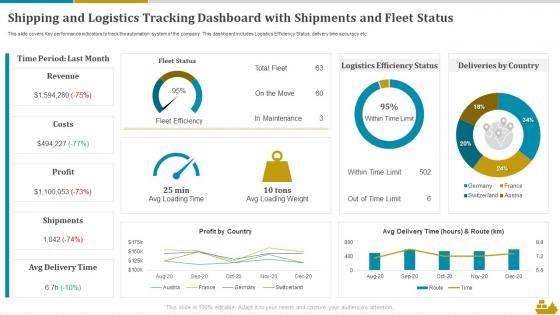
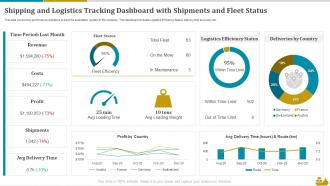
Shipping And Logistics Tracking Dashboard With Shipments And Fleet Status




Try Before you Buy Download Free Sample Product
 Impress Your
 Audience
 100%
100% Editable
 Save Hours
 of Time


This slide covers Key performance indicators to track the automation system of the company. This dashboard includes Logistics Efficiency Status, delivery time accuracy etc.
People who downloaded this PowerPoint presentation also viewed the following :
Shipping And Logistics Tracking Dashboard With Shipments And Fleet Status with all 7 slides:
Use our Shipping And Logistics Tracking Dashboard With Shipments And Fleet Status to effectively help you save your valuable time. They are readymade to fit into any presentation structure.





FAQs for Shipping And Logistics Tracking Dashboard With Shipments
For your shipping dashboard, definitely track on-time delivery percentage and average transit time - those are gonna be your bread and butter. Shipping cost per unit matters too, along with carrier performance ratings. Oh, and inventory turnover is huge (learned that one the hard way). You'll want real-time tracking and exception alerts because customers get super antsy without updates. Order accuracy rates will save you headaches down the road. Freight costs as percentage of sales and damage rates round it out. Honestly, start simple with these and build from there based on what your team actually looks at daily.
Dude, real-time data integration is a game changer - you'll catch problems right when they pop up instead of scrambling hours later. Live updates on ship locations, weather, port delays, all that stuff feeds into one dashboard. Way better than the old-school method of calling around to different systems (honestly felt like detective work half the time). Once you've got current info flowing in, you can reroute stuff, update delivery times, or give customers a heads up before they're even worried. I'd start by figuring out which data sources would boost your visibility the most first.
Maps are your best friend here – get those route overlays showing real-time tracking. Gantt charts will save you when you're trying to spot delivery bottlenecks across different timeframes. Heat maps are seriously underrated though, they're perfect for volume patterns and finding your busiest shipping lanes. Progress bars and status badges work great for quick updates. Oh, and make sure your color-coding is obvious when delays happen – your dashboard users need to spot problems immediately. Nothing fancy, just clear visual hierarchy that actually makes sense.
So basically a shipping dashboard gives you this bird's-eye view of everything happening in real time. You can see processing times, how your carriers are doing, warehouse stuff - all on one screen. Super helpful for catching bottlenecks before they blow up into actual problems. Like if orders start backing up somewhere or deliveries slow down in certain areas, you'll spot it fast. Then you can actually fix what's broken instead of just putting out fires later. Oh and definitely set up alerts for the important stuff so it hits your phone right away.
So predictive analytics is like having a crystal ball for your supply chain instead of just looking at what already went wrong. It'll spot delivery delays and demand spikes before they actually happen - weather issues, port backups, holiday rushes, all that stuff. Way better than scrambling after the fact, you know? You can reroute shipments early, stock up when needed, and actually tell customers realistic delivery times. The algorithms catch patterns way faster than any human could (which is honestly kind of scary but also awesome). I'd start by figuring out what's causing you the biggest headaches right now and see if predictive models could help.
Honestly, you're gonna want automated validation rules running constantly - catches the messy data before it hits your reports. Skip manual entry and plug straight into carrier APIs because people fat-finger stuff all the time. Daily reconciliation between your WMS, TMS, and carrier systems is clutch for spotting issues early. Your team still needs proper training though since someone's always manually updating tracking info (unfortunately). Focus on the big stuff first - delivery times, costs, shipment status. The rest can wait. Oh, and those APIs aren't perfect either, but they're way better than humans typing.
Pull your tracking data from the TMS first - that's your bread and butter. Warehouse systems give you inventory levels, carrier APIs handle delivery updates. Your ERP is the foundation for order data. If you're shipping internationally, definitely tap into customs feeds because that bureaucratic mess will catch you off guard every time. IoT sensors are clutch for temperature-sensitive stuff. Financial systems track costs and how well your carriers are actually performing. Honestly, start with these basics and add more specialized feeds later when people start asking for weird metrics you didn't think of.
Okay so here's the thing - when your shipping dashboard actually makes sense, people can find stuff without wanting to throw their computer out the window. I've worked with some truly awful interfaces that made simple tasks take forever. Good design means clear visual hierarchy and logical groupings, so your team spots delays right away instead of digging through confusing data. Smart color coding helps too. Honestly, most dashboards look like someone just dumped a spreadsheet on screen and called it done. Clean, intuitive design = faster problem-solving and way less frustrated employees.
Honestly, the real game-changers right now are dashboards with real-time visibility plus AI that can actually predict what's coming next. Pretty cool stuff. IoT sensors are everywhere now for tracking cargo, and machine learning keeps finding patterns that would totally fly under our radar. Mobile access is huge too since nobody's chained to their desk anymore. Oh, and automated exception handling is becoming standard - saves so much headache. If your current setup doesn't have real-time data or predictive features, you're missing out big time. Worth checking what gaps you've got.
Dude, mobile access is absolutely crucial for logistics work. You're never sitting at your desk - always running around warehouses, talking to drivers, bouncing between sites. When a shipment gets delayed at 2 AM, you need to pull up that data from wherever you are. I can track deliveries, approve route changes, talk to my team, all from my phone. It's basically like carrying your whole control center around. Honestly, tablets work great too when you need a bigger screen on the loading dock. Just make sure whatever dashboard you pick actually works well on mobile - some are terrible.
Honestly, the worst part is going to be your data being a complete mess. Different systems never play nice together, so you'll be stuck cleaning and fixing everything forever. Getting people to actually use it? Good luck with that - everyone hates changing how they work. Real-time stuff breaks constantly too, which is super frustrating when you're trying to make quick decisions. Oh, and large datasets will make everything slow as hell. Mobile usually looks terrible unless you really focus on it. My advice? Start tiny - pick one data source and maybe three users who actually care. Prove it works before going big.
So basically you hook up ML algorithms through APIs that pump predictions straight into your dashboard. The algorithms crunch historical data, weather, traffic - all that stuff - to spit out real-time insights in the background. Route optimization, demand forecasting, delay predictions. Pretty useful honestly. Tableau and PowerBI already connect to ML services from AWS, Google Cloud, whatever you're using. I'd start with something simple like delivery time predictions first. Once you see it working, then expand to other areas. Way easier to prove value that way.
Honestly, start with on-time delivery - that's what actually matters to customers. Damage rates are huge too, plus cost per shipment and whether they're hitting their promised transit times. Pickup performance is where I've seen most carriers screw up first, so definitely track that. Oh, and customer service response times when stuff inevitably goes missing. The thing that'll save you tons of headaches? Set up alerts when carriers dip below your benchmarks. You can always add more detailed tracking later, but these basics will catch most problems before they blow up.
Dude, logistics dashboards are amazing for compliance stuff. They track all the regulatory requirements across different countries automatically and flag when you're missing docs or trying to ship restricted items. Super helpful during crazy busy times! The system connects to regulatory databases so it stays current with rule changes - no more frantically googling new requirements at 2am. Oh and it keeps audit trails without you having to think about it. I'd definitely start by setting up alerts for whatever routes you ship most often. Game changer honestly.
So basically everyone gets to see the same info at once instead of playing email tag all day. Your suppliers, warehouse people, carriers - they're all looking at the same shipment updates and inventory numbers. Honestly cuts down on so many "where's my stuff?" calls it's ridiculous. You can set different access levels so people only see what they need to. When something goes wrong, at least everyone finds out together instead of three days later when it's too late to fix anything. Figure out what each team actually checks daily and start there.
-
Excellent Designs.
-
If you are looking for satisfactory PowerPoint services, SlideTeam is your go-to place. I am fully contented with their research and development team.