


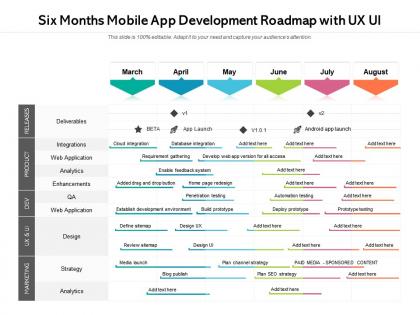
Six months mobile app development roadmap with ux ui




Try Before you Buy Download Free Sample Product
 Impress Your
 Audience
 100%
100% Editable
 Save Hours
 of Time


Visualize your work plan and communicate your ideas impactfully with our pre designed Six Months Mobile App Development Roadmap With UX UI. Showcase the detailed overview of the project, the key deliverables, and the milestones to be achieved with the help of our fully customizable PowerPoint layout. You can easily emphasize on the project goals and discuss all the activities involved in an easy to comprehend manner by utilizing our professionally designed PPT theme. This roadmap PowerPoint layout is a perfect strategic planning tool that can help in keeping the project on track. With our attractive PowerPoint theme, you can articulate the workflow, track the work progress, and have a clear vision of the goal to be achieved. Download this versatile Six Months Mobile App Development Roadmap With UX UI and save your hours of work.
People who downloaded this PowerPoint presentation also viewed the following :
Six months mobile app development roadmap with ux ui with all 2 slides:
Give your audience a fulfilling experience. They will find our Six Months Mobile App Development Roadmap With UX UI elevating.
FAQs for Six months mobile app development roadmap
So you've got planning/research first, then UI/UX design, development, testing, and finally deployment. Start by figuring out what your app actually does and who'll use it. Wireframing and designing the interface comes next. Development is where things get messy - that's the actual coding part where you'll probably want to throw your laptop out the window at least twice. Testing across different devices is crucial for catching bugs. Then you submit to app stores. Honestly, spend way more time on planning than you think you need. I know it's boring compared to the fun stuff, but trust me - you'll thank yourself later when you're not rebuilding everything from scratch.
Honestly, get ridiculously specific about who's gonna use your app every day. Age and location are just the start - dig into their actual behaviors and what's driving them crazy right now. I make 2-3 detailed personas, like "Sarah, 28, marketing manager who panic-orders lunch between back-to-back meetings." Sounds dumb but it actually helps! Check competitor reviews for complaints, survey real people if you can. Oh and write up a one-page profile for each persona - you'll reference them constantly during development. Way better than building for some vague "everyone" audience.
Honestly? Swift owns iOS since Apple basically forced everyone off Objective-C. Google did something similar with Kotlin for Android - though Java still works if you're into that. JavaScript's everywhere because React Native lets you hit both platforms, which is pretty sweet for lazy developers like me lol. Flutter's getting big too, uses Dart which... eh, it's fine I guess. Cross-platform stuff saves tons of time but I'd still learn one native language first. Helps you actually understand what's happening under the hood.
Honestly depends on what you're building and how fast you need it done. Native apps will always feel smoother and give you access to every iOS/Android feature, but you're literally coding everything twice. React Native and Flutter have gotten way better lately though - most apps can get away with cross-platform now. You'll finish faster and spend less money. Just make a list of your features first and see if cross-platform handles them. I've seen too many people overthink this when they could've just started building.
Dude, UX is literally make-or-break for mobile apps. People are ruthless - they'll bounce in seconds if something feels clunky. Think about thumb placement, how stuff flows between screens, all that navigation stuff. Mobile users have zero patience (I mean, same). Every tap needs to feel natural or you're toast. Honestly, I'd map out your user flows super early - like before you get attached to any design ideas. Trust me on this one. Your engagement and retention rates depend on nailing these UX decisions. The app store's brutal if users aren't sticking around.
Honestly, just download your competitors' apps and see what people are complaining about in the reviews - that's where the gold is. Hit up Reddit or even bug your friends to validate the idea before you get too deep into it. Google Trends is pretty solid for checking if people actually search for this stuff. I'd skip the expensive research reports tbh. Throw together a basic landing page or mockup and see if anyone cares enough to sign up. App Annie's useful for market data too. The whole point is getting real feedback from actual humans, not just hoping your idea works.
Just build the one thing that solves their main problem - that's it. Get basic login working, then focus on that core feature that actually delivers value. Map out the simplest path from signup to that moment where users go "oh, this is useful!" Honestly, I see so many people get distracted by cool animations and random features way too early. Don't do that yet! You need error handling so it doesn't crash, obviously, and somewhere to store data. But really, think bare minimum - what's the least they need to accomplish their goal and not hate using it? Build that, ship it, then see what real people actually want.
Ugh, don't make my mistake and save security for the end - I got absolutely roasted in a code review once. Build it in from the start with proper input validation and encrypted storage. OAuth for your APIs is pretty much non-negotiable these days. Static analysis tools catch stuff you'll miss, trust me. Apple and Google have their own security checklists too, which are actually helpful once you get past the corporate speak. Schedule reviews every sprint or two. Way easier than scrambling before launch when you find some glaring vulnerability.
Definitely test on actual phones, not just simulators - they'll catch weird stuff that emulators totally miss. Start with unit tests for your main functions, then do integration testing between your app and APIs. Getting real users to test is honestly the most important part. Your team knows the app too well. TestFlight and Google Play Console make beta testing pretty painless. Test the annoying stuff too - bad wifi, dead battery, tiny screens. Oh and accessibility testing if you haven't already. Set up automated tests for your main user flows so you don't accidentally break things later. Saves so much headache.
Honestly, just go with Flutter or React Native - they handle the responsive stuff automatically. Use percentages instead of fixed pixels for layouts, trust me on this one. The screen density thing is annoying but super important - you'll need @1x, @2x, @3x images or everything looks blurry on high-end phones. Test on simulators early and often, like at least 3-4 different sizes. Oh and don't forget tablets need different breakpoints than phones since the whole UX changes. I learned this the hard way when my first app looked terrible on iPads.
Honestly, freemium is probably your best bet - free basics, then charge for the good stuff. Games and productivity apps crush it with in-app purchases. Subscriptions are everywhere now, especially if you're doing content or services. You could do paid downloads but that's rough these days unless you're really confident. Oh and ads can be decent side income through banners or videos. My advice? Pick one main strategy first. Don't try mixing a bunch right away - you'll just confuse yourself and your users. Get one thing working well, then maybe add others later.
Dude, ASO is literally make-or-break for apps. Think of it as Google but for app stores - without decent optimization, your app just disappears into the void with millions of others. I've watched decent apps get maybe 50 downloads because their ASO sucked, while average apps with smart keywords hit thousands. Keywords, screenshots, descriptions, reviews - all that stuff matters for search rankings. Oh and the gap between ranking first vs tenth for a keyword? It's huge for downloads. Honestly, I'd start by stalking your competitors to see what keywords they're using, then optimize everything from launch day.
So you've got two routes - native or cross-platform. Native means Swift/Xcode for iOS, Kotlin/Android Studio for Android. Best performance, but you're coding twice. Cross-platform is more interesting though! Flutter and React Native are solid choices. Flutter's been blowing up lately and honestly, the hot reload feature is like crack for developers. There's also .NET MAUI if you're already doing Microsoft stuff. I'd probably go Flutter for something new - the tooling's really good. Just pick whatever matches what you already know and throw together a quick prototype first. That'll tell you way more than overthinking it.
Honestly, just start with app store reviews and maybe an in-app feedback thing. Analytics like Mixpanel help too - oh and push notifications work but don't be that annoying app, you know? People will roast you on Twitter way before they'll email support, so definitely keep an eye on social media. User interviews are actually gold though. Talk to your power users every couple weeks and they'll tell you stuff you never would've thought to ask in some boring survey. Don't go crazy with too many channels at first or you'll drown in feedback you can't even use.
Dude, skip the user research at your own peril - I've seen so many apps tank because of this. Don't cram every feature you can think of into v1 either. Performance testing early is huge, crashes will murder your app store ratings instantly. Build for one platform first instead of trying to please everyone (spoiler: impossible). Actually budget like triple the time you think testing will take. Oh and ignore platform guidelines if you want Apple to reject you lol. Start simple, test with real people constantly, and for the love of god resist adding "just one more thing" before launch.
No Reviews