

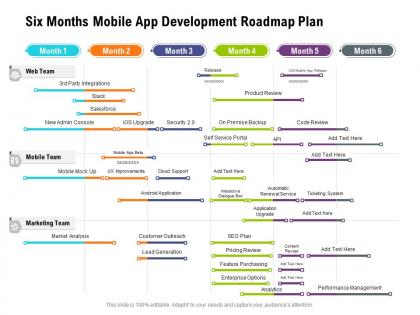
Six months mobile app development roadmap plan




Try Before you Buy Download Free Sample Product
 Impress Your
 Audience
 100%
100% Editable
 Save Hours
 of Time


Utilize our pre build Six Months Mobile App Development Roadmap Plan to present your plan of action in the most effective way. Reduce the paperwork and showcase how different activities are linked to each other by incorporating this attention grabbing PowerPoint theme. This completely editable roadmap PPT layout is suitable to fit all your needs and to have a structured outline of the entire process flow using color coding. Provide guidelines to your teammates about the progression process by employing our PPT theme. Team members can easily be designated into teams by accessing the work milestones to be accomplished within the timeframe. You can easily modify the PowerPoint slide according to real time situations. Download our stunning Six Months Mobile App Development Roadmap Plan, and you are good to go to prove your expertise in strategic planning.
People who downloaded this PowerPoint presentation also viewed the following :
Six months mobile app development roadmap plan with all 2 slides:
Use our Six Months Mobile App Development Roadmap Plan to effectively help you save your valuable time. They are readymade to fit into any presentation structure.
FAQs for Six months mobile app
So you're looking at planning/research first - figure out who you're building for and what they actually need. Then comes design and wireframing, which is honestly my favorite part. Development's next and wow, this is where your timeline becomes a joke. Everything takes twice as long as you think it will. Testing comes after - gotta check it works on different phones and OS versions. Finally you can deploy to the app stores. Oh, and don't think you're done after launch - updates and maintenance never stop. Seriously, build in extra time for each phase because something will definitely break or take forever.
Honestly, UX principles are everything when you're building mobile apps. People are scrolling with one thumb most of the time, so make buttons easy to hit. Map out your user flows first - that's way more important than making things look pretty (though that matters too). Keep navigation simple and don't make users think too hard about where to tap next. Fewer taps = happier users. I always focus on clear visual hierarchy and consistent patterns. The "don't make me think" rule is golden here - if someone opens your app and feels confused, you've already lost them.
So you're looking at mobile app development? Native is your best bet for performance - Swift for iOS, Kotlin/Java for Android. But honestly, who has time to maintain two separate codebases these days? Cross-platform is where it's at. React Native uses JavaScript, Flutter uses Dart, Xamarin does C
-
Understandable and informative presentation.
-
Innovative and Colorful designs.
-
Excellent design and quick turnaround.
-
Great quality slides in rapid time.
-
Commendable slides with attractive designs. Extremely pleased with the fact that they are easy to modify. Great work!