

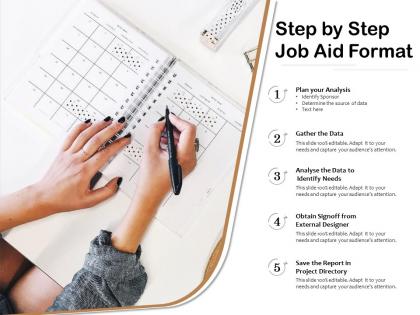
Step by step job aid format




Try Before you Buy Download Free Sample Product
 Impress Your
 Audience
 100%
100% Editable
 Save Hours
 of Time


Our Step By Step Job Aid Format are topically designed to provide an attractive backdrop to any subject. Use them to look like a presentation pro.
People who downloaded this PowerPoint presentation also viewed the following :
Step by step job aid format with all 2 slides:
Use our Step By Step Job Aid Format to effectively help you save your valuable time. They are readymade to fit into any presentation structure.
FAQs for Step by step
Effective job aid formats include clear headings, step-by-step instructions, visual cues, quick reference sections, and concise troubleshooting guides. These elements streamline workflow efficiency by reducing training time, minimizing errors, and enhancing productivity, with many organizations finding that well-structured job aids ultimately deliver faster onboarding and improved operational performance.
The target audience significantly influences job aid design through user experience level, technical proficiency, workplace environment, and preferred learning styles. For instance, hospital nurses require quick-reference cards with visual cues for emergency protocols, while software developers benefit from detailed flowcharts with technical specifications, ultimately ensuring job aids deliver maximum usability and performance outcomes.
Visual elements that enhance job aid usability include flowcharts for process navigation, annotated screenshots for software guidance, icons for quick recognition, diagrams for complex relationships, and checklists for step verification. These design components streamline task completion by reducing cognitive load, minimizing errors, and accelerating learning curves, with many organizations finding that well-designed visuals significantly improve employee performance and reduce training time.
Job aid length and complexity should align with task difficulty, user expertise, frequency of use, and available reference time during task execution. Simple, repetitive tasks require brief checklists or quick reference cards, while complex procedures need detailed step-by-step guides with visual elements, troubleshooting sections, and decision trees, ultimately delivering optimal task support without overwhelming users.
Color schemes enhance job aid effectiveness by improving readability, creating visual hierarchy, reducing cognitive load, and enabling faster information processing. Strategic color choices help users quickly identify critical steps, warnings, and categories, while consistent palettes across organizational materials streamline training processes and boost comprehension rates, ultimately delivering more efficient task completion.
Digital job aids can be optimized for mobile devices through responsive design, touch-friendly interfaces, offline accessibility, compressed file formats, and simplified navigation structures. These optimizations enable field workers, sales teams, and remote employees to access critical information seamlessly, while organizations experience improved productivity and reduced training costs, ultimately delivering faster task completion and enhanced operational efficiency.
Common pitfalls include overloading with excessive detail, using technical jargon without clear explanations, poor visual organization, and failing to test with actual users. These mistakes significantly reduce effectiveness, with many organizations finding that streamlined, user-tested job aids enhance workflow efficiency, reduce training time, and minimize errors in complex technical processes.
Assessing job aid effectiveness involves measuring performance improvements, task completion rates, error reduction, and user feedback through surveys and observations. Organizations typically track metrics like decreased training time, improved accuracy, and enhanced productivity, with many finding that regular assessments help refine aids for maximum operational efficiency and employee satisfaction.
Methods for gathering job aid feedback include user surveys, focus groups, performance assessments, direct observation during task completion, and usage analytics tracking. Organizations across sectors like healthcare, manufacturing, and financial services find that combining quantitative metrics with qualitative insights enables continuous improvement, enhanced user adoption, and ultimately delivers more effective training resources that streamline workflow efficiency.
Different job aid formats significantly impact user engagement through visual appeal, cognitive processing, and task complexity alignment, with checklists excelling for sequential tasks, flowcharts for decision-making processes, and infographics for data comprehension. Organizations across healthcare, manufacturing, and financial services find that matching format to user needs enhances completion rates, reduces errors, and ultimately delivers faster task execution and improved performance outcomes.
Best practices for integrating job aids into training programs include aligning aids with learning objectives, introducing them during hands-on practice sessions, ensuring accessibility across devices, and incorporating feedback mechanisms for continuous improvement. These approaches enhance knowledge retention by providing just-in-time support, reducing cognitive overload during complex tasks, and enabling seamless workflow integration, with many organizations finding that strategic job aid placement significantly accelerates employee competency development.
Job aids accommodate varying expertise levels by incorporating layered information structures, progressive disclosure techniques, multiple format options, and adaptive complexity controls. Through strategic design approaches, organizations create resources that serve both novice and expert users simultaneously, with clear entry points, optional detail levels, and intuitive navigation systems, ultimately enabling seamless knowledge transfer across diverse skill sets.
Job aids require regular content updates, format refreshments, technology compatibility checks, user feedback integration, and performance metric reviews to maintain effectiveness. Organizations typically conduct quarterly reviews of procedural changes, annual format assessments, and continuous user experience evaluations, with many finding that proactive maintenance cycles reduce training costs while enhancing operational efficiency and employee satisfaction.
Storytelling enhances job aids by embedding procedures within relatable scenarios, case studies, and real-world examples that create emotional connections and memorable contexts. Through narrative frameworks, organizations transform abstract processes into concrete situations, with many training departments finding that story-driven job aids increase knowledge retention by 60-70%, ultimately delivering better performance outcomes and faster skill acquisition.
Job aids provide quick, task-specific guidance for immediate performance support, while traditional training manuals offer comprehensive instructional content for learning new skills or processes. Job aids work best for experienced employees needing quick reference during task execution, whereas training manuals serve organizations implementing new systems, onboarding staff, or building foundational knowledge across departments.
No Reviews