

Diapositives de présentation Powerpoint sur la gestion des stocks




Try Before you Buy Download Free Sample Product
 Impress Your
Audience
 100%
Editable
 Save Hours
of Time


Nos diapositives de présentation Powerpoint sur la gestion des stocks sont conçues par sujet pour fournir une toile de fond attrayante à n'importe quel sujet. Utilisez-les pour ressembler à un pro de la présentation.
People who downloaded this PowerPoint presentation also viewed the following :
Contenu de cette présentation Powerpoint
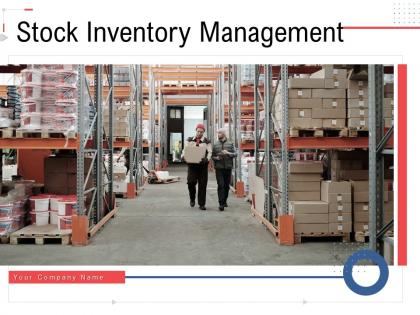
Diapositive 1 : Cette diapositive présente la gestion des stocks. Indiquez le nom de votre entreprise et commencez.
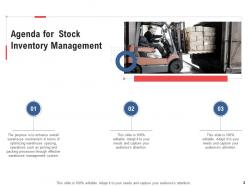
Diapositive 2 : Il s'agit d'une diapositive d'ordre du jour. Énoncez vos agendas ici.
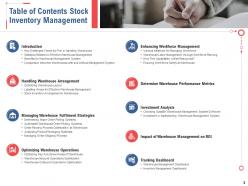
Diapositive 3 : Cette diapositive présente la table des matières de la présentation.
Diapositive 4 : Cette diapositive montre la table des matières mettant en évidence l'introduction.
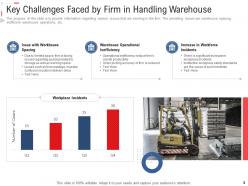
Diapositive 5 : Cette diapositive présente les principaux défis rencontrés par l'entreprise dans la manutention des entrepôts.
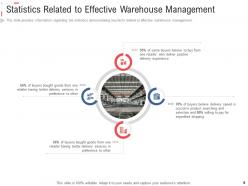
Diapositive 6 : Cette diapositive représente les statistiques relatives à la gestion efficace des entrepôts.
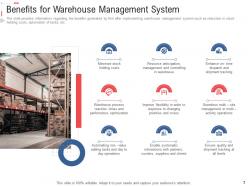
Diapositive 7 : Cette diapositive montre les avantages générés par l'entreprise après la mise en œuvre du système de gestion d'entrepôt.
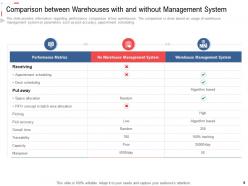
Diapositive 8 : Cette diapositive présente la comparaison entre les entrepôts avec et sans système de gestion.
Diapositive 9 : Cette diapositive montre la table des matières de la présentation.
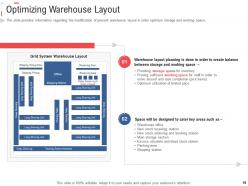
Diapositive 10 : Cette diapositive affiche l'optimisation de la disposition de l'entrepôt.
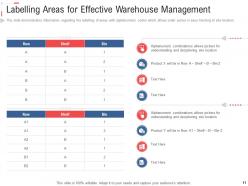
Diapositive 11 : Cette diapositive représente les zones d'étiquetage pour une gestion efficace des entrepôts.
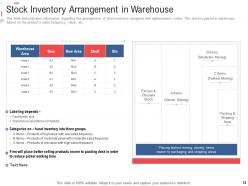
Diapositive 12 : Cette diapositive montre la disposition des stocks dans l'entrepôt.
Diapositive 13 : Cette diapositive présente la table des matières de la présentation.
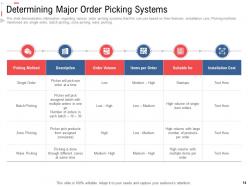
Diapositive 14 : Cette diapositive montre divers systèmes de préparation de commandes que l'entreprise peut utiliser en fonction de leurs caractéristiques.
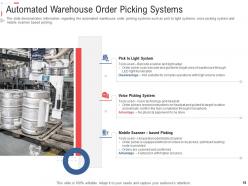
Diapositive 15 : Cette diapositive affiche des systèmes automatisés de préparation de commandes en entrepôt, tels que des systèmes pick to light, un système de préparation de commandes vocales et une préparation de commandes basée sur un scanner mobile.
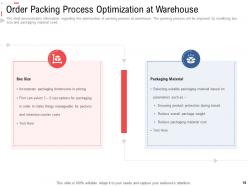
Diapositive 16 : Cette diapositive représente l'optimisation du processus d'emballage dans l'entrepôt.
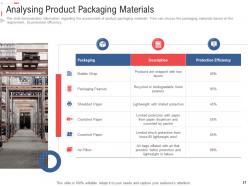
Diapositive 17 : Cette diapositive montre l'évaluation des matériaux d'emballage des produits.
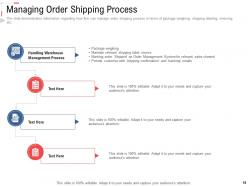
Diapositive 18 : La diapositive montre des informations sur la manière dont l'entreprise peut gérer le processus d'expédition des commandes en termes de pesée des colis, d'étiquetage d'expédition, de facturation, etc.
Diapositive 19 : Cette diapositive montre la table des matières de la présentation.
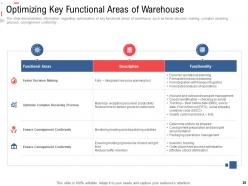
Diapositive 20 : Cette diapositive affiche l'optimisation des principaux domaines fonctionnels de l'entrepôt.
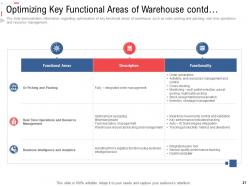
Diapositive 21 : Cette diapositive représente l'optimisation des principaux domaines fonctionnels de l'entrepôt, tels que la préparation et l'emballage des commandes, les opérations en temps réel et la gestion des ressources.
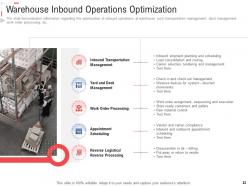
Diapositive 22 : Cette diapositive montre l'optimisation des opérations entrantes d'entrepôt.
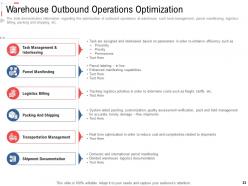
Diapositive 23 : Cette diapositive présente l'optimisation des opérations sortantes à l'entrepôt telles que la gestion des tâches, la présentation des colis, la facturation logistique, l'emballage et l'expédition, etc.
Diapositive 24 : Cette diapositive montre la table des matières de la présentation.
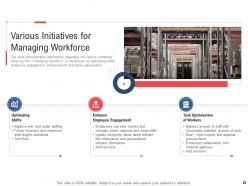
Diapositive 25 : Cette diapositive affiche diverses initiatives pour la gestion de la main-d'œuvre.
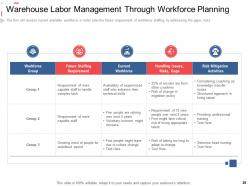
Diapositive 26 : Cette diapositive représente la gestion de la main-d'œuvre en entrepôt via la planification de la main-d'œuvre.
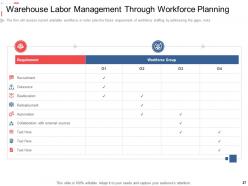
Diapositive 27 : Cette diapositive montre comment les capacités des entreprises seront approvisionnées.
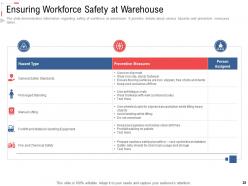
Diapositive 28 : La diapositive montre des informations concernant la sécurité de la main-d'œuvre dans l'entrepôt.
Diapositive 29 : Cette diapositive montre la table des matières de la présentation.
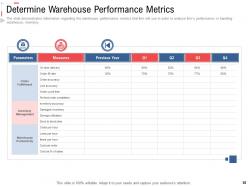
Diapositive 30 : Cette diapositive affiche les mesures de performance de l'entrepôt que l'entreprise utilisera pour analyser les performances de l'entreprise.
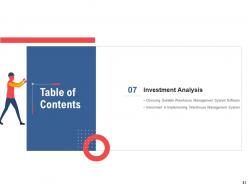
Diapositive 31 : Cette diapositive représente la table des matières de la présentation.
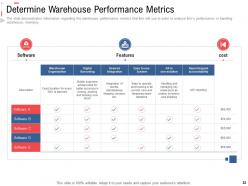
Diapositive 32 : Cette diapositive montre le choix d'un logiciel de système de gestion d'entrepôt approprié.
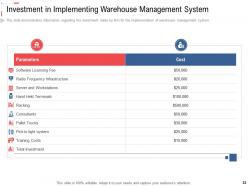
Diapositive 33 : Cette diapositive présente l'investissement dans la mise en œuvre du système de gestion d'entrepôt.
Diapositive 34 : Cette diapositive montre la table des matières de la présentation.
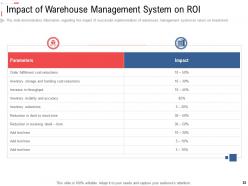
Diapositive 35 : Cette diapositive affiche l'impact du système de gestion d'entrepôt sur le retour sur investissement.
Diapositive 36 : Cette diapositive représente la table des matières de la présentation.
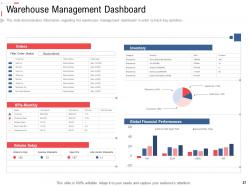
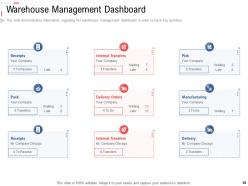
Diapositive 37 : Cette diapositive montre le tableau de bord de gestion d'entrepôt afin de suivre les activités clés.
Diapositive 38 : Cette diapositive présente le tableau de bord de gestion des stocks afin de suivre les activités clés.
Diapositive 39 : Cette diapositive montre les icônes de gestion des stocks.
Diapositive 40 : Cette diapositive est intitulée Diapositives supplémentaires pour aller de l'avant.
Diapositive 41 : Ceci est la diapositive À propos de nous pour montrer les spécifications de l'entreprise, etc.
Diapositive 42 : Ceci est notre diapositive de mission avec des images et du texte connexes.
Diapositive 43 : Cette diapositive présente un plan de 30 60 90 jours avec des zones de texte.
Diapositive 44 : Cette diapositive montre des Post It Notes. Postez vos notes importantes ici.
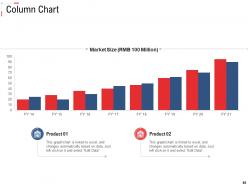
Diapositive 45 : Cette diapositive affiche un histogramme avec une comparaison de deux produits.
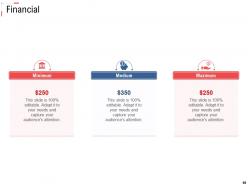
Diapositive 46 : Il s'agit d'une diapositive financière. Montrez vos trucs liés aux finances ici.
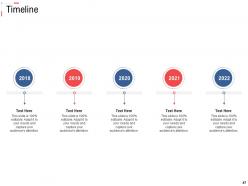
Diapositive 47 : Ceci est une diapositive de la chronologie. Affichez ici les données relatives aux intervalles de temps.
Diapositive 48 : Il s'agit d'une diapositive de comparaison pour indiquer la comparaison entre les produits, les entités, etc.
Diapositive 49 : Ceci est une diapositive de remerciement avec l'adresse, les numéros de contact et l'adresse e-mail.
Gestion des stocks de diapositives de présentation Powerpoint avec les 49 diapositives :
Utilisez nos diapositives de présentation Powerpoint sur la gestion des stocks pour vous aider efficacement à gagner un temps précieux. Ils sont prêts à l'emploi pour s'adapter à n'importe quelle structure de présentation.


FAQs for Stock inventory management
Honestly, the accuracy boost alone is worth it - no more manual counting mistakes. You'll save tons of time too since your team won't be stuck doing inventory all day. Real-time stock updates mean customers won't get mad when you're suddenly out of something. Auto-reordering is clutch though, probably my favorite feature since it prevents those "oh crap we're empty" moments. The data insights help you figure out buying patterns and stuff. I'd say figure out what's driving you crazy about inventory right now, then find a system that fixes exactly those problems first.
Get inventory software that connects to your POS and scanners - that's what actually works. Barcode everything when it comes in, moves around, or sells. NetSuite's solid if you have budget, inFlow's cheaper and still good. Trust me, spreadsheets will drive you insane trying to keep up. Set automatic alerts for when stuff runs low so you're not scrambling. The tricky part? Getting your team to scan consistently - missed scans mess up everything and suddenly your data's worthless. But once everyone's in the habit, you'll know exactly what you have in real time.
So demand forecasting is basically trying to predict what your customers will actually buy and when. Look at your sales data from the past year or two - you'll start seeing patterns pretty quickly. Seasonal stuff is usually obvious, but there's other trends too. Honestly, without this you're just throwing darts blindfolded and hoping for the best. Either you'll be sold out of your hot items or stuck with tons of crap nobody wants. Get better at predicting demand and you can order smarter amounts, spend less on storage, and actually have stuff in stock when people want it. Way better than guessing.
Track your turnover ratios every month - that's where you'll spot the problem areas. Fast-moving stuff should get just-in-time ordering while slow movers are basically cash vampires sitting on your shelves. Run some promotions to dump the dead inventory, honestly it's better to break even than let it collect dust. Your demand forecasting probably needs work too so you're not over-ordering from the start. I learned this the hard way with seasonal items last year. The goal is simple: enough stock to avoid pissing off customers but not so much that your cash is tied up forever.
Ugh, you're gonna deal with demand forecasting screwups, stockouts, and overstocking for sure. Everyone does! Start with decent inventory software - the real-time data actually helps. Safety stock levels based on your sales history are clutch. Also, find suppliers you can trust for quick restocks. I'd do cycle counts regularly too, catches problems early. Honestly though? Figure out your worst issue first. Usually it's either your bestsellers going out of stock or dead inventory eating up your cash. That second one's the worst because it just sits there mocking you.
Dude, inventory software can totally make or break how smoothly things run. Your order accuracy shoots up right away, stock counts get way faster, and you're not drowning in manual entry anymore. Trust me on this - bad software means your team burns hours doing annoying workarounds. Good ones actually play nice with whatever tools you're already using. They'll automate when to reorder stuff and show you what's happening everywhere in real-time. Plus everyone can actually find things in the system (revolutionary concept, right?). Demo a few with your real data first though - see what feels right for how your people work.
Inventory turnover ratio is your best starting point - shows how fast you're actually moving stuff. I'd also watch stockout rates and carrying costs as a percentage of inventory value. Days sales outstanding is clutch but honestly most people ignore it for some reason. Shrinkage rates matter too, plus fill rate percentage. Oh and dead stock percentage - that'll show you what's just sitting around doing nothing. But seriously, don't try tracking all this at once. Pick maybe 2-3 that match whatever's driving you crazy right now.
Honestly, just get your supply chain data talking to your inventory system directly. APIs make this way easier now - no more manual spreadsheet hell. Pull in supplier orders, shipping updates, and demand forecasting all into one place so you can actually see what's happening. Set up those automated reorder points based on your lead times and how reliable each supplier actually is. The trick is having everything update automatically when stuff ships or orders come in. Oh, and definitely start with your biggest suppliers first - don't try to do everyone at once or you'll go crazy.
Honestly, start by looking at your stock turnover rates - figure out what's sitting around too long. Better demand forecasting is huge, so get some decent data analytics going. Just-in-time ordering works well if you can match your actual consumption patterns instead of guessing. Set up automated reorder points based on what you've used historically. ABC analysis is super helpful too - categorize stuff by value and how fast it moves so you're not stuck with tons of slow inventory. Oh, and do regular audits. Sounds boring but they catch problems before you're hemorrhaging money. Once you know which products are your problem children, adjust those order quantities accordingly.
Dude, seasonal demand is a total game-changer for inventory planning. Start stocking up 2-3 months before your busy seasons - trust me on this one. I'd rather have too much than run out when everyone's buying. The forecasting part gets tricky though. Pull your sales data from the same months last year, but don't ignore new trends that might mess with your usual patterns. Oh, and definitely plan your cash flow around this since you'll be dropping way more money upfront on stock. My neighbor learned this the hard way last Christmas. Use last year's numbers as your starting point and build from there.
Honestly, just stay consistent with it - I do mine quarterly and it works pretty well. Always count when things are slow, like weekends or after closing. Print your inventory lists ahead of time (learned that one the hard way). Break everything into sections and assign people to specific zones or SKU groups. Yeah, it's boring as hell but finding problems early beats dealing with a massive mess later. Start with your expensive stuff first. Document weird numbers right away while you remember what happened. The key is having a system and sticking to it every time.
Honestly, start with just one product category and look at last year's sales patterns - that's way less overwhelming than diving into everything at once. You'll start seeing trends in your sales cycles and can actually predict when demand's about to spike. Real-time data shows you what's selling fast vs. what's just sitting there collecting dust (which happened to me with those seasonal items I thought would be huge). Set up alerts for low stock so you're not scrambling. Historical data is your friend for forecasting what you'll need and when. Track inventory turnover rates too - it's pretty eye-opening once you get into it.
Dude, e-commerce totally changes the inventory game. Real-time tracking across all your channels is a must now - forget just watching your physical store. Demand gets crazy unpredictable too. One random viral video can clear you out overnight (trust me on this one). You're juggling way more SKUs, faster turnover, and people want to know if stuff's available RIGHT NOW. Buffer stock for both online and in-store? Yeah, that ties up your cash. Oh and manually tracking everything will literally make you lose your mind. Get inventory software that syncs automatically - it's worth every penny.
Start simple - just use a spreadsheet and do basic ABC analysis. Group your stuff by value so you're not wasting time on cheap items that don't matter. Seriously, people overcomplicate this when they're just getting going. Your POS probably has decent reports already, so use those. Set reorder points based on what you're actually selling, not some formula you found online. Track your fast movers, slow stuff, and how long suppliers take to deliver. Do that consistently for a few months first. Then yeah, maybe look at fancy inventory software if you really need it.
Honestly, AI and machine learning are game-changers for demand forecasting - way more accurate than old-school methods. IoT sensors give you real-time stock visibility, which is clutch. RFID and smart barcoding basically eliminate manual counting (thank god). Blockchain's getting big for supply chain transparency. Automated robotics are handling more warehouse stuff now too. Cloud systems connect everything across your network pretty seamlessly. If I were you, I'd start with AI-powered demand forecasting first - quickest ROI and biggest impact usually.
-
Very educative and insightful
-
Awesome use of colors and designs in product templates.
-
Unique research projects to present in meeting.
-
Helpful product design for delivering presentation.
-
Qualitative and comprehensive slides.
-
Wonderful templates design to use in business meetings.
-
Excellent Designs.
-
Understandable and informative presentation.
-
Very unique and reliable designs.