


Strategic plan for database upgradation powerpoint presentation slides




Try Before you Buy Download Free Sample Product
 Impress Your
 Audience
 100%
100% Editable
 Save Hours
 of Time


Data up-gradation increases the capacity of an organizations existing databases to fulfill the storage needs of multiple operations. The primary objective of this module is to draft a strategic plan to enhance the current storage limit of the data repository system. A competently designed Strategic Plan for Database Upgradation template highlights critical issues. Further, we have compared database expansion strategies, i.e., scale-up vertical scaling and scale-out horizontal scaling, on multiple factors such as implementation ease, the cost involved, upgrades required, etc. Also, this module includes the action plan, team structure, budget plan, and training plan to successfully implement the selected scale-out strategy. Additionally, it covers the comparison of multiple distributed databases on different parameters. Using the horizontal scaling approach, the comparative analysis helps select the ideal database to expand the current data repository. Further, the PPT lists down key risks in storage system expansion and approaches to mitigate them. Eventually, it also incorporates dashboards to monitor the performance of the expanded database system using key performance indicators such as average database response time, database throughput, etc. Download this 100 percent editable template now.
People who downloaded this PowerPoint presentation also viewed the following :
Content of this Powerpoint Presentation
Slide 1: This slidse presents the title i.e. 'Strategic Plan for Database Upgradation'.
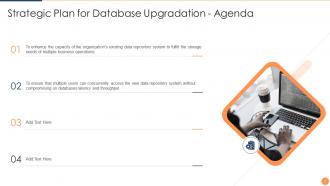
Slide 2: This slide displays the agenda.
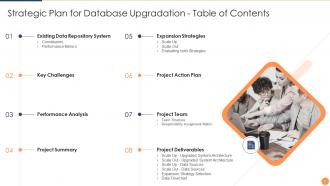
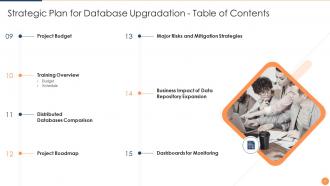
Slide 3: This slide shows the table of contents.
Slide 4: This slide again shows the continued table of contents.
Slide 5: This slide displays two topics under 'Existing Data Repository System' to be covered in the template.
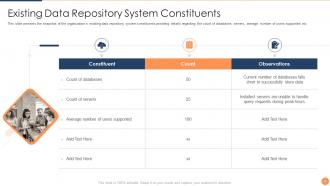
Slide 6: This slide presents the snapshot of the organization's existing data repository system constituents.
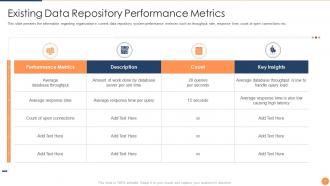
Slide 7: This slide presents the information regarding organization's current data repository system performance metrices such as throughput rate etc.
Slide 8: This slide shows the topic key challenges to be further covered in the template.
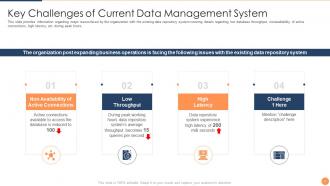
Slide 9: This slide provides information regarding major issues faced by the organization with the existing data repository system.
Slide 10: This slide displays the topic 'Performance Analysis' to be covered in the template.
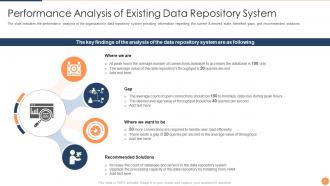
Slide 11: The slide indicates the performance analysis of the organization's data repository system.
Slide 12: This slide displays the topic 'Project Summary' to be covered in the template.
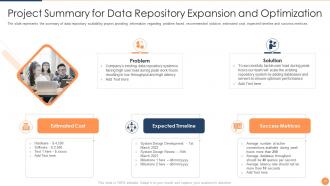
Slide 13: The slide represents the summary of data repository scalability project.
Slide 14: This slide displays three topics under 'Expansion Strategies' to be covered in the template.
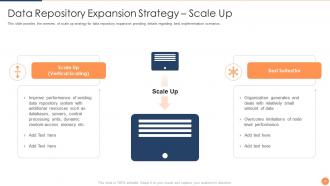
Slide 15: This slide provides the overview of scale up strategy for data repository expansion.
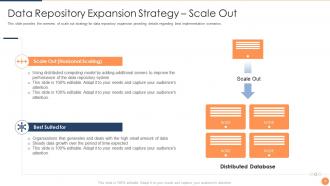
Slide 16: This slide provides the overview of scale out strategy for data repository expansion.
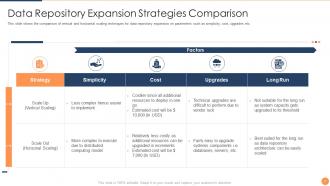
Slide 17: This slide shows the comparison of vertical and horizontal scaling techniques for data repository expansion on certain parameters such as simplicity etc.
Slide 18: This slide displays the topic 'Project Action Plan' to be covered in the template.
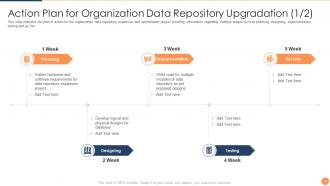
Slide 19: This slide indicates the plan of action for the organization data repository expansion and optimization project.
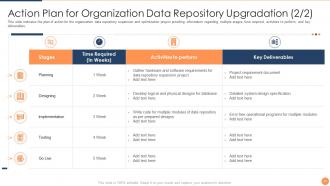
Slide 20: This slide indicates the plan of action for the organization data repository expansion and optimization project.
Slide 21: This slide displays two topics under 'Project Team' to be covered in the template.
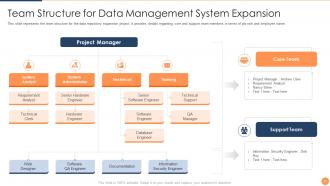
Slide 22: This slide represents the team structure for the data repository expansion project.
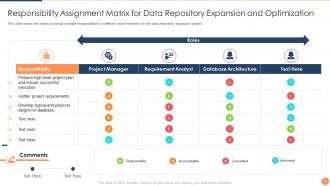
Slide 23: This slide shows the matrix to assign multiple responsibilities to different team members for the data repository expansion project.
Slide 24: This slide displays six topics under 'Project Deliverables' to be covered in the template.
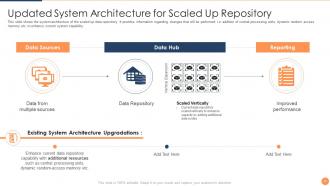
Slide 25: This slide shows the system architecture of the scaled up data repository.
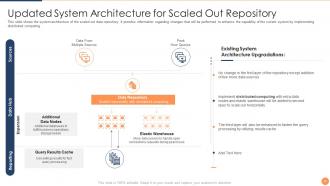
Slide 26: This slide shows the system architecture of the scaled out data repository.
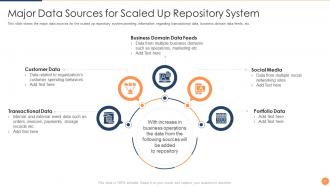
Slide 27: This slide shows the major data sources for the scaled up repository system.
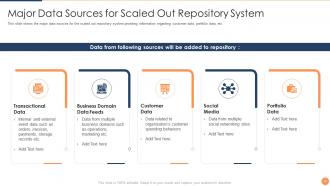
Slide 28: This slide shows the major data sources for the scaled out repository system.
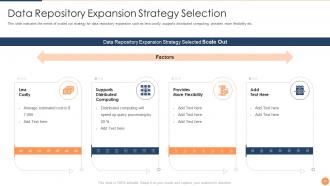
Slide 29: This slide indicates the merits of scaled out strategy for data repository expansion such as less costly etc.
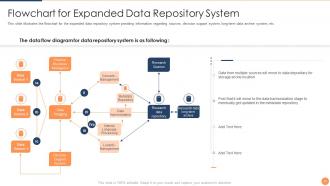
Slide 30: This slide presents flowchart for expanded data repository system.
Slide 31: This slide displays the topic 'Project Budget' to be covered in the template.
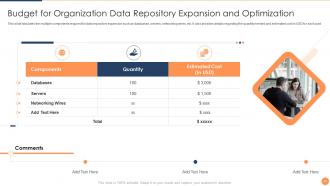
Slide 32: This slide tabulates the multiple components required for data repository expansion such as databases etc.
Slide 33: This slide displays two topics under 'Training Overview' to be covered in the template.
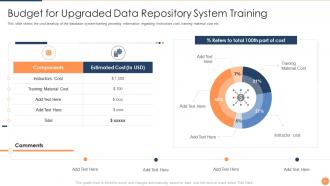
Slide 34: This slide shows the cost breakup of the database system training providing information regarding Instructors cost etc.
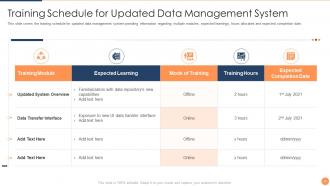
Slide 35: This slide covers the training schedule for updated data management system.
Slide 36: This slide shows the topic 'Distributed Databases Comparison' to be covered in the template.
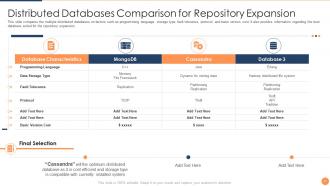
Slide 37: This slide compares the multiple distributed databases on factors such as programming language etc.
Slide 38: This slide gives the roadmap.
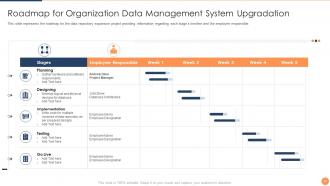
Slide 39: This slide represents the roadmap for the data repository expansion project.
Slide 40: This slide displays the topic 'Major Risks and Mitigation Strategies' to be covered in the template.
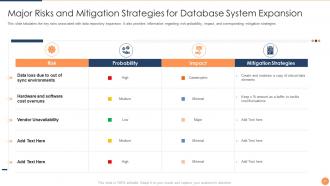
Slide 41: This slide tabulates the key risks associated with data repository expansion and also provides information regarding risk probability etc.
Slide 42: This slide displays the Business Impact of Data Repository Expansion topic to be covered in the template.
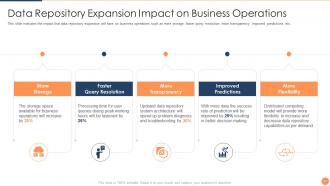
Slide 43: This slide indicates the impact that data repository expansion will have on business operations such as more storage etc.
Slide 44: This slide displays the topic 'Dashboards for Monitoring' to be covered in the template.
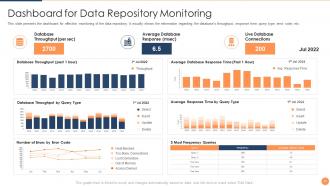
Slide 45: This slide presents the dashboard for effective monitoring of the data repository and visually shows the information regarding the database's throughput etc.
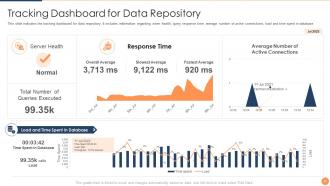
Slide 46: This slide indicates the tracking dashboard for data repository.
Slide 47: This is the Icons slide.
Slide 48: This slide presents title for additional slides.
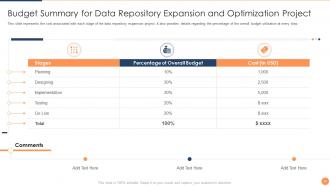
Slide 49: This slide represents the cost associated with each stage of the data repository expansion project.
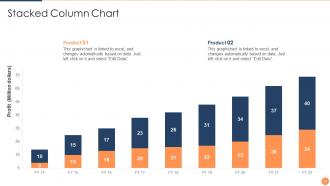
Slide 50: This slide displays yearly profits for two products in a Stacked Column Chart. This graph/chart is linked to excel.
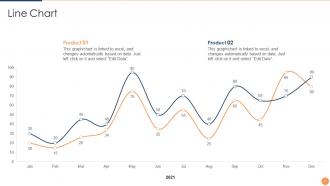
Slide 51: This slide presents an yearly Line Chart for two products. This graph/chart is linked to excel.
Slide 52: This slide shows organization's target.
Slide 53: This slide displays a puzzle.
Slide 54: This slide displays a quote by Stephen Covey.
Slide 55: This slide displays a Venn.
Slide 56: This is a 'Thank You' slide that has address, contact number etc.
Strategic plan for database upgradation powerpoint presentation slides with all 56 slides:
Use our Strategic Plan For Database Upgradation Powerpoint Presentation Slides to effectively help you save your valuable time. They are readymade to fit into any presentation structure.

FAQs for Strategic plan for database upgradation
Key factors include system compatibility, data migration complexity, performance requirements, security protocols, and budget constraints. These considerations streamline the upgrade process by ensuring seamless integration, minimizing downtime, and maintaining data integrity, with many organizations finding that thorough planning ultimately delivers enhanced operational efficiency and competitive advantage.
Organizations can assess database performance through monitoring response times, analyzing resource utilization, evaluating scalability limitations, reviewing security compliance gaps, and examining maintenance costs. These comprehensive evaluations help identify bottlenecks affecting user experiences, with many enterprises finding that systematic performance audits reveal optimization opportunities, ultimately delivering faster query processing, enhanced data security, and improved operational efficiency in increasingly data-driven business environments.
Common database upgrade challenges include data migration complexities, application compatibility issues, performance degradation risks, extensive downtime requirements, and inadequate rollback procedures. These obstacles often impact organizations through disrupted operations and user productivity, with many financial institutions and healthcare systems finding that comprehensive testing, phased rollouts, and backup strategies ultimately deliver smoother transitions.
Cloud migration fundamentally transforms database upgrade strategies by enabling seamless version transitions, automated backup processes, and reduced downtime through cloud-native scaling capabilities. Organizations across sectors like financial services and healthcare find that cloud platforms deliver faster deployment cycles, enhanced disaster recovery, and significantly lower infrastructure costs, while providing greater flexibility for testing upgrades before full implementation.
Data integrity serves as the foundation of successful database upgradation, ensuring accuracy, consistency, and reliability throughout migration processes, version transitions, and system modernizations. Through comprehensive validation protocols, backup verification, and rollback procedures, organizations maintain operational continuity while minimizing data loss risks, with many financial services and healthcare institutions finding that robust integrity measures ultimately deliver seamless upgrades and enhanced system performance.
Strategies to minimize downtime include rolling upgrades, blue-green deployments, database replication with failover, incremental migration approaches, and comprehensive pre-upgrade testing environments. These methods enable organizations to maintain continuous operations by gradually transitioning systems, creating parallel environments, and validating changes beforehand, with many enterprises finding that strategic planning ultimately delivers seamless upgrades and enhanced operational efficiency.
Organizations ensure application-database compatibility through comprehensive testing environments, gradual migration strategies, API abstraction layers, and backward compatibility validation. Through systematic approaches like parallel running systems and phased rollouts, companies in sectors like banking and healthcare minimize disruption while maintaining operational continuity, ultimately delivering seamless transitions and enhanced performance.
Database upgrade tools include Oracle Database Upgrade Assistant, Microsoft SQL Server Upgrade Advisor, MySQL Workbench Migration Wizard, IBM InfoSphere Optim, and third-party solutions like DBmaestro and Redgate. These platforms streamline migration by automating compatibility checks, data transfer processes, and performance optimization, with many financial institutions and healthcare organizations finding that automated tools reduce upgrade timeframes by 60% while minimizing operational disruptions.
Backup and recovery plans should incorporate full system backups before upgrades, point-in-time recovery capabilities, rollback procedures, comprehensive testing protocols, and automated failover mechanisms. These strategic adjustments enable organizations to minimize downtime risks, ensure data integrity throughout transitions, and maintain business continuity, with many financial institutions and healthcare providers finding that robust backup strategies reduce upgrade-related disruptions by up to seventy percent.
Testing a new database version requires comprehensive validation through sandbox environments, performance benchmarking, data integrity checks, backup verification, and rollback procedure testing. Organizations should conduct parallel testing with production-like workloads, validate all integrations and applications, while establishing clear success criteria and emergency protocols, ultimately ensuring seamless transitions that minimize downtime and maintain business continuity.
Organizations can manage user training through comprehensive documentation, hands-on workshops, role-specific training modules, and dedicated support channels during the transition period. By implementing phased rollouts with super-user programs, many companies find that gradual exposure combined with real-time assistance significantly reduces adaptation time, ultimately delivering smoother operations and enhanced user confidence in the upgraded system.
Database upgrade success metrics include performance improvements, downtime duration, data integrity validation, user satisfaction scores, and cost-benefit analysis. These measurements enable organizations to assess operational efficiency gains, minimize future risks, and demonstrate ROI, with many enterprises finding that comprehensive metrics tracking ultimately delivers better resource allocation decisions and enhanced competitive advantage.
Database architectures significantly influence upgrade strategies through compatibility requirements, data migration complexity, and system dependencies. Relational databases often require structured, sequential upgrades with extensive testing phases, while NoSQL databases enable more flexible, distributed upgrade approaches, and cloud-native architectures allow rolling updates with minimal downtime, ultimately delivering faster deployments and reduced operational risks.
Version control in database upgrades ensures systematic tracking of schema changes, rollback capabilities, and collaborative development coordination across teams. This approach enables organizations to maintain data integrity, minimize downtime risks, and streamline deployment processes, with many financial institutions and healthcare systems finding that structured version control delivers faster recovery times and enhanced operational reliability.
Automation streamlines database upgrades by reducing manual interventions, minimizing human errors, and accelerating deployment timelines through scripted processes and continuous integration pipelines. Through automated testing, rollback mechanisms, and configuration management, organizations in banking, healthcare, and retail can achieve consistent upgrades with reduced downtime, ultimately delivering enhanced system reliability and operational efficiency.
-
Excellent Designs.
-
Graphics are very appealing to eyes.
-
Professional and unique presentations.