

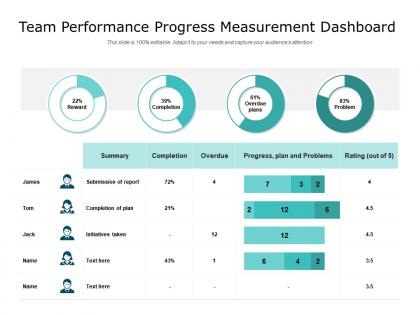
Team performance progress measurement dashboard




Try Before you Buy Download Free Sample Product
 Impress Your
 Audience
 100%
100% Editable
 Save Hours
 of Time


Engage in fruitful interaction with our Team Performance Progress Measurement Dashboard. Draw folks into considering your ideas.
People who downloaded this PowerPoint presentation also viewed the following :
Team performance progress measurement dashboard with all 2 slides:
Draw folks into considering your ideas with our Team Performance Progress Measurement Dashboard. Engage in fruitful interaction.
FAQs for Team performance
Honestly, I'd start with the basics - task completion rates, sprint velocity, and how long stuff actually takes to finish. Quality matters just as much though, so defect rates and customer satisfaction scores are gold. Oh, and don't sleep on team health metrics like engagement and turnover (burned out devs quit, and hiring sucks). Pick maybe 5-7 KPIs that actually connect to what you're trying to achieve. Way better than tracking everything under the sun. Once you've got those dialed in, you can always tweak based on what your boss or stakeholders really want to see.
For your dashboard, try bar charts showing stuff like tasks done or hours worked per person. Progress bars are perfect too - seriously, there's something weirdly addictive about watching that thing fill up. Profile cards with key stats work well, or maybe a leaderboard if your team's into that competitive vibe. Oh, and make sure you're actually tracking stuff that matters, not just random busy work that looks impressive but doesn't mean anything. Color-coding helps people spot their progress instantly.
Start with your top 3-5 metrics and don't try to cram everything in at once. Use clean charts with consistent colors - lots of white space so people aren't squinting at messy screens. Progress bars work great for showing trends over time. Traffic light colors are useful but man, I've seen dashboards that look like someone went crazy with a highlighter set! Keep your most important stuff at the top where everyone can see it right away. Cards or tiles help separate different areas nicely. You'll want to build from there once the basic setup is working.
So basically you'll want different views for different people. Managers need the big picture stuff - team velocity, burndown charts, that kind of thing. Individual contributors? They just want to see their own tasks and what's blocking them. Most tools have role permissions but honestly it took me ages to set those up properly the first time. Time frames matter too - execs want monthly views while everyone else needs real-time updates. Oh and definitely ask each team what they actually check daily before building anything. Save yourself the headache of creating dashboards nobody uses.
Tableau and Power BI are really powerful if you want serious analytics, but honestly the learning curve can be annoying. Monday.com or Asana's dashboards are way easier to jump into. Google Data Studio is solid too if budget's tight - I've used it before and it gets the job done. The main thing is picking whatever your team won't abandon after a week. Most people get excited about fancy features then never touch them again. I'd grab free trials of like 2-3 options and see which one feels right with how you guys actually work.
Weekly updates are your sweet spot for most teams. Real-time is cool if you've got the tech for it, but honestly weekly gives you enough data to catch trends without driving everyone nuts. Sales teams might need daily refreshes, but for regular teams? That's overkill. I swear I've watched people refresh their dashboards like it's social media - such a waste of time lol. Match it to when you actually review performance. Monthly reviews = weekly updates works perfectly. Oh, and definitely automate the data pulls. Nobody wants to update spreadsheets manually every week.
Honestly, real-time data is a total game changer for dashboards. You'll catch problems as they happen instead of finding out weeks later when it's too late to fix anything. Your team actually stays way more engaged when they can watch their numbers update throughout the day - there's something addictive about seeing immediate impact. I'd definitely set up alerts though, because constantly refreshing gets old fast. When metrics start dipping, you can jump on it right away rather than playing catch-up. Makes the whole thing feel less like checking yesterday's news and more like actually managing performance.
So basically, when everyone can see the same data in real-time, you stop getting those annoying "wait, where are we on this project?" messages every five minutes. The transparency thing actually works. Problems show up on the dashboard and your team can tackle them together instead of scrambling later when everything's on fire. Honestly, half the battle is just getting people to actually check it regularly - some folks are weird about dashboards for whatever reason. But once they do? Way fewer awkward status meetings where nobody knows what to say.
So for tracking team morale, I'd start with eNPS - basically how likely people are to recommend your company as a workplace. Super telling metric. Then throw in engagement survey scores and turnover rates (just voluntary though, not the people you had to let go). Internal promotion rates are clutch too. Honestly, I also look at weird stuff like sick leave patterns and whether people actually show up to team events. Monthly pulse surveys beat those dreaded annual reviews any day. Oh, and track how often managers are doing 1:1s - says a lot about leadership engagement.
Connect your data sources straight to the dashboard - most platforms handle databases, CSVs, or whatever analytics tools you're already using. Automated syncing is clutch here because nobody wants to manually update stuff every week (learned that the hard way). Line charts are perfect for showing trends over time, and comparison views help you spot weird patterns. Just make sure you're tracking the same metrics consistently or your data won't make sense. Oh, and start with your biggest KPIs first - don't try to track everything at once.
Honestly, the worst thing you can do is cram like 15 different metrics on one screen. Nobody looks at that mess. Stick to maybe 5-7 things that actually matter for your goals. Skip the vanity stuff too - yeah those big impressive numbers feel good but they don't help anyone make real decisions. Your data needs to update often enough to be useful, and definitely add some context like targets so people know if 47% is amazing or terrible. Oh, and don't overthink it at first. Build something basic, see what your team ignores, then fix it.
Start with clean data - garbage in, garbage out basically. Set up validation rules that catch weird outliers before they mess up your dashboard. Pick ONE source for each metric so you're not getting different numbers everywhere. Someone should manually check a sample monthly (boring but necessary). Define what each KPI actually means - you'd be surprised how much people argue about this stuff. Oh, and document your whole pipeline. Trust me, when things break at 2am you'll thank yourself for writing it down. Regular spot checks will save you from looking stupid in meetings.
Start with your biggest problem areas - missed deadlines, uneven workloads, that kind of stuff. When someone's struggling, don't just assume they need training. Talk to them first. Maybe they're drowning while Sarah over there is checking Instagram half the day (happens more than you'd think). Use your data to actually shuffle work around. Set up regular check-ins to see if you're making progress. Honestly, half the managers I know collect all this performance info and then... do nothing with it. Don't be that person.
Traffic light colors are your best friend here - green when you're crushing targets, yellow for close calls, red for stuff that needs work. Show current numbers next to your goals so you can see the gap instantly. Trend lines help too since they show if things are actually getting better or worse. Honestly, I'd throw in some kind of celebration box for big wins because people love seeing those. Focus on your 3-5 most important metrics first - don't try to track everything at once or it'll just look messy. The whole point is telling your story in like 5 seconds.
Honestly, showing your dashboard to external people is a game-changer. Executives and clients stop bugging you for constant updates once they can actually see what's happening. I've seen meeting time get cut in half - no joke. They make way smarter decisions about resources when they understand your real workload. Plus it goes both ways. When external dependencies are holding you up, they can see it's not on your team. Just give them view-only access and everything flows better. Works especially well with partner teams who need to coordinate timing with you.
No Reviews