

Training and development powerpoint templates




Try Before you Buy Download Free Sample Product
 Impress Your
 Audience
 100%
100% Editable
 Save Hours
 of Time


Be the man to back with our Training And Development Powerpoint Templates. Get all the bets going for you.
People who downloaded this PowerPoint presentation also viewed the following :
Content of this Powerpoint Presentation
A US company that manages specialized protective clothing for hospitals and industries opened a service facility in South Asia. At the plant, workers, primarily local youngsters with the bare minimum of qualification, were hired to care for the clothing using sophisticated machines, iron it, and fold it into specified shapes. Machines even monitored the rate of folding the specialized clothing.
The management put all this investment into the palace and then promptly waited for the revenue and the profits to roll in from the plant. Instead of this rosy scenario, its customers, however, called in with complaints to say that the quality of service had declined; clothes were contaminated even after their service. On a double-take, the management found that the training of workers had been improper. A critical process in maintenance had been taken for granted, and no dedicated person in charge was hired for it. The end-result: Many firings, the CEO coming down to the plant and a new training and development plan being put into place.
Individual development plan training is critical to business success, as without adequate training of key individuals, real change is impossible. Find the plan on individual development plan training here.
The above instance illustrates how vital training and development are to doing business. The usual attitude of businesses, especially when they are new to the entrepreneurial world, is to take training and development as just another domain that they must conquer. It is, thus, not given the weight it deserves in the scheme of things, and the real tragedy is that not enough budget and top-level leadership time is devoted to it. As a business dedicated to success, however, you cannot afford to make this error. You must understand training and development thoroughly and then proceed to give it due importance in your organization.
Without a training plan strategy development roadmap, businesses tend to struggle. Access our product on training plan strategy with key insights to ensure you can do well in your business.
SlideTeam has curated 100% editable and customizable templates for training and development to help you grasp the concept fully and share it with stakeholders across your organization. You are spared the tedium of drawing up this PPT Template from scratch while also getting to showcase your expertise within seconds of downloading it.
Let’s explore!
Template 1 Training and Development PPT Templates
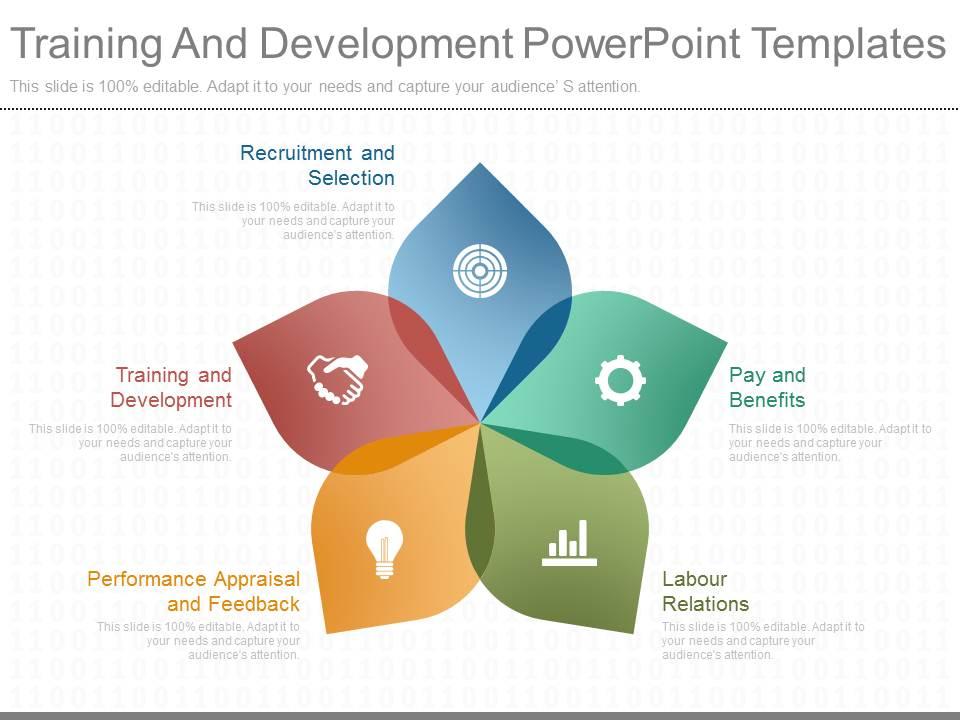
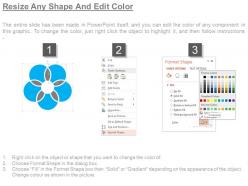
This is a classic slide meant to act as the introductory slide to the HR role of training and development. With the PPT designers choosing to represent this fundamental concept through the flower-petal design, the five petals become essential to master for all stakeholders in a business setting. These special parts then represent the five significant heads needed to ensure training and development happens across the organization. These five (in their usual order) are recruitment and selection; training and development (the actual program implementation); performance appraisal and feedback; labor relations and, pay and benefits. When you closely look at the icons with each petal, you realize the importance of this PPT Template. The slides’ use will mark you out as a master of the craft of training and development and hiring and ensure that human resources are always optimally utilized to the benefit of all. For instance, the hand-shake icon for training and development in red color indicates a willingness to embrace the new and create space for learning in your ecosystem, be it an individual, a team or a large group. On similar lines, when the audience of this presentation template understand its significance, they will be thanking the trainer for this. Download now to enter an elite group of businesses and people already using this template.
*****
TRAINING IS THE NEED OF THE HOUR
Old skills, jaded thoughts and non-use of technology can lead businesses astray faster than a virus and create conditions for bankruptcy. The only way to stay fresh and ready for businesses is to invest in the training and development of the employees and ensure that your equipment too is the best-in-class. Training and development and its five constituent elements will always stay in fashion as there is always something new developing every few months. Customer preferences, software, people skills, education, modes of payment, and international relationships all change and only those businesses that understand the need for the continuous, relentless pace of training and refresher programs will make the cut and live to see another day.
PS Training and development are heavily dependent on learning schemas and protocols for effective results. Access this training and development slide that focuses on learning roadmaps for success, which can be company learning roadmap et al,
Training and development powerpoint templates with all 7 slides:
Create a lasting impression on any elite panel. Make your mark with our Training And Development Powerpoint Templates.
FAQs for Training and
Honestly, you just need a few key things to make it work. Start with clear learning goals that actually connect to what the business needs - not just fluff. Figure out who you're training and what they don't know yet. Pick your delivery methods and timeline with some milestones. Budget's obviously huge (finance will hunt you down if you skip this part). Don't forget the boring stuff like prerequisites and resources. Oh, and build in ways to measure if it's actually working - during AND after. The trick is being detailed enough to follow but not so rigid that you can't pivot when stuff changes. Which it always does. Just make one good template first, then tweak it.
Templates save you from building training programs from scratch every single time. They create consistency across departments, which is honestly pretty crucial when you're trying to maintain quality standards. Your facilitators can spend time customizing content instead of worrying about structure. I'd start with the basics - orientation, compliance, maybe skills training. Templates also mean you're not reinventing the wheel constantly (trust me, trainers love this). Once you get a few solid ones going, you'll notice your programs start feeling way more professional and streamlined.
Honestly, templates are a game-changer for training stuff. They keep people way more engaged than boring slides, and learners actually remember what you taught them. No more panic-staring at blank PowerPoints wondering what to do next - the structure's already there. Your sessions will look consistent too, which is pretty professional. Breaking up walls of text with visuals makes everything easier to follow. Oh, and complex topics become way less intimidating when they're laid out nicely. Find one template you actually like and just tweak it for different topics. Trust me, it beats starting over every single time.
Honestly, figure out how your audience learns best first - are they visual people, need to hear stuff, or gotta get hands-on? Then switch up your template. Visual learners love infographics and charts. Audio folks want discussion questions or maybe recorded walkthroughs. Kinesthetic people need interactive stuff they can actually do. I'm big on making everything modular so you can just swap pieces around depending on what you're trying to accomplish. Different goals mean tweaking how deep you go, how you test people, and what kind of practice you give them. The whole point is keeping your basic structure but making it flexible enough that you're not starting from scratch every time.
Honestly, I'd focus on the basics first - completion rates, test scores, and how long it takes people to actually get competent. Reaction surveys help too (did they hate it or love it?). The tricky part is measuring if they're actually using what they learned back on the job. That's where the real value is. Knowledge retention tests at 30/60/90 days are clutch for seeing what sticks. ROI calculations are great if you can swing them, though sometimes it's hard to connect the dots. Pick maybe 3-5 metrics max that matter to your goals - tracking everything just gets overwhelming.
Honestly, quarterly reviews are your best bet - anything less and you'll fall behind. I subscribe to a few industry newsletters and stalk the smart people on LinkedIn (probably too much, but whatever). Professional associations help too if you can stomach the networking events. Here's what actually works: keep a running doc where you dump new trends or skill gaps as you spot them. Boring? Yes. Effective? Also yes. Then block out time to actually update your stuff based on those notes. Don't wait until everything feels outdated - that's when you're already screwed. Make it routine instead of scrambling to catch up.
Honestly, feedback is what separates templates that actually work from ones that just sit there looking pretty. Both your trainers and participants will tell you stuff you never would've thought of - like which sections are confusing or what's totally missing. I always tell people to watch for patterns. When three different groups get stuck on the same part? Time to fix it. After each training cycle, take their comments and update things. It sounds obvious but you'd be surprised how many people skip this step and wonder why their materials keep falling flat.
Start with an icebreaker - seriously, people's brains are still stuck on their last meeting. Mix in discussion prompts and hands-on stuff every 10-15 minutes because attention spans are terrible these days. Leave actual white space for notes (revolutionary concept, I know). Add reflection questions that connect to their real jobs, not just busy work. Oh, and create a "parking lot" section where they can dump random questions. The whole point is bouncing between different activities so nobody zones out during another boring slideshow marathon. Works way better than just talking at people for an hour straight.
Honestly, the worst thing is making templates super rigid - like, they should help your trainers, not box them in. Don't stuff everything into one template either. People get overwhelmed and just ignore it completely. I've literally watched gorgeous templates sit unused because nobody bothered asking the actual users what they needed first. Keep the language simple too - skip corporate speak that makes people's eyes glaze over. Oh, and make sure you have clear learning goals that you can actually measure. Vague objectives = vague results every time. Test with a few people before you roll it out everywhere.
Honestly, going digital with your training templates is a game changer. You can add clickable stuff, embed videos, and let people collaborate in real-time. Articulate and Canva are solid options - even Google Workspace works great. The templates automatically adjust for phones, tablets, whatever. Way better than passing around those clunky Word docs we used to deal with. Multiple people can edit at once, plus you get screen reader support and auto-translations. I'd start with your most popular templates first - you'll see the engagement boost right away. Updates are so much easier too.
Honestly, just connect your training directly to whatever business goals you're actually trying to hit. Check your company's strategic plan first - figure out which skill gaps are genuinely blocking progress. Don't waste time on random training sessions (we've all suffered through those). Get department heads involved early so the content feels real. Your templates should track metrics that leadership actually cares about. Oh, and here's a game-changer: before you finalize anything, ask yourself "Does this training get us closer to our yearly targets?" Simple as that. If you can't answer yes, scrap it.
So basically you throw your team into realistic situations and make them figure stuff out step-by-step. Way better than just drilling procedures into their heads. Pick the messy problems they actually deal with - angry customers, broken equipment, whatever keeps you up at night. Honestly, the messier the better because real life isn't clean. I'd start with your top 3 headaches and build from there. People get so much more confident when they've practiced the actual thinking process. It's like... you know how athletes run drills? Same concept but for workplace problems.
Scenario-based stuff works really well for remote learning - way better than boring Zoom presentations anyway. Break things into smaller chunks people can do at their own pace. Video modules are solid too. You want templates with polls and quizzes built in since it's harder to keep everyone engaged when they're not in the same room. Oh, and make sure everything works on phones since people join from all kinds of devices. I'd start by taking whatever training you do best in-person and chopping it up into bite-sized digital pieces first.
Honestly, the best approach is weaving it throughout instead of making it some separate D&I module that feels forced. Add learning objectives around unconscious bias and inclusive leadership. Mix in diverse case studies and scenarios from different backgrounds - that stuff actually works. Your facilitator guides should prompt discussions about different perspectives too. The whole thing needs to feel natural, not like checking boxes (which people can smell from a mile away). Start by auditing what you've got now. Pick 2-3 spots where you can easily slip in inclusive elements without overhauling everything.
So there's a bunch of ways to track training progress - skills matrices are pretty standard where you map out what people knew before vs after. Learning scorecards work too for tracking completion rates and test scores. Honestly, I'm obsessed with the dashboard ones because you get that instant visual snapshot. Individual development plans are good if you want to set specific goals and milestones. Oh, and competency gap analysis templates show you exactly how much people improved from start to finish. I'd probably just start simple with a basic scorecard and see what works for your team first.
-
Presentation Design is very nice, good work with the content as well.
-
Thanks for all your great templates they have saved me lots of time and accelerate my presentations. Great product, keep them up!