

Understanding kubernetes architecture with diagrams complete deck




Try Before you Buy Download Free Sample Product
 Impress Your
 Audience
 100%
100% Editable
 Save Hours
 of Time


Provide a brief overview of the containers by employing Understanding Kubernetes Architecture With Diagrams Complete Deck. Discuss the importance of using containers by the organization with the help of cluster architecture PPT visuals. Highlight the microservices architecture of containers along with its applications with the help of our visually appealing open-source container PPT slides. Discuss the usages of Kubernetes and provide the core reasons for an organization to opt Kubernetes. The presentation also demonstrates the roadmap for installing Kubernetes in organizations. Showcase the features and major advantages of Kubernetes in an organization by taking assistance from our readily available cluster management software PowerPoint layouts. After that, mention the key components of Kubernetes and explain its functionality with the help of a diagram. The slides also help you to understand another tool Kubeadm. Discuss in brief about nodes and the development process of Kubeadm. Demonstrate networking models and security measures in Kubernetes with the help of Kubernetes cluster PPT slideshow. Hence without any further ado download our meaningful Kubernetes architecture PPT slide deck and create an amazing presentation.
People who downloaded this PowerPoint presentation also viewed the following :
Content of this Powerpoint Presentation
Kubernetes has proved to be beneficial for a number of multinational companies. Using smart containers from the Kubernetes software, multiple managers, officials, and professionals have undergone tasks related to software scaling, deployment, and management. However, just this one statement is not sufficient to reflect the importance of the open-source system.
What you can use is SlideTeam’s 100% customizable Kubernetes architecture template. This slide offers everything you need to cater to the attention of your audience toward the usability of Kubernetes, its benefits, the challenges it solves, the services your company offers, and much more. Using this template, you can enlighten the audience about advantages of Kubernetes architecture and bring in clients for your business. So, let’s check out the template.
To showcase the pros and cons of Kubernetes architecture for any business, you can take the help of the chart offered in this template.
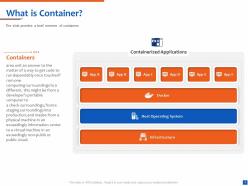
Template 1: What is a Container?
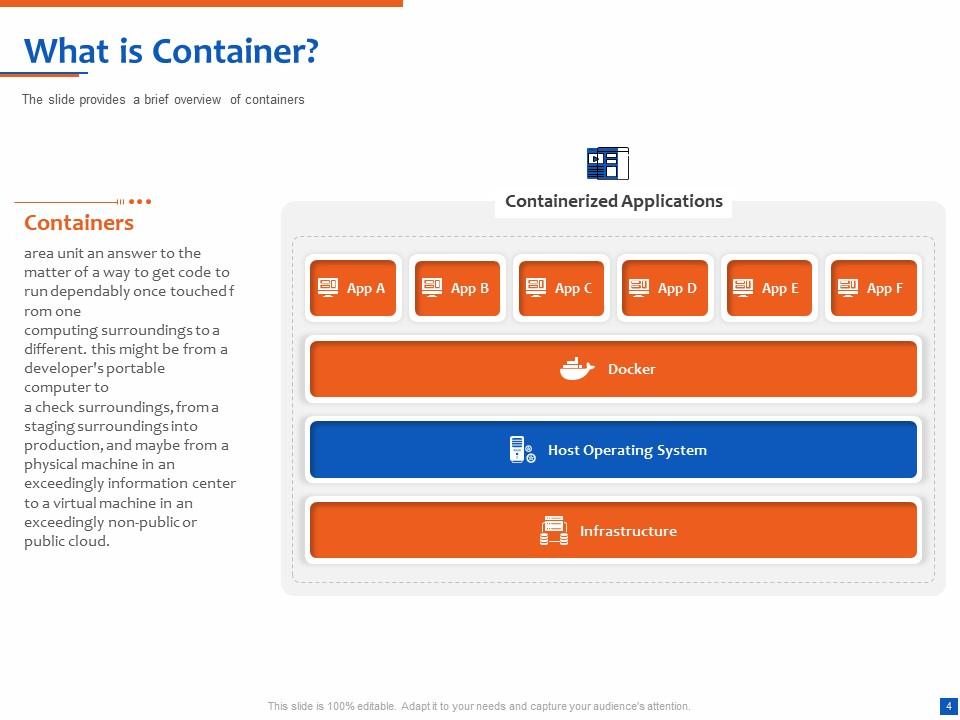
When any business or individual comes to know about Kubernetes architecture, one of the first questions he has is the meaning and relevance of a container. You can take the help of this slide to provide a smart and infographic answer to this query. You can explain that a container is an automated way that defines how a code would proceed and run while being transferred from one computing surrounding to the other.
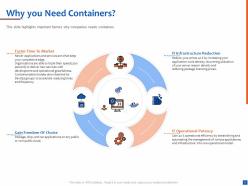
Template 2: Why Do You Need Containers?
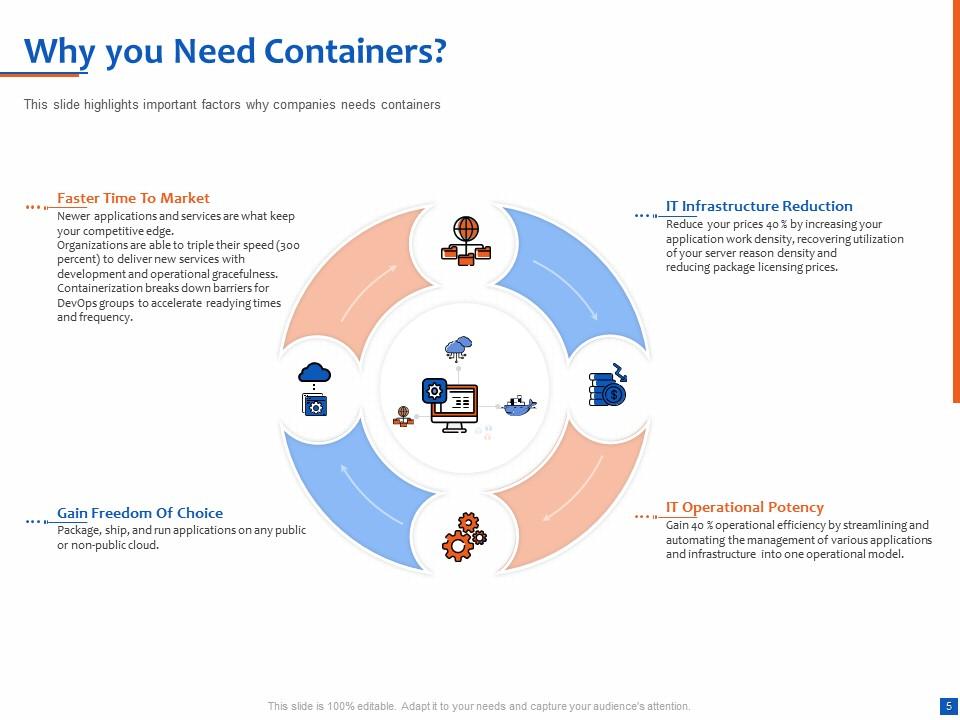
Once the definition of the containers is conveyed, the audience may want to know the relevance of the same. Using this slide, you can showcase the significance of using containers for business. Here, you can explain the benefits of containers concerning having Faster time in markets, reduction in IT infrastructure facilities, getting the freedom of extensive choice, and increasing the potency of IT operations in real-time. You can add supportive and informative text as required with each benefit.
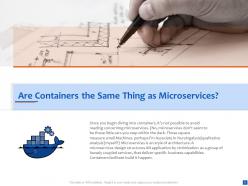
Template 3: Are Containers the Same Thing as MicroServices?
As your audience may also know about the basics of software and app development, confusion between containers and microservices is evident. You can take the help of this slide to showcase the difference between the two. You can state that microservices refer to a style of architecture and containers are the element that helps in building the business-specific services. To further enlighten the audience about the difference, you can also take the help of a couple of examples and put them inside a bracket in the text.
Template 4: Microservices Architecture
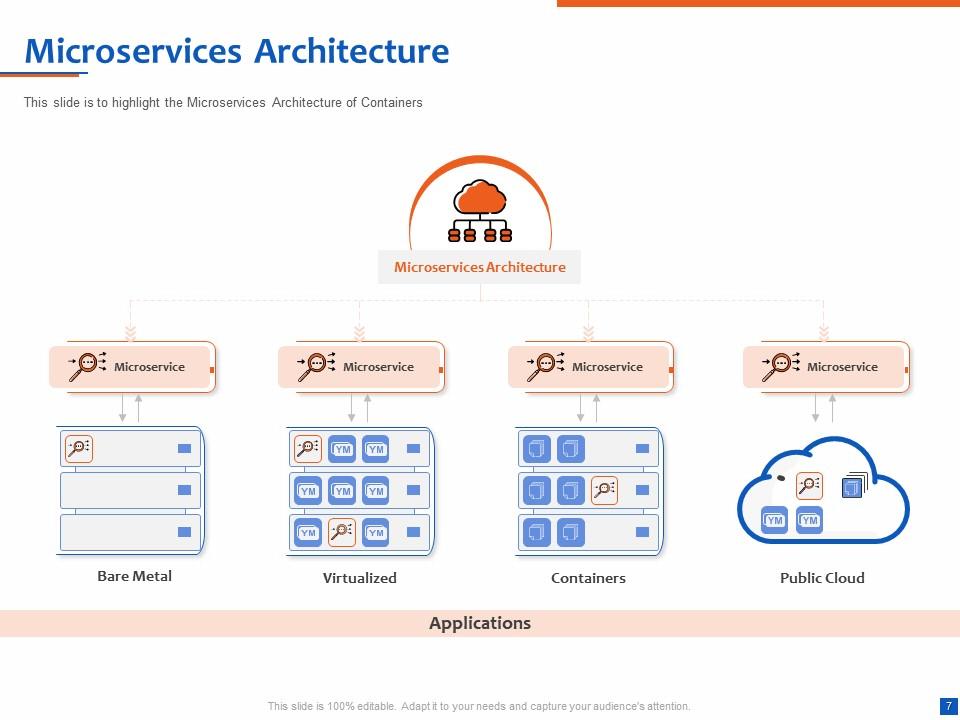
Showcasing the importance of this Kubernetes Architecture Template further, we have another slide that allows you to showcase the applications of the microservices. For the same purpose, the tool uses an infographic chart. Within this chart, you can showcase the relationship of the microservices with Bare Material, Virtualized, Containers, and the Public Cloud. The relationship works after establishing a microservices architecture base at the top.
Template 5: Microservice Architecture e-Commerce Application
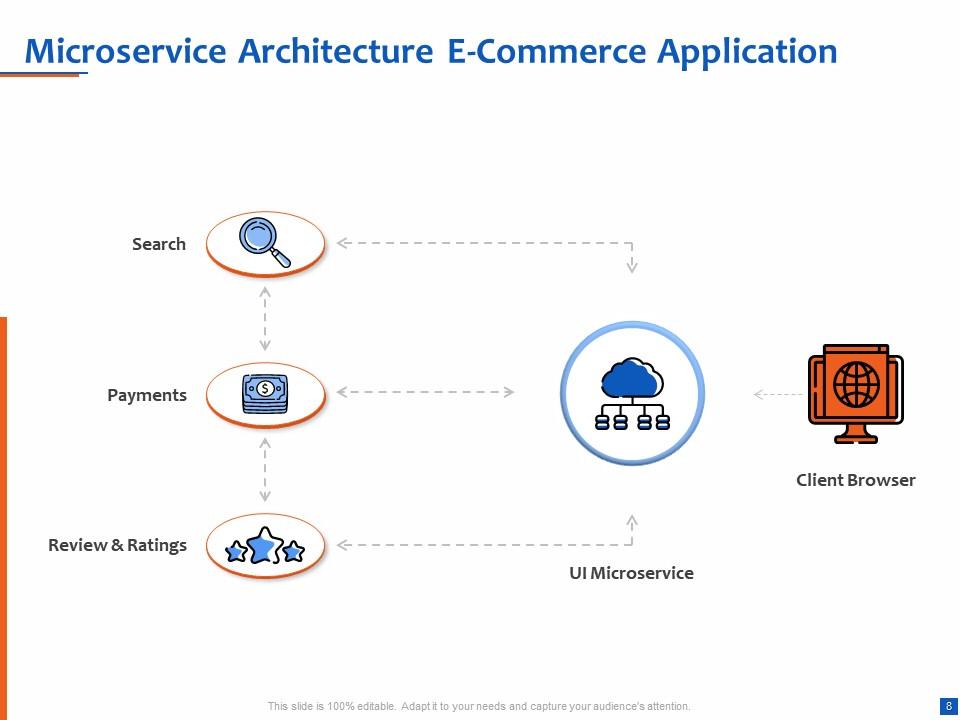
Your audience may have some queries related to the relevance of the microservice architecture in e-commerce application development and usage. You can take the help of this slide to showcase this relevance. For this purpose, you can take the help of an infographic chart as provided below. The chart showcases that the UI microservice works like the bridge starting from the client browser and connecting to the payment portals, search results, and reviews or ratings offered by the users.
Template 6: Container Architecture
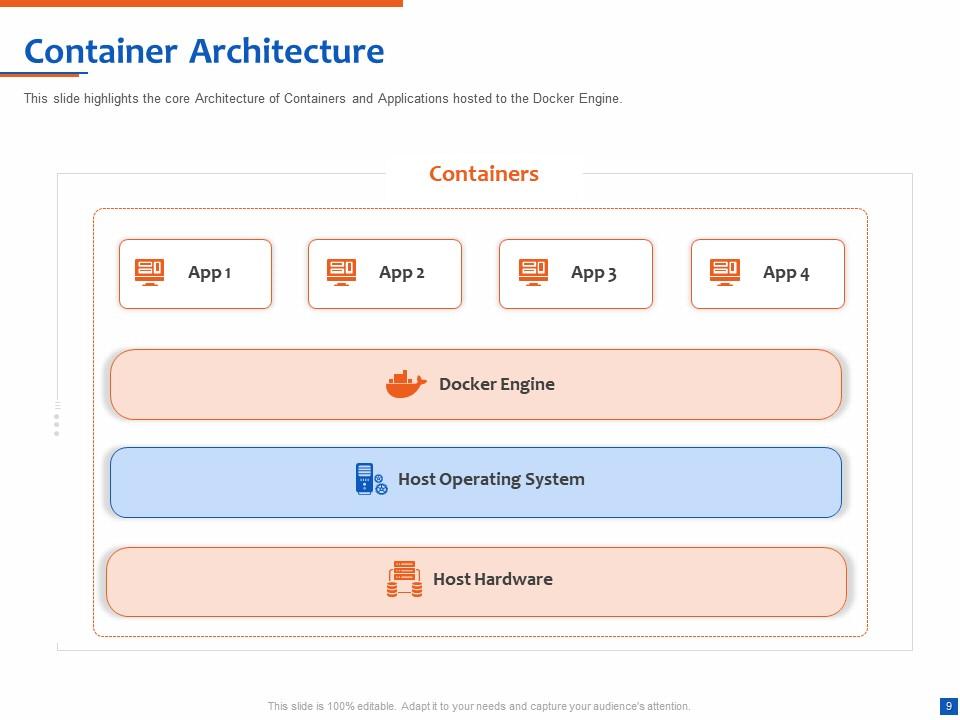
To support the definition of containers in the Kubernetes Architecture template as showcased, you can use this one to showcase the structure of the container architecture. Just like any other slide on this template, this one is also an infographic and moves along stages. The top stage starts with the name addressing of all the apps and then proceeds to the Docker engine, further connecting with the host operating system and then summing up with host hardware.
Template 7: Microservices Use Cases
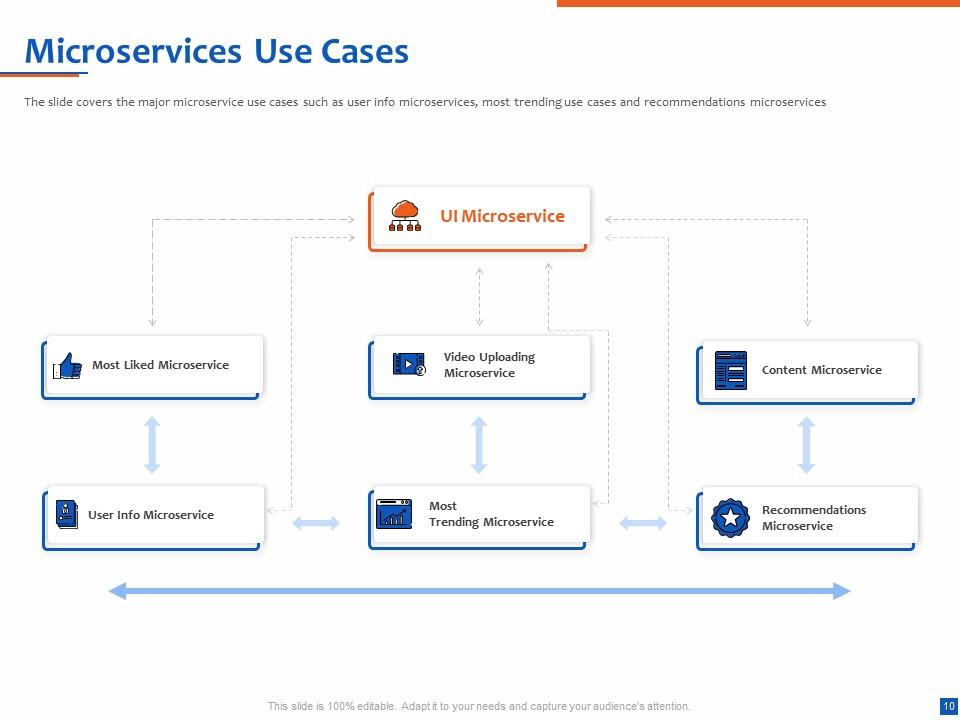
Let’s learn more about the usage pattern of microservices in this Kubernetes Architecture template. You can take the help of this slide to include the use cases of the microservices that are relevant for the enlightenment of your audience. You can enlist the use cases of microservices as most liked microservice, video uploading microservice, content microservice, user info microservice, most trending microservice, and recommendations microservice. To show the relationship with each microservice, you can take the help of arrows and dashes and represent the connection.
Template 8: What is Kubernetes?
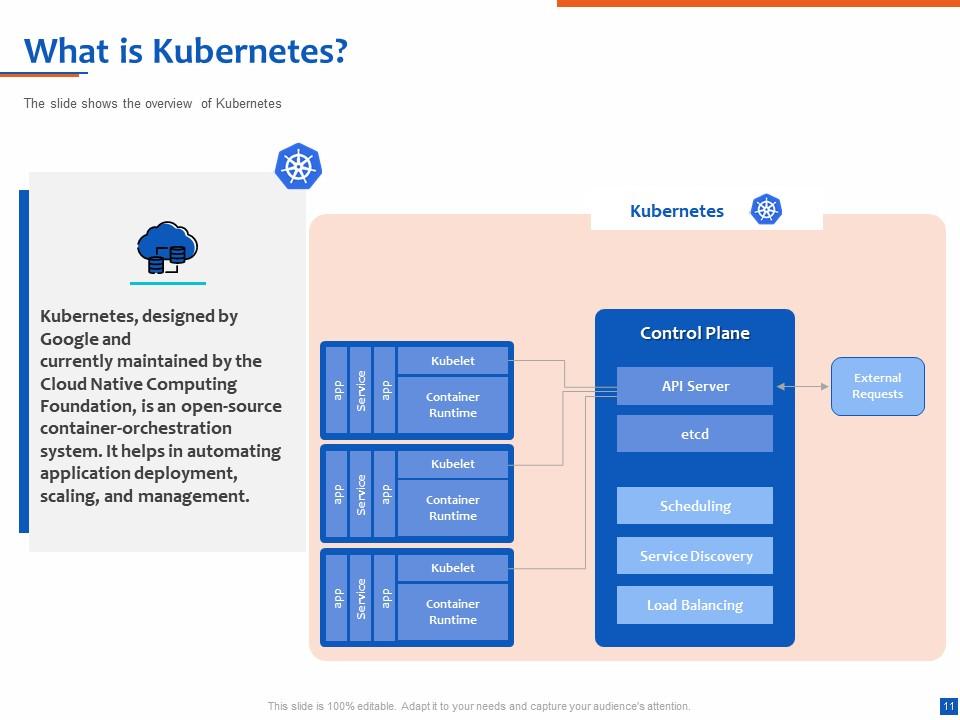
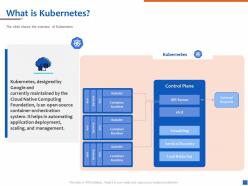
Now that the basic information related to the microservices and their relevance is conveyed, it is time to enlighten the audience about Kubernetes. You can take the help of this slide to define the purpose and definition of Kubernetes with the help of text and infographic. You can state that Kubernetes is a Google-designed and Cloud Native Computing Foundation-managed service that allows a feasible container orchestration system. This open-source system helps in the scaling, management, and automation of application deployment.
Template 9: Before and After Kubernetes
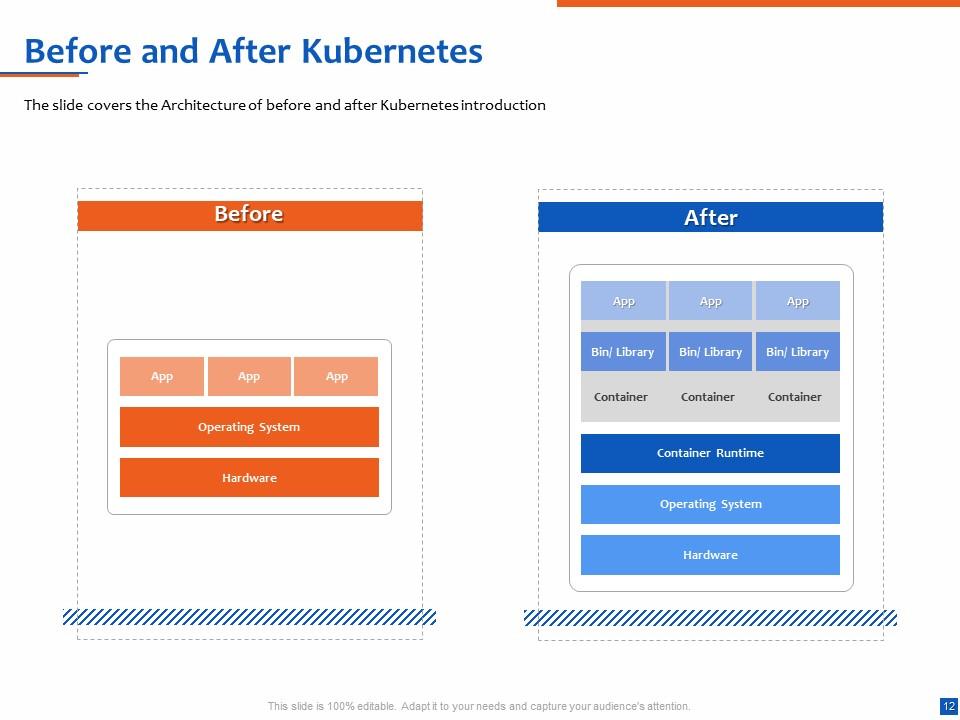
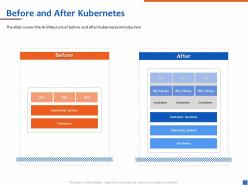
As you are using this Kubernetes Architecture template to showcase the relevance of the system for your clients and their business, it's important that you showcase the benefits of employing Kubernetes and the drawbacks of not using Kubernetes Architecture. This slide is divided into two parts or modules — Before and After. The before module showcases the relationship between the apps, operating system, and hardware. Once you employ Kubernetes, then the After-part adds modes to the module.
Template 10: Why Organizations Should Use Kubernetes?
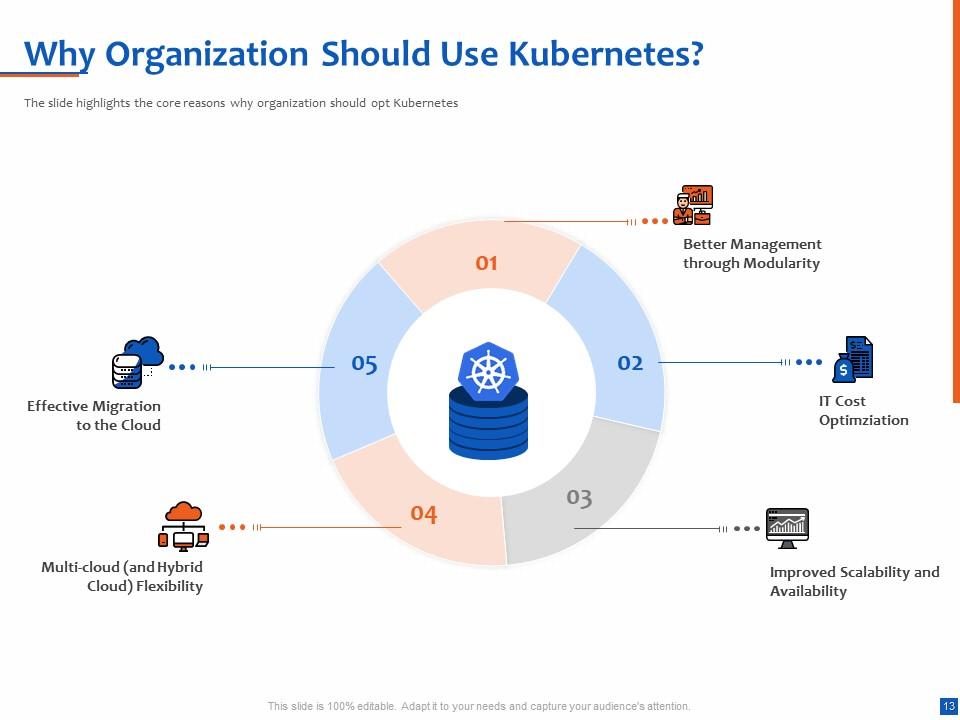
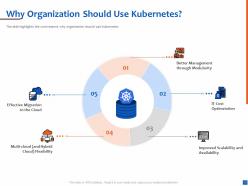
Now, let’s answer the big question. The WHY. The above-provided slides and information may not be sufficient to offer the required information to your audience. Hence, you should use this slide to let them know why Kubernetes is beneficial. To feed your case, you can state that Kubernetes helps in better management through modularity, reduces the cost of IT, improves the scalability of the apps, and allows multi-cloud integration and/or migration. You can also add more benefits, specific to the audience if needed.
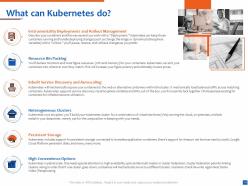
What can Kubernetes do? Offer a brief answer to this question to any business or your audience using the template offered here.
Kubernetes Architecture: A Smart and Effective Approach
That’s all folks. The Kubernetes architecture template provided above includes everything that’s required to make your case in favor of the open-source application deployment and management system. It's a fact that using Kubernetes architecture will surely be beneficial for any business deploying an e-commerce app. However, some businesses may not know this and the template above is the best way to prove this point in a well-structured manner.
Here’s an alternate way to showcase the relevance and importance of Kubernetes using concepts and architecture. Check out the template now.
Understanding kubernetes architecture with diagrams complete deck with all 48 slides:
Use our Understanding Kubernetes Architecture With Diagrams Complete Deck to effectively help you save your valuable time. They are readymade to fit into any presentation structure.
-

Understanding Kubernetes Architecture with Diagrams
-
Table of Contents for Kubernetes Introduction
-
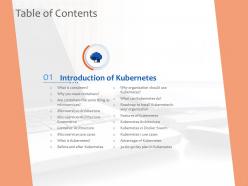
Introduction of Kubernetes
-
What is Container
-
Why you Need Containers
-
Are Containers the Same Thing as Microservices
-
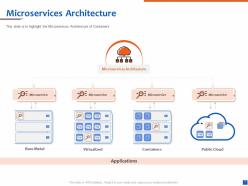
Microservices Architecture
-
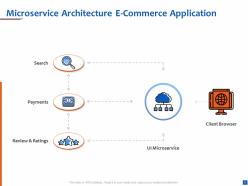
Microservice Architecture E Commerce Application
-
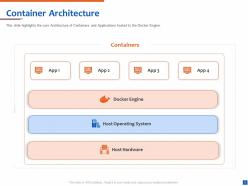
Container Architecture
-
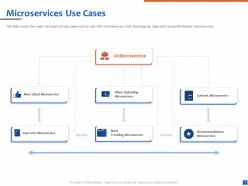
Microservices Use Cases
-
What is Kubernetes
-
Before and After Kubernetes
-
Why Organization Should Use Kubernetes
-
What can Kubernetes do
-
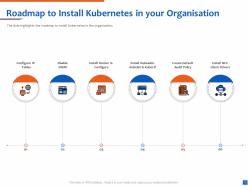
Roadmap to Install Kubernetes in your Organisation
-
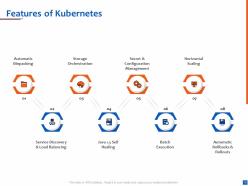
Features of Kubernetes
-
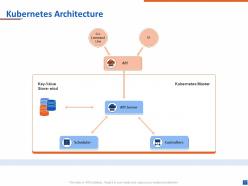
Kubernetes Architecture
-
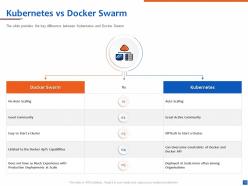
Kubernetes vs Docker Swarm
-
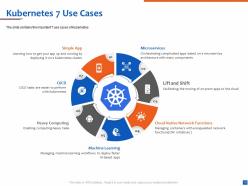
Kubernetes 7 Use Cases
-
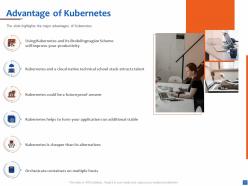
Advantage of Kubernetes
-
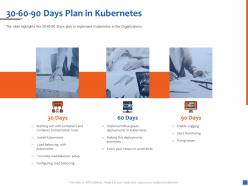
30 60 90 Days Plan in Kubernetes
-
Kubernetes Component
-
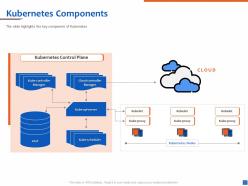
Kubernetes Components
-
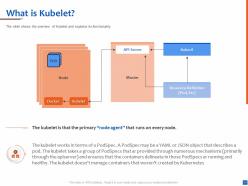
What is Kubelet
-
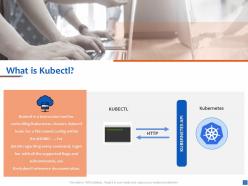
What is Kubectl
-
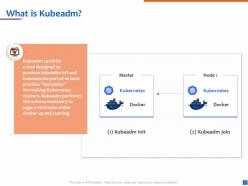
What is Kubeadm
-
Nodes in Kubernetes
-
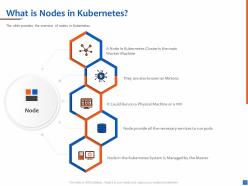
What is Nodes in Kubernetes
-
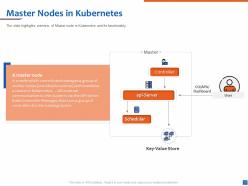
Master Nodes in Kubernetes
-
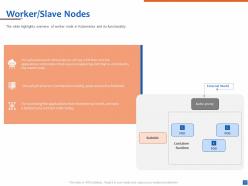
Worker Slave Nodes
-
Kubernetes Development Process
-
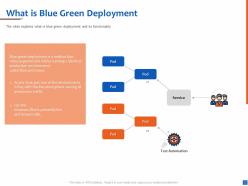
What is Blue Green Deployment
-
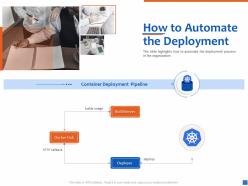
How to Automate the Deployment
-
Networking in Kubernetes
-
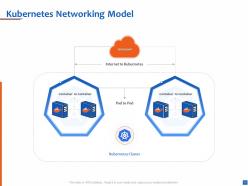
Kubernetes Networking Model
-
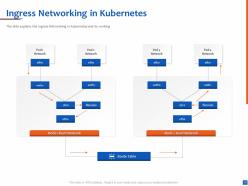
Ingress Networking in Kubernetes
-
Security Measures in Kubernetes
-
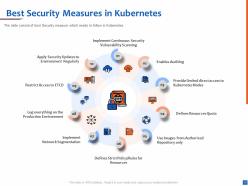
Best Security Measures in Kubernetes
-
Icons Slide for Understanding Kubernetes Architecture with Diagrams
-

Additional Slides
-
Our Mission
-
About Us
-

Our Team
-
Comparison
-
Our Goal
-
Timeline
-
Roadmap
-

Thank You
FAQs for Understanding kubernetes architecture with
So Kubernetes basically has two pieces - control plane and worker nodes. The control plane runs your API server (where kubectl commands go), etcd for storage, scheduler, and controller manager. Worker nodes handle kubelet, kube-proxy, and your actual pods. Honestly, the API server is like the central nervous system - everything flows through it first. Scheduler figures out pod placement, kubelet makes stuff happen on nodes, controllers keep everything humming along. I'd start there since it connects all the dots. Once you see how the API server orchestrates everything, the rest clicks pretty quick. Way less intimidating than it sounds initially.
So the control plane is like the brain of your K8s cluster - it handles scheduling and keeps track of what's happening everywhere. You've got the API server as your main entry point, etcd for storage, plus the scheduler that figures out pod placement. Controller managers keep everything humming along nicely. Honestly, I think of it like air traffic control for containers (weird analogy but it works). It's constantly comparing what you want vs what's actually running and fixes any weirdness. Pro tip: when stuff breaks, check the control plane components first - they're usually the problem.
So nodes are just your worker machines where pods actually run. There's two kinds - control plane nodes handle all the management stuff (scheduling, API server, that etcd storage thing) while worker nodes do the actual work of running containers. Honestly the manager vs factory worker comparison is pretty spot on. Worker nodes need kubelet for talking to the control plane, plus a container runtime like Docker and kube-proxy for networking. Just make sure you've got enough CPU and memory on those workers or you'll hate yourself later when everything's slow.
So the kube-apiserver is like the main control center for your whole cluster. Everything talks to it - when you run kubectl commands, that's what you're hitting. It does authentication, validates stuff, and stores all the cluster state in etcd. Honestly, it's kind of like a receptionist who knows everything going on. Your scheduler, controller manager, nodes - they all go through the API server to communicate. If this thing goes down, your cluster's toast. That's why when I'm debugging cluster problems, I always check those API server logs first thing.
So etcd is basically where Kubernetes stores everything - all your cluster config, what pods are running, services, the whole deal. It's like the cluster's memory bank. Honestly, I was shocked when I first learned how much depends on this one thing! Your cluster literally can't function without it. That's why most people run multiple copies in production (learned that the hard way). Oh and definitely back up your etcd data before you make big changes. Trust me on that one. If it goes down, you're pretty much screwed until you get it back up.
Pods are basically wrappers around your containers - they're the smallest thing you can actually deploy in k8s. Usually it's just one container per pod (which honestly makes the most sense 99% of the time), but you can stick multiple containers in there if they need to be super tight together. Here's the cool part: containers in the same pod share an IP and can talk via localhost, plus they get shared storage and networking. Oh, and their lifecycles are tied together too. When you're planning deployments, think in terms of pods, not individual containers - that's your actual unit of work.
So kube-scheduler is like Kubernetes' wingman - it matches pods to the right nodes. When you deploy something, it checks your pod's needs (CPU, memory, etc.) and hunts for a node that can handle it. Pretty clever honestly. It weighs stuff like node capacity, affinity rules, taints - all that jazz. Your pods would just hang in limbo without it. Oh, and if you see pods stuck "Pending" forever? That's usually scheduler drama, so check those logs first. Saved me hours of debugging more times than I'd like to admit.
So Kubernetes uses Services and kube-proxy for this. Create a Service and it gets a cluster IP plus DNS name that your pods can hit - doesn't matter what nodes they're actually on. Then kube-proxy handles the load balancing part, spreading traffic across healthy pods with round-robin or whatever. Honestly the whole thing just works better than you'd expect. Your apps connect to the service name and K8s sorts out the networking mess behind the scenes. Oh and start with a basic ClusterIP service first - that'll show you how it maps to your pod labels and stuff.
Deployments are for stuff that doesn't need to remember anything - like web servers. Pods get random names and you can kill them whenever. StatefulSets are the opposite - each pod gets a predictable name (app-0, app-1, etc) and keeps its storage even if it crashes. Databases are the classic example since they actually care about startup order and keeping their data around. Honestly, most people overthink this choice. If your app can restart from scratch without issues, just use a Deployment. Need persistent storage or specific pod ordering? That's when you go StatefulSet.
Honestly, Kubernetes is pretty brilliant when you think about it. The declarative API means you just tell it what you want instead of micromanaging every step. Control plane runs separately from worker nodes - super smart design choice because you can scale them independently. Everything's built to be stateless and replaceable, which sounds scary but actually makes scaling way easier. Oh, and it uses eventual consistency rather than trying to keep everything perfectly synced all the time (which would be a nightmare). Once you get these core ideas, you'll understand why it handles huge workloads without breaking a sweat.
So basically the scheduler looks at your pod specs and finds nodes that have enough CPU/memory available. You'll want to set those resource requests and limits - honestly, skipping this is where most people mess up. The scheduler's actually pretty clever about matching things up, checking node affinity and taints and all that. Once your pod lands somewhere, the kubelet keeps an eye on it to make sure containers don't go crazy with resources. Just always define your limits in deployments. Saves you from that fun moment when one app eats all your cluster resources.
So basically when you update a Deployment, Kubernetes creates a new ReplicaSet and slowly swaps out the old pods for new ones. It's actually pretty clever - keeps your app running the whole time since traffic still hits the healthy pods. The ReplicaSet controller handles all the scaling math for you. If things go sideways (and they will eventually), you can just run `kubectl rollout undo` to instantly roll back. Kubernetes saves your deployment history automatically. Oh and definitely set up readiness probes - learned that one the hard way. They'll catch broken deployments before users notice anything's wrong.
So Kubernetes actually has tons of security stuff baked in. RBAC controls who can mess with what, network policies isolate traffic between pods, and pod security standards block sketchy containers. The API server is super paranoid (honestly probably overkill sometimes) - it checks every single request. You've also got secrets management, service accounts for permissions, and admission controllers that'll reject bad configs. Start with RBAC and network policies first though. Those two will handle like 90% of your security headaches right off the bat.
So basically Kubernetes takes care of all the storage headaches for you. Your pods just say "hey I need 10GB of storage" through PersistentVolumeClaims, then K8s goes and finds it. Storage classes are where the magic happens - you can set up different tiers like fast SSD vs cheap spinning disks. The kubelet does the actual mounting work on each node. Honestly the whole dynamic provisioning thing is pretty slick once you get it working. I'd start simple though - just create a couple storage classes for your common scenarios and go from there. Way better than manually creating volumes every damn time.
So CRDs let you teach Kubernetes about your own custom resource types - not just the usual pods and services stuff. You define what these objects look like, then K8s treats them like first-class citizens. kubectl works on them, you can watch for changes, the whole nine yards. Pretty neat once you wrap your head around it. They get stored in etcd with everything else. Controllers can react when your custom resources change - that's basically how operators do their magic. Honestly, I'd just start small. Pick something your team already deals with and make a simple CRD for it. Then automate around that.
-
Unique design & color.
-
Presentation Design is very nice, good work with the content as well.
-
Excellent template with unique design.
-
Great designs, really helpful.
-
Excellent products for quick understanding.
-
I love this ppt . Excellent
-
Excellent template with unique design.
-
Graphics are very appealing to eyes.
-
Very well designed and informative templates.
-
Much better than the original! Thanks for the quick turnaround.