

Kubernetes docker container implementation ppt powerpoint presentation slide templates




Try Before you Buy Download Free Sample Product
 Impress Your
 Audience
 100%
100% Editable
 Save Hours
 of Time


Our Kubernetes Docker Container Implementation PowerPoint presentation is curated to provide in-depth knowledge and understanding of Kubernetes. With visually appealing slides and engaging graphics, it covers various aspects. This Kubernetes presentation explains the concept of containers, their significance, and why they are used. One of the key highlights of this presentation is the inclusion of microservices architecture, which is illustrated through informative diagrams. Furthermore, it encompasses a wide range of use cases, showcasing practical applications of Kubernetes, Kubernetes architecture, and more. The template also delves into the fundamentals of Kubernetes, providing a clear explanation of what it is and its capabilities. The content within these slides is meticulously curated, backed by thorough research to ensure accuracy and relevance. This complete Kubernetes presentation is an invaluable resource for corporate employees seeking to create and articulate Kubernetes roadmaps, present use cases, and emphasize the advantages of adopting this technology. It provides detailed insights into various Kubernetes components, offering a comprehensive understanding of their functionalities. Moreover, these PowerPoint slides are highly editable, allowing users to tailor the content to their needs and preferences. Don't miss out on the opportunity to download this stunning Kubernetes ppt. Go and download our docker ppt today!
People who downloaded this PowerPoint presentation also viewed the following :
Content of this Powerpoint Presentation
Kubernetes is one of the fastest-growing open-source systems in the world. According to a report by ‘Markets N Research,’ the global Kubernetes market was valued at $1.8 billion in 2022. The number is expected to grow to $7.3 billion in 2030.
Kubernetes helps improve overall productivity with its automation capabilities. It is a time-tested, open-source solution backed by a large community.
Several professionals have added skills that will help them work better with Kubernetes. As an organization, rolling out training sessions on Kubernetes and its development process would be beneficial.
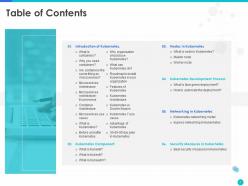
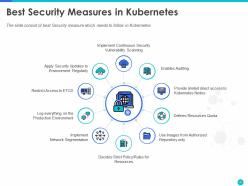
You can use our pre-designed and content-rich Kubernetes Docker Container Implementation PPT for your sessions. It covers topics such as an introduction to Kubernetes, components, nodes, and security measures.
Kubernetes Docker Container Implementation PPT Template
Our Kubernetes implementation deck consists of 48 slides, complete with data and diagrams. If you want to provide an overview of your company before presenting the topic, you can use the additional slides included in the bundle, such as ‘About Us,’ ‘Team,’ and ‘Goal'.
The design elements are editable so that you can adapt them according to your company’s branding.
Let us look at some slides that are a part of our kubernetes docker container implementation template.
Template 1: What is a Container?
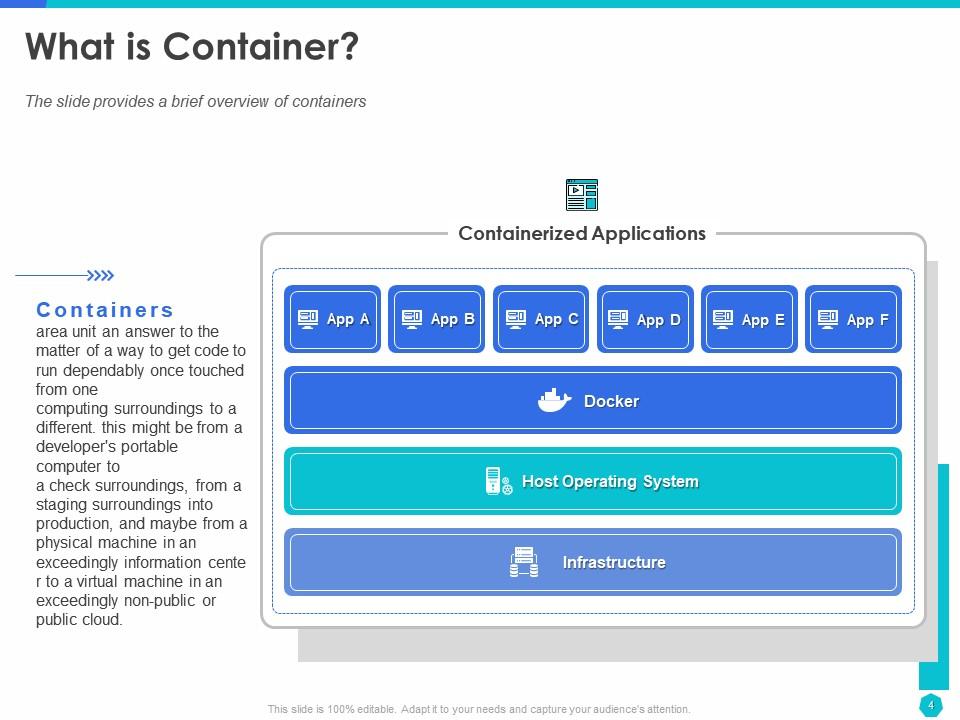
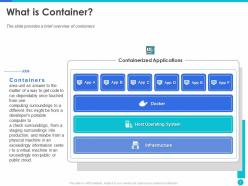
A container is one of the basic components of the kubernetes architecture. The slide provides a brief overview of the container with text content and an infographic. During the presentation the infographic can help you further explain the concept of container with examples. It also helps the audience retain information better. The slide is editable, so you can use the text content as is or add a definition and example of your own.
Template 2: Why do you need Containers?
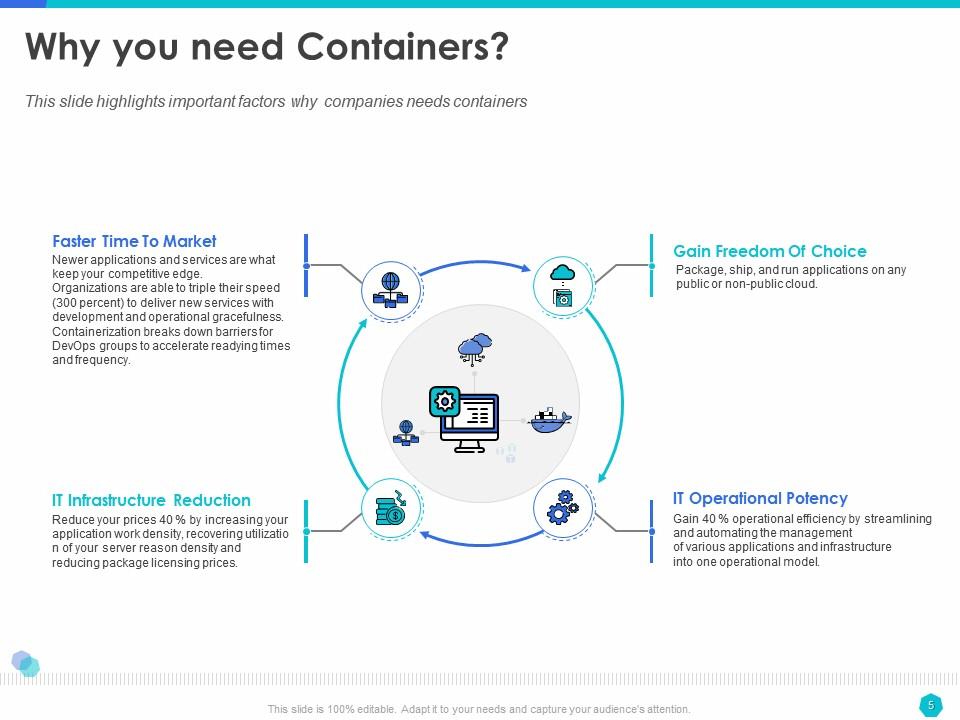
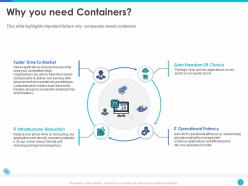
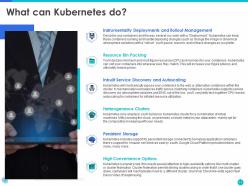
Containers help companies deliver consistent application performance on different platforms. It helps reduce IT infrastructure cost while reducing the time to market. You can elaborate on these container advantages using this template. At the center of the slide is a circular container infographic with four sections on the circumference for advantages. The container advantages are mentioned as headings with detailed explanations below them.
Template 3: Microservices Architecture
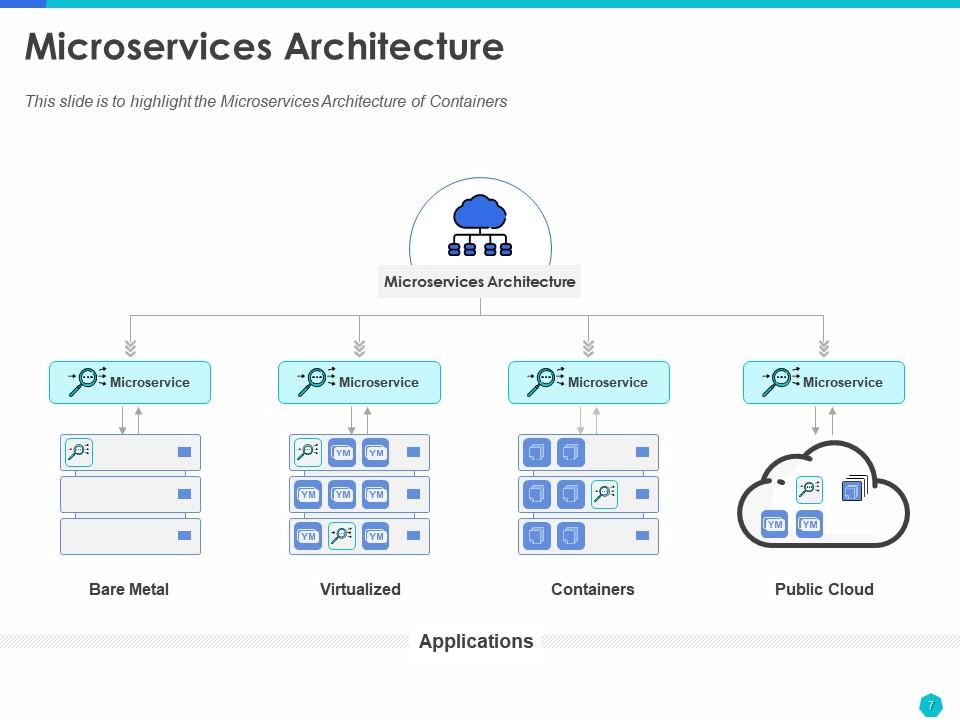
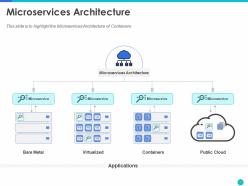
With the help of a microservices architecture style, companies can develop applications as a collection of services. You can develop and deploy these services independently. For example, the architecture style can be used to run media and payment transactions independently on websites. Our pre-designed slide includes a detailed diagram of the microservices architecture; this is an easier and effective way to really get your point across the audience.
Template 4: Microservices Architecture E-Commerce Application

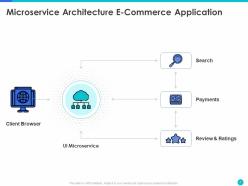
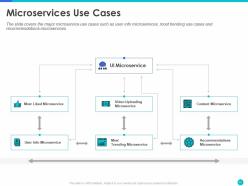
The slide explains the concept of microservices with an e-commerce application use case. Let us consider the process of viewing a product on Amazon. When you search for a product, look for its reviews, or make payments, each request is broken down and sent to its corresponding microservices. Now, if you want to make changes to the payment or the review section, you can do so independently. With this slide, we have attempted to explain the architectural style better with the help of an illustration.
Template 5: Why should Organizations use Kubernetes?
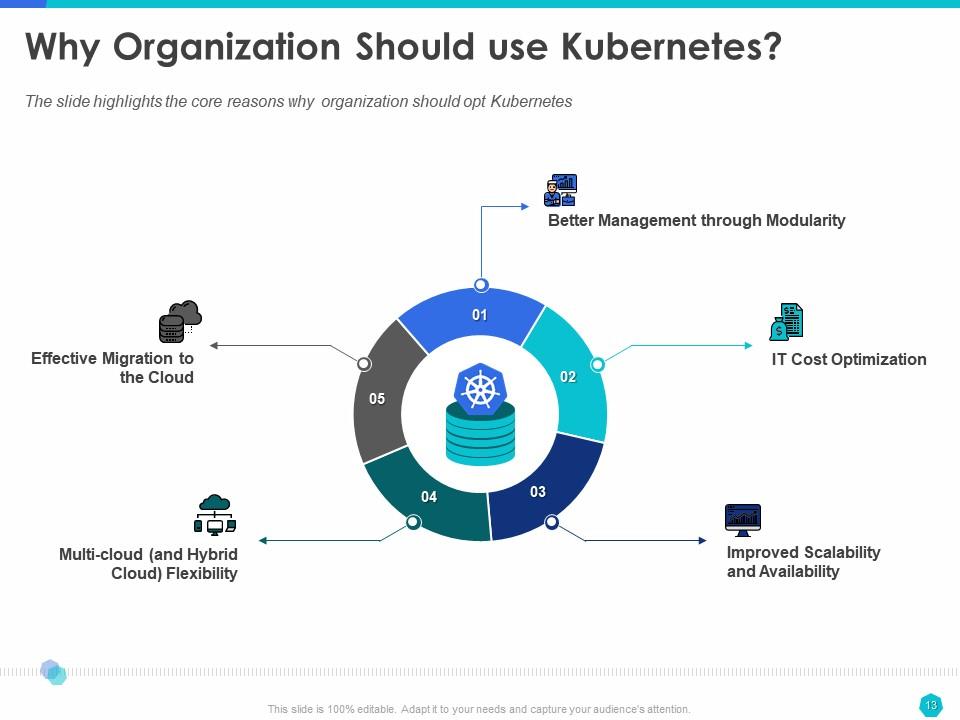
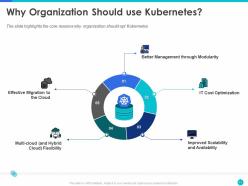
Kubernetes can make the process of developing and deploying complex applications easier. It can help improve application scalability while bringing down the associated IT costs. If you want to convince stakeholders to adopt Kubernetes or help investors understand the part of technology in business growth, this is the slide that can help you. We have used a donut chart with five sections highlighting reasons for Kubernete's adoption. The slide has a clutter-free design, with only the infographic and the headings taking space. You can elaborate on these reasons at the time of presentation.
Template 6: Roadmap to install Kubernetes
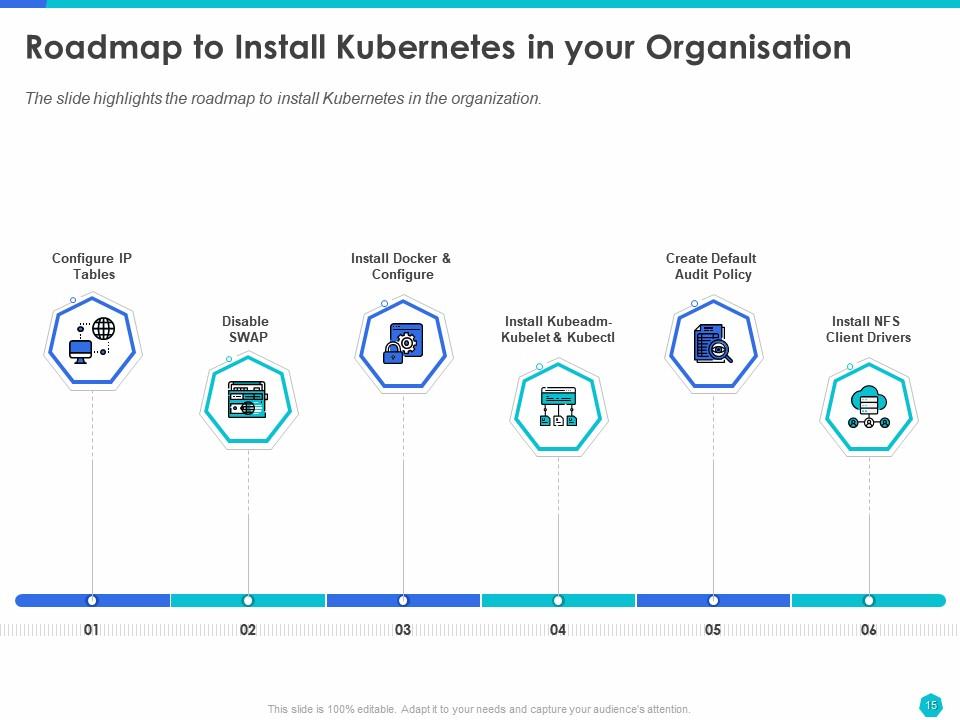
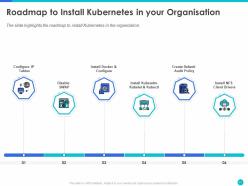
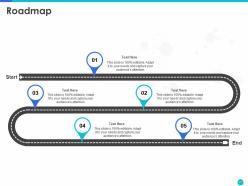
There are ways in which one can install Kubernetes, depending on usage. For example, if you want to experiment with Kubernetes, you can opt for a single-node installation. If you want to get an in-depth understanding of the topic, installing it from scratch would be the way to go. You can present the agreed-upon Kubernetes installation approach for your organization with this slide. We have used a roadmap illustration with numbers, icons, and steps to explain the process.
Template 7: Features of Kubernetes
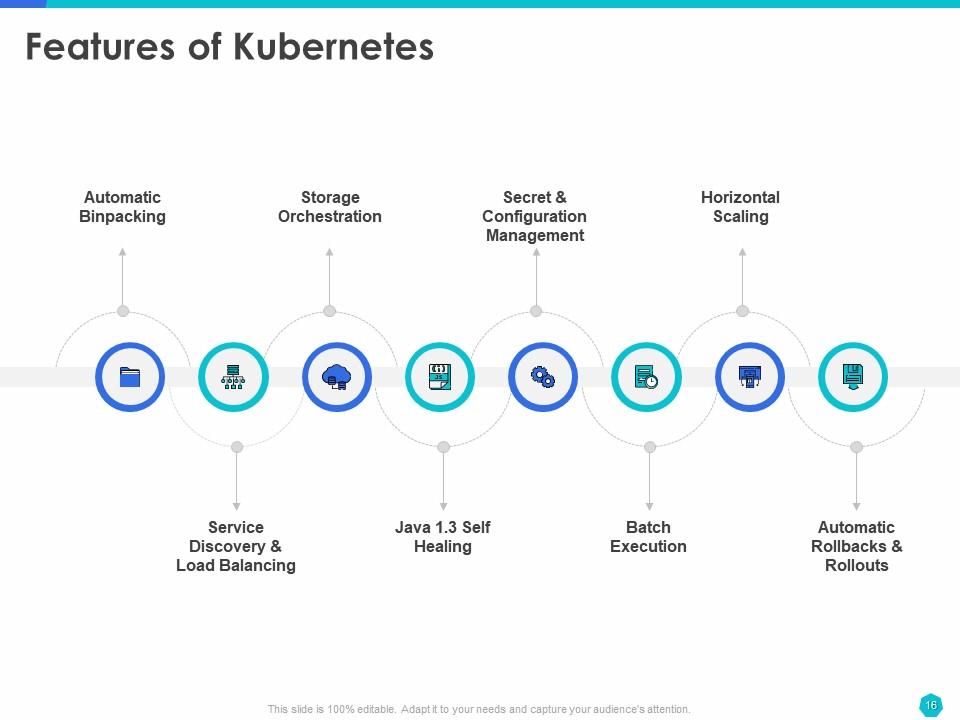
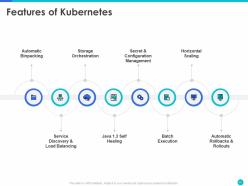
In this slide, we focus on the particulars of what Kubernetes does. Kubernetes can roll out changes, evaluate application health, and roll back changes in case of issues. It is self-healing, meaning if a node dies, it reschedules the containers, and if the containers fail, they are restarted. Kubernetes can roll out changes, monitor application health, and roll back changes in case of issues. It is self-healing, meaning if a node dies, it reschedules the containers, and if the containers fail, they are restarted.
Template 8: Kubernetes Architecture
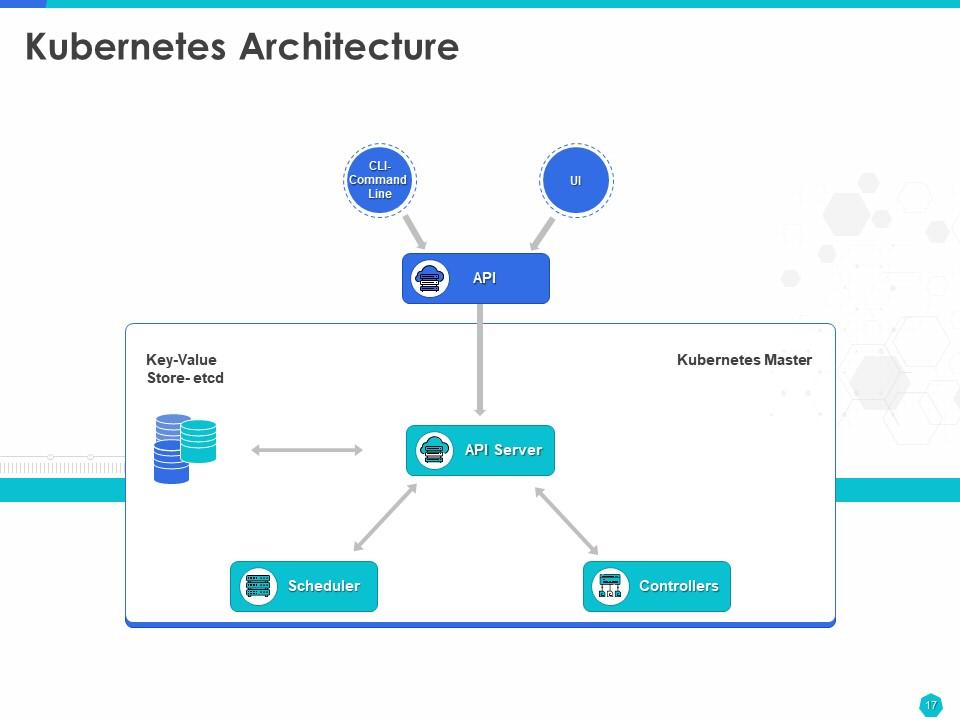
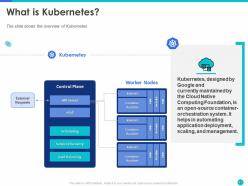
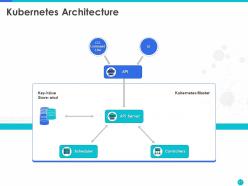
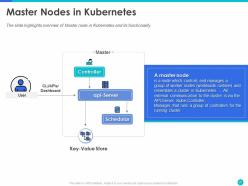
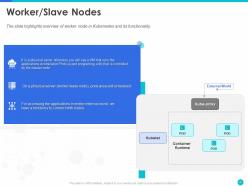
The Kubernetes architecture consists of two main parts: the master node and worker nodes. The master node consists of the API server, scheduler, controller, etc. It is responsible for cluster management. The applications run on the worker nodes. The Kubernetes architecture slide provides a graphical representation of the master node and UI. Instead of text, using this visual image during a presentation can help viewers process and retain information better.
Template 9: Advantage of Kubernetes
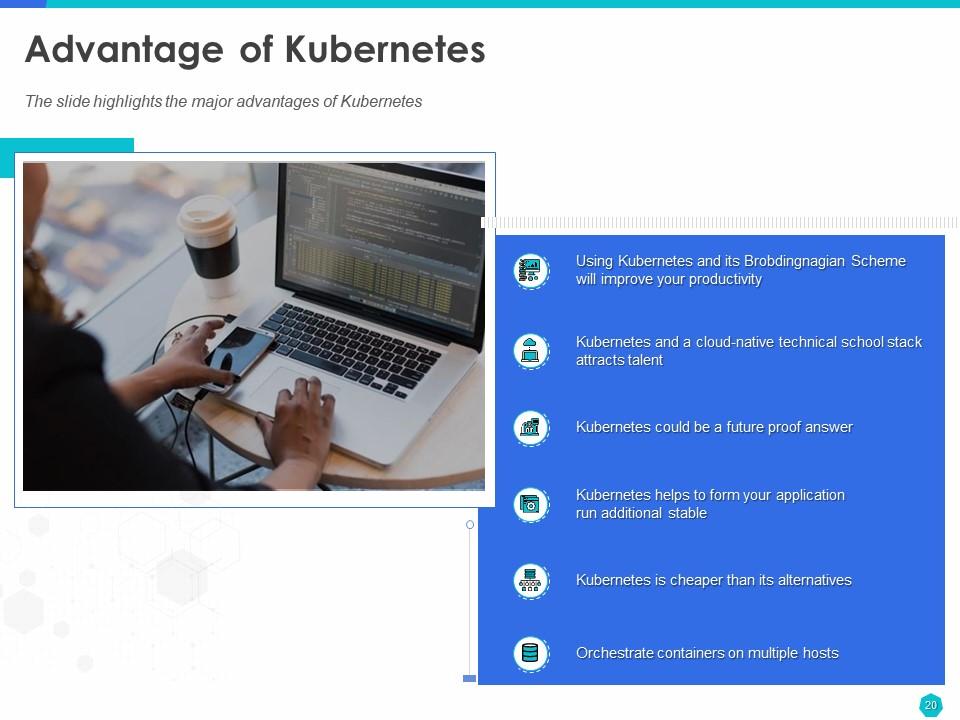
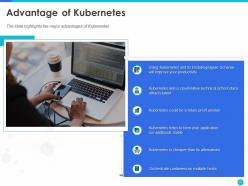
Use the ‘Advantages of Kubernetes’ slide to reiterate the importance of Kubernetes and how it can help your business. For example, how Kubernetes is an affordable solution to improve productivity. We have kept the slide structure simple, with one section dedicated to imagery and the other to the advantages. The advantages are listed with descriptive icons acting as bullet points.
Template 10: Kubernetes Components
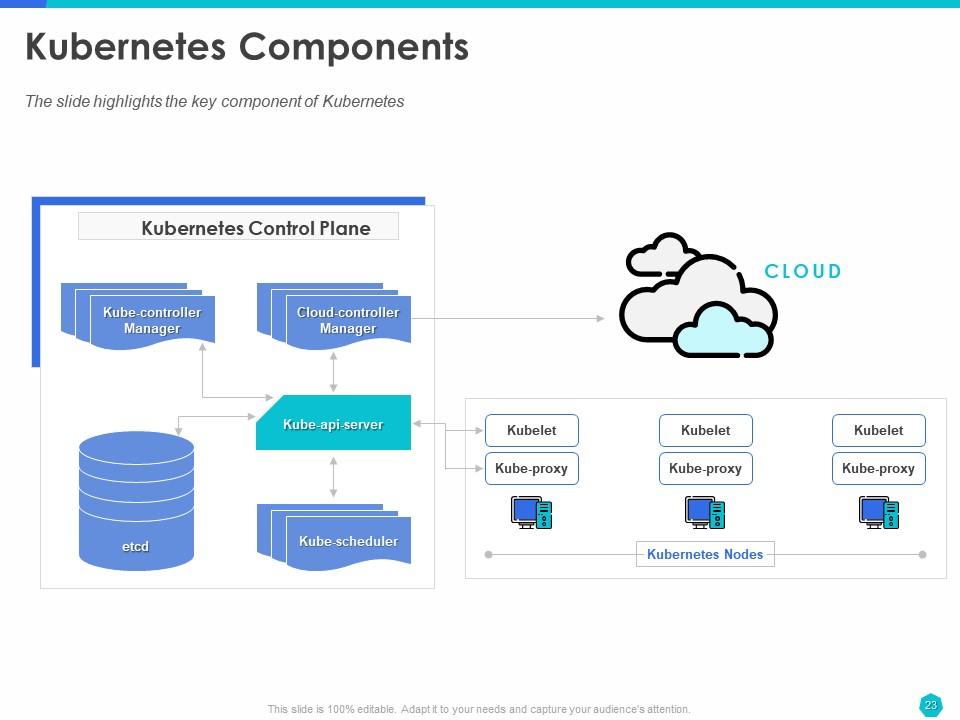
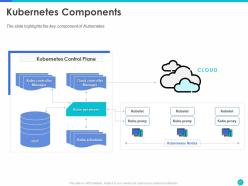
The slide provides an in-depth diagram of the Kubernetes architecture. Here, you can see the master node, the multiple worker nodes, and the interaction between them. Earlier, we saw the components in the master node. This slide introduces worker node components like Kubelet and kube-proxy. Keeping in line with the theme of the deck, we have only used the illustration for presentation purposes. The slide is editable so that you can include additional elements in the architecture specific to your application.
Template 11: What is Kubelet?
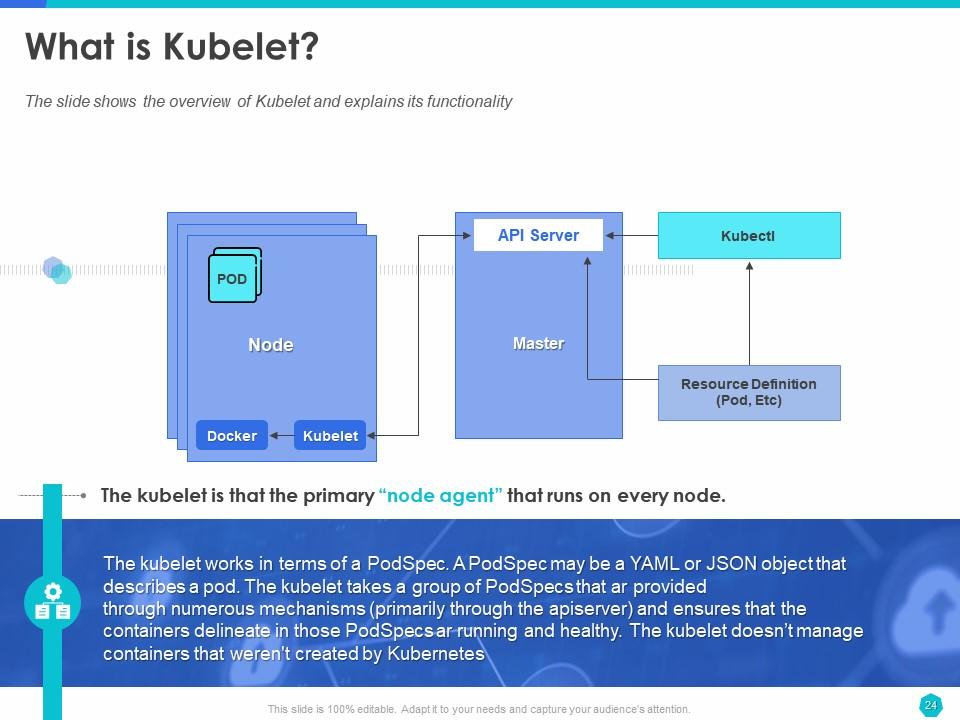
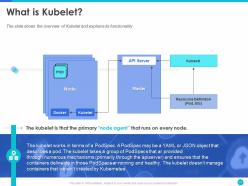
The slide provides an overview of the node component called Kubelet and explains what it does. You can explain what a Kubelet is with the help of an infographic and text description. Again, the slide is 100% editable, so adapt it to your business application.
Deploy, Scale, and Manage Applications Better with Kubernetes
Is your company looking to adapt Kubernetes? Are you responsible for upskilling employees? Do you provide professional training on Kubernetes? Our pre-made kubernetes docker container implementation PPT can help in all these scenarios. We have predominantly used illustrations and text where required to explain topics like containers, microservices, architecture, components, and benefits. The well-researched and designed deck can significantly reduce the efforts required to prepare comprehensive training material on Kubernetes. As the design elements are 100% editable, you can personalize the deck to reflect your business branding.
Do you need to explain the continuous deployment process to upper and mid-level managers? Consider using our pre-designed continuous deployment containerization with docker PPT. The deck extensively uses diagrams and lists to explain complex topics in an easy-to-understand manner.
Kubernetes docker container implementation ppt powerpoint presentation slide templates with all 48 slides:
Use our Kubernetes Docker Container Implementation Ppt Powerpoint Presentation Slide Templates to effectively help you save your valuable time. They are readymade to fit into any presentation structure.

FAQs for Kubernetes docker container implementation ppt powerpoint
So basically Docker runs one container at a time, while Kubernetes manages tons of them across different servers. It's like the difference between driving one car vs coordinating an entire taxi company. Start with Docker to get the basics down - building containers, running them locally, that stuff. Once you need to scale up though, that's when Kubernetes becomes your best friend. It handles all the messy parts like load balancing and what happens when things crash (which they will). Docker Swarm technically does orchestration too but honestly? Everyone just uses K8s in production these days.
So for multi-container stuff, you'll want to use Pods to group containers that need to share storage or networking. Deployments are honestly clutch for managing replicas and updates - saved my butt so many times when scaling. Services handle the load balancing between different parts of your app. ConfigMaps and Secrets are where you store all your config data. I usually start by writing everything out in YAML files first (kind of tedious but worth it), then deploy with kubectl. Oh, and don't sleep on the monitoring features - they're pretty solid for tracking how everything's running together.
So Pods are like the smallest thing you can actually deploy in Kubernetes - they're basically wrappers for your containers. Most of the time it's just one container per Pod, but you can stick multiple ones together if they need to work super closely. What's cool is that containers in the same Pod share networking and storage, so they can chat via localhost. When you deploy stuff, you're actually deploying Pods, not containers directly. Oh, and here's the catch - Pods are totally temporary. Don't put anything critical in there that you can't afford to lose, because they will disappear on you.
So basically Kubernetes uses PVs and PVCs to handle storage that sticks around when your pods crash or get shuffled. Think of it like claiming a locker - you make a PVC asking for X amount of storage, then K8s finds you a matching PV. Works with whatever storage you've got - local drives, AWS EBS, Azure stuff. Mount the PVC to your pod and you're set. Honestly the parking spot analogy is pretty solid too lol. I'd just spin up a simple PVC first and mess around with it on a test pod to see how it behaves.
Run containers as non-root and use read-only filesystems when you can. Resource limits are key so nothing goes crazy with your cluster resources. Pod Security Standards replaced the old policies - enable those in enforce mode first since it'll catch obvious issues right away. Network policies will segment your pod traffic. For scanning, Trivy or Snyk work well (honestly most teams mess this part up). Pull from trusted registries only and avoid "latest" tags - use specific ones instead. Oh and the new Pod Security Standards are way better than the old policy system, just saying.
So Helm is like the package manager for Kubernetes - similar to how you'd use apt or brew, but for K8s stuff. You can bundle all your deployments, services, and configs into these things called "charts" that make installing apps way less painful. Trust me, it beats wrestling with a million YAML files every time. Just run `helm install` and your whole application stack deploys the same way across different environments. It'll handle dependencies, versioning, rollbacks - the works. I'd start by downloading some charts from their public repo to see how they're put together, then build your own chart for whatever you're working on.
So there's basically two ways to scale in Kubernetes. HPA adds more pods when things get busy - works off CPU/memory or whatever metrics you want. VPA just gives existing pods more juice instead. Oh and cluster autoscaling exists too if you need whole new nodes, but that's getting ahead of ourselves. Honestly, I'd go with HPA first since it handles failures way better than just beefing up individual pods. Just make sure you've got your resource requests and limits set up right first, otherwise the autoscaler's gonna be flying blind trying to figure out what to do.
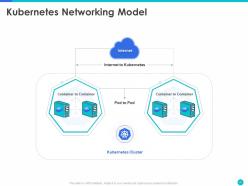
So Kubernetes networking - basically each pod gets its own IP, but those IPs are temporary and disappear when pods restart (which honestly happens way more than you'd expect). That's where Services come in. They create stable endpoints that route traffic to your pods using labels and selectors. Pretty neat system actually. The cluster DNS automatically resolves service names, so your containers can just use friendly names like "my-database-service" instead of hardcoded IPs. I'd start by setting up Services for any pods that need to receive traffic from other containers.
Okay so microservices + Kubernetes is pretty powerful for scaling stuff independently and rolling out updates without breaking everything else. But honestly? You're trading simplicity for a networking nightmare. Service discovery becomes this whole thing, and when something breaks across multiple services... good luck figuring out where. The operational headache is no joke either. My advice? Don't go crazy right away - maybe start with 2-3 services max to see how it feels. You can always add more later, but you can't easily un-complicate a distributed mess.
Honestly, just go with Prometheus + Grafana for metrics and throw in ELK or Loki for logs. Raw Prometheus queries will make you want to pull your hair out, so Grafana's basically mandatory. For collecting logs, run Fluentd or Fluent Bit as daemonsets - they'll grab everything from your containers as long as you're writing to stdout/stderr (which you should be doing anyway). Make sure your logs are structured though, it'll save you later. Start with kube-prometheus-stack from Helm. Seriously, don't overthink it - this gets you like 80% of what you need without the headache of setting everything up from scratch.
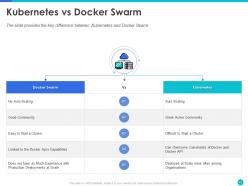
Yeah, Kubernetes is totally worth learning even though it's a pain at first. The networking stuff is way more flexible than Docker Swarm, and honestly the auto-scaling alone makes it worth it. Rolling updates without downtime? Chef's kiss. Resource management is also miles better - like, noticeably better once you start scaling up. Oh and if you're doing multi-cloud stuff (which you probably will eventually), Kubernetes doesn't lock you into one vendor like Swarm kinda does. I'd mess around with it on some throwaway project first though. The learning curve sucks but it pays off.
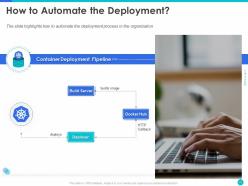
Honestly, GitLab CI or GitHub Actions make this pretty straightforward. Build your Docker images, push to a registry, then use kubectl or Helm to deploy - Kubernetes handles the rolling updates so you won't be up at 3am fixing broken deployments (been there). I'd split environments into different namespaces, though some people prefer separate clusters entirely. Start basic: just build and deploy when you merge to main. Once that's working smoothly, throw in some tests and approval steps. Oh and Jenkins works too if you're already using it, but the cloud options are honestly less hassle to set up.
Honestly, state management and config stuff will probably trip you up first - stateless apps are cake, but anything touching databases gets messy quick. Networking's a headache too since services can't just talk directly anymore, they go through Kubernetes' whole service mesh thing. Secrets management is... ugh, don't even get me started on that nightmare. Your team might struggle with setting CPU and memory limits if they're not used to it. Oh, and maybe start with your simplest services? Get comfortable with the basics before jumping into the complicated stuff that'll make you want to quit.
So requests are basically you telling Kubernetes "my container needs this much to function" - it's like booking a hotel room, you're guaranteed that space. Limits are different though, they're the max your container can grab before Kubernetes steps in. CPU limits will just slow things down, but if you hit memory limits? Your pod gets straight-up murdered (OOMKilled). Honestly, I'd start with smaller requests than you think you need - you can always bump them up once you see how your app actually behaves in the wild.
So there's four service types in Kubernetes. ClusterIP is what you get by default - keeps everything internal to the cluster. NodePort opens up a port on each node so external traffic can reach it, but honestly it feels pretty hacky for real production stuff. LoadBalancer is way cleaner - your cloud provider handles the external load balancer automatically. Then there's ExternalName which just maps to external DNS without doing any proxying (I rarely use this one tbh). Most of the time you'll want ClusterIP for services talking to each other, then bump up to LoadBalancer when you need outside traffic.
-
The pathway to our success! We now have a professional edge that impresses clients and stakeholders alike thanks to these ppt designers.
-
Plenty of knowledge! This ppt producers provide well-researched and concrete data, providing us an advantage in our field.
-
My expectations were exceeded by this presentation template. It saved my time and effort by providing significant understanding into Kubernetes and Docker.
-
After using this template for a project presentation, I received good response from my clients. Excellent investment!
-
Crafted with meticulously! This ppt creators are actual specialists who provide us with concrete information to help us succeed.
-
Make Your Skills Future-Proof! This presentation provides us with the most recent trends and strategies in Kubernetes Docker implementation.
-
Five stars! My expectations were exceeded by templates. They provided the ideal balance of clarity and inventiveness, making a lasting impression on my audience.
-
Astonishing design and content flow! Docker PPT slides brought my thoughts to life, captivating my audience's attention from beginning to end.
-
It condenses massive volumes of data and explained effectively and efficiently.
-
Incredible clarity and structure! The difficult principles of Kubernetes and Docker are expertly explained in this PowerPoint presentation. Anyone in the IT business should read this.
