


Voice And Non Voice Process Services Company Profile Powerpoint Presentation Slides




Try Before you Buy Download Free Sample Product
 Impress Your
 Audience
 100%
100% Editable
 Save Hours
 of Time


Company profile describes all the relevant elements of a business, which helps the investors and stakeholders evaluate the business value and performance. Here is a professionally designed Voice And Non-Voice Process Services Company Profile PowerPoint presentation. It covers the executive summary of BPO, company overview, vision mission, offices, business process outsourcing solutions, specialized services, and inbound and outbound call volume rate. Additionally, It presents the business model, company journey roadmap, team org structure, management team, business clients, customer testimonials, awards, and accolades. Moreover, It describes financials, including revenue and profit, revenue breakdown of services by industries and regions, and integrated performance. At last, this profile includes a gender equality index, competitive analysis, financial performance comparison, SWOT analysis, complaint handling strategy, CSR initiatives, and a case study of a shopping website. Book a free demo with our research team now.
People who downloaded this PowerPoint presentation also viewed the following :
Content of this Powerpoint Presentation
Slide 1: This slide displays title i.e. 'Voice and Non-Voice Process Services Company Profile' and your Company Name.
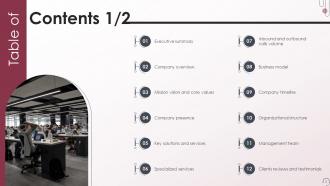
Slide 2: This slide presents table of contents.
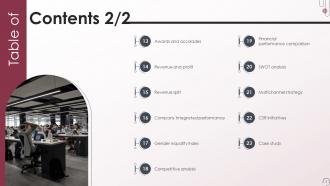
Slide 3: This slide also shows table of contents.
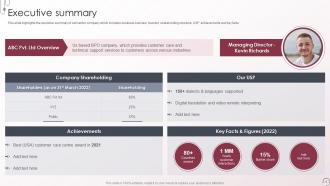
Slide 4: This slide highlights the executive summary of call center company which includes business overview, founder, shareholding structure, USP, etc.
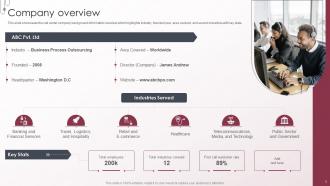
Slide 5: This slide showcases the call center company background information overview which highlights industry, founded year, area covered, etc.
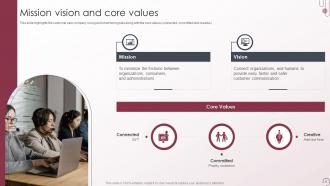
Slide 6: This slide highlights the customer care company’s long and short-term goals along with the core values (connected, committed and creative).
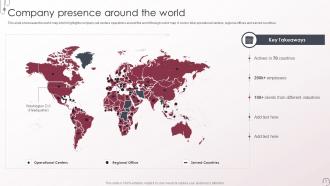
Slide 7: This slide showcases the world map which highlights company call centers operations around the world through world map.
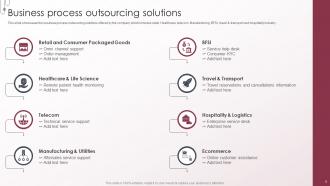
Slide 8: This slide showcases the business process outsourcing solutions offered by the company which includes retail.
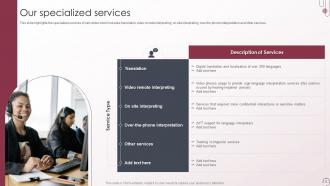
Slide 9: This slide highlights the specialized services of call center which includes translation, video remote interpreting, on site interpreting, etc.
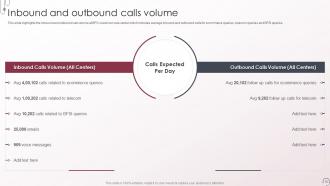
Slide 10: This slide highlights the inbound and outbound call volume at BPO customer care center.
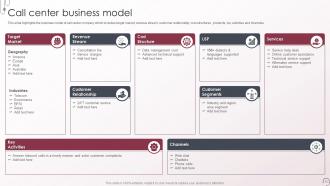
Slide 11: This slide highlights the business model of call center company which includes target market, revenue stream, customer relationship, etc.
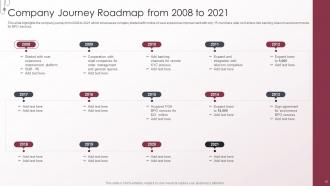
Slide 12: This slide highlights the company journey form 2008 to 2021.
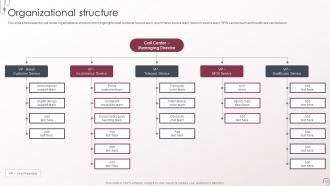
Slide 13: This slide showcases the call center organizational structure which highlights retail customer service team, ecommerce service team, etc.
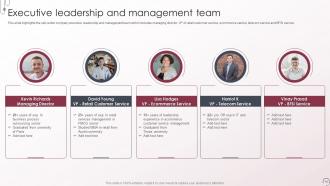
Slide 14: This slide highlights the call center company executive leadership and management team which includes managing director, etc.
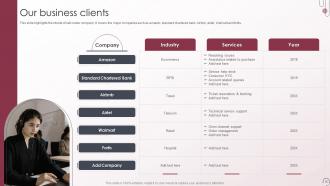
Slide 15: This slide highlights the clients of call center company. It covers the major companies such as amazon, standard chartered bank, Airbnb, etc.
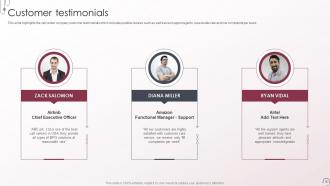
Slide 16: This slide highlights the call center company customer testimonials which includes positive reviews such as well trained support agents, etc.
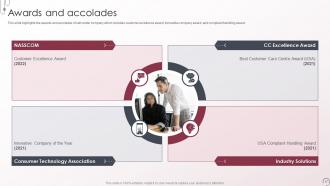
Slide 17: This slide highlights the awards and accolades of call center company which includes customer excellence award, innovative company award, etc.
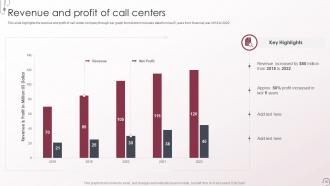
Slide 18: This slide highlights the revenue and profit of call center company through bar graph format.
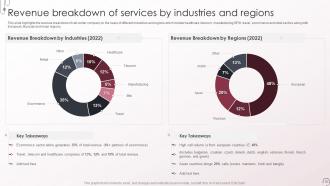
Slide 19: This slide highlights the revenue breakdown of call center company on the basis of different industries and regions which include healthcare, etc.
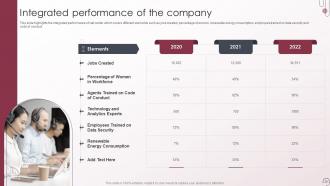
Slide 20: This slide highlights the integrated performance of call center which covers different elements such as jobs created, percentage of women, etc.
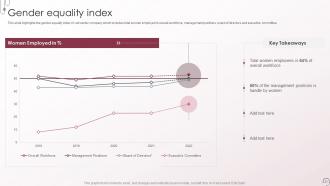
Slide 21: This slide highlights the gender equality index of call center company which includes total women employed in overall workforce, etc.
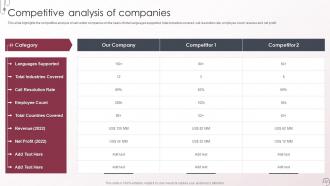
Slide 22: This slide highlights the competitive analysis of call center companies on the basis of total languages supported, total industries covered, etc.
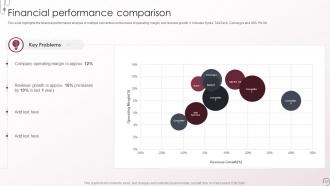
Slide 23: This slide highlights the financial performance analysis of multiple call centers on the basis of operating margin, and revenue growth.
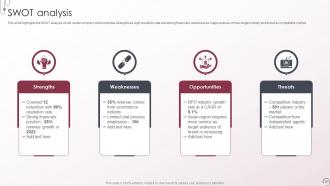
Slide 24: This slide highlights the SWOT analysis of call center company which includes strengths as high resolution rate and strong financials, etc.
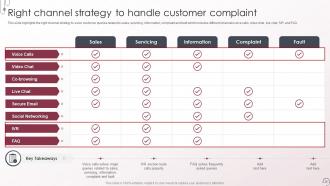
Slide 25: This slide highlights the right channel strategy to solve customer queries related to sales, servicing, information, etc.
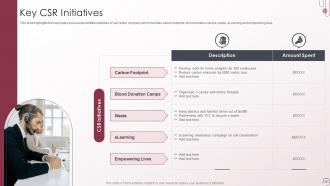
Slide 26: This slide highlights the corporate social responsibilities activities of call center company which includes carbon footprint, blood donation camps, etc.
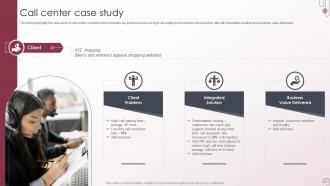
Slide 27: This slide highlights the case study of call center company which includes key problems such as high call waiting time, etc.
Slide 28: This is the icons slide.
Slide 29: This slide presents title for additional slides.
Slide 30: This slide shows about your company, target audience and its client's values.
Slide 31: This slide presents your company's vision, mission and goals.
Slide 32: This slide shows details of team members like name, designation, etc.
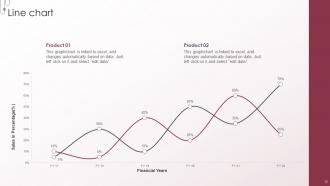
Slide 33: This slide exhibits yearly sales line charts for different products. The charts are linked to Excel.
Slide 34: This slide displays targets of the company.
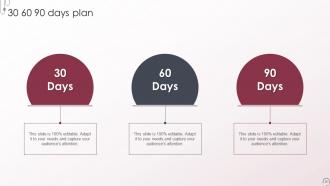
Slide 35: This slide depicts 30-60-90 days plan for projects.
Slide 36: This slide depicts posts for past experiences of clients.
Slide 37: This slide exhibits ideas generated.
Slide 38: This is thank you slide & contains contact details of company like office address, phone no., etc.
Voice And Non Voice Process Services Company Profile Powerpoint Presentation Slides with all 43 slides:
Use our Voice And Non Voice Process Services Company Profile Powerpoint Presentation Slides to effectively help you save your valuable time. They are readymade to fit into any presentation structure.






FAQs for Voice And Non Voice Process Services Company Profile
Okay so basically voice means your team's actually talking to customers on the phone - sales calls, support, that kind of thing. Non-voice is everything else: chat support, emails, data entry, content moderation stuff. Non-voice has gotten huge lately because honestly? It's way cheaper and you can multitask. Voice work needs better language skills since you're talking in real-time, but with non-voice you can juggle multiple conversations at once. Really depends on your team's strengths and whether your customers actually want to talk to a human or if they're fine with chat.
So voice support actually works because people get to talk to real humans who can solve their problems right away. Your customers can express frustration or get excited - there's something weirdly cathartic about that. Agents pick up on emotional cues way better than any chatbot ever could. The back-and-forth conversation thing? That's where you really build rapport. I mean, try explaining a complicated billing issue through email - nightmare. Train your team to actually listen instead of just reading scripts, and you'll see those satisfaction scores jump. It's honestly night and day compared to other support channels.
Dude, AI and machine learning are total game-changers right now. They're handling data entry, document processing, all that tedious stuff that used to take forever. RPA is crushing it too - just runs repetitive workflows on autopilot. Cloud platforms make everything way more scalable, though honestly the speed of change is kinda overwhelming sometimes. Natural language processing has gotten scary good at customer queries and content moderation. My advice? Start by mapping out your most repetitive tasks first. Those are your low-hanging fruit for automation wins.
Track your first call resolution and customer satisfaction scores - those are gold. Average handle time matters too, but don't obsess over it if you're solving problems right the first time. Call abandonment is brutal for business, so definitely watch that. Quality scores from evaluations help spot training gaps. Honestly, looking at just one metric is pretty useless - you need the full picture. Set up a dashboard with maybe 3-4 core ones that actually align with what you're trying to achieve. Agent utilization is worth tracking too, especially if you're dealing with staffing issues.
Honestly? Call quality and keeping agents around are your biggest headaches. Your team's dealing with angry customers non-stop, which burns people out fast. Peak hours are absolutely brutal when calls suddenly explode. You're constantly trying to balance speed vs actually fixing problems - agents feel rushed but customers still need real help. Real-time monitoring while coaching everyone is like juggling fire. Different shifts perform differently too, which makes consistency tough. SLA targets don't help the pressure either. My advice? Start with good coaching and flexible schedules. Happy agents stick around longer and that fixes half your problems right there.
So non-voice processes are like having invisible employees handling all the boring stuff - data entry, processing documents, chat support, email responses. Your actual team doesn't get stuck doing repetitive tasks anymore. They plug right into whatever systems you're already using, which is nice because you don't have to rebuild everything. Honestly, the amount of time it frees up is kind of ridiculous. Your people can actually focus on selling and growing the business instead of drowning in paperwork. I'd start by figuring out what's eating up most of your team's time right now.
Honestly, AI is a game-changer for cutting down on boring, repetitive work. Your team can tackle the tricky stuff while AI handles basic customer questions through chatbots or routes calls to the right people. It also knocks out data entry and email sorting - which, let's be real, nobody enjoys doing anyway. The cool part? AI learns patterns and can actually suggest solutions during live customer calls. I'd start by looking at whatever tasks make your team groan the most. Those repetitive processes are perfect spots to test it out first.
Honestly, you gotta make sure your phone and chat people are saying the same stuff. Create some basic scripts and guidelines that both teams can use - same tone, same key phrases, all that. I've seen companies where their phone support is amazing but then you get an email that sounds like a robot wrote it. Super weird for customers. Train everyone on the brand voice whether they're talking or typing. Oh and definitely do quality checks on both sides regularly. Maybe set up some shared docs or whatever so when someone's not sure what to say, they can quickly reference it. Consistency is really what makes the difference here.
Honestly, nail the basics first - make sure they actually know your product inside and out. Nothing's worse than agents who sound clueless. Then drill communication skills hard: listening, empathy, dealing with angry customers (and trust me, there will be plenty). Role-playing is where the real learning happens - have them shadow your best people before throwing them to the wolves. Oh, and create a space where they can ask "dumb" questions without judgment. Regular coaching sessions help too, but don't overdo it. The confidence builds naturally once they've handled a few tough calls successfully.
Oh man, non-voice processes are honestly such a lifesaver for efficiency. Your agents aren't stuck on endless phone calls anymore, so turnaround times get way faster. Plus you can handle more volume without hiring more people - which your budget will thank you for. Written stuff tends to be more accurate too since there's less back-and-forth confusion. A lot of the boring tasks like data entry can just run on autopilot. I'd definitely start with whatever you're doing most repetitively and see how much time you save by switching those over first.
So basically, voice and non-voice track totally different stuff. With phone calls, you're measuring things like how long people wait on hold, if issues get fixed on the first try, average call times - all that real-time conversation stuff. Non-voice work? That's more about how much you can process and how accurate it is. Like, how many cases did you knock out per hour, error rates, processing speed. Here's the thing though - phone metrics have to balance speed AND keeping customers happy at the same time. Non-voice lets you slow down to get things right. Just focus on what actually matters for each type.
So basically, everyone's using AI chatbots now for the simple stuff customers ask about. Omnichannel is huge too - people want to start on chat, then jump to a call without repeating everything. Way smarter than the old days. Most companies are ditching hourly rates for outcome-based pricing, which actually makes sense when you think about it. There's also this push toward specialized knowledge - like if you're in healthcare or fintech, they need someone who gets your compliance headaches. Oh, and definitely look for vendors training their people on automation tools rather than just... existing.
You'll want feedback collection at different stages for both types of work. Post-call surveys and monitoring scorecards work great for voice processes - plus real-time coaching helps catch issues early. Non-voice is honestly simpler since everything's already digital. Case feedback forms and automated satisfaction pings after ticket closure do most of the heavy lifting. Here's the thing though - collecting feedback means nothing if you're not acting on it. Weekly team reviews where you spot patterns and actually fix stuff? That's where the magic happens. I'd start with just one method per process type first, then build from there once you get the rhythm down.
Dude, cultural sensitivity can totally make or break your voice team. When agents actually get how different cultures communicate, customers feel respected and you'll see way better satisfaction scores. I've watched entire teams transform just from decent cultural training - like, night and day difference. Map out who your customers are first, then train agents on those specific preferences. Even basic stuff helps tons. Skip this and you're looking at confused customers, failed calls, and honestly? Your brand takes a hit. Oh, and first-call resolution rates improve too which your managers will love.
Start by tracking stuff like how long tasks take, error rates, and quality scores - that's where the magic happens. You'll catch workflow bottlenecks super fast and figure out when you're about to get slammed with extra work. Honestly, the resource optimization part is my favorite because you can see who's actually crushing it at specific tasks. Maybe Sarah's amazing with invoices but terrible at data entry, you know? Pick one process first and really dive deep into the numbers. Don't try to analyze everything at once or you'll just overwhelm yourself.
-
The slides come with appealing color schemes and relevant content that helped me deliver a stunning presentation without any hassle!
-
The design is very attractive, informative, and eye-catching, with bold colors that stand out against all the basic presentation templates.