

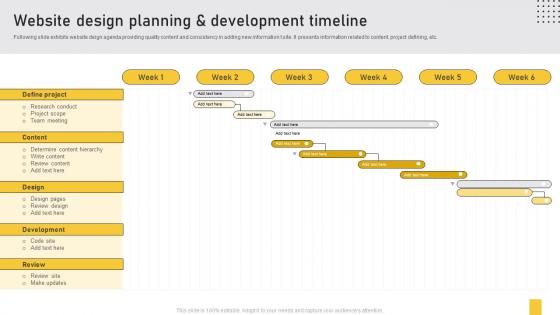
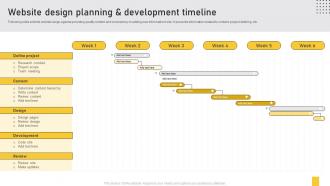
Website Design Planning And Development Timeline




Try Before you Buy Download Free Sample Product
 Impress Your
 Audience
 100%
100% Editable
 Save Hours
 of Time


Following slide exhibits website deign agenda providing quality content and consistency in adding new information t site. It presents information related to content, project defining, etc.
People who downloaded this PowerPoint presentation also viewed the following :
Website Design Planning And Development Timeline with all 6 slides:
Use our Website Design Planning And Development Timeline to effectively help you save your valuable time. They are readymade to fit into any presentation structure.





FAQs for Website Design Planning
So you've got discovery/research first - figure out what the client actually wants and who they're targeting. Then wireframing to map out the structure. Visual design comes next, which is honestly the most fun part. Development builds it all out, and testing/launch wraps things up. Each phase usually runs 1-3 weeks depending on how complex things get. Definitely pad your timeline though - clients always want changes, and you don't want to be scrambling. Oh, and get sign-off before moving between stages or you'll hate yourself later.
Honestly, rushing will destroy your site quality. You'll skip testing, cut design rounds short, and launch with obvious bugs. I've watched so many "we need this yesterday" projects that looked completely amateur because nobody had time for proper QA - it's painful to see. But here's the thing: dragging it out forever kills momentum too. Scope creep becomes a real problem. Give your team enough breathing room for two revision rounds and actual testing phases. That way they can think through the user experience properly and test on different devices. Trust me, those polished details make all the difference between looking professional vs homemade.
Notion or Airtable work really well for this - super easy to map out phases and track everything. Oh, and Figma actually has timeline stuff built in, which is clutch since you're probably designing in there anyway. Monday.com and Asana are good if your team needs heavier project management (though honestly they can be overkill sometimes). Don't sleep on Google Sheets either - sounds basic but if you set it up right it's surprisingly powerful. Just make sure whatever you choose lets clients see updates easily. Trust me, it'll cut down on those constant "where are we at?" messages that drive you nuts.
E-commerce builds usually run 3-6 months - all that payment integration and inventory stuff gets messy fast. Portfolio sites? Way easier, maybe 2-4 weeks since you're just showing off work that already exists. Blogs sit around 1-2 months, though honestly the content part always drags longer than building it. Here's what really screws timelines though: clients taking forever with feedback and not having their content ready. I've watched simple portfolio projects stretch for months because of that nonsense. Whatever timeline you're thinking, add 25-50% on top. Trust me on this one.
Honestly, content creation and client feedback will eat up way more time than you think. Clients always say "just a quick tweak" then want you to redesign half the site. Buffer time saves your sanity here - I usually add 20-30% padding because something random always breaks. Tech integrations are the worst for this. Map out each phase realistically first, then be super clear about timelines upfront. Oh and don't let clients think revisions are unlimited or you'll be stuck in feedback hell forever.
Oh man, client feedback is literally the thing that'll destroy your timeline every single time. Quick, clear feedback? You're golden. But when they disappear for weeks or suddenly want to change everything halfway through... your schedule is toast. I learned the hard way to always build in extra time - like 20-30% buffer minimum. Also super helpful to be really specific about what feedback you need and when. Otherwise you'll get random comments about font colors when you need approval on the actual concept, you know? Set those boundaries early or you'll regret it.
You'll want to test twice - first when you've got wireframes ready (week 3-4ish) and then right before you go live. Early testing catches the big stuff when it's still easy to fix. The second round? That's your safety net to make sure everything actually works. Look, I've seen too many projects skip this step and regret it later. It's kinda like... well, you wouldn't serve dinner without tasting it first, right? Budget maybe 1-2 weeks total for testing plus any fixes. Oh, and here's something cool - you don't need tons of people. Just 5 users will show you most of your problems.
Dude, just chunk it into 1-2 week sprints instead of that whole waterfall mess. Start with wireframes and basic stuff first, then get client feedback before moving on. Trust me, this approach is a total game-changer - no more waiting months just to find out they hate everything! Each sprint should cover design, dev, testing, and review. Basically treat every piece like its own mini project. When requirements change (and they always do), you can pivot fast. Weekly check-ins keep things moving too. Clients love seeing constant progress rather than radio silence for ages.
Honestly, the biggest thing is padding your estimates because clients NEVER have content ready when they say they will. I always add 20-30% buffer time because scope creep happens every single time. Project complexity matters obviously - are you starting from scratch or working with existing brand stuff? Revisions depend on the client too, some want like 47 changes to every button. Team size affects timeline, plus you gotta think about approval processes if there's multiple stakeholders involved. Oh and any weird technical requirements. Start tracking your actual vs estimated time now though, you'll get way better at this with practice.
Yeah, revisions will absolutely mess with your timeline - usually 1-3 weeks depending on what they want changed. Color tweaks or copy edits? Maybe a few days. But when clients start asking for new pages or want to redesign entire sections... that's when things go sideways. I've literally watched projects double in time because of stuff like this. Honestly, the wireframe stage is your best friend here - catch changes then instead of during development when it's a nightmare to fix. Oh, and always pad your timeline by 20%. Trust me on that one. Document everything so they can see exactly how their "quick changes" affect the schedule.
Here's what works for me - chunk everything into discovery, design, development, and testing phases. Always add buffer time because clients will 100% change their minds at the worst possible moment. I'm obsessed with Asana for tracking stuff, but Monday works too. Weekly check-ins with clients are a lifesaver. Plan for 2-3 revision rounds per phase (they never get it right the first time, obviously). Oh, and this is crucial - get written approval before moving forward or you'll be stuck redoing the same work forever. Set realistic deadlines with your team upfront. Trust me, it saves so much headache later.
You'll want those weekly check-ins (maybe bi-weekly if it's a longer project). Use something like Trello or Asana so everyone sees what's happening in real time - trust me, overcommunicating is way better than nasty surprises later. Document scope changes right when they happen, don't sit on them. I always use a simple traffic light system: green/yellow/red so people instantly get where things stand. Oh, and figure out who approves what before you start. Those approval bottlenecks will absolutely wreck your timeline if you don't sort that mess out early.
Yeah, tool choice is huge for timelines. Go with what your team already knows and you'll fly through it. Learning something new mid-project? That's where things get messy - I've watched teams burn weeks chasing the latest shiny tool instead of just using what works. Webflow or Squarespace can be clutch for simpler stuff, but custom coding takes forever even though you get way more control. Match your tool to both the project complexity AND what your people actually know how to use. When deadlines are tight, boring and familiar wins every time.
Run content and design together, not one after the other - that's your lifesaver here. Get your content people started on wireframes while designers mess with visual concepts. Don't wait for "perfect" copy before designing (learned that the hard way). Have content delivered in chunks - homepage first, then service pages. Designers can start working with real text way earlier. Weekly check-ins between teams catch problems fast. Building together instead of this back-and-forth handoff thing? Saves you like 2-3 weeks easy.
Honestly, just break everything into smaller chunks with real deadlines - wireframes, designs, dev phases, all of it. I used to let projects drag on forever until I got strict about this stuff. Do weekly check-ins so problems don't spiral out of control. Here's the thing though - you HAVE to limit revisions upfront (like 2-3 rounds max) or clients will have you tweaking button colors forever. Oh, and always add buffer days to your timeline because something always goes sideways. Share that timeline with everyone so they can't act surprised later when you stick to it.
-
The team is highly dedicated and professional. They deliver their work on time and with perfection.
-
Colors used are bright and distinctive.