


Weekly Project Status Report Powerpoint PPT Template Bundles




Try Before you Buy Download Free Sample Product
 Impress Your
 Audience
 100%
100% Editable
 Save Hours
 of Time


Our Weekly Project Status Report Powerpoint PPT Template Bundles are topically designed to provide an attractive backdrop to any subject. Use them to look like a presentation pro.
People who downloaded this PowerPoint presentation also viewed the following :
Weekly Project Status Report Powerpoint PPT Template Bundles with all 17 slides:
Use our Weekly Project Status Report Powerpoint PPT Template Bundles to effectively help you save your valuable time. They are readymade to fit into any presentation structure.
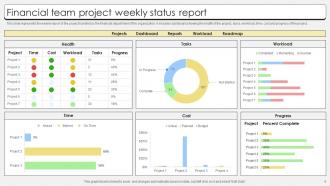
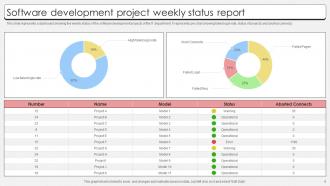
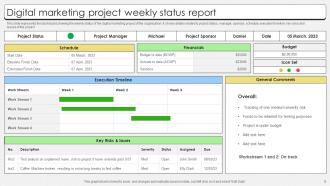

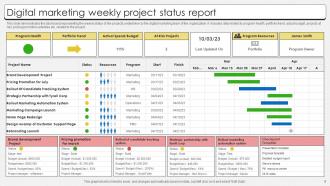





FAQs for Weekly Project Status Report Powerpoint
So for weekly status reports, I always cover what I got done last week, what I'm working on now, and next week's priorities. Don't forget blockers or anything that might derail you - those are crucial. Budget and timeline stuff too, obviously. Oh, and I love adding a "quick wins" section because honestly, people eat that up. Dependencies on other teams? Definitely mention those. Sometimes executives need to make decisions, so call that out clearly. Keep it scannable with bullet points - nobody has time to read paragraphs. The goal is someone should understand your project's health without having to ping you later.
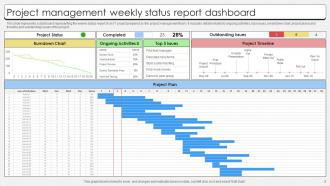
Dude, seriously - throw some visuals in there. Stakeholders don't want to read paragraphs of text when they could just look at a chart showing completion percentages or those red/yellow/green status dots. I swear executives have like a 10-second attention span for text, but they'll actually stop and look at a good timeline graphic or progress bar. Even something super basic works. Last week I added one simple Gantt chart snippet to what was basically a wall of text, and suddenly people were actually responding with questions and feedback. It's honestly kind of ridiculous how much difference one visual makes, but whatever works, right?
Honestly, skip the laundry list of tasks and focus on what you actually got done. Numbers are your best friend - say "hit 3 out of 5 milestones" instead of something vague like "made good progress." I usually break mine into three chunks: what's finished, what I'm working on now, and next week's priorities. Bullet points work way better than those dense paragraphs nobody reads anyway. Oh, and here's the thing most people mess up - call out your blockers right at the top. Your manager can't help if they don't know you're stuck on something.
Honestly, just be straight up about what's going wrong. Don't sugarcoat it or hide behind vague language. Say "The API integration is delayed because of authentication issues" instead of "we're experiencing minor setbacks" - that stuff drives me crazy. Sort your risks by how bad they are and actually explain what you're doing to fix them. Ask for help if you need it! People would rather know the truth so they can support you. Perfect updates are usually BS anyway, and stakeholders can smell that from a mile away.
Honestly, just track three things: are you hitting deadlines, burning through budget too fast, and what's blocking you. Leadership only cares about those anyway. Your team needs that clarity too. Quality metrics matter if you're testing stuff - trust me, surprises there suck. But ditch anything that just looks good on paper without telling you if the project's actually healthy. Short answer? Know if you're on track, on budget, and what problems you're facing. Answer those three every week and you'll be fine. Sometimes I'll throw in a quick risk assessment, but that's probably overkill for most projects.
Skip the solo summary approach and get your team involved directly. I send a Friday morning survey with questions like "What blocked you this week?" or "What support do you need?" People are way more honest typing responses than speaking up in meetings, honestly. Then I weave their actual feedback into the relevant project sections instead of dumping everything together. Rotate who contributes each week too - you'll get different perspectives that way. The whole point is making it feel collaborative rather than just another boring checkbox exercise.
Honestly, the worst thing you can do is be super vague - like "everything's fine" tells nobody anything. Get specific about what you actually finished and what's stuck. Don't hide problems either! I've watched people bury delays at the end and it always backfires. Keep it short too. Bullet points beat paragraphs every time since everyone just skims these updates anyway. Oh, and always end with clear next steps - otherwise people will bug you asking what's happening next. Focus on stuff your stakeholders actually care about, not every tiny detail you worked on.
Honestly, it's all about reading the room. Executives just want the headlines - budget status, big risks, maybe some charts if you're feeling fancy. Your actual project team? They need everything - tasks, what's blocking them, what's next. Clients are weird though... they want updates but mostly just need to feel like they're in the loop. Department heads care about how this affects their people and timelines. I've learned you've got to figure out what decisions each person needs to make, then give them exactly that info. Don't overwhelm the C-suite with details they won't use.
Dude, project tracking software is a game changer for status reports. Tools like Asana or Monday just pull all the data automatically - task progress, deadlines, team updates, everything. No more chasing people down for info. You can literally generate reports in a few clicks showing what's done, what's lagging, what's next. Way better than those nightmare spreadsheet days (ugh). The reports are customizable too, so stakeholders see exactly what they want. Oh, and set up weekly automated exports - then you'll never forget to send updates again. Trust me on this one.
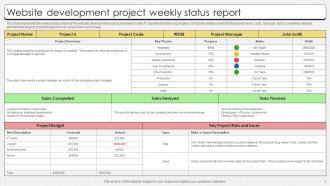
Put people's actual names next to tasks - none of that "the team will do it" nonsense. Seriously, accountability goes way up when someone's name is right there. Show what got done versus what was promised last time, and don't sugarcoat the misses. I'd throw in deadlines too, obviously. Oh and add a blockers section where people have to say what's actually stopping them. Creates this natural peer pressure thing where it's harder to just... you know, disappear into the background without doing much.
I swear by the traffic light thing - green for good stuff, yellow for risky, red for disasters. Quick visual that doesn't hide the ugly truth. When something's going wrong, just say it straight up first, then jump into how you'll fix it and when. Honestly, people respect you more for being real about problems than trying to make everything sound fine. For wins, get specific about what worked and why - helps you repeat it later. Oh, and always tell them what's happening next, whether things are great or terrible. Keeps everyone from wondering what the hell comes after.
Weekly is definitely the way to go. Daily feels way too pushy - like you're micromanaging everyone. Monthly? Forget it, too much can blow up in that timeframe without anyone catching it. You get enough real progress to actually report with weekly updates, plus it keeps people accountable without being annoying. I usually send mine on Fridays so the team can look it over during downtime, though some people prefer Monday kickoffs (honestly depends on your team's vibe). If things are totally falling apart, maybe twice a week temporarily, but that's it.
Try telling it like a story - sounds cheesy but it actually works. Start with where you were last week, then walk through what happened this week (the mess-ups, wins, whatever). End with what's next. Way easier to follow than those awful bullet point reports everyone hates reading. Open with something like "Last week we hit a wall with X, but here's what we figured out..." People can actually track the progression instead of scanning random updates. Makes you look way more organized too.
Honestly, Canva's probably your best bet - it's free and has tons of project templates you can customize super quick. PowerPoint actually works great too, people just don't realize how much you can do with it. If you want something fancier, Adobe Creative Suite is solid but might be overkill. Excel can make decent dashboard-style reports if you format it right. Oh, and if your data's already in Notion or Airtable, they've got built-in report tools that look pretty clean. I'd mess around with Canva first though - you can probably whip something together in like 10 minutes.
Think of status reports as your safety net. Regular updates keep stakeholders in the loop so they don't randomly pop up freaking out about stuff. Honestly, people just want to know what's going on - even the mundane updates help. It builds trust over time and you'll catch problems early before they blow up. I've noticed that when you share info consistently (even boring stuff), people make way better decisions because they actually understand the project. Brief but regular works best. Oh, and you'll have fewer surprise "urgent" meetings, which is honestly reason enough to do them.
-
If you are looking for satisfactory PowerPoint services, SlideTeam is your go-to place. I am fully contented with their research and development team.
-
A beautiful, professional design paired with high-quality images and content that is sure to impress. It is a must-use PPT template in my opinion.