

WFM Powerpoint Presentation Slides





Try Before you Buy Download Free Sample Product
 Impress Your
 Audience
 100%
100% Editable
 Save Hours
 of Time


Improve employee productivity and lower operational cost of the organization by employing WFM PowerPoint Presentation Slides. The content-ready workforce management PowerPoint presentation contains the slides on the process of staff management, analyzing current workforce, gap analysis, measuring productivity, and expected results, You can easily display the budget for WFM, software, performance tracking of employees, per employee productivity dashboard by using this PPT slideshow. Take the advantage of employee management system PPT slide deck, to present the characteristics of the current workforce and work status. Forecast work management and staff by employing our informative and elaborative HR planning PPT infographics. Successfully manage employee productivity and performance with the help of this visually appealing staff performance optimization PPT slides. This effective PPT slideshow helps in developing a budget for workforce management. Also, mention the software required for workforce management. Hence, download the attention-grabbing employee management system PowerPoint templates to maximize the competency of your organization.
People who downloaded this PowerPoint presentation also viewed the following :
Content of this Powerpoint Presentation
Slide 1: This slide introduces WFM. Mention Your Company Name
Slide 2: This slide displays Agenda for WFM.
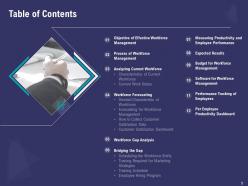
Slide 3: This slide displays Table of Contents.
Slide 4: This slide displays Table of Content with- Objective of Effective Workforce Management
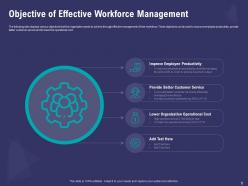
Slide 5: This slide displays various objectives that the organization wants to achieve through effective management of their workforce. These objectives can be used to improve employee productivity, provide better customer service and to lower the operational cost.
Slide 6: This slide displays Table of Content
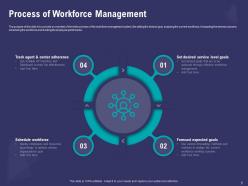
Slide 7: This slide shows Process of Workforce Management
Slide 8: This slide displays Table of Content.
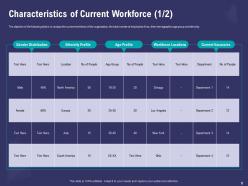
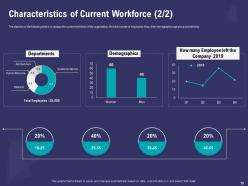
Slide 9: The objective of this slide is to analyze the current workforce of the organization, the total number of employees it has, their demographics age group and ethnicity.
Slide 10: The objective of the following slide is to analyze the current workforce of the organization, the total number of employees it has, their demographics age group and ethnicity.
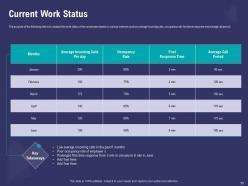
Slide 11: The purpose of This slide is to analyze the work status of the employees based on various metrices such as average incoming calls, occupancy rate, first time response and average call period.
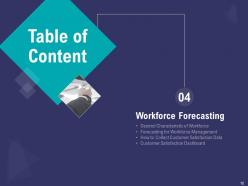
Slide 12: This slide displays Table of Content with- Workforce Forecasting, Desired Characteristic of Workforce, Forecasting for Workforce Management, How to Collect Customer Satisfaction Data, Customer Satisfaction Dashboard.
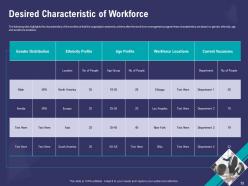
Slide 13: This slide highlights the characteristics of the workforce that the organization desired to achieve after the work force management program these characteristics are based on gender, ethnicity, age and workforce locations.
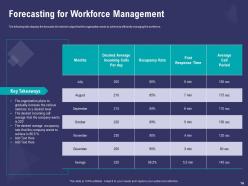
Slide 14: The following slide displays the forecasts the desired output that the organization wants to achieve by efficiently managing the workforce.
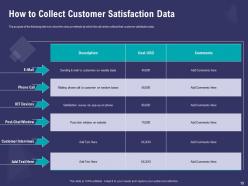
Slide 15: The purpose of this slide is to show the various methods by which the call center collects their customer satisfaction data.
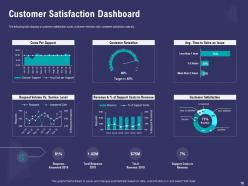
Slide 16: This template slide displays a customer satisfaction score, customer retention rate, customer satisfaction rate etc.
Slide 17: This slide displays Table of Content containing- Workforce Gap Analysis.
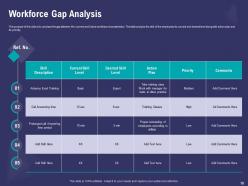
Slide 18: The purpose of this slide is to amylase the gap between the current and future workforce characteristics. The table analysis the skill of the employees its current and desired level along with action plan and its priority.
Slide 19: This slide displays Table of Content.
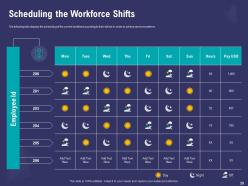
Slide 20: This slide displays the scheduling of the current workforce according to their skill set in order to achieve service excellence.
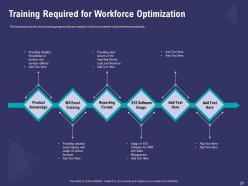
Slide 21: This slide shows the various training programs that are required in order to increase the overall workforce productivity.
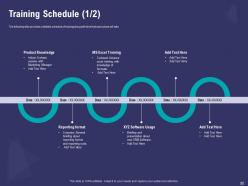
Slide 22: This slide provides a detailed schedule of training along with time that each phase will take.
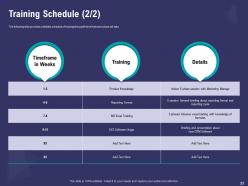
Slide 23: This slide provides a detailed schedule of training along with time that each phase will take.
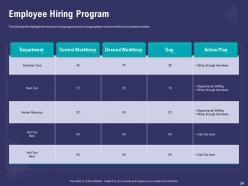
Slide 24: This slide highlights the employee hiring program based on the gap between current workforce and desired workforce.
Slide 25: This slide displays Table of Content contaning- Measuring Productivity and Employee Performance
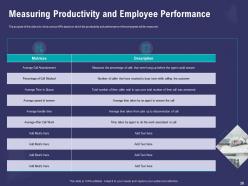
Slide 26: The purpose of this slide is to show various KPIs based on which the productivity and performance of the employees will be measured.
Slide 27: This slide displays Table of Content with- Expected Results
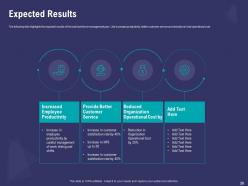
Slide 28: The following slide highlights the expected results of the total workforce management plan. Like increased productivity, better customer service and reduction in total operational cost.
Slide 29: This slide shows Table of Content with- Budget for Workforce Management
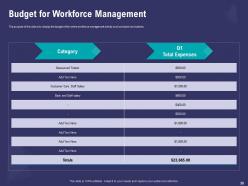
Slide 30: The purpose of this slide is to display the budget of the entire workforce management activity such as trainer and salaries.
Slide 31: This slide displays Table of Content with- Software for Workforce Management
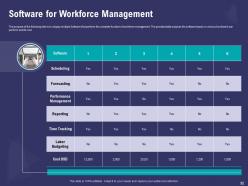
Slide 32: The purpose of the following slide is to display multiple Software that perform the complete function of workforce management. The provided table analyses the software based on various functions it can perform and its cost.
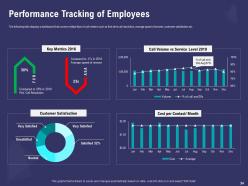
Slide 33: This slide depicts Table of Content containing- Performance Tracking of Employees
Slide 34: This slide displays a dashboard that covers multiple Kpis of call centers such as first-time call resolution, average speed of answer, customer satisfaction etc.
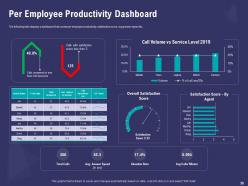
Slide 35: This slide displays Table of Content containing- Per Employee Productivity Dashboard
Slide 36: The following slide displays a dashboard that covers per employee productivity, satisfaction score, avg answer speed etc.
Slide 37: This is WFM Icons Slide.
Slide 38: This is About Us slide to showcase Company specifications.
Slide 39: This is About us slide.
Slide 40: This is Our team slide with Names and designations.
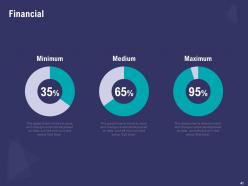
Slide 41: This slide shows Finance related stuff.
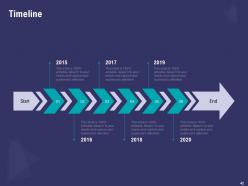
Slide 42: This slide shows Timeline process.
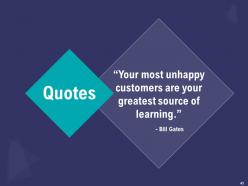
Slide 43: This is Quotes slide.
Slide 44: This is Puzzle slide.
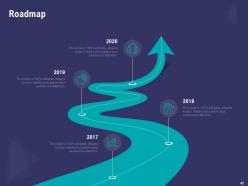
Slide 45: This slide shows Roadmap process.
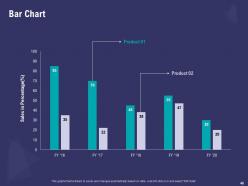
Slide 46: This slide depicts Bar Chart for Comparison of products.
Slide 47: This is Thank you slide with Contact details.
WFM Powerpoint Presentation Slides with all 47 slides:
Use our WFM Powerpoint Presentation Slides to effectively help you save your valuable time. They are readymade to fit into any presentation structure.




FAQs for WFM
So WFM software basically fixes all your scheduling headaches. You'll stop overstaffing shifts and actually stay compliant with labor laws. The forecasting part is honestly amazing - it uses your old data to predict exactly how many people you need, so no more panic hiring. Your team can swap shifts and request time off through the app, which saves you from constant texts asking about schedules (trust me on this one). Most companies see the ROI pretty fast just from cutting labor costs. I'd say figure out what's driving you crazy about scheduling right now, then demo a few different platforms. Some are way more user-friendly than others.
Honestly, WFM makes such a difference because people finally get some control over their schedules. Your team can actually see shifts ahead of time and request days off without jumping through hoops. Better forecasting means way less scrambling with last-minute changes - which everyone hates, obviously. It also spreads out the good shifts fairly and prevents people from getting totally burned out. The whole transparency thing makes employees feel human instead of just... I don't know, worker bees? Start by asking what scheduling stuff drives them crazy most.
Definitely focus on service level first - what percentage of calls you're answering within your target time. Average handle time matters too, plus schedule adherence so people actually stick to their shifts. First call resolution is probably the biggest one though - customers hate calling back for the same damn problem. Track agent utilization but don't go crazy with occupancy rates or you'll burn people out. Customer satisfaction scores are obvious, but honestly employee engagement tells you just as much since miserable agents create miserable customers. Set baselines for everything, then review monthly to catch issues before they explode.
So predictive analytics is like having a crystal ball for your workforce data - you can actually see staffing shortages coming weeks ahead and spot which employees might quit before they do. The accuracy is wild once you feed it enough historical data. Instead of scrambling to cover shifts last minute, you're solving problems before they happen. Honestly, the ROI is pretty solid too since your labor costs drop and people are happier when schedules aren't chaos. I'd start small though - pick your biggest headache (probably scheduling or turnover) and test it there first.
Ugh, data migration is going to be your worst nightmare - seriously, all those weird scheduling exceptions from the past 5 years? Total mess to clean up. Your team will probably hate you at first because nobody wants to learn new workflows. Integration with payroll and HR systems always gets tricky too. Oh, and productivity will definitely tank for a few weeks while everyone figures things out. Whatever timeline the vendor gives you, just double it. Maybe throw some good training sessions at people so they don't revolt completely.
Most WFM software connects through APIs or ready-made connectors that sync all your employee data, schedules, and time tracking straight into HR and payroll systems. Works really well with the big players like Workday, ADP, BambooHR - honestly once you get it running, it's pretty smooth. Hours worked, overtime, PTO all gets pushed to payroll automatically. Employee info flows back from HR too. No more entering stuff twice, which is nice. One thing though - definitely check what integrations your vendor actually supports before you commit. And get your IT people involved early or you'll regret it later.
So AI basically turns WFM from just reacting to stuff into actually being smart about it. The forecasting gets way better - it looks at historical data, seasonal patterns, even outside factors to predict what you'll need staffing-wise. Machine learning keeps improving over time which is honestly pretty sweet. Real-time schedule optimization is huge too. It'll auto-adjust when people call out sick or you get slammed unexpectedly. Plus it can match your best agents to specific tasks based on their skills and past performance. I'd start by checking your current forecasting accuracy first - that's where you'll notice the biggest difference right away.
Build those compliance checks right into your WFM system instead of trying to track everything manually. Automated alerts are your friend - set them up for overtime limits, missed breaks, weird shift patterns. The system should handle meal periods and consecutive days automatically because honestly, who has time to babysit all that? I've watched companies get hit with violations they totally could've avoided. Real-time reports work way better than waiting until something's already messed up. Make sure your managers actually look at these reports weekly though - otherwise what's the point? Skip the spreadsheets. Your WFM tools can handle this stuff so much better than guessing.
Clean data is everything - seriously, bad data will screw you over every time. When you're building forecasts, don't forget about seasonality and holidays, plus any major business changes that happened. Always pad your schedules with buffer time because Murphy's law is real. Track your actual results against predictions constantly so you can catch trends early. Weekly forecast reviews are a must - I learned this the hard way. Don't just set your scheduling rules and walk away either. Keep tweaking based on what's actually going down on the floor. Flexibility beats perfection here.
So WFM lets you move fast when things get crazy in the market. Good forecasting models help you spot trends early - way better than scrambling later. You can shift people around, tweak schedules, scale teams up or down based on what's actually happening. Honestly, most companies are terrible at this part. But when you nail it, you're matching your workforce to real business needs instead of being stuck with some rigid plan from six months ago. Your whole organization gets more flexible. Start with getting your demand forecasting right first though.
Ugh, remote work basically breaks everything you know about workforce management. Your old scheduling tricks? Useless when people are scattered across time zones doing flexible hours. Demand forecasting gets weird too - I'm still figuring that part out honestly. You can't just watch people work anymore, so tracking productivity becomes this whole thing about measuring actual results instead of butt-in-seat time. The tools you're using now probably won't cut it either. Time to figure out what actually works when everyone's working from their kitchen table.
Honestly, WFM tools are pretty solid for handling different generational preferences at work. Set up automated workflows so older employees get the advance notice they want, while younger staff can swap shifts instantly through mobile apps. The analytics part is where it gets interesting - you'll actually see how different age groups react to incentives and scheduling styles. Survey your teams first about their communication preferences and flexibility needs. Then use those reporting features to figure out what motivates each group. I was surprised how much the data reveals about scheduling patterns. Tailor your approach based on what you find - it's way more effective than guessing.
AI forecasting is where it's at - seriously cuts down on scheduling headaches. Mobile platforms are taking over because nobody wants to be stuck at a desk to check their schedule anymore. Your team can handle shift swaps and time-off requests themselves now, which honestly saves managers a ton of back-and-forth. Cloud systems beat those clunky old tools every time. Predictive scheduling keeps getting better at reading demand patterns too. Worth checking if your current setup is keeping up - some of this stuff can make a real difference in how smooth operations run.
Honestly, training your team on WFM tools is a total game-changer. People who actually know how to use the scheduling and forecasting features give you way better data. Without proper training? They'll either ignore the system completely or mess it up, which screws with your forecasts. Most folks catch on fast though - especially once they realize it actually makes their job easier (not harder like they probably think). Focus your training on the daily stuff they'll actually use. Don't overwhelm them with every random feature right away.
Honestly, WFM analytics is a game changer for planning ahead. Pull your last 12 months of data first - that's where the gold is. You'll spot patterns in when you're totally swamped vs. dead quiet, plus it shows exactly where your skill gaps are before they bite you. The seasonal stuff becomes super obvious too. I love how you can predict headcount needs and figure out which roles actually move the needle. Oh, and tracking performance metrics helps with who to promote or train next. Might sound boring but it beats guessing every quarter.
-
Thanks for all your great templates they have saved me lots of time and accelerate my presentations. Great product, keep them up!
-
Attractive design and informative presentation.