Workstream Updates Project Status Report

Rating:
100%
Workstream Updates Project Status Report
Slide 1 of 6
Favourites Favourites

Try Before you Buy Download Free Sample Product

Audience Impress Your
Audience
Editable 100%
Editable
Time Save Hours
of Time
The Biggest Sale is ending soon in
0
0
:
0
0
:
0
0
Rating:
100%
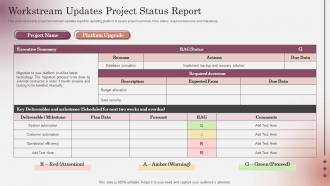
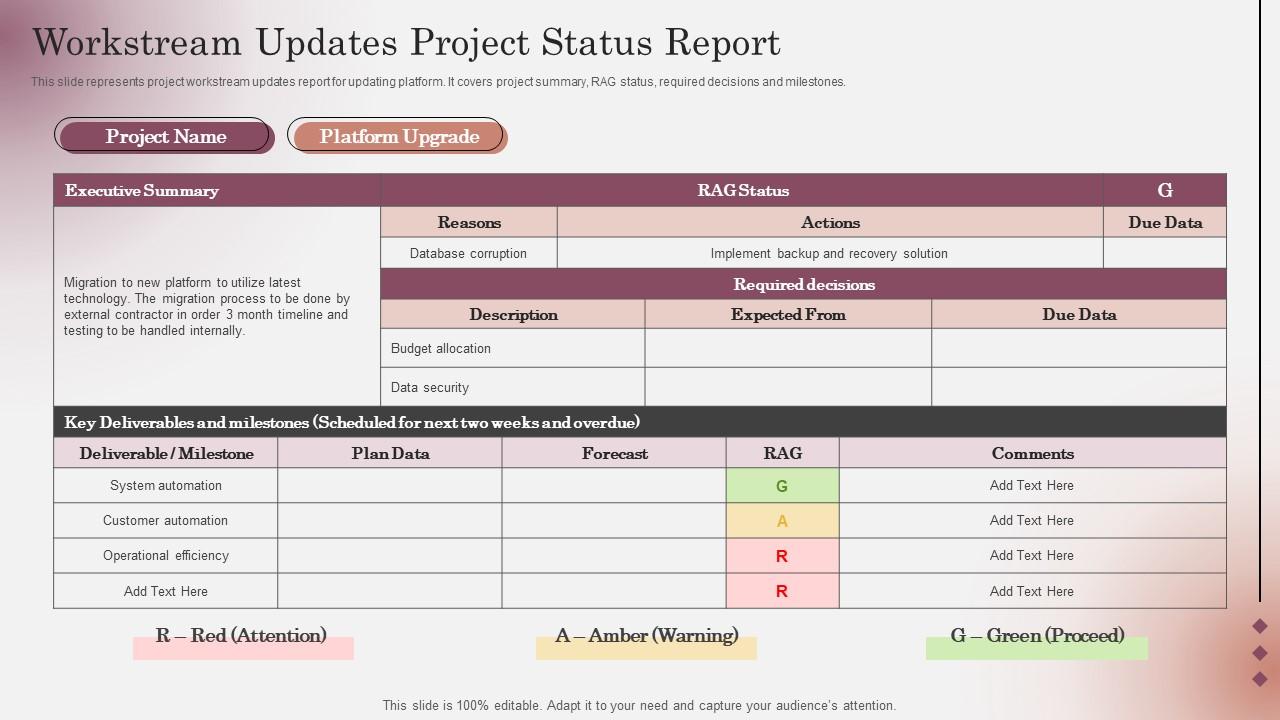
This slide represents project workstream updates report for updating platform. It covers project summary, RAG status, required decisions and milestones. Presenting our well-structured Workstream Updates Project Status Report. The topics discussed in this slide are Workstream Updates, Project Status Report. This is an instantly available PowerPoint presentation that can be edited conveniently. Download it right away and captivate your audience.
FAQs for Workstream Updates

Okay so for workstream updates, hit these four things: where you actually are vs where you planned to be (with real numbers), any blockers screwing you over, what's next with actual dates, and what decisions you need from people. I used to ramble through these forever but honestly? Just cut the BS and focus on what your stakeholders actually care about. Concrete progress beats vague updates every time. Oh and always - ALWAYS - end with who's doing what next. Otherwise people just sit there like "cool story bro, now what?" You want them walking out knowing their homework.

Honestly, visuals are a game-changer for workstream updates. Dense info becomes so much easier to digest when you throw in some timelines for project phases and progress bars for completion status. Color-coding is clutch too – green/yellow/red system works every time. Charts show your metrics and trends way better than paragraphs ever could. Simple icons are underrated for breaking up those awful text walls, makes everything scannable. Oh, and consistency is key across all your updates or it'll look messy. I'd start small though – maybe one or two visual elements per slide first, then add more once you get the hang of it.

Track progress stuff first - milestone completion, budget vs actual spend, timeline adherence. Then add health metrics like team velocity, blockers, and stakeholder satisfaction. Honestly, I've watched teams completely lose their minds with too many dashboards. Pick maybe 4-6 that actually matter for decisions. Numbers are great but throw in some qualitative updates too since context is everything. Start simple with these basics, then get fancy later once you've got the rhythm down. Way easier than trying to boil the ocean from day one.

Dude, you gotta match your updates to who's reading them. Execs want the big picture - budget stuff, timeline issues, major roadblocks. That's it. Don't bog them down with details. Your team though? They need all the nitty-gritty - what's due when, who's waiting on what, next steps. Other departments are tricky - give them enough so they know how it hits their world but don't go overboard. I once sent my CEO a ridiculously detailed report and... yeah, learned that lesson fast. Honestly, just think about what each person actually needs to do their job, then write for that. Works every time.

Ugh, the two biggest mistakes I see? People either write these super vague updates that tell you nothing, or they dump way too much info and you're like "get to the point already." Don't save bad news for your weekly meeting either - seriously, flag problems when they happen. Nobody wants those surprise bombshells. Oh, and include what happens next! I can't tell you how many updates I've read where I'm sitting there like "cool story, but what now?" Focus on what actually changed, what might go sideways, and what you need from people. End with clear next steps so folks know how to help.

Honestly, just treat your updates like you're telling a story. People's brains are wired for narratives - way more than boring bullet points anyway. So instead of just listing stuff, walk them through the journey. "Here's where we started, then we hit this annoying roadblock, figured out this solution, and boom - here's what happened." Include real examples and outcomes that actually matter to whoever's listening. The key is having clear characters (your team), challenges you faced, and wins you scored. Oh and definitely lead with the story first before you dump a bunch of numbers on them. Makes everything stick better.

Getting feedback is a total game-changer for your workstream updates. Ask specific stuff like "Was the timeline clear?" instead of just "thoughts?" - you'll actually get useful answers. I've sat through way too many boring updates where nobody ever bothered asking what people needed! When your audience tells you about pacing issues or requests different data, you can fix it for next time. Way better than just going through the motions. The whole point is serving what they actually want to know, not just presenting whatever you feel like sharing.

Weekly updates usually work best for most projects, but honestly it depends on how crazy things are. Fast-moving stuff might need bi-weekly check-ins. Monthly works if it's one of those long-term projects that barely moves. I've totally seen teams get trapped doing nothing but status reports – such a waste of time! Pick whatever schedule makes sense and stick with it. Your stakeholders will actually appreciate knowing when to expect updates rather than random emails hitting their inbox. Oh, and start weekly then adjust if people complain it's too much.

So I always start with PowerPoint or Google Slides, but honestly? Canva has way better templates that don't scream "generic corporate presentation." Before jumping into slides though, I'll map out timelines in Miro first - makes everything clearer. If you're using Asana or Monday, just pull your data straight from there so it stays current. The real game-changer is building one solid master template with sections for status, risks, and next steps. Sounds boring but trust me, it'll save you tons of time later. Oh, and short sentences mixed with longer explanations keep people awake during those Monday morning updates.

Keep it stupid simple - lead with your main win or whatever's blocking you, then maybe add one or two details that actually matter. I used to drone on about every little thing (seriously, no one cares that you organized your inbox), but now I just hit what affects the team or deadlines. Bullet points work great when you've got multiple things - forces you to cut the fluff. Try setting yourself like a 50-75 word limit. If you can't get your point across in that space, you're probably over-explaining stuff everyone already knows anyway.

Honestly, you gotta get out in front of their worries before they blow up. Just acknowledge what they're thinking and throw some actual data or timelines at them - people mostly want to feel heard and see there's a real plan. Don't just tackle their surface complaints though. Dig deeper into what's actually bugging them. Oh, and leave room for questions during your presentation instead of racing through everything. Follow up one-on-one with anyone who looked sketchy about it. Here's the thing that took me forever to learn: when someone pushes back, don't get all defensive. Use their feedback to make your next update way stronger.

Oh man, this is so true! Your German teammates probably want bullet points and deadlines - no fluff. Meanwhile, your Japanese colleagues might think that's super rude and want more context first. I've definitely messed this up before lol. New Yorkers think everything's urgent, but that can come across as pushy elsewhere. Honestly, different cultures just have totally different expectations for work updates. Ask your team leads what format they actually prefer - saves you from looking like a jerk. Sometimes the "efficient" approach backfires completely depending on who you're talking to.

Honestly, templates are a game-changer - get everyone using the same format and you'll stop wasting time trying to figure out what people actually mean. Do quick stand-ups covering what's done, what's next, and any blockers. Keep it tight though, like 2-3 minutes max per person or it drags forever. I'd skip the meetings entirely if you can and just use shared docs or dashboards instead. Way more efficient. Oh, and those red/green status indicators are clutch for seeing problems at a glance. Start with templates first - seriously, it'll cut your prep time in half right away.

So I'd hook up automated dashboards that pull straight from whatever project tools you're using - Power BI works, but honestly even Google Sheets with API connections does the trick. Pick 3-4 metrics that actually matter to whoever you're presenting to. Completion percentages, blockers, budget stuff. Nobody wants to stare at a spreadsheet full of random numbers, trust me. Build those key things into a template you can just fill out quickly before meetings. Saves you from spending forever hunting down data manually every single time.

Definitely shoot them a recap email within 24 hours - list out the key decisions, who's doing what, and any questions you couldn't answer during the presentation. Always attach the slide deck too because people will 100% forget half of what you said and need to reference it later. Oh, and definitely follow up one-on-one with anyone who seemed skeptical or asked tough questions. Strike while the iron's hot and schedule any follow-up meetings now while everyone's still engaged. Don't let those action items just sit there though - circle back in a week or two to make sure stuff's actually getting done.

Ratings and Reviews

100% of 100
Review Form
Write a review
Most Relevant Reviews
  1. 100%

    by Michael Clark

    This visual representation is stunning and easy to understand. I like how organized it is and informative it is. 
  2. 100%

    by Rodriguez Morgan

    Thank you SlideTeam for such an excellent service.

2 Item(s)

per page: