

Accounting worksheet powerpoint presentation




Try Before you Buy Download Free Sample Product
 Impress Your
 Audience
 100%
100% Editable
 Save Hours
 of Time


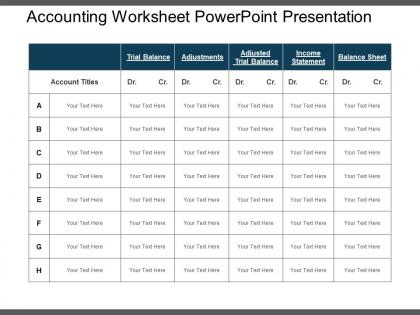
Put on your ideas on accounting and finance basics using our one of the most creative accounting worksheet PowerPoint presentations and amaze your audience. This is the best financial presentation PPT among a wide range of templates available as the graphics used in PPT template are of high quality and can be used for multiple purposes. Basic accounting worksheet details e.g. trial balance, adjustments, adjusted trial balance, income statement, balance sheet along with their debit and credit statement can easily be demonstrated with this financial report PowerPoint presentation. PPT is useful for finance and accounting related presentations. You can use this design to calculate the profitability of a business firm or to determine profit-loss statements. Overall expenditure, cash inflows and outflows can be determined with this accounting department presentation PPT template. The design has been created by our professional experts keeping all the subject matter in mind. So, download this brilliantly designed PPT diagram and use it in your next presentation. Our Accounting Worksheet Powerpoint Presentation encourage great effort. Get your team going hard at it.
People who downloaded this PowerPoint presentation also viewed the following :
Accounting worksheet powerpoint presentation with all 5 slides:
Focus on delivering the goods again with our Accounting Worksheet Powerpoint Presentation. Handle deterioration in any area.


FAQs for Accounting
So there are five columns on an accounting worksheet - trial balance, adjustments, adjusted trial balance, income statement, and balance sheet. Start with your trial balance showing initial account balances. Then you'll add adjusting entries (this is where I always mess up my debits and credits tbh). The adjusted trial balance combines both. After that, sort everything into income statement or balance sheet columns depending on account type. It's basically your safety net for month-end closing - catches mistakes before they make it to final statements. Way better than fixing errors later!
So basically, an accounting worksheet is like your one-stop shop for getting your financials together. You throw all your trial balance stuff, adjustments, and calculations in there instead of bouncing between a million different spreadsheets. Honestly, it's a game changer because you can spot mistakes way earlier in the process. Plus you can actually see how your adjustments affect both the income statement and balance sheet - makes everything way clearer. I swear, once you start using one for month-end, you'll wonder why you didn't do it sooner. Cuts prep time like crazy.
Dude, worksheets are a lifesaver for catching dumb mistakes before they mess up your actual financial statements. You get everything from your trial balance laid out in columns, so it's way easier to spot when debits and credits don't match up. I always find random calculation errors I would've totally missed otherwise - like last week I caught a transposition that would've thrown everything off. The format makes it simple to trace where numbers go from trial balance to your final statements. Maybe takes an extra hour each month, but beats scrambling to fix errors later when your boss is breathing down your neck.
Most people use either 10-column worksheets (trial balance, adjustments, adjusted trial balance, income statement, balance sheet) or the 6-column version that cuts out the adjusted trial balance part. Manufacturing companies get stuck with way more complex versions because of all that inventory stuff - honestly such a pain. Service businesses usually go simple since they don't have inventory headaches. Retail might throw in extra columns for merchandise adjustments. I'd just start with whatever your accounting software spits out automatically, then tweak it if you need something specific.
Dude, yes - software tools are a game changer for worksheets. They'll automatically pull from your general ledger and handle all those annoying calculations. No more hunting down random cells that mess up your totals (ugh, the worst). The time you save on data entry alone is worth it. Error checking catches stuff before it becomes a headache too. Honestly, I'd just go with whatever plays nice with your current setup. Maybe test it on a smaller period first? My old boss swore by this approach and it actually worked out pretty well for our team.
Honestly, it's all about speed and not screwing up the math. With manual worksheets you're doing everything by hand - all those calculations and transferring numbers between columns. Takes forever and you're bound to mess something up eventually. Excel or accounting software does the calculations for you and catches weird inconsistencies. You still input the adjusting entries yourself, but everything updates right away. The best part? You can make changes without having to erase and redo everything. Month-end is stressful enough without that headache. If you're dealing with more than just a couple entries each month, go automated for sure.
Think of worksheets as your rough draft space - you can test out all your adjusting entries without screwing up the real ledger. Accruals, depreciation, deferrals, all that fun stuff goes here first. What I love about them is how they lay everything out side by side: your trial balance, adjustments, then the adjusted trial balance. Makes spotting mistakes way easier when it's all visual like that. My professor always said they're optional but honestly? They've saved me from so many headaches. Once you're happy with how everything looks, then you post the adjustments for real.
So accounting worksheets are basically where you test out budget ideas without screwing up your real numbers. I always start with last year's actual data as my foundation. Then you can mess around with different revenue scenarios and see what happens if you shift expenses around. Honestly, the best part is creating separate tabs - like one for conservative projections and another for if everything goes perfectly. Throughout the year you can track how your budget's holding up against reality. Trust me, future you will be so grateful when budget season rolls around and you're not starting from scratch.
Honestly, worksheets are a lifesaver for audit prep. They organize your trial balance and adjustments in one spot, so you can catch errors before auditors show up. Way less stressful that way. When they ask about specific entries, you'll have clear documentation of your adjusting entries and reasoning. Auditors actually appreciate seeing your work process laid out - makes their job easier too. My advice? Keep them detailed throughout the year instead of throwing them together last minute. I learned that the hard way my first audit season.
Oh man, I feel you on this one! Start with clear column headers and stick to the same account names everywhere - trust me on this. Your formulas should be super simple because deciphering complicated ones later is actual torture. I spent like an hour last month trying to figure out what past-me was thinking with some random nested formula. Always throw in a reconciliation section and some basic error checks. Keep it clean but don't go crazy with formatting. Comments are your friend for weird entries. Test it with fake data first!
Honestly, worksheets are like your backup plan for compliance stuff. They show auditors exactly how you got to your final numbers - every adjustment and fix is right there with documentation. Super helpful for catching mistakes before they end up on official statements (trust me, explaining those to regulators later is not fun). The organized format proves you're following proper accounting rules. Auditors usually ask for these first thing, so keep them detailed. It's way easier to demonstrate compliance when everything's laid out clearly. Makes the whole review process less stressful.
Look, Excel's biggest win is that it's cheap (you've got it already) and totally flexible. No weird templates forcing you into boxes. Most accountants already live in Excel anyway, so zero learning curve there. Downside? You miss out on the fancy automated stuff - tax calculations, audit trails, all that jazz. But honestly, for basic worksheets and trial balances, having complete control over your formulas is pretty sweet. I'd say start simple and add complexity when you actually need it. Sometimes the basic tools work best anyway.
Honestly, start with Google Sheets or Excel Online - way better than emailing files back and forth like it's 2005. Pick someone to own each section so you're not stepping on each other's toes. I'd add a change log tab where people can jot down what they tweaked. Color coding helps too, or just use comments when you have questions instead of randomly changing numbers. Set up some kind of naming system for versions. The biggest thing though? Actually talk to each other regularly. Catch problems early before they snowball into disasters.
Worksheets are seriously underrated for making financial decisions. They help you spot trends and catch mistakes before they mess up your official statements. Everything's organized in one place - all your trial balance adjustments right there where you can actually see what's happening. Makes budgeting and cash flow decisions way easier when you know your data's solid. You can test different scenarios too, which is clutch. Honestly, most people skip this step but they shouldn't. Use them during closing and you'll feel way more confident about your numbers. Trust me on this one.
Honestly, good worksheet layout is a game changer for catching errors. Group your columns logically - like putting all assets together, liabilities together - and you'll spot discrepancies way faster. I used to hate reviewing messy spreadsheets until I started using clear headers and some basic color coding. Makes your brain work less hard, you know? When accounts are organized well, checking that debits equal credits becomes almost automatic. Also random tip - proper alignment matters more than you'd think. Spend a few minutes setting it up right at the start and you won't be squinting at chaos later trying to find where things went wrong.
-
Easily Understandable slides.
-
Easy to edit slides with easy to understand instructions.