


Slides de exemplos de Ppt de modelo de fluxo de negócios






Try Before you Buy Download Free Sample Product
 Impress Your
 Audience
 100%
100% Editable
 Save Hours
 of Time


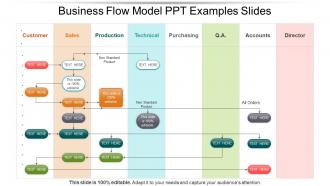
Apresente uma apresentação dinâmica de fluxo de trabalho usando o modelo de modelo de fluxo de negócios para PowerPoint. Modelos de fluxo de processo são uma importante ferramenta de negócios para gerenciar procedimentos complicados. Na maioria das vezes, existem várias configurações e opções nas operações da força de trabalho que podem se tornar um motivo para resultados conflitantes. Os procedimentos operacionais padrão precisam ser seguidos por muitas pessoas em uma organização e você pode ilustrar o mesmo usando o slide de apresentação do modelo de fluxo da organização. O slide PPT do diagrama de modelo de fluxo de processo auxilia no ensino de instruções específicas para determinados processos ou procedimentos a um indivíduo ou grupo de indivíduos. O modelo de apresentação do fluxograma de negócios atua como um modelo de diagrama instrucional eficiente que é repetidamente útil para muitas pessoas em uma organização. Quando um funcionário enfrenta uma situação de processo que possui um diagrama de modelo de fluxo, esse funcionário pode consultar o fluxograma para descobrir a solução em vez de buscar a ajuda de outras pessoas. Para criar um diagrama de modelo de fluxo de processo incrível, é realmente importante conduzir pesquisas relevantes sobre o processo, bem como considerar todos os cenários possíveis que envolvem o processo. Nossos slides de exemplos de exemplos de modelo de fluxo de negócios podem ser improvisados. Sinta-se à vontade para personalizar como desejar.
People who downloaded this PowerPoint presentation also viewed the following :
Modelo de fluxo de negócios Exemplos de slides de slides com todos os 5 slides:
Percorra o feixe com nossos slides de exemplos de modelo de fluxo de negócios. Seus pensamentos voarão com precisão para o alvo.

FAQs for Business flow model
You'll want clear steps, defined roles, decision points, and ways to measure success. Map out who does what and when - basically like a roadmap showing different scenarios. But here's the thing: keep it simple or people won't actually use it. I've seen so many overcomplicated flowcharts that just collect dust. Start by documenting how things work now, then spot your bottlenecks. Don't forget feedback loops and what happens when things go wrong (they always do). Once you've got that down, you can design your ideal process.
So basically, mapping out your business flow shows you exactly where work gets stuck or duplicated. I'd pick one main process and trace it from start to finish - you'll probably find some ridiculous steps that nobody questions. Like, why does this form go to three different people? Bottlenecks become super obvious once you see everything laid out. Plus your team finally understands how their piece fits into the whole thing. Honestly, half the stuff we do is just habit at this point. But once you clean it up, everything runs way smoother.
You definitely need input from different people across the company - can't map out business processes accurately without it. Operations folks see the fulfillment headaches, sales understands where customers get stuck, finance knows all the approval drama. Each group has pieces of the puzzle you'd miss otherwise. I learned this the hard way trying to document workflows solo once... total disaster. Short interviews with everyone who touches the process (even the peripheral teams) will reveal bottlenecks and dependencies that aren't obvious from the outside. It's honestly one of those things where more voices = way better results.
Honestly, it depends so much on what industry you're in. Manufacturing is pretty straightforward - linear production chains mostly. But service stuff like consulting? Way more flexible and relationship-heavy. Healthcare has insanely rigid compliance checkpoints (which makes sense obviously). Tech companies do the opposite - agile, iterative cycles everywhere. Retail's weird because you're juggling inventory with seasonal demand spikes. Financial services throw in tons of risk assessment stages. First thing I'd do is map out what you're currently doing. Then check how your competitors handle their flows - see what actually works instead of what sounds good on paper.
Honestly, I'd just start with draw.io (they renamed it to diagrams.net but whatever). It's completely free and works great with Google Drive. Super easy for basic flowcharts and process stuff. If you end up needing fancier collaboration features later, then maybe look at Lucidchart - it's got better templates and team sharing options. Visio's still around if your company's already paying for Microsoft everything, but it feels pretty dated at this point. Both draw.io and Lucidchart handle swimlane diagrams and all that standard business process mapping without any problems. Start free, upgrade if you need to.
Dude, visual elements are a game changer for business flow models. Colors help - like blue for sales, green for finance, whatever works. Use different shapes too: rectangles for actions, diamonds for decisions. Arrows should actually guide people through the steps (sounds obvious but you'd be surprised). Bold text for main processes, smaller font for details. Icons are clutch because nobody wants to read a wall of text. I swear, half the flow charts I see look like someone threw spaghetti at a wall. Keep it clean and your team won't hate you.
Honestly, map out what's actually happening first before you dream up the perfect scenario. You'll find weird gaps you never noticed. Get your stakeholders looped in early - they spot stuff you totally miss. Keep the notation dead simple so everyone can follow along without squinting at confusing symbols. Focus on the main happy path initially rather than getting lost in every random edge case (there's always that one weird scenario, right?). Test your map with real users and actual data before you start building. You'd be surprised how wrong your assumptions can be.
So basically, you map out your whole process step by step - visually. Makes it way easier to spot where things get jammed up. Look for places where work just sits there waiting, or one step takes forever compared to others. Honestly, sometimes it's super obvious once you actually draw it out (wish I'd learned this sooner). Track how long each step takes and how much stuff flows through. The bottlenecks will jump out at you - like that narrow part of a funnel backing everything up. Start with your current process from beginning to end, then add the timing data.
Track cycle times, throughput rates, and error percentages - those tell you if stuff's actually flowing smoothly. Customer satisfaction matters most though, because who cares about internal metrics if people hate using your service? Cost per transaction is pretty useful too. Don't go crazy measuring everything - pick maybe 3-4 things that actually matter to your goals. Oh, and definitely get baseline numbers before changing anything, otherwise you can't prove it worked. Employee productivity and wait times between steps will show you where things get stuck.
Honestly? Every quarter at minimum, but it really depends on your industry. Fast-moving stuff like tech? Maybe monthly. I've watched teams use models that were like 2 years outdated - such a mess. New processes are your biggest trigger for updates. Also system changes, people switching roles, or when you're looking at the model thinking "wait, we don't actually do it this way anymore." Just throw a recurring reminder on your calendar and treat it seriously. Better to catch problems early than realize your whole flow chart is basically fiction.
Honestly, the worst thing you can do is get way too granular right off the bat. You'll spend forever mapping every tiny detail and burn out before anything's useful. Start broad first. And don't just copy your current messy process - map out how things *should* work instead. Talk to the people actually doing the job every day too. They'll tell you where stuff really breaks down, not what some outdated manual claims. Oh, and resist the urge to make it all polished and pretty before you've even tested whether it makes sense. I see that mistake constantly. Keep it simple, test with real people, then clean it up.
So basically, flow models stop your team from talking past each other all the time. Everyone can actually *see* how work moves instead of just guessing. You'll spot those annoying handoff points where stuff always breaks down, and no more "wait who's doing what?" confusion. Honestly, it's kind of like finally having GPS when you've been driving around lost. Pick one messy process that's bugging everyone and map it out together - I bet your meetings get way more focused after that. The visual thing really works.
Honestly, business flow models are game-changers for strategic planning. They show you exactly where your processes are bleeding money or creating value. Bottlenecks become super obvious, plus you'll catch redundant steps that just eat up time and resources. The automation opportunities basically jump out at you too. What I really love though is you can play around with "what if" scenarios before committing to major changes - saves you from expensive mistakes. Start by mapping what you're doing now, then sketch your dream setup. The gap between those two? That's your roadmap right there.
So business flow models are basically the glue between all your different systems - CRM, ERP, project tools, whatever. They show how your processes actually move data around instead of staying stuck in silos. When teams use totally different frameworks (which happens way too often), these models help you see where everything connects. You'll spot the handoff points, bottlenecks, all that stuff. Honestly, just start simple - map out what you're doing now, then see how it lines up with your current systems. The gaps will jump out at you pretty quick.
Start building compliance right into your workflow from day one. GDPR, industry regs, audit trails - all that fun stuff needs to be baked in, not slapped on later. Map out where your sensitive data goes and who can touch it. Document every required approval and sign-off point. Those mandatory review periods? Yeah, those too. Honestly, the biggest mistake is trying to add compliance after you've already built everything - total pain. Get legal to look at your flows early on. They'll catch things you missed and save you from rebuilding half your system later. Trust me on this one.
-
Innovative and Colorful designs.
-
Unique and attractive product design.