


Capacity Planning Powerpoint Presentation Slides




Try Before you Buy Download Free Sample Product
 Impress Your
 Audience
 100%
100% Editable
 Save Hours
 of Time


Our Capacity Planning Powerpoint Presentation Slides are topically designed to provide an attractive backdrop to any subject. Use them to look like a presentation pro.
People who downloaded this PowerPoint presentation also viewed the following :
Content of this Powerpoint Presentation
Slide 1: This slide introduces CAPACITY Planning. State Your Company Name and begin.
Slide 2: This is Our Main Agenda slide. State your agendas here.
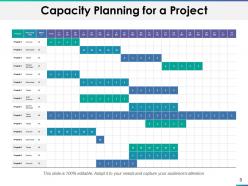
Slide 3: This slide shows a table for Capacity Planning for a Project. Put relevant data accordingly.
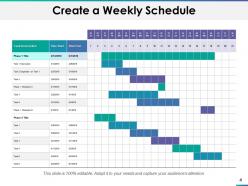
Slide 4: This slide displays Create a Weekly Schedule showing task description, plan start and plan end dates. You may change the data as per requirement.
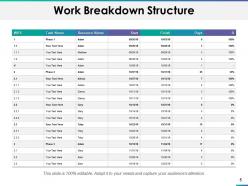
Slide 5: This slide presents Work Breakdown Structure describing tasks, resources, start and finish date, no. of days and data in percentage.
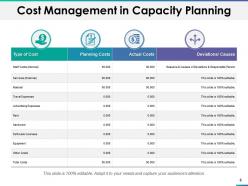
Slide 6: This slide showcases Cost Management in Capacity Planning describing- Type of cost, Planning costs, Actual costs and Deviation/causes.
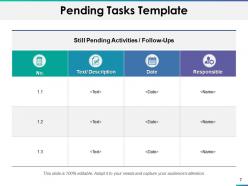
Slide 7: This slide represents Pending Tasks Template describing- No. of tasks, Task Description, Task Date and person responsible for the task.
Slide 8: This slide shows Capacity Planning Icons.
Slide 9: This slide is titled Additional slides for moving forward. You may change the content as per need.
Slide 10: This is an About our company slide to state company specifications etc.
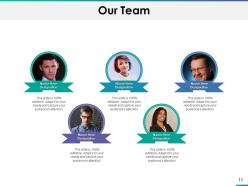
Slide 11: This is Our team slide with names and designation.
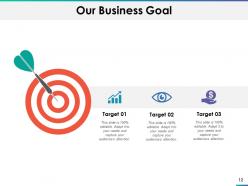
Slide 12: This slide shows Our business Goal. State your important goals here.
Slide 13: This is Our mission slide with imagery and text boxes to go with.
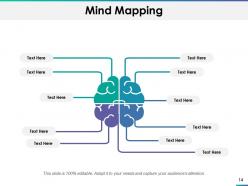
Slide 14: This slide shows Mind mapping for representing entities.
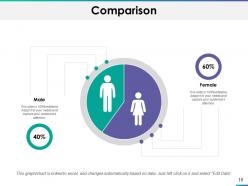
Slide 15: This is a Comparison slide to state comparison between commodities, entities etc.
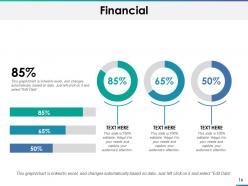
Slide 16: This is a Financial slide. Show your finance related stuff here.
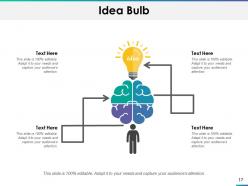
Slide 17: This is Idea bulb slide to state a new idea or highlight specifications, information etc.
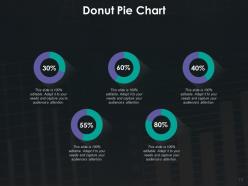
Slide 18: This slide shows Donut Pie chart with text boxes to show information.
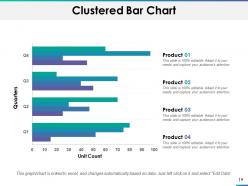
Slide 19: This slide shows Clustered Bar chart with Four products comparison.
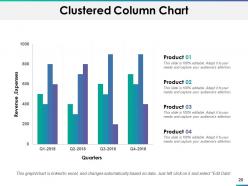
Slide 20: This slide presents Clustered Column Chart with four product comparison.
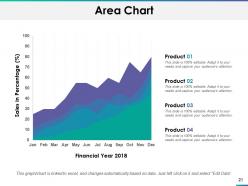
Slide 21: This slide shows Area Chart with four products comparison.
Slide 22: This is a Thank You slide with Address# street number, city, state, Contact Number, Email Address.
Capacity Planning Powerpoint Presentation Slides with all 22 slides:
Use our Capacity Planning Powerpoint Presentation Slides to effectively help you save your valuable time. They are readymade to fit into any presentation structure.



FAQs for Capacity Planning
Look at your historical data first - figure out demand forecasting and what growth actually looks like (not the fantasy version). Most people totally blow this part by being way too optimistic. Then do a gap analysis - what you have now vs what you'll actually need. Run some "what if" scenarios for different growth rates. Oh and don't forget lead times when you're scaling up - that's bit me before. Honestly? Always build in buffer capacity because something will definitely go sideways with your perfect plan.
So demand forecasting is basically figuring out what you'll need before you actually need it. Look at your past sales data, check market trends, see what's coming up business-wise. From there, you can plan if you need more people, equipment, whatever. The hard part? Not going overboard or falling short. Nobody wants to scramble for staff during busy season, but you also don't want to blow money on stuff that sits unused. I'd say check how accurate your forecasts actually were every few months and tweak your planning accordingly.
Dude, there's actually a bunch of decent options now. Datadog and New Relic are pretty solid for monitoring what you're using right now. If you're already on AWS or Azure, their built-in tools (CloudWatch, Azure Monitor) work fine too. Grafana's another good one - lots of people love it. For the planning side, PlanForCloud is decent, though honestly? I've seen teams do surprisingly well with just spreadsheets if you're not running anything massive. Prometheus is worth checking out if you don't mind getting your hands dirty with open-source stuff. My advice would be start with whatever monitoring you've got and just add to it gradually.
Hit around 80-85% utilization - that's your goldilocks zone. Not too tight, not too loose. I learned this the hard way during a crazy December rush a few years back. Watch your demand patterns like a hawk and adjust for seasons. Forecasting tools help but don't get cocky and cut too much capacity. You'll regret it. The real trick? Having resources you can quickly scale up or down. Start by looking at what you're using now. Where are you constantly over or under? Those spots will tell you everything you need to know.
So capacity planning is like trying to predict how much stuff you'll need before you actually need it - production space, storage, trucks, all that. Start with decent demand forecasting, then work backwards through each step of your supply chain. You don't want to be stuck scrambling when orders pour in, but you also don't want massive warehouses sitting empty (been there, it sucks). The trick is building in flexibility since demand forecasts are wrong like 90% of the time anyway. It's really about finding that sweet spot where you're not over or under capacity.
So here's what's worked for me - dig into your last 2-3 years of data to spot the seasonal patterns. Then build out three different scenarios: conservative, realistic, and optimistic growth. Honestly, the post-pandemic stuff makes predictions way trickier than they used to be. You'll want to start planning your seasonal moves 3-6 months early so you're not panicking when things get crazy. Think temp staff for busy periods, flexible vendor contracts, that kind of thing. The key is not getting caught off guard when demand suddenly spikes or drops.
Start with utilization rates - that's your foundation for seeing actual capacity usage. Throughput matters too (how much work gets done), plus queue times and resource idle time. Response times directly hit user experience, so definitely track those. Honestly, lead time is super underrated but it reveals so much about where bottlenecks are hiding. You also need to monitor your capacity buffer - basically how much room you have before everything goes sideways. Oh, and don't try to track everything at once. Begin with these basics, then layer on more metrics when you spot specific problems.
Honestly, global stuff like COVID just breaks all your normal planning rules. Historical data? Pretty much useless when everything goes sideways. I'd build in way more buffer capacity than you think you need - trust me on this one. Multiple scenarios help too, so you're not caught totally off guard. Ditch the annual planning thing and check in quarterly instead. Supply chain chaos, geopolitical drama, random demand spikes - they happen fast and you need to pivot faster. Have escalation plans ready because scrambling sucks. Better to be slightly over-prepared than completely screwed when the next weird thing hits.
Dude, when you mess up capacity planning, everything goes sideways fast. Either you're burning cash on stuff you don't actually need, or worse - demand hits and you're scrambling like crazy. Missed deadlines, paying triple for emergency hires, angry customers bailing for your competitors. I watched one team basically live at the office for weeks because they ignored the warning signs. Honestly, just spend like 30 minutes each month checking your capacity trends. Way better than dealing with that nightmare later when everything's on fire.
So you'll want monthly or quarterly reviews where you compare what actually went down versus your predictions. Track how accurate your forecasts were and figure out why they were off. Honestly, these meetings used to be torture for me but they're total game-changers. Your ops team sees bottlenecks way before you do, so loop them in for feedback. Don't just obsess over utilization numbers - watch lead times, quality problems, customer complaints too. Making tiny tweaks regularly beats waiting for everything to explode. Oh and document what you learn so you're not making the same dumb mistakes twice.
First thing - figure out who actually needs to be there. Skip the people who just like meetings and focus on whoever controls budgets or gets hit by capacity issues. Set up regular check-ins instead of random meetings because this stuff never stops being relevant. Be upfront about your constraints and what's coming, but ditch the tech jargon for business speak they'll get. Getting consistent attendance is honestly such a pain, but it's half the win. Ask what they think should be prioritized - don't just lecture them. Always wrap up with who's doing what next.
So manufacturing is all about physical stuff - machine hours, warehouse space, materials. Pretty straightforward math really. Services though? You're dealing with people and time, which gets messy fast. Like, a factory can ask "can we make 10,000 widgets?" but service businesses are more "do we have enough staff when clients actually need us?" Way harder to predict. Plus you can't stockpile services - nobody's storing up haircuts for later lol. That makes demand forecasting super critical. I'd start by figuring out if your main constraint is equipment or people, since that'll shape everything else you do.
Honestly, automation flips capacity planning on its head. Instead of worrying about hiring more people, you're suddenly thinking about servers, processing power, and whether your systems can actually talk to each other. The crazy part? Automated stuff scales way faster than humans ever could, but then you hit these weird new bottlenecks around data flow and integration headaches. You'll definitely need people who actually know how to manage all this tech though - that's become the real constraint. I'd start by picking a few processes to automate first, then figure out what kind of technical setup you need to make it work.
Just be straight up about what you can't handle - trust me, people would rather know upfront than get screwed over later. During busy times, shoot them regular updates about your bandwidth and give realistic timelines. Don't be that team that says yes to everything then panics when deadlines hit (we've all seen it). Skip the corporate jargon and talk like a normal person. Can't deliver? Offer alternatives. Maybe set up some kind of dashboard so they can check your capacity themselves - turns it into their planning tool instead of you constantly having to explain why you're swamped.
Honestly, don't run at 100% capacity all the time - that's just setting yourself up for disaster when things get crazy. I'd build in some buffer room, maybe aim for 80-85% max. Cross-training helps a ton too since people can cover different roles when someone's swamped or out sick. For the busy periods, contractors can be a lifesaver. Oh, and get some forecasting tools to spot problems before they blow up in your face. Set up alerts when you hit that 80-85% threshold so you're not scrambling last minute. Way better to catch this stuff early than deal with the mess later.
-
Content of slide is easy to understand and edit.