

Introdução ao gerenciamento de mudanças Slides de apresentação em PowerPoint





Try Before you Buy Download Free Sample Product
 Impress Your
 Audience
 100%
100% Editable
 Save Hours
 of Time


Gerencie as mudanças impostas ou não planejadas com a ajuda de slides de apresentação em PowerPoint prontos para uso profissionalmente projetados. Promova uma mudança efetiva dentro de uma organização usando slides PPT de gerenciamento de mudanças. Obtenha metodologias práticas de mudança organizacional, estruturas, etapas, processos e implemente uma mudança bem-sucedida. Adicione apresentação de slides do PowerPoint de gerenciamento de mudanças e conscientize as pessoas em sua organização sobre a mudança. Esta apresentação de slides completa do PowerPoint cobre tópicos como drivers de implementação de gerenciamento de mudanças, identificação da mudança, tipos de gerenciamento de mudanças, forças para mudança, análise de lacunas, lista de verificação de prontidão para mudanças na organização, etc. Esses layouts de slides PPT de introdução ao gerenciamento de mudanças são editáveis. Você pode utilizá-los de acordo com sua necessidade organizacional. Prepare seus funcionários para a mudança e faça uma transição bem-sucedida. Adicione modelos de PowerPoint de gerenciamento de mudança organizacional para controlar e melhorar os processos de melhoria de uma organização como um todo. Torna-se necessário no ciclo de negócios de uma organização a reengenharia de processos de negócios. Adote uma mudança e faça uma transição suave com a apresentação de slides PPT de introdução ao gerenciamento de mudanças. Divida tudo com nossos slides de apresentação em PowerPoint de introdução ao gerenciamento de mudanças. Permita que cada elemento surja com eficácia.
People who downloaded this PowerPoint presentation also viewed the following :
Conteúdo desta apresentação em PowerPoint
Slide 1 : Este slide apresenta a introdução ao gerenciamento de mudanças. Indique o nome da sua empresa e comece.
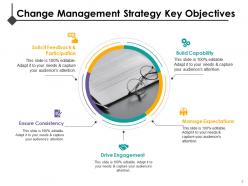
Slide 2 : Este slide mostra os principais objetivos da estratégia de gerenciamento de mudanças, como - Gerenciar as expectativas, impulsionar o envolvimento, garantir a consistência, desenvolver capacidade, solicitar feedback e participação.
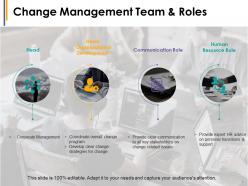
Slide 3 : Este slide mostra a Equipe de Gestão de Mudanças e funções mostrando - Chefe: Gestão Corporativa. Chefe: Coordenar o Programa de Mudança Geral de Desenvolvimento Organizacional, Desenvolver estratégias de mudança claras para a mudança. Função de comunicação: Fornecer comunicação clara a todas as principais partes interessadas sobre questões relacionadas à mudança. Função de recursos humanos: Fornecer aconselhamento especializado de RH sobre transições pessoais e suporte.
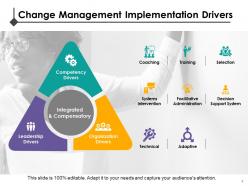
Slide 4 : Este slide mostra os Drivers de Implementação do Gerenciamento de Mudanças divididos em - Drivers de Competência: Coaching, Treinamento, Seleção. Drivers de Organização: Intervenção de Sistemas, Administração Facilitadora, Sistema de Apoio à Decisão. Motivadores da liderança: técnicos, adaptativos.
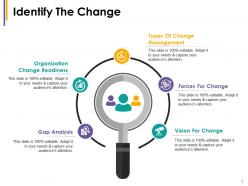
Slide 5 : Este slide mostra Identifique a Mudança com os seguintes subtítulos - Tipos de Gerenciamento de Mudanças, Forças para Mudar, Visão para Mudar, Análise de Lacunas, Preparação para Mudanças Organizacionais.
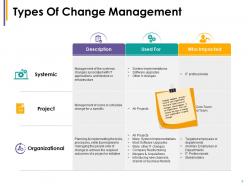
Slide 6 : Este slide apresenta Tipos de gerenciamento de mudanças - Descrição, Usado para, Quem é afetado. A mudança acontece em todos os níveis da sua organização. Listamos mudanças comuns que acontecem em uma organização. Você pode escolher o tipo de mudança pela qual sua organização está passando.
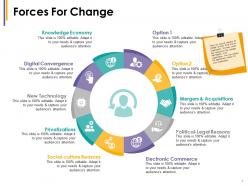
Slide 7 : Este slide mostra as Forças de Mudança, tais como - Fusões e Aquisições, Razões Político-Legais, Comércio Eletrônico, Economia do Conhecimento, Convergência Digital, Nova Tecnologia, Privatizações, Razões Sócio-culturais. Existem vários motivos para a mudança em todos os níveis da sua organização. Listamos alguns motivos para as mudanças que acontecem em uma organização. Você pode escolher o motivo apropriado para sua organização.
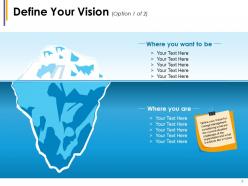
Slide 8 : Este slide mostra Defina sua visão com imagens criativas de iceberg. Defina sua visão para a gestão da mudança, considerando quais são a situação / desafios atuais da organização e como será no futuro
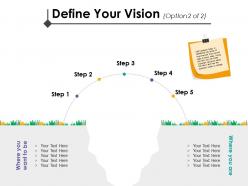
Slide 9 : Este slide mostra Defina sua visão com imagens criativas semicirculares. A análise de GAP ajuda a identificar as principais áreas de melhoria do estado atual para o estado futuro. Usando essa ferramenta, você pode tomar decisões importantes sobre o futuro e como o negócio precisa mudar.
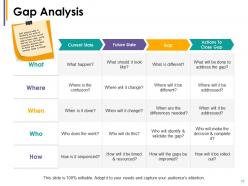
Slide 10 : Este slide mostra a exibição da análise de lacunas - Estado atual, Estado futuro, lacuna, ações para fechar lacuna. A análise de GAP ajuda a identificar as principais áreas de melhoria do estado atual para o estado futuro. Usando essa ferramenta, você pode tomar decisões importantes sobre o futuro e como o negócio precisa mudar.
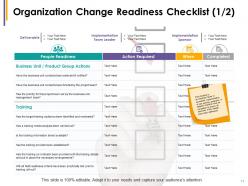
Slide 11 : Este slide apresenta a Lista de Verificação de Preparação para Mudança da Organização mostrando- Entregável, Líder da Equipe de Implementação, Patrocinador da Implementação, Ação Necessária, Quando Concluída, Preparação do Pessoal. Esta lista de verificação é um fator importante na implementação bem-sucedida de novas políticas e programas. Uma lista de verificação detalhada deve ser preenchida para garantir que todos os elementos da mudança foram tratados.
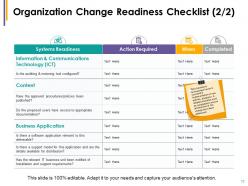
Slide 12 : Este slide apresenta a Lista de Verificação de Prontidão para Mudança da Organização mostrando- Ação de Prontidão de Sistemas necessária quando concluída Esta lista de verificação é um fator importante na implementação bem-sucedida de novas políticas e programas. Uma lista de verificação detalhada deve ser preenchida para garantir que todos os elementos da mudança foram tratados.
Slide 13 : Este é um slide do ícone de introdução ao gerenciamento da mudança. Use os ícones conforme a necessidade.
Slide 14 : Este slide é intitulado Slides adicionais. Você pode alterar o conteúdo conforme sua necessidade.
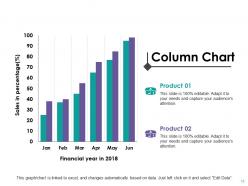
Slide 15 : Este slide mostra um gráfico de colunas para comparação de dois produtos / entidades, informações, especificações, etc.
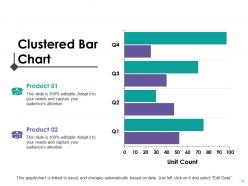
Slide 16 : Este slide mostra um gráfico de barras agrupadas para comparação de dois produtos / entidades, informações, especificações, etc.
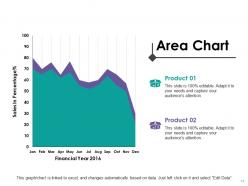
Slide 17 : Este slide mostra um gráfico de área para comparação de dois produtos / entidades, informações, especificações, etc.
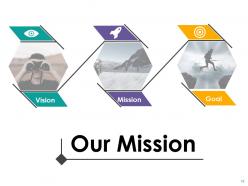
Slide 18 : Este slide contém Nossa missão com visão e objetivo. Declare-os aqui.
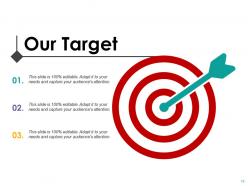
Slide 19 : Este é o slide Nossa meta. Declare-os aqui.
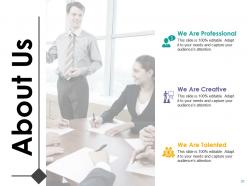
Slide 20 : Este é um slide sobre nós. Declare sua posição, fatos ou qualquer assunto aqui.
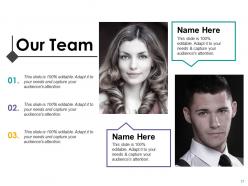
Slide 21 : Este slide apresenta Nossa Equipe com designação, suporte de texto de imagem e caixas de texto para preencher informações.
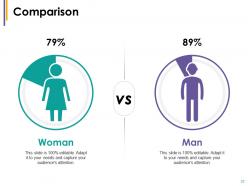
Slide 22 : Este slide mostra a comparação de uma maneira criativa, exibindo imagens masculinas e femininas. Indique aqui os aspectos de comparação.
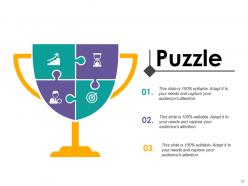
Slide 23 : Este é um slide de imagem de quebra-cabeça com caixas de texto para informar informações, especificações, etc.
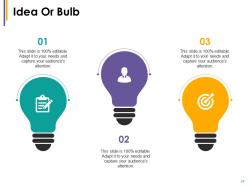
Slide 24 : Este é um slide de ideia ou imagem Bulbo. Apresente quaisquer novas informações, dados aqui.
Slide 25 : Este é um slide de agradecimento com endereço #, rua, cidade, estado, números de contato e endereço de e-mail a serem colocados e exibidos.
Introdução ao gerenciamento da mudança Slides de apresentação em PowerPoint com todos os 25 slides:
Adapte-se às demandas em constante evolução com nossos slides de apresentação em PowerPoint de introdução ao gerenciamento de mudanças. Eles são projetados para oferecer flexibilidade.

FAQs for Change management introduction
Okay so here's what actually works - you need to nail the communication first. Like, seriously explain WHY this change is happening because most leaders just dump it on people and wonder why everyone's confused. Get your executives fully on board, then find those informal leaders in each team who can help sell it to their coworkers. Oh and don't forget proper training and support throughout. I've seen so many companies mess this up by skipping straight to implementation. The truth is, if people don't get why it matters, you're basically fighting an uphill battle for everything else.
Honestly, your team usually knows first when stuff's broken - they're the ones dealing with it daily. Watch for the obvious red flags: metrics tanking, customers bitching more, people constantly finding workarounds just to do their jobs. That last one's a dead giveaway something's wrong. New regulations or competitors doing things differently can also force your hand. I'd set up regular check-ins where people can actually speak up about what sucks. Don't wait until it's a total disaster - track this stuff so you can fix things before they blow up.
Dude, leadership makes or breaks everything here. Your team's watching to see if you actually believe in this change - and trust me, they can smell fake enthusiasm from a mile away. Be super clear about WHY you're doing this and don't stop talking about it. Show up, deal with their complaints directly, and throw little celebrations when things go right. People hate change by default, so you've got to remove whatever's making it harder for them. Oh and get your own head straight first about the reasons behind it all. Can't lead what you don't understand yourself.
Look, resistance happens when people don't get the "why" - so explain it clearly first. Get the biggest skeptics involved in planning if you can, because honestly? People buy into stuff they helped build. Listen to their pushback too, sometimes they catch things you missed. Training helps with the skills gap, and celebrating quick wins keeps momentum going. Oh, and find your cheerleaders early - they'll do half the convincing for you. My advice? Map out your top resisters and grab coffee with each one this week. One-on-ones work way better than group meetings for this stuff.
Honestly? Start with ADKAR - it's way more straightforward than most frameworks and actually focuses on the human side (awareness, desire, knowledge, ability, reinforcement). Kotter's 8-Step Process is solid too for building momentum. Here's the thing though - I've watched so many changes crash and burn because people skip explaining the "why" and just dive into execution. Big mistake. You'll need impact assessments to figure out who gets hit by the changes, plus communication that actually reaches people. Oh, and some feedback system to spot pushback before it kills everything. ADKAR's probably your best bet starting out.
Honestly, culture pretty much determines if your change stuff will work or totally bomb. Got a rigid, "we've always done it this way" vibe? People will fight you on everything. But when your team actually likes trying new things and learning, they'll be way more open to whatever you're proposing - makes life so much easier. I'd definitely figure out what kind of culture you're dealing with first. Then you can work with what's already there instead of trying to force something that'll never stick. Way smarter approach.
Honestly, the worst thing you can do is rush it and leave people in the dark. Nobody likes getting blindsided at work, you know? Don't skip explaining WHY you're making changes - seriously, that's where most rollouts die. People will push back hard if they think it's just change for change's sake. Leadership needs to actually show up and support it too, not just send an email and disappear. Oh, and you'll probably think adoption takes like 2 weeks when it's more like 2 months. Map out everyone who's affected first, then communicate way more than feels necessary. I'd rather annoy people with updates than have them feel forgotten.
Okay so first thing - explain the "why" or people will just freak out and resist everything. I'd hit multiple channels too: town halls, emails, those awkward one-on-ones. The office rumor mill is honestly brutal and spreads faster than wildfire, so beat it to the punch. Don't pretend you have all the answers when you don't - people see right through that BS. Set up ways for folks to actually give feedback instead of just talking at them. Oh, and tailor your messaging! What keeps your frontline workers up at night is totally different from what executives obsess over.
Track adoption rates first - are people actually using the new stuff? Check your performance metrics too like productivity and error rates before/after. Employee surveys are honestly where you'll learn the most though. Nobody talks about that enough. Training completion rates, timeline stuff, budget variance - all matters. But here's the thing: pick maybe 3-4 metrics max that match what you're trying to do. Otherwise you'll get buried in spreadsheets and lose sight of what's working. Oh, and check them regularly so you can course-correct if needed.
Honestly, just talk to people early and often - like, way more than you think you need to. Figure out who's actually affected and what they care about, then craft your message around that. I've seen too many people just blast generic updates and wonder why nobody's on board. Set up real conversations, not just email dumps. Get feedback and actually do something with it (this part's huge). Oh, and if you can swing it, bring your key players into the planning phase - people will fight for something they helped build. Maybe start with your biggest influencers? Schedule some quick one-on-ones this week and see what happens.
First, figure out what your people actually don't know - don't waste time on generic stuff they already get. Mix up how you teach it too. Videos work for some folks, hands-on for others. Role-playing feels super weird at first but honestly it's the best way to practice tricky conversations. Keep groups small or people won't speak up. Here's the thing though - one training session never sticks. You'll need follow-ups once they're actually doing the work because that's when real questions come up. Oh, and give them someone specific to bug when they're confused later!
Honestly, tech makes change management way less painful. Slack keeps everyone updated during transitions - no more "wait, what's happening?" moments. Tools like Asana are clutch for tracking who's actually adopting new stuff and hitting deadlines. The data side is where it gets really useful though - you can see exactly where people get stuck instead of wondering why things aren't working. Oh, and digital training lets people go at their own speed, which cuts down on pushback big time. I'd say pick whatever fixes your biggest headache first, whether that's communication or just keeping track of progress.
So basically there's two types of change. Incremental is like your everyday tweaks - updating processes, small tech improvements, that kind of stuff. Transformational is the massive overhauls that flip everything upside down. New business models, complete digital makeovers, you know? Here's the thing though - most companies are doing way more incremental changes than they think! It's just less scary for everyone. People can actually handle those small shifts. But when you're asking them to completely change how they work? Yeah, that needs real planning and tons of communication. My advice? Figure out which one you're actually dealing with first, because honestly your whole strategy depends on it.
Don't wait until the end to ask for feedback - bake it right into every step. Weekly check-ins work great during rollouts. Mix up how you gather input too - some people love surveys, others will only open up during random coffee conversations (honestly, those informal chats often give you the best intel). Try pulse surveys, focus groups, or just block out office hours for people to drop by. The biggest mistake? Not closing the loop. Tell people what you heard and what you're actually doing about it. Otherwise they'll stop bothering to give feedback at all. Make it feel safe and adjust how often you check in based on what's working.
Look, your people's well-being during change isn't just nice to have - it literally determines if your whole thing succeeds or crashes. Stressed, confused employees will either fight you or mentally disappear. I've watched teams basically shut down when leadership dropped the ball on this. You've got to watch for stress signals and throw extra support at people. Be ridiculously clear about what's happening and why. Mental health always takes a hit during big transitions, so maybe offer flex schedules or bring someone in to talk through stuff. Oh, and those leadership office hours? Game changer. Basically, take care of them first and they'll actually work with you instead of against you.
-
Awesome presentation, really professional and easy to edit.
-
It saves your time and decrease your efforts in half.