

CIOs Guide For IT Strategy Powerpoint Presentation Slides Strategy CD V




Try Before you Buy Download Free Sample Product
 Impress Your
 Audience
 100%
100% Editable
 Save Hours
 of Time


Enhance your organizational growth with our comprehensive PowerPoint presentation, CIOs guide for IT strategy. This invaluable resource illuminates the strategic alignment between IT and business objectives, paving the way for excellence and cost leadership. Additionally, using our IT strategy framework PPT template, discover the cutting-edge technologies harnessed to drive IT and business success, such as IT infrastructure management encompassing storage, service, and network oversight. Moreover, IT risk management PPT slides include the power of IT automation, risk management, and enhanced marketing strategies as vital initiatives for business advancement. Further, our IT steering committee deck offers a holistic perspective on how technology leaders effectively manage and optimize IT department performance. It also sheds light on the indispensable role of the IT steering committee in attaining cost leadership. Lastly, our exceptional IT automation PPT presents dynamic dashboards for tracking IT security incidents and monitoring customer satisfaction. Get access to this powerful template now.
People who downloaded this PowerPoint presentation also viewed the following :
Content of this Powerpoint Presentation
Slide 1: This slide introduces CIOs Guide for IT Strategy. State your company name and begin.
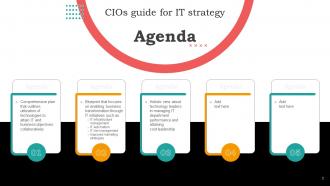
Slide 2: This is an Agenda slide. State your agendas here.
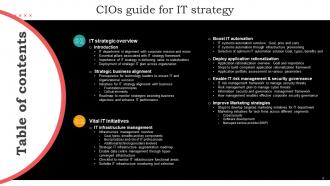
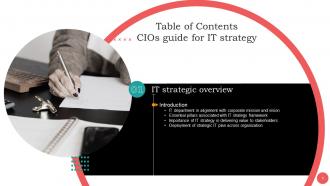
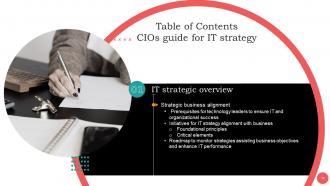
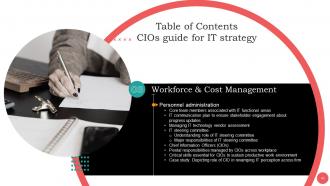
Slide 3: This slide shows Table of Content for the presentation.
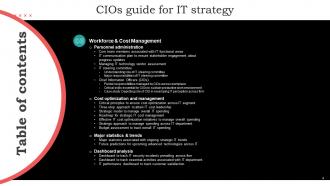
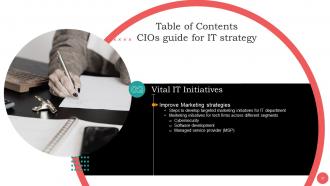
Slide 4: This slide also shows Table of Content for the presentation.
Slide 5: This slide shows title for topics that are to be covered next in the template.
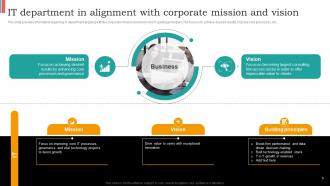
Slide 6: This slide provides information regarding IT department aligning with the corporate mission and vision and IT guiding principles.
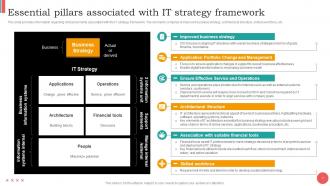
Slide 7: This slide displays information regarding critical elements associated with the IT strategy framework.
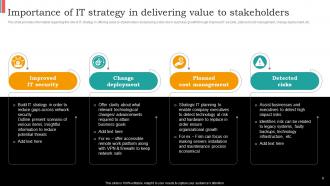
Slide 8: This slide presents information regarding the role of IT strategy.
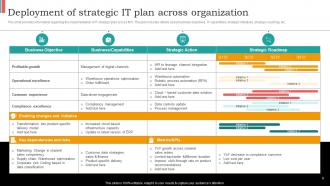
Slide 9: This slide provides information regarding the implementation of IT strategic plan across firm.
Slide 10: This slide shows title for topics that are to be covered next in the template.
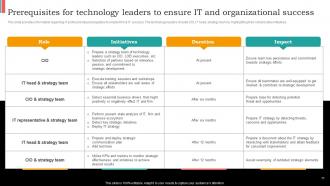
Slide 11: This slide presents information regarding IT professionals prerequisites to enable firm & IT success.
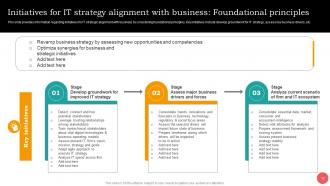
Slide 12: This slide describes information regarding initiatives for IT strategic alignment with business by considering foundational principles.
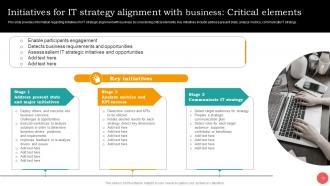
Slide 13: This slide provides information regarding initiatives for IT strategic alignment with business by considering critical elements.
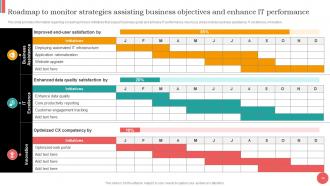
Slide 14: This slide presents information regarding a roadmap to track initiatives that support business goals and enhance IT performance.
Slide 15: This slide shows title for topics that are to be covered next in the template.
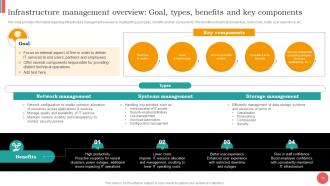
Slide 16: This slide describes information regarding infrastructure management overview by highlighting goal, types, benefits and key components.
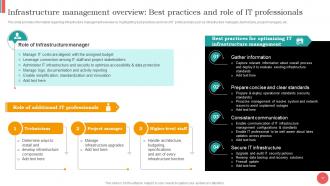
Slide 17: This slide provides information regarding infrastructure management overview by highlighting best practices and role of IT professionals.
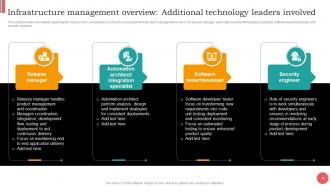
Slide 18: This slide presents information regarding the various roles considered as critical for successful infrastructure management.
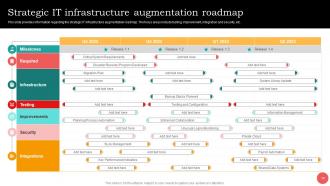
Slide 19: This slide describes information regarding the strategic IT infrastructure augmentation roadmap.
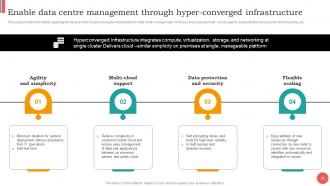
Slide 20: This slide provides information regarding the development of hyperconverged infrastructure for data center management.
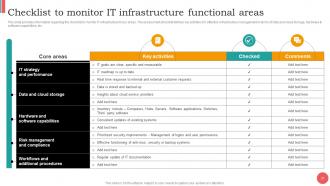
Slide 21: This slide presents information regarding the checklist to monitor IT infrastructure focus areas.
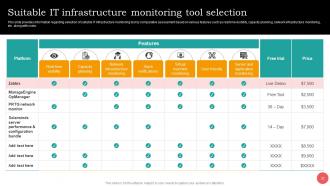
Slide 22: This slide provides information regarding selection of suitable IT infrastructure monitoring tool.
Slide 23: This slide shows title for topics that are to be covered next in the template.
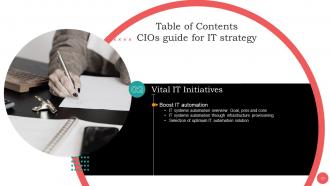
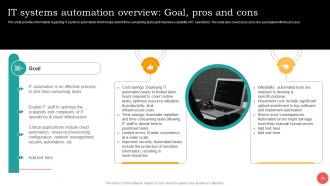
Slide 24: This slide provides information regarding IT systems automation.
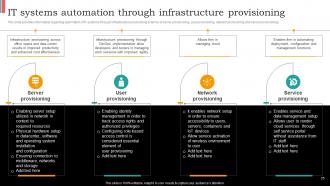
Slide 25: This slide presents information regarding automation of IT systems through infrastructure provisioning.
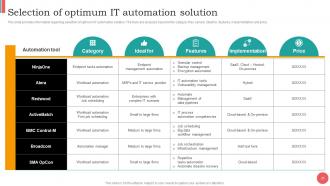
Slide 26: This slide provides information regarding selection of optimum IT automation solution.
Slide 27: This slide shows title for topics that are to be covered next in the template.
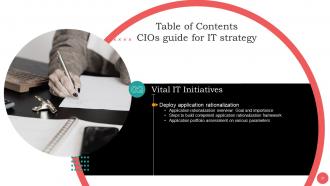
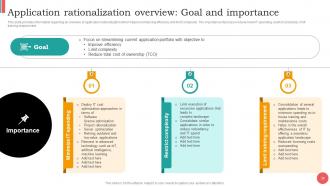
Slide 28: This slide presents information regarding an overview of application rationalization.
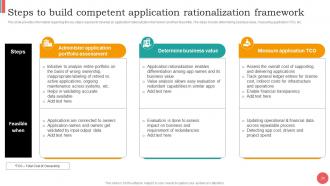
Slide 29: This slide provides information regarding the key steps required to develop an application rationalization framework and their feasibility.
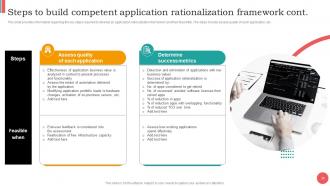
Slide 30: This slide also provides information regarding the key steps required to develop an application rationalization framework and their feasibility.
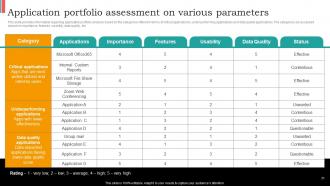
Slide 31: This slide presents information regarding application portfolio analysis.
Slide 32: This slide shows title for topics that are to be covered next in the template.
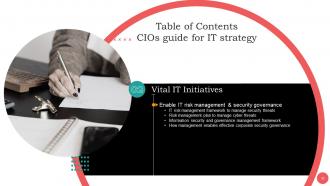
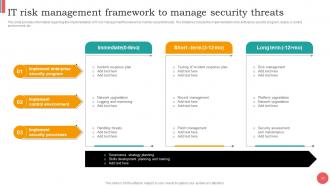
Slide 33: This slide provides information regarding the implementation of IT risk management framework to monitor security threats.
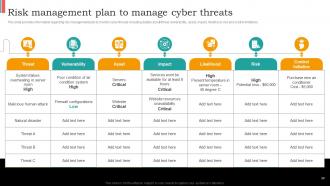
Slide 34: This slide displays information regarding risk management plan to monitor cyber threats.
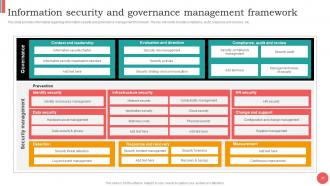
Slide 35: This slide provides information regarding information security and governance management framework.
Slide 36: This slide portrays information regarding the management role in effective corporate security governance.
Slide 37: This slide shows title for topics that are to be covered next in the template.
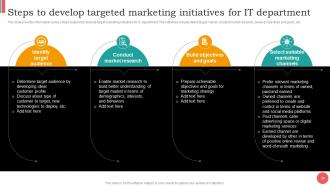
Slide 38: This slide presents various steps required to develop target marketing initiatives for IT department.
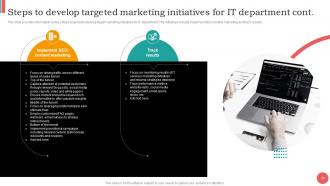
Slide 39: This slide also presents various steps required to develop target marketing initiatives for IT department.
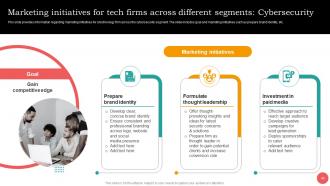
Slide 40: This slide provides information regarding marketing initiatives for a technology firm across the cybersecurity segment.
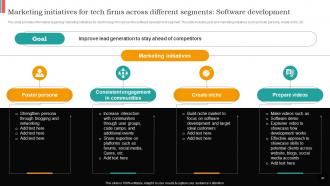
Slide 41: This slide presents information regarding marketing initiatives for a technology firm across the software development segment.
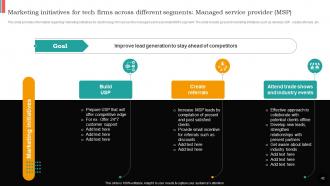
Slide 42: This slide displays information regarding marketing initiatives for a technology firm across the managed service provider(MSP) segment.
Slide 43: This slide shows title for topics that are to be covered next in the template.
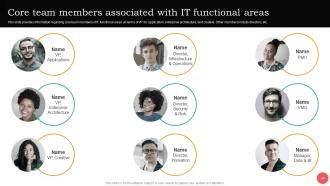
Slide 44: This slide provides information regarding core team members of IT functional areas.
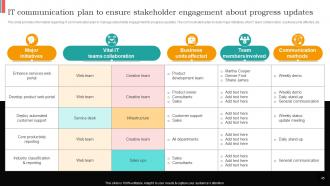
Slide 45: This slide presents information regarding IT communication plan to manage stakeholder engagement for progress updates.
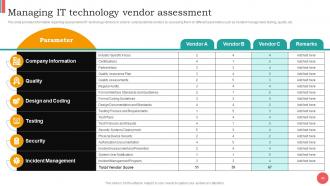
Slide 46: This slide provides information regarding assessment of IT technology vendors.
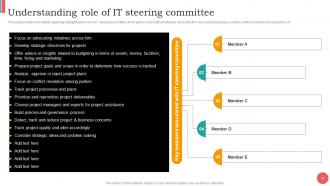
Slide 47: This slide describes information regarding highlighting the role of IT steering committee.
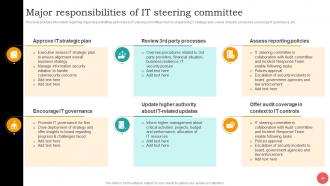
Slide 48: This slide presents information regarding major responsibilities performed by IT steering committee.
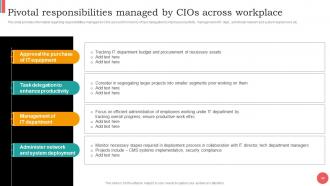
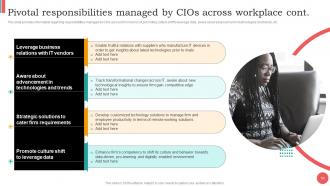
Slide 49: This slide provides information regarding responsibilities managed by CIOs across firm.
Slide 50: This slide also provides information regarding responsibilities managed by CIOs across firm.
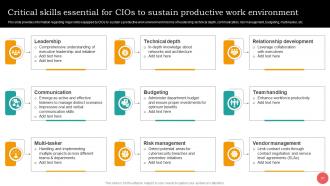
Slide 51: This slide provides information regarding major skills equipped by CIOs to sustain a productive work environment.
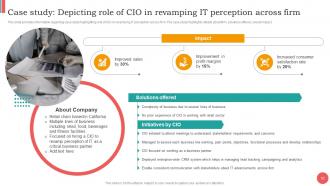
Slide 52: This slide describes information regarding case study highlighting role of CIO in revamping IT perception across firm.
Slide 53: This slide shows title for topics that are to be covered next in the template.
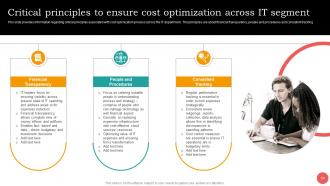
Slide 54: This slide provides information regarding critical principles associated with cost optimization process across the IT department.
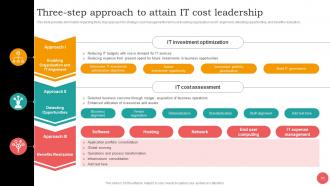
Slide 55: This slide presents information regarding three step approach for strategic cost management.
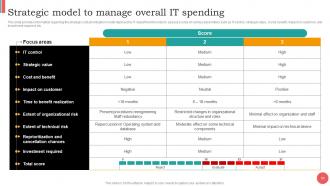
Slide 56: This slide displays information regarding the strategic cost prioritization model deployed by IT department.
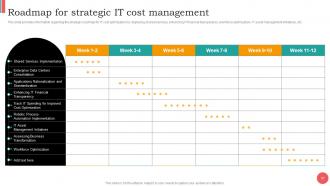
Slide 57: This slide presents information regarding the strategic roadmap for IT cost optimization.
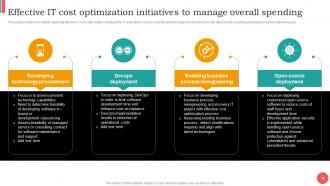
Slide 58: This slide provides information regarding effective IT cost optimization strategies for IT executives.
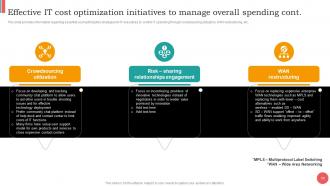
Slide 59: This slide describes information regarding essential cost optimization strategies for IT executives to control IT spending.
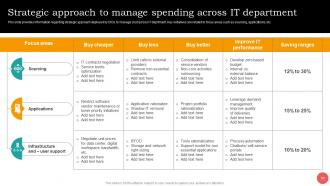
Slide 60: This slide provides information regarding strategic approach deployed by CIOs to manage cost across IT deprtment.
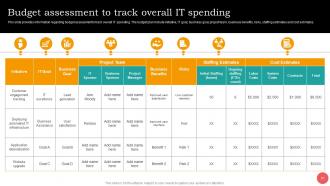
Slide 61: This slide presents information regarding budget assessment to track overall IT spending.
Slide 62: This slide shows title for topics that are to be covered next in the template.
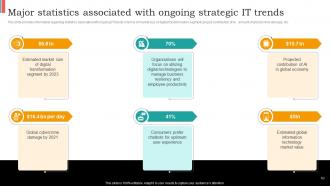
Slide 63: This slide provides information regarding statistics associated with ongoing IT trends.
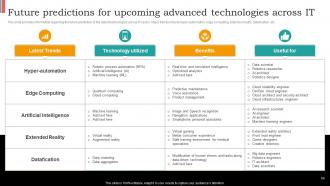
Slide 64: This slide presents information regarding the future prediction of the latest technologies across IT sector.
Slide 65: This slide shows title for topics that are to be covered next in the template.
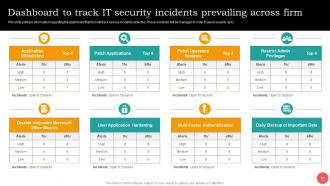
Slide 66: This slide portrays information regarding the dashboard that firm will track various incidents detected.
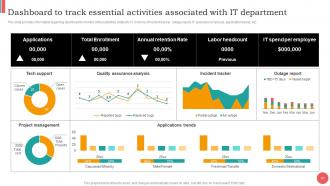
Slide 67: This slide provides information regarding dashboard to monitor critical activities related to IT.
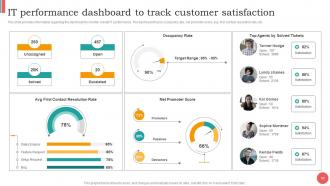
Slide 68: This slide describes information regarding the dashboard to monitor overall IT performance.
Slide 69: This slide shows all the icons included in the presentation.
Slide 70: This slide is titled as Additional Slides for moving forward.
Slide 71: This is Our Team slide with names and designation.
Slide 72: This is About Us slide to show company specifications etc.
Slide 73: This is Our Vision, Mission & Goal slide.
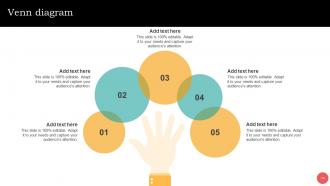
Slide 74: This slide depicts Venn diagram with text boxes.
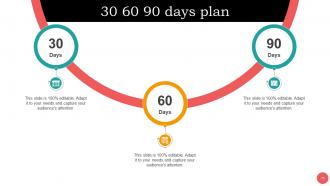
Slide 75: This slide provides 30 60 90 Days Plan with text boxes.
Slide 76: This slide shows SWOT analysis describing- Strength, Weakness, Opportunity, and Threat.
Slide 77: This is a Thank You slide with address, contact numbers and email address.
CIOs Guide For IT Strategy Powerpoint Presentation Slides Strategy CD V with all 82 slides:
Use our CIOs Guide For IT Strategy Powerpoint Presentation Slides Strategy CD V to effectively help you save your valuable time. They are readymade to fit into any presentation structure.









FAQs for CIOs Guide For IT Strategy Powerpoint Presentation Slides
So you'll need four main things: business alignment, tech roadmap, resource planning, and risk management. Start by mapping what tech you have now to actual business results - that's where most people mess up honestly. Then figure out your gaps. Your roadmap should show how you're upgrading systems over time, nothing too crazy. Budget realistically for both money and people (good luck with that part). Oh and don't skip governance and security frameworks - I know they're boring but they'll save your ass later. Map current state first, then build from there.
Honestly, most CIOs mess this up by jumping straight into tech stuff without actually figuring out what the business needs. Sit down with your other executives regularly - like actually block time for it. Map out their goals and frustrations first. Once you get that, connect every IT project back to those specific business wins. Sales team struggling with slow customer onboarding? That's your automation priority right there. The budget meetings are where this really pays off. Show them clear ROI numbers instead of rambling about server upgrades nobody cares about.
Track the obvious stuff first - uptime, project timelines, user satisfaction. But honestly? The business metrics are what actually matter. Are you saving money or helping generate revenue? Is the sales team hitting targets because of what you built? Customer experience improvements are massive too, btw. I always look at team productivity and budget vs innovation balance. Pick maybe 3-4 metrics that match what your company cares about most. Review quarterly - monthly gets too noisy.
So cloud computing completely flips how you think about IT strategy. Instead of buying servers and stuff, you just use what you need when you need it. Scaling becomes instant - no more guessing what hardware you'll need in three years (which honestly was always a nightmare). Your team stops babysitting servers and can actually work on cool projects instead. Plus your budget isn't tied up in equipment that'll be outdated soon anyway. I'd start thinking cloud-first for new stuff and figure out what makes sense to move over first. Game changer, really.
Dude, cybersecurity isn't some side thing anymore - it literally shapes your whole IT strategy. Every decision you make, whether it's moving to cloud or picking vendors, has to factor in security first. Budget planning? Security drives that too. I know it sounds like a pain (because honestly, it kind of is), but your security setup affects everything from staying compliant to keeping customers happy. Oh, and stop treating your CISO like they're just there to shut down good ideas. They're actually strategic partners now. Business continuity depends on getting this right.
Honestly, just carve out some actual budget for experimenting and let people mess around without jumping through approval hoops. Mix your IT people with regular business folks - those combos always surprise me with what they come up with. Set up small pilot programs where failing is totally fine, just write down what went wrong. Pick some low-stakes area and give a tiny team 90 days to go nuts with it. Oh, and define upfront what "winning" looks like so you're not just throwing money at cool tech for no reason. The bureaucracy will kill innovation faster than bad ideas ever will.
Getting stakeholders on board is probably your biggest headache - people really do hate change. Budget and timeline pressure will hit you hard too. Oh, and don't get me started on legacy systems... they're such a pain to work with or replace. Cultural shifts are brutal when you're bringing in new tech. Making sure your strategy actually matches business goals instead of just chasing the newest trendy thing? That's trickier than it sounds. Start small, rack up some wins first. Then keep explaining the "why" to everyone - like, constantly. Trust me on this one.
Honestly, cloud stuff and good collaboration tools aren't negotiable anymore - that's your starting point. Get decent VPN solutions and communication platforms that don't suck (seriously, ditch anything from 2019). Zero-trust security is huge now since people work from literally everywhere. Track productivity differently too - focus on what gets done, not how many hours someone logs. The goal is making everything feel seamless whether they're home, office, or that weird hybrid thing everyone's doing. I'd start by figuring out what's driving your team crazy on a daily basis - that'll tell you where to focus first.
Honestly, I'd start with cloud stuff - AWS or Azure are solid choices for scaling up. Jenkins or GitLab will save you tons of time on deployments (trust me on this one). API management platforms are a game changer for connecting systems without wanting to pull your hair out. Salesforce and Power Platform are great if your business folks want to build things themselves - less work for you. Oh, and definitely grab something like Splunk or DataDog for monitoring. Things break at 2am otherwise. My advice? Audit what you've got first, then tackle your 2-3 biggest pain points. Don't try to fix everything at once.
Honestly, data analytics saves you from making expensive mistakes based on gut feelings. You'll actually see where systems are breaking down and what users desperately need. Performance metrics reveal which apps are becoming mission-critical - stuff you might've overlooked. The cool part is catching infrastructure gaps before they blow up your budget. I'd focus on building dashboards that track metrics that matter to YOUR business, not just generic ones everyone uses. Then you've got real data backing up those strategy meetings instead of just "I think we should..."
Honestly, it's all about balancing what you need right now versus what'll pay off later. Map your budget to real business results first - not just basic operations. Hidden costs will kill you (training, integration, all that stuff), so factor those in early. I always tell people to prioritize by three things: risk, revenue impact, and staying competitive. Oh and definitely save some budget for those "emergency" requests that always come up halfway through the year. Set clear criteria upfront so you're not caving to pressure when department heads start breathing down your neck.
Dude, skip the tech speak completely. Connect everything to what they actually give a shit about - money coming in, costs going down, happy customers. I swear, half the CIOs I know lose people the second they start throwing around acronyms. Show them real ROI numbers instead. Get them involved in planning so they feel like it's their thing, not just IT telling everyone what to do. Oh, and those regular check-ins? Talk business results, not how cool your new system is. Make it about fixing their headaches, period.
Honestly, your IT strategy means nothing if your team can't actually execute it. I've seen companies blow tons of money on fancy tech roadmaps only to watch them fail because people didn't know how to use the new systems. Nobody wants to be that person scrambling when new tools drop either. The trick is making training ongoing - not just cramming it in during rollouts. Figure out where your skill gaps are right now and work learning into everyone's regular routine. Trust me, it'll save you so much headache later.
Honestly, treat your vendors like actual partners instead of just whoever's cheapest. I've watched way too many CIOs pick the bargain option and then get completely screwed over later - it's painful to see. Look for vendors who actually fit your long-term plans and can grow with you. Set up solid governance with clear SLAs and performance check-ins, but here's the thing - don't put all your eggs in one basket. Spread the risk around. Start by looking at what you've got now and figure out which vendors are actually worth keeping versus the ones just bleeding money.
Look, AI/ML is huge right now - you can't ignore it anymore. Quantum's still pretty far out but worth keeping an eye on. Edge computing and 5G though? Those are already changing how we handle real-time stuff and IoT. The whole list never ends, which is honestly exhausting. AR/VR is getting interesting, blockchain has some solid use cases now, and automation platforms are everywhere. But here's the thing - don't try to chase everything. Pick maybe 2-3 techs that actually matter for your industry and really learn them well. Way better than being mediocre at ten different things.
-
The customer care of SlideTeam is very responsive. I was having a payment issue and they fixed it for me in no time.
-
The design is very attractive, informative, and eye-catching, with bold colors that stand out against all the basic presentation templates.