


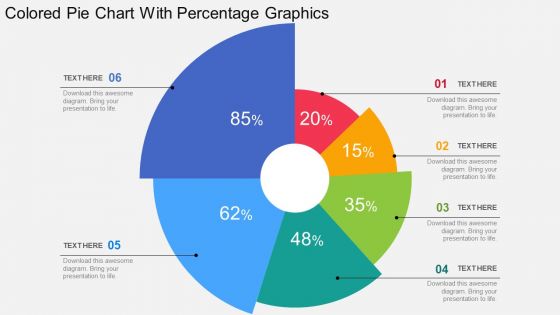
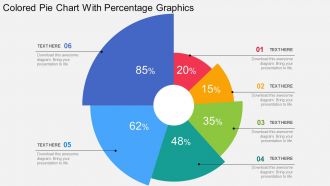
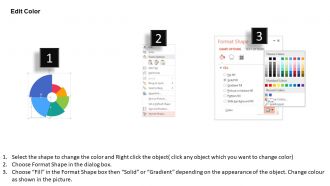
Colored pie chart with percentage graphics flat powerpoint design




Try Before you Buy Download Free Sample Product
 Impress Your
 Audience
 100%
100% Editable
 Save Hours
 of Time


Control from base with our Colored Pie Chart With Percentage Graphics Flat Powerpoint Design. Deliver goods anywhere on earth.
People who downloaded this PowerPoint presentation also viewed the following :
Colored pie chart with percentage graphics flat powerpoint design with all 4 slides:
Enhance your game with our Colored Pie Chart With Percentage Graphics Flat Powerpoint Design. They add to your agility.
FAQs for Colored pie chart with percentage graphics
Go for bold, high-contrast colors that actually look different from each other. I've watched people squint at charts trying to figure out if something's light blue or "slightly less light blue" - it's painful. Make sure colorblind folks can read it too (that's like 1 in 12 people). Your most important stuff should get the strongest colors so people notice it first. Oh, and definitely use a colorblind-friendly palette if you can find one. Here's what really works though: step back from your screen or ask someone else to look at it. You'll spot problems immediately that you totally missed up close.
Honestly, colored pie charts are a game-changer because people can instantly see which chunks are biggest without doing mental math. The visual separation is huge - way better than staring at a bunch of numbers. Black and white charts? They're just sad looking these days. You can get strategic with it too, like making your main point pop with a bright color while everything else stays subtle. Oh, and definitely think about accessibility when you're picking colors. Nobody wants to deal with clashing neon green and red when it's up on the projector!
Honestly, Excel's probably your best starting point - especially if you already have it. Their color options have gotten so much better lately. Google Sheets works too if you're collaborating with others. Now if you've got bigger datasets or want interactive stuff, Tableau and Power BI are worth checking out. Adobe Illustrator gives you crazy control over design but man, that learning curve is rough. I always forget how complicated it gets until I'm three hours deep trying to adjust one color. Start simple with Excel, then upgrade to Tableau if you need fancier features.
Stick to 5-7 slices max, trust me on this one. Any more and it becomes a hot mess where you can't tell the difference between colors. I've made that mistake before - created these ridiculous rainbow wheels that nobody could read. Short sentences work better here. If you've got tons of categories, just lump the tiny ones into "Other" or honestly? Ditch the pie chart completely and go with bars instead. Way easier to compare that way. The whole point is someone should look at it and immediately get what you're trying to show them.
Ugh, don't make the same mistakes everyone does! First off, way too many colors - like 5-7 slices tops or it looks crazy. Pick colors that actually contrast so people aren't squinting at your chart. Your most important slice should pop with the boldest color. Dark tiny slices are the worst - they just vanish. I learned this the hard way lol. Also throw in labels or a legend because some people can't distinguish certain colors. Here's what I do: show it to someone for 5 seconds and see if they get the main point right away.
So basically you want colors that don't rely on telling red from green apart - that's where most people struggle. I'd grab ColorBrewer or Viz Palette, they're honestly game-changers for this. Blues, oranges, purples work really well since they're easy to distinguish. Skip red-green combos completely (obvious but worth saying). Make sure there's good contrast between your pie slices too. Oh and definitely run it through a colorblind simulator first - learned that one the hard way when my boss couldn't read half my chart last month.
Honestly, pie charts are great when you've got 3-5 categories tops and the slices are actually different sizes - not like five nearly identical wedges that make everyone's eyes hurt. Perfect for stuff like budget breakdowns or showing market share. Colors help people tell segments apart instantly without hunting for the legend (which half the time is too small anyway). Just skip them if you have tons of tiny slices or need super precise comparisons. Oh, and definitely put the percentages right on the chart - saves everyone the math.
Try clustering your data first - way better than just throwing raw categories into slices. Each segment becomes more meaningful that way. Color intensity can show forecasted vs actual values, which looks pretty slick. Honestly, the interactive tooltips showing correlation coefficients are my favorite part when you hover over sections. You can even use different colors for confidence intervals. Oh and definitely run dimensionality reduction beforehand - saves you from visualizing stuff that doesn't actually matter. I've been playing around with this approach lately and it makes pie charts way more insightful than the basic ones everyone's used to.
Yeah, colors totally mess with people's heads when they're looking at your charts. Red screams "urgent!" while blue feels safe and trustworthy. Green = good news usually. I'd avoid too much yellow though - gives me a headache honestly. Orange has that energetic vibe, purple feels fancy. People react to your color choices before they even read the numbers, which is kinda wild if you think about it. Just match your colors to whatever vibe you're going for. Oh, and different cultures see colors differently, so keep your audience in mind.
Dude, animated pie charts are actually genius for presentations. Your audience stays locked in because the data reveals bit by bit instead of them scanning ahead while you're talking. Colors make everything click instantly - people just get it. Each segment popping up creates these cool little "oh, I see!" moments. Static charts? Boring as hell, honestly. The animation gives you perfect spots to pause and dive deeper into each piece. Oh, and don't get tempted by those crazy spinning transitions - they're distracting. Keep it clean so your data does the talking.
Honestly, go with solid colors for pie charts. They're way clearer when you've got multiple slices. Sure, gradients look fancy but they mess with readability - especially for colorblind people. I learned this the hard way on a work presentation once. The visual weight gets all wonky too, making some sections look more important than others. Short answer: solid colors with good contrast are your friend. Only use gradients if you've got like 2-3 segments and really need that polished look.
For bigger slices, just slap the labels right on there. Smaller ones? Use those little lines that point to labels outside the chart. Honestly though, if you've got a bunch of tiny slivers, just throw them into "Other" - nobody's gonna squint at microscopic text anyway. Dark gray text works great, and make sure nothing overlaps (drives me crazy when labels are all jumbled). Oh, and if you're dealing with like 12+ categories, maybe ditch the pie chart entirely? Bar charts are way easier to read sometimes. Your brain will process it faster.
Oh definitely need legends for pie charts - without them you're just staring at random colored slices. I usually put mine on the right side or underneath. Match the colors exactly to what's in your chart (obviously) and make sure people can actually read the text. Can't tell you how many times I've seen legends with fonts so tiny they're pointless. The color boxes should be big enough to see too. Try ordering them by slice size or alphabetically - whatever makes sense. Honestly, if someone squints at your chart trying to figure out what's what, you've failed.
Start with your company's main brand colors for the chart segments. Then grab your secondary colors or different shades of those same ones to fill out the rest. Honestly, I just keep our brand guide open while I'm working on it - way easier than guessing and having to redo stuff later. Just make sure there's good contrast between the slices that sit next to each other. Nobody wants to squint at a chart, you know? The whole point is staying on-brand while actually being able to read the thing.
Honestly, just get something with decent color palette options - both preset themes and the ability to pick your own colors. Excel's fine for basic charts, but Tableau or even Canva will give you way more control. You'll need stuff like slice reordering, data labels, and font customization. Oh, and make sure it does percentages and lets you move the legend around easily. Donut charts are kinda cool if you want to mix it up. The main thing is finding software that doesn't make simple edits feel like pulling teeth.
-
Awesome presentation, really professional and easy to edit.
-
Excellent products for quick understanding.