


Diapositivas de presentación en Powerpoint del plan de contingencia





Try Before you Buy Download Free Sample Product
 Impress Your
 Audience
 100%
100% Editable
 Save Hours
 of Time


Nuestras diapositivas de presentación en Powerpoint del plan de contingencia están diseñadas por temas para proporcionar un telón de fondo atractivo para cualquier tema. Úselos para parecer un profesional de presentaciones.
People who downloaded this PowerPoint presentation also viewed the following :
Contenido de esta presentación de Powerpoint
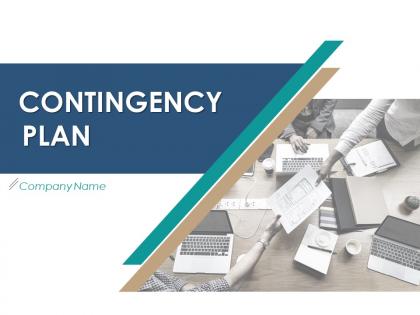
Diapositiva 1 : Esta diapositiva presenta el plan de contingencia. Indique el nombre de su empresa y comience.
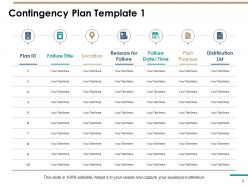
Diapositiva 2 : Esta diapositiva muestra la Plantilla 1 del plan de contingencia con una tabla y cuadros de texto relacionados.
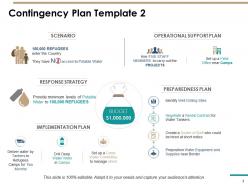
Diapositiva 3 : Esta diapositiva presenta la Plantilla 2 del plan de contingencia que describe el escenario, la estrategia de respuesta, el plan de implementación, el plan de apoyo operativo y el plan de preparación.
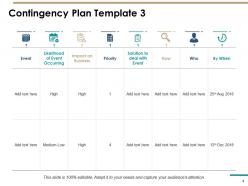
Diapositiva 4 : Esta diapositiva representa la Plantilla 3 del plan de contingencia con iconos y texto relacionados. Puede agregar o editar texto según los requisitos.
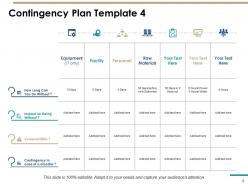
Diapositiva 5 : Esta diapositiva muestra la Plantilla 4 del plan de contingencia que describe: cuánto tiempo puede prescindir, impacto en prescindir, vulnerabilidades, contingencia en caso de desastre.
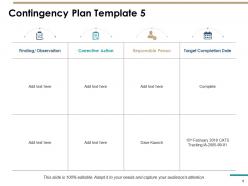
Diapositiva 6 : Esta diapositiva muestra la Plantilla 5 del plan de contingencia que describe: Hallazgo / observación, Acción correctiva, Persona responsable, Fecha prevista de finalización.
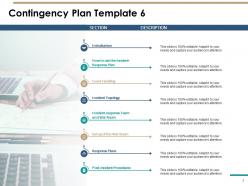
Diapositiva 7 : Esta diapositiva muestra la Plantilla 6 del plan de contingencia que describe: Introducción, Cómo usar el Plan de respuesta ante incidentes, Manejo de eventos, Topología de incidentes, Equipo de respuesta a incidentes y Sala de guerra, Configuración de la Sala de guerra, Planes de respuesta, Post-Incidente Procedimientos.
Diapositiva 8 : Esta diapositiva recuerda la pausa para el café de 30 minutos. Puede modificar la diapositiva según sea necesario.
Diapositiva 9 : Esta diapositiva muestra Gráficos y tablas. Esto indica que las diapositivas adicionales tratan sobre gráficos y tablas.
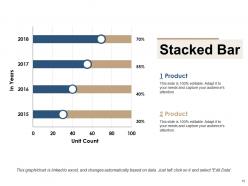
Diapositiva 10 : Esta diapositiva muestra un gráfico de barras apiladas con una comparación de 2 productos.
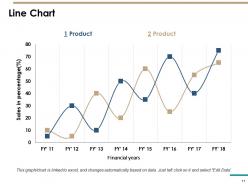
Diapositiva 11 : Esta diapositiva presenta Gráfico de líneas. Con esto puedes comparar productos.
Diapositiva 12 : esta diapositiva dice Diapositivas adicionales. Puede cambiar el título y el contenido de la diapositiva.
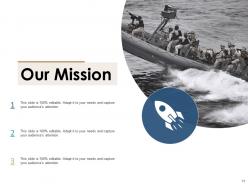
Diapositiva 13 : Esta diapositiva representa la diapositiva Nuestra misión. Puede escribir la misión, la visión y el objetivo de su empresa.
Diapositiva 14 : Esta diapositiva representa sobre nuestro equipo. Puede ingresar el nombre, la designación y las imágenes de los miembros del equipo.
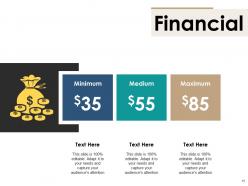
Diapositiva 15 : Esta diapositiva se titula Finanzas. Muestre cosas relacionadas con las finanzas aquí.
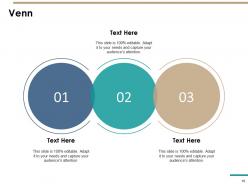
Diapositiva 16 : esta es una diapositiva VENN con cuadros de texto para mostrar información.
Diapositiva 17 : Esta es una diapositiva de agradecimiento con dirección # número de calle, ciudad, estado, número de contacto, dirección de correo electrónico.
Diapositivas de presentación de PowerPoint del plan de contingencia con las 17 diapositivas:
Utilice nuestras diapositivas de presentación en PowerPoint del plan de contingencia para ayudarle a ahorrar su valioso tiempo de manera eficaz. Están listos para adaptarse a cualquier estructura de presentación.


FAQs for Contingency Plan
You'll want to nail down four main things: risk assessment, trigger points, response steps, and who does what. Figure out what could realistically go wrong first - most people get paralyzed here because they try to plan for every possible disaster. Map out your actual response procedures and make sure everyone knows their role. Communication plans and resources matter too, obviously. Here's the thing though - keep it stupidly simple or nobody will follow it when stuff goes sideways. Test it out regularly and tweak based on what doesn't work.
Start by brainstorming everything that could tank your business - natural disasters, cyber attacks, losing key people, the usual suspects. Get different departments involved since they'll catch stuff you missed. Finance people are weirdly good at spotting operational weak spots, btw. Check what's gone wrong in your industry before, both for you and competitors. Don't forget regulatory stuff and supply chain issues. Here's the thing though - do this quarterly, not just once. Your risks change constantly, so your backup plans need to stay fresh too.
Honestly, communication can make or break your whole contingency plan. Map out who needs what info and how they'll get it during a crisis. Your brilliant plan means nothing if nobody knows about it when things go south - learned that one the hard way. Set up clear channels, pick your spokespersons, build in regular updates. Oh, and definitely test your communication methods ahead of time. Trust me, you don't want to be frantically trying to figure out how to reach people during an actual emergency.
Honestly, just think about two things: how likely is this to happen, and how screwed would we be if it did? Map out your risks and score them both ways. Those high-probability, high-impact nightmares? Yeah, those get handled first - no brainer. But also keep an eye on the rare stuff that could totally wreck you, even if it's unlikely. I always make a simple grid to see everything visually. Start with the scary top-right corner and work down from there. It's not rocket science, but you'd be surprised how many companies skip this step entirely.
Oh man, there's tons of stuff that'll help with this. Monday.com and Asana are solid for mapping out who does what when things go sideways. Microsoft Project works too but it's kinda overkill sometimes. RiskWatch is decent for the actual risk assessment part - though I've never used LogicGate personally. Honestly? A shared Google Drive with some templates can work just as well if you're not trying to spend money. The real trick is finding something everyone will actually use instead of ignoring it. Start with whatever you've already got, then upgrade later once you figure out what you really need.
At minimum once a year, but that's honestly pretty bare bones. Any big changes - new tech, staff shakeups, moving offices - should automatically trigger a review. Most places do quarterly check-ins which seems about right. Don't let these become dusty binders on a shelf though. After any incident (even small stuff), take a quick look at what worked and what didn't. Oh, and definitely set a calendar reminder now or you'll totally forget. I learned that one the hard way.
Honestly? Most people plan for crazy scenarios that'll never happen while completely missing the obvious stuff. I learned this the hard way - spent weeks mapping out these elaborate "what if" situations, then got blindsided by something super basic. Keep your plans simple enough that you can actually use them when you're stressed. Three realistic risks max to start with. Build responses you can test easily. Oh, and don't just write plans and stick them in a drawer somewhere - your business evolves, so should your backup strategies. The whole point is having something that actually works when things go sideways.
Honestly, training is what separates plans that actually work from ones that just look good on paper. Your team needs to practice this stuff regularly - otherwise they'll be scrambling around during a real crisis trying to figure out who's supposed to do what. I've seen it happen and it's not pretty. Regular drills help everyone build that muscle memory so responses become automatic. Plus you'll catch weird gaps or confusing sections that seemed fine when you wrote them but make zero sense in practice. Do it quarterly at least, and make the scenarios as realistic as possible. Trust me on this one.
So for crisis metrics, focus on the basics first - response time, whether your comms actually reached people, how well you used resources. The stuff that really matters though? Business continuity. Uptime, keeping customers, protecting revenue. Honestly, don't stress about perfect measurements since crises are chaos anyway. Stakeholder confidence surveys help too, plus watching for any compliance headaches. Oh, and set up some kind of simple dashboard beforehand - trust me, you don't want to be figuring out what to track while everything's falling apart. Way too stressful.
So regulatory stuff sets your bare minimum standards, but it's all over the place depending on your industry. Healthcare gets stuck with HIPAA in every disaster plan. Financial companies? They're dealing with SOX compliance for backups - total pain honestly. Manufacturing worries more about environmental safety rules, tech has GDPR breathing down their necks. You can't just grab some random template and call it good. Figure out what regs actually hit your sector first. Build around those requirements, then worry about the fancy extras later. Sounds boring but you'll thank yourself when audit time rolls around.
Honestly, the trick is making it feel like their problem to solve, not yours. Get them involved in spotting the risks that'd actually mess with their work - they know stuff you don't anyway. Those brainstorming sessions work way better than just handing people a manual. I'd explain upfront how this protects their jobs and keeps things stable. Run some practice drills, but don't go overboard and disrupt everything. People hate feeling like they're just taking orders when crisis hits. If they help build the plan, they'll actually care about following it.
Honestly, first figure out what actually scares you - floods, hackers, supply chain mess, whatever. Build response plans that you can mix and match depending on what hits. Like, your communication setup might work the same for fire or flood, but evacuation? Totally different story. Don't make everything super rigid - flexibility is way better than having some script nobody follows. Oh, and definitely run those tabletop exercises to test everything out. You'll find holes in your plan that you never saw coming, trust me.
Think of scenario planning like a crystal ball for your backup plans. You brainstorm different "what if" situations before they actually happen - minor issues, major disasters, whatever. This way you're not panicking when things go wrong (and they will). Having your team think through multiple futures is honestly where the magic happens. You end up with specific strategies instead of some useless generic emergency plan. I'd start with your 3-5 biggest risks and build actual response plans around those. Way better than winging it when stuff hits the fan.
Yeah, global business makes contingency planning a total headache. You're juggling different regulations, currencies going crazy, and supply chains that can break in like 5 different countries. Cultural stuff matters too - what works in Germany won't fly in Japan. One mess-up in Asia and suddenly your whole operation's scrambled. Honestly, the ripple effects happen way faster than you'd think. Best bet? Map out your biggest global weak spots first. Build some wiggle room into everything and get solid local contacts who actually know their turf. They'll save you from making stupid assumptions about their markets.
Honestly, COVID taught me that backup plans are basically useless if they're too rigid. You can't just prepare for one scenario - you need like 3-4 different "what if" situations mapped out. Communication always gets messy during actual emergencies (learned that the hard way), so have backup ways to reach people. Those tabletop exercises aren't just corporate BS either - they actually show you where your plan breaks down before it matters. Oh, and question your assumptions constantly. Ask yourself "what if I'm totally wrong about this?" Most crisis plans fall apart because we assume too much.
-
Unique and attractive product design.
-
Excellent template with unique design.
-
Understandable and informative presentation.
-
Unique design & color.