


Continuous integration using jenkins powerpoint presentation slides




Try Before you Buy Download Free Sample Product
 Impress Your
 Audience
 100%
100% Editable
 Save Hours
 of Time


Our Continuous Integration Using Jenkins Powerpoint Presentation Slides are topically designed to provide an attractive backdrop to any subject. Use them to look like a presentation pro.
People who downloaded this PowerPoint presentation also viewed the following :
Content of this Powerpoint Presentation
Slide 1: This title slide presents CONTINUOUS INTEGRATION USING JENKINS. Add the name of your company here.
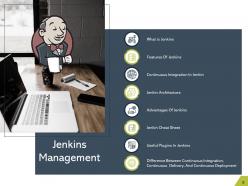
Slide 2: This slide presents the Table of Contents called Jenkins Management. It includes - What is Jenkins, Features of Jenkins, Continuous Integration in Jenkins, etc.
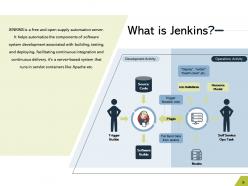
Slide 3: This slide presents What is Jenkins? JENKINS is a free and open supply automation server.
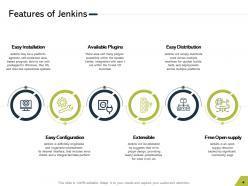
Slide 4: This slide presents the Features of Jenkins. It includes - Easy Installation, Easy Configuration, Available Plugins, etc.
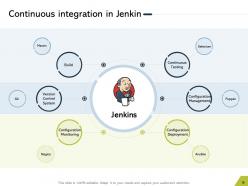
Slide 5: This slide presents Continuous integration in Jenkin. It includes – Build, Continuous Testing, Version Control System, Configuration Management, Configuration Monitoring, and Configuration Deployment.
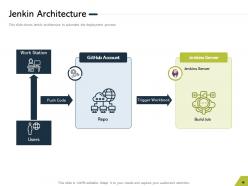
Slide 6: This slide presents the Jenkin Architecture. It shows Jenkin architecture to automate the deployment process.
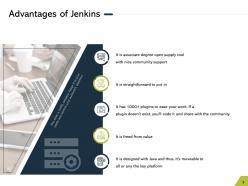
Slide 7: This slide presents the Advantages of Jenkins.
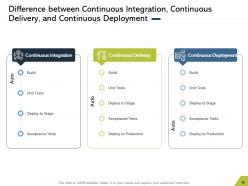
Slide 8: This slide presents the Difference between Continuous Integration, Continuous Delivery, and Continuous Deployment.
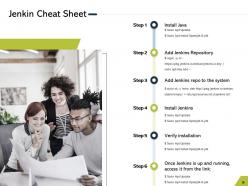
Slide 9: This slide presents the Jenkin Cheat Sheet.
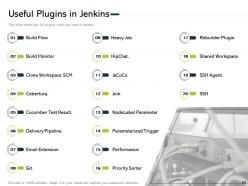
Slide 10: This slide presents the Useful Plugins in Jenkins. It shows the top 20 plugins which are used in Jenkins.
Slide 11: This is the Continuous Integration Using Jenkins Icons Slide.
Slide 12: This slide introduces the Additional Slides. It includes - Our Team, Our Mission, Timeline, About Us, Post-it Notes, Area charts, Financial, Stacked charts, 30 60 90 Days, and Thank You.
Slide 13: This slide contains the information about the company aka the ‘About Us’ section. This includes the Value Clients, the Target Audience, and Creative.
Slide 14: This slide provides the Mission for the entire company. This includes the vision, the mission, and the goal.
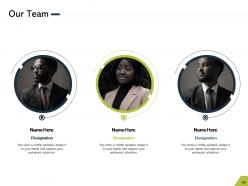
Slide 15: This slide shows the members of the company team with their name, designation, and photo.
Slide 16: This slide presents the Financial with a data’s numbers at minimum, medium, and maximum percentage.
Slide 17: This is a slide with a 30 60 90 Days Plan to set goals for these important intervals.
Slide 18: This slide contains Post It Notes that can be used to express any brief thoughts or ideas.
Slide 19: This slide is a Timeline template to showcase the progress of the steps of a project with time.
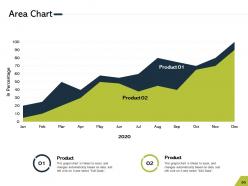
Slide 20: This slide shows an Area Chart that compares 2 products’ data over a timeline of years.
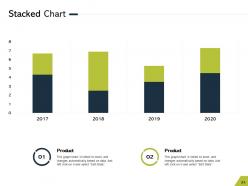
Slide 21: This slide shows a Stacked Chart that compares 2 products’ data over a timeline of years.
Slide 22: This is a Thank You slide where details such as the address, contact number, email address are added.
Continuous integration using jenkins powerpoint presentation slides with all 22 slides:
Use our Continuous Integration Using Jenkins Powerpoint Presentation Slides to effectively help you save your valuable time. They are readymade to fit into any presentation structure.

FAQs for Continuous integration using jenkins
So basically you want to commit code often, automate builds, test everything, and keep your main branch ready to deploy. Jenkins handles the heavy lifting - it watches your repo and kicks off builds when you push code. Tests run automatically too. I've found it catches integration problems super early, which saves you from those nightmare merge conflicts later. Think of it like a teammate who never takes breaks (kind of creepy but useful lol). Just start with basic automated builds and testing - don't overcomplicate it at first.
Jenkins plugins are your best friend here. Grab the language-specific ones - Maven for Java, Node.js plugin for JavaScript, Python plugin for Python stuff. They'll handle most of the build setup automatically, which is honestly a lifesaver. You can technically mix languages in one pipeline but trust me, that gets ugly quick. Set up your Jenkinsfile with the right plugin syntax, make sure your PATH variables are good to go, and specify your build tools. Oh, and definitely start with just one language first - don't try to do everything at once or you'll hate yourself later.
Honestly, plugins are what make Jenkins actually worth using. The base install is pretty meh, but once you start adding plugins? Game changer. You can hook up GitHub, push to AWS, run Docker stuff, ping your team on Slack - there's literally thousands to pick from. Sometimes that's overwhelming tbh. Start small though - grab the ones you actually need for your current setup first. Source control, testing, wherever you're deploying. You can always add more later as things get more complex. Trust me, don't install everything at once or you'll regret it.
So Jenkins just uses whatever build tool you're already working with. Your package.json or requirements.txt files define everything, then Jenkins runs npm install or pip install during the build. Caching dependencies between builds is clutch - saves so much time especially with those massive node_modules. I always set up dependency checks as separate pipeline stages because catching version conflicts early beats debugging broken builds later. Oh and definitely use workspace cleanup between runs, trust me on that one. Stale dependencies will mess you up when you least expect it.
Break your pipeline into smaller chunks that you can reuse - trust me, this'll save you hours later. Run stuff in parallel wherever you can. Shared libraries are a game changer once you've got multiple projects, honestly wish I'd started using them sooner. Use agent labels to spread work across nodes, and get your artifact management sorted between stages. Stick with declarative Jenkinsfiles over scripted ones since they're way easier to maintain. Oh, and parameterize everything - makes environment configs so much cleaner. Start by figuring out which stages can run at the same time.
First check if the Git plugin's installed in Jenkins - should already be there but doesn't hurt to look. When setting up a new job, just point the SCM section at your repo URL and throw in credentials if it's private. Webhooks are honestly the way to go since they'll auto-trigger builds when people push to certain branches. Though polling works too if webhooks are being weird. Configure your branch triggers under "Build Triggers" and you're set. I'd start simple with just main branch, then mess around with feature branches later once you've got the hang of it.
Start with Docker containers - seriously, they'll save you so much "works on my machine" pain later. Get different Jenkins agents running for dev, staging, and prod environments. Terraform or Ansible are solid for spinning up infrastructure consistently. Store your Jenkinsfiles in version control too (honestly forgot to do this early on and regretted it). Secrets management is non-negotiable. Ephemeral environments that get created per build are pretty sweet once you've got the basics down. The containerized build environments should be your first priority though - trust me on this one.
So Jenkins basically watches your code repo and runs all your tests automatically when you push changes. Unit tests, integration tests, code quality stuff - whatever you'd normally run manually (and probably skip when you're in a rush, let's be real). It hooks up with tools like SonarQube and Selenium pretty easily. The cool thing is it'll block your deployment if tests fail, so buggy code never makes it to production. Honestly once you set up the pipeline, it's like having a really paranoid teammate who actually catches your mistakes before users see them.
Dude, Jenkins will drive you crazy with three main things. Configuration drift is brutal - someone changes one setting and builds start failing randomly. Builds that crawl along forever because nobody bothered optimizing them. Plugin hell is probably the absolute worst though - update one plugin and watch everything explode. Here's what actually works: Put your config in Jenkinsfiles so it's version controlled. Run builds in parallel and don't be stingy with resources. Oh, and test plugin updates in staging first - learned that one the hard way. Start documenting stuff now or you'll hate yourself later.
After your build/test phases, just add deployment stages to your pipeline. I usually start with staging first - way easier to debug issues there. Jenkins pipeline-as-code is honestly clutch once you figure it out. Hook it up to your cloud APIs or something like Ansible for the actual deployments. Integration tests in staging, then if everything's green, push to prod. Obviously you'll want approval gates and rollback stuff for production deploys. The whole thing sounds complicated but it's pretty straightforward when you break it down step by step.
Okay so Jenkins has tons of built-in stuff for tracking your CI. Build history shows you success rates, how long things take, queue times - all that good stuff. Blue Ocean plugin makes it look way less ugly if you care about that (honestly it's pretty nice). For alerts, you can do email, Slack, webhooks when builds break or get fixed. There's plugins like Build Monitor for team dashboards too. My take? Just start simple with build history and email alerts. Don't overthink it early on - you can always add the fancy monitoring later when your team actually needs it.
Honestly, Jenkins is perfect for this. Set up shared pipelines so everyone can see what's happening and chip in. Pull request triggers are a game-changer - code gets tested automatically before merging, which stops those annoying arguments later. The visibility thing is huge though. When people can actually see what's broken and why, they'll fix stuff instead of just blaming each other. Hook up Slack notifications (or email if your team's old school) so everyone knows when builds break. Make that dashboard visible somewhere. Trust me, once you configure notifications right and make build status impossible to ignore, your team collaboration gets so much smoother.
Alright, so Jenkins security - start by checking who's got admin access right now because that's usually a mess. Set up proper authentication and role-based permissions so random people can't just trigger builds. Update everything regularly, especially security patches (boring but actually super important). Never hardcode secrets in your scripts - use Jenkins credentials instead. Oh and be picky about plugins since sketchy ones can bite you later. Running builds in isolated environments helps too if you can swing it. Honestly the plugin thing trips up a lot of people.
So there's a few ways to get Jenkins and Docker working together. The Docker Pipeline plugin is probably your best bet to start - lets you build and push images right from your Jenkinsfile. Honestly, once you try running builds inside containers with `docker.image().inside()`, you'll never go back. Everything just works the same everywhere. You can also spin up Jenkins agents as Docker containers, which is pretty neat for keeping builds isolated. I'd mess around with the pipeline plugin first though - containerize a few build steps and see how it feels. Way easier than I thought it'd be when I first tried it.
Dude, Jenkins is actually great for microservices. Each service gets its own pipeline so teams don't mess with each other's deployments. Builds run in parallel which is way faster - and thank god one broken service won't kill your whole release anymore. The plugin situation is pretty solid too, works with Docker, Kubernetes, whatever you're using. Different services can have different deployment strategies - maybe blue-green for the important stuff, rolling updates for others. Oh and pro tip: build one pipeline first as your template, then just copy/tweak it for the rest. Way easier than starting from scratch each time.
-
Out of the box and creative design.
-
Nice and innovative design.
-
Perfect template with attractive color combination.
-
Great designs, really helpful.
-
Excellent Designs.
-
The content is very helpful from business point of view.