


Dashboard For Monitoring Fraud And Money Implementing Bank Transaction Monitoring




Try Before you Buy Download Free Sample Product
 Impress Your
 Audience
 100%
100% Editable
 Save Hours
 of Time


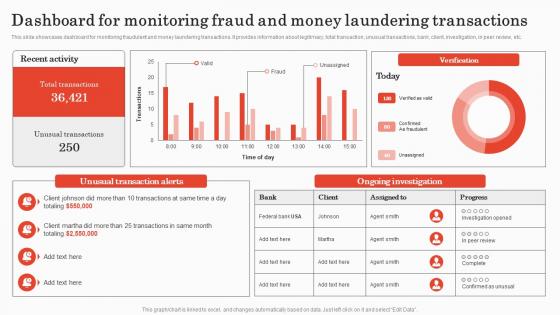
This slide showcases dashboard for monitoring fraudulent and money laundering transactions. It provides information about legitimacy, total transaction, unusual transactions, bank, client, investigation, in peer review, etc.
People who downloaded this PowerPoint presentation also viewed the following :
Dashboard For Monitoring Fraud And Money Implementing Bank Transaction Monitoring with all 7 slides:
Use our Dashboard For Monitoring Fraud And Money Implementing Bank Transaction Monitoring to effectively help you save your valuable time. They are readymade to fit into any presentation structure.





FAQs for Dashboard For Monitoring Fraud And Money Implementing
Track your fraud detection rate, false positives, and transaction volume first - those are non-negotiable. Average investigation time matters too, plus both losses prevented and actual losses (obviously). Fraudsters keep evolving their tactics, so trend analysis is huge. For the dashboard, real-time alerts are clutch, geographic views help spot patterns, and you need something to track investigator workload or people burn out fast. Honestly, start simple with these basics then add whatever your team actually ends up using daily. No point building something fancy that sits there collecting digital dust.
Honestly, real-time visualization is a game changer for catching fraud. Instead of finding out days later, you'll see weird stuff happening immediately - like transaction spikes or sketchy geographic patterns popping up on heat maps. Your brain just processes visual patterns way faster than scrolling through endless data rows (which is mind-numbing anyway). Set up alerts for when things hit certain thresholds so you're not glued to screens 24/7. I'd start simple though - pick your top 3 fraud red flags and build live charts around those first. Way easier than trying to track everything at once.
So those ML algorithms are basically doing all the heavy lifting for fraud detection. They're scanning through millions of transactions looking for sketchy patterns that would take humans forever to catch. You've got some that learn from old fraud cases, others that spot totally new weird behavior. The real-time scoring is honestly pretty impressive - flags stuff as it's happening. What's cool is they get better over time, so fewer false alarms but better at catching the actual bad guys. Oh, and definitely check your model performance stats regularly or things can go sideways fast.
So basically, user behavior analytics gives your fraud alerts way better context. You're not just flagging weird amounts or locations anymore - you can catch stuff like someone who always shops online suddenly hitting up physical stores nonstop, or logins from totally different devices. It creates this "normal" baseline for each person. False positives drop like crazy because you're seeing the full picture, not random isolated events. I'd start tracking maybe 3-4 key things per user - how they login, spending patterns, what devices they use. Honestly makes your whole dashboard way smarter at spotting actual fraud.
Put your high-risk stuff right at the top where nobody can miss it. Red for urgent, yellow for moderate - you know the drill. I swear half the dashboards I've seen look like someone threw up rainbow alerts everywhere. Make your key metrics visible without scrolling, and when people need to dig deeper, the path should be obvious. Oh, and throw in transaction history and customer profiles on the main screen. Less clicking means faster responses. Your analysts shouldn't have to hunt around when there's a real threat sitting there.
Honestly, dashboards are a game-changer for catching fraud. You can spot weird patterns instantly - like sudden spikes in sketchy transactions or clusters of activity from random locations. Way better than scrolling through endless spreadsheets (seriously, who has patience for that anymore?). Set up alerts when things hit certain thresholds so you're not just staring at screens all day. Track stuff like failed logins, weird spending habits, or transaction speeds that don't make sense. The visual aspect makes everything click faster - heat maps and real-time charts just make the sketchy stuff pop out at you.
Main thing is don't overwhelm people with a million metrics - focus on what actually moves the needle. I've seen too many teams set alert thresholds way too low, so everyone just starts ignoring them. Classic boy-who-cried-wolf situation. Make sure your data refreshes fast enough for people to actually do something about it. Account for false positives in your charts too, or you'll drive everyone crazy. Keep the visualizations simple and add context so people know what they're looking at and what to do next. Honestly, less is usually more with these things.
So banking fraud dashboards are all about tracking transaction speed and weird location stuff. E-commerce companies focus more on account takeovers and sketchy shipping addresses - makes sense when you think about it. Healthcare is honestly crazy with how creative people get with billing scams, so they watch provider patterns closely. Insurance folks cross-check damage photos against claims data. The real trick? Look at your own past fraud cases first. Figure out what red flags would've caught those specific scams early. Don't just copy some generic dashboard template - build around the fraud that actually hits your industry hard.
Start with your transaction data - payment history, amounts, frequency, where they're happening. Customer info is huge too: accounts, behavior patterns, device fingerprints, IP stuff. External feeds matter - blacklists, credit bureaus, fraud databases. Social media can actually be pretty useful, though the privacy thing gets messy there. Historical fraud cases? Pure gold for spotting patterns. Real-time integration between all these sources is what makes or breaks it. I'd build out your core transaction and customer data first, then add the external stuff once you've got that foundation solid. Much easier that way.
Honestly, visualization beats staring at spreadsheets any day. Heat maps will show you fraud hotspots instantly - way better than scrolling through endless rows. Time-series charts are clutch for catching weird spikes in transactions. I'm obsessed with scatter plots because outliers just pop right out at you. Network diagrams are pretty cool too, they'll expose when accounts are linked in sketchy ways. The trick is building dashboards where the bad stuff basically screams at you visually. Oh, and match your chart types to whatever fraud you see most often.
Real-time commenting is clutch - your team can flag weird patterns right on the dashboard. Shared workspaces are a lifesaver too since multiple people can work cases without creating chaos. Set up role-based access so people only see their stuff. Activity feeds keep everyone in the loop when case statuses change or new intel drops. Honestly, exportable reports are probably the biggest win though. Makes those Monday meetings so much smoother and keeps everyone on the same page about current threats. Way better than trying to remember everything from memory.
Historical data is basically your fraud detection goldmine. You're feeding past transaction patterns and known fraud cases into machine learning models so they can learn what "normal" vs "suspicious" looks like. More quality data = better algorithms at catching subtle stuff humans miss. Think of it like teaching someone to spot a fake by showing them thousands of real examples first. Your models pick up on seasonal trends, merchant behaviors, fraud tactics - honestly, the pattern recognition gets pretty impressive. Oh, and definitely audit what historical data you actually have access to first. Make sure it's clean and labeled properly or you'll just confuse your models.
So you'll want to layer your security pretty heavily here. Role-based access is huge - only let people see what they actually need to see. Multi-factor auth is non-negotiable too. Encrypt literally everything, both stored data and stuff moving around. PII fields should get masked because nobody needs to see full SSNs anyway. Audit logs are boring but critical - track every single access. Session timeouts will save you when someone inevitably walks away from their desk. Regular security reviews help catch gaps you missed. Honestly, I'd tackle access controls first since that's where you're most exposed right now.
Just throw some quick rating buttons right on your dashboard - makes it super easy for users to flag false positives or report stuff you missed. Comment boxes work great too. Honestly, I've watched teams spin their wheels for months because they never asked users what actually sucked about their setup. Don't do that! Regular review sessions help a ton - analysts will tell you exactly what's broken. Oh and A/B test new features if you can. Track which detection rules actually catch real fraud vs just creating more noise. The whole thing only works if giving feedback doesn't feel like a chore.
Honestly, bias is your biggest headache here. Historical data loves to bake in discrimination, so your model might flag certain groups way more than others. Privacy's another nightmare - you can't just hoover up personal data without thinking about storage and compliance. Those privacy laws will bite you hard if you mess up. Always have humans double-checking the big decisions though. Don't let the algorithm auto-reject someone's mortgage application or whatever. Oh, and audit regularly for fairness issues. Document everything too because you'll need those policies later.
-
Great product, helpful indeed!
-
SlideTeam is the best in the business. Their templates are engaging and customizable. You can rely on them.