

Data Centre Relocation Powerpoint Presentation Slides




Try Before you Buy Download Free Sample Product
 Impress Your
 Audience
 100%
100% Editable
 Save Hours
 of Time


Introducing our content ready Data Centre Relocation Powerpoint Presentation Slides. Plan a successful data center relocation with the help of this professionally designed data migration presentation deck. The visually appealing data center migration methods PowerPoint complete deck comprises of various self-explanatory templates such as data migration approach, steps, lifecycle, flowchart, etc. Moving a data center is extremely sensitive operation. Showcase key considerations of data center migration using the ready-to-use data transfer process PPT slides. Incorporate the IT relocation PowerPoint templates to showcase ways to streamline the planning and executing of complex migration projects. Make use of the server migration PPT visuals to demonstrate tools for migration analysis, planning, and execution. Furthermore, the data center transfer strategy PowerPoint presentation is also useful to plan IT relocation in a structured manner. Thus, download this high-quality professional-looking infrastructure relocation PPT slides to present a comprehensive and systematic process of migrating the existing data center to a new site. Our Data Centre Relocation Powerpoint Presentation Slides enable effective follow up action. Draw from the benefits of events gone by.
People who downloaded this PowerPoint presentation also viewed the following :
Content of this Powerpoint Presentation
Slide 1: This slide introduces Data Centre Relocation. State Your Company Name and begin.
Slide 2: This is an Agenda slide. State your agendas here.
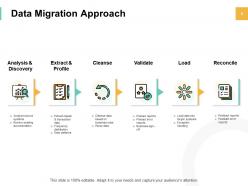
Slide 3: This slide shows Data Migration Approach describing- Analysis & Discovery, Cleanse, Load, Extract & Profile, Validate and Reconcile.
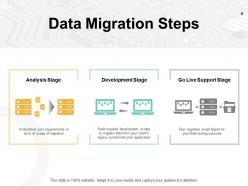
Slide 4: This slide presents Data Migration Steps which includes- Analysis Stage, Development Stage and Go Live Support Stage.
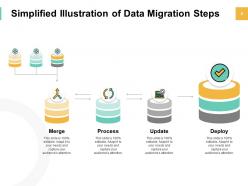
Slide 5: This slide displays Simplified Illustration of Data Migration Steps which includes- Merge, Process, Update and Deploy.
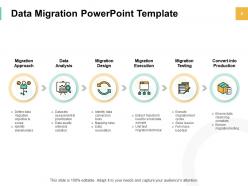
Slide 6: This slide represents Data Migration PowerPoint Template describing- Migration Approach, Data Analysis, Migration Design, Migration Execution, Migration Testing and Convert into Production.
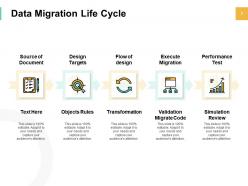
Slide 7: This slide showcases Data Migration Life Cycle describing- Source of Document, Design Targets, Flow of Design, Execute Migration and Performance Test.
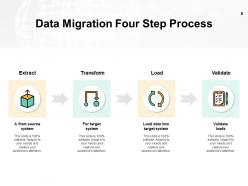
Slide 8: This slide shows Data Migration Four Step Process as- Extract, Transform, Load and Validate.
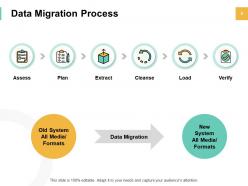
Slide 9: This slide presents Data Migration Process as- Assess, Plan, Extract, Cleanse, Load and Verify.
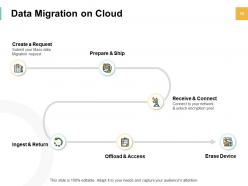
Slide 10: This slide displays Data Migration on Cloud as- Create a Request, Prepare & Ship, Receive & Connect, Ingest & Return, Offload & Access, Erase Device.
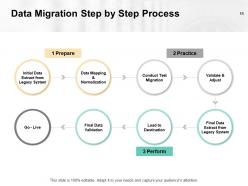
Slide 11: This slide represents Data Migration Step by Step Process as- Initial Data Extract from Legacy System, Data Mapping & Normalization, Conduct Test Migration, Validate & Adjust, Go - Live, Final Data validation, Load to Destination and Final Data Extract from Legacy System.
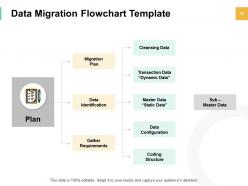
Slide 12: This slide showcases Data Migration Flowchart Template describing- Migration Plan, Gather Requirements, Data Identification, Cleansing Data, Transaction Data “Dynamic Data”, Master Data “Static Data”, Data Configuration, Coding Structure and Sub – Master Data.
Slide 13: This slide displays icons for Data Centre Relocation.
Slide 14: This slide is titled as Additional Slides for moving forward.
Slide 15: This is Our Mission slide with related imagery and text boxes.
Slide 16: This is About us slide to show company specifications etc.
Slide 17: This is Our Team slide with names and designation.
Slide 18: This is a Financial slide. Show your finance related stuff here.
Slide 19: This is a Puzzle slide with text boxes to show information.
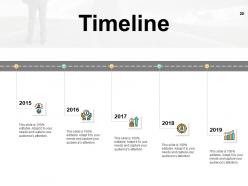
Slide 20: This is a Timeline slide to show information related with time period.
Slide 21: This slide is titled as Important Notes. Post your important notes here.
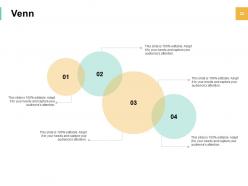
Slide 22: This is a Venn slide with text boxes.
Slide 23: This is an Idea Generation slide to state a new idea or highlight information, specifications etc.
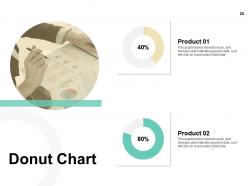
Slide 24: This slide shows Donut Chart with data in percentage.
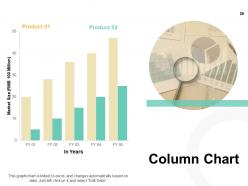
Slide 25: This slide presents Column Chart with two products comparison.
Slide 26: This is a Thank you slide with address, contact numbers and email address.
Data Centre Relocation Powerpoint Presentation Slides with all 26 slides:
Use our Data Centre Relocation Powerpoint Presentation Slides to effectively help you save your valuable time. They are readymade to fit into any presentation structure.






FAQs for Data Centre Relocation
Honestly, timeline's your biggest enemy here - everything will take twice as long as you think. Power and cooling capacity at the new site needs to handle your current stuff plus whatever growth you're planning. Oh, and if you're crossing borders, compliance gets messy fast. Build your migration runbook now, not later. Hardware's gonna fail during transport so have backup plans ready. Test your critical systems in the new environment before you flip the switch. I've seen too many migrations go south because someone skipped the boring prep work.
First thing - power and cooling are make-or-break. Can they handle your current load plus like 30-50% growth? I've seen way too many "adequate" cooling systems that definitely weren't lol. Measure everything: rack space, ceiling height, floor weight limits. Fiber options matter too, especially redundant internet paths. Honestly, don't trust photos - you've gotta walk the facility yourself. Accessibility and actual conditions are always different than what they show you. Oh, and create some kind of scoring system to compare sites. Your gut's probably wrong when there's this much money involved.
Data loss is your worst nightmare here, plus downtime and busted equipment if movers screw up. Back everything up first - like, everything. Get IT-specialized movers because regular ones will toss your servers around like furniture. Honestly, I'd keep your old systems running until the new site's bulletproof and tested. Build detailed runbooks so nothing gets missed. Oh, and tell everyone it'll take way longer than planned because it always does. These moves are brutal on timelines. Start planning this thing at least 6 months out, maybe more.
Definitely set up backup connections between both sites first - like having a safety net before you jump. VPN tunnels or dedicated circuits work great for keeping everything talking during the move. Don't do one massive cutover (learned that the hard way once). Gradual migration saves you so much stress. Test your failover stuff on non-critical systems multiple times before touching anything important. Oh, and map out your network topology at both locations beforehand. Trust me, you don't want your team scrambling around asking "wait, which cable goes where?" when you're under pressure.
So basically you need a solid backup plan for when stuff inevitably goes sideways during your move. Map out what you'll do if each critical system crashes - where's your temporary site, how long to get back up, all that. Test everything beforehand though, seriously. I learned this the hard way on my last project. You don't want to be scrambling to figure out recovery steps while half your infrastructure is down. Document the whole process and run through it with your team. Trust me, Murphy's Law loves server moves.
First thing - make encrypted backups of everything before you even think about moving stuff. Run checksums and hash checks at every step to catch corruption right away. Finding data issues weeks later is honestly the worst. Don't shut down your backup systems at the old location until you've tested everything thoroughly at the new site. Document who handled what hardware and when - chain of custody matters more than you'd think. Use secure transport with GPS tracking too. The whole point is having multiple checkpoints so if something goes wrong, you'll know exactly where it happened.
Dude, start planning at least 6 months ahead - these moves will absolutely wreck you if you wing it. First thing: detailed inventory and risk assessment. Break it into smaller chunks by system priority instead of moving everything at once (way less stressful). Test everything in a lab first, obviously. Communication between your tech teams and vendors is crucial or you'll have chaos. Build buffer time into your timeline because Murphy's Law is real. Oh, and have solid rollback plans for each phase - learned that one the hard way. Honestly, treating it like several mini-projects saves your sanity.
First thing - figure out the carbon footprint for both spots. Look at what powers each facility (coal vs renewables makes a huge difference), plus cooling efficiency and PUE ratings. Moving from coal to clean energy? That's a game changer. Climate matters too - some locations just need way less AC. But honestly, don't forget about the move itself. Trucking servers cross-country isn't exactly green, even if it sounds boring to calculate. Map this out over 3-5 years to see if you actually come out ahead environmentally.
Dude, start with asset discovery tools like Device42 or Lansweeper - trust me on this one. Map everything at least 90 days out because finding random servers during migration is a nightmare. Monday or Asana will save your butt when juggling all the moving pieces. Robocopy handles data transfers pretty well, and SolarWinds lets you watch network performance during cutover. Oh, and if you're running VMs, vMotion is clutch for moving stuff with barely any downtime. Honestly, the asset audit part is boring but you'll thank yourself later.
Start with a complete network diagram - map every physical and logical connection you've got. Seriously, this will save you so much pain later. Take photos of your rack layouts and note power requirements, cable management, all that stuff. Make detailed hardware inventories with serial numbers, configs, firmware versions. Oh, and grab your current monitoring baselines so you can actually verify things work after the move. I learned this the hard way - once you start tearing everything apart, you can't exactly go back to double-check something you forgot to document.
Get your vendors sorted early and pick one person to handle each relationship. Map out your timeline with all the dependencies - trust me, this gets chaotic quick without proper organization. Weekly calls with the big players are non-negotiable: network, movers, power/cooling people. They won't coordinate with each other (learned that the hard way), so you're basically the middleman. Document everything, especially timelines and what happens if things go sideways during the move. Oh, and line up backup vendors now before you actually need them.
Okay so first thing - map out every compliance requirement you're dealing with. SOX, HIPAA, PCI DSS, whatever nightmare regulations hit your industry. Document your current controls and how you'll keep them working during the move and after. Some regulations are picky about data residency too, so check if moving locations screws anything up geographically. Your new facility better have the right certifications - SOC 2, ISO 27001, all that stuff. Oh and make sure your security protocols can actually survive the transition. Honestly, start this whole compliance review super early because getting auditor approval is painfully slow.
Dude, set up your communication stuff right away - email lists, Slack channels, regular check-ins with stakeholders. Our last migration was an absolute disaster because nobody knew what was happening. Get contact info for everyone: business owners, IT folks, facilities, end users. Weekly updates work well - include timelines, what could go wrong, and what each group needs to do. Oh, and this is huge - make sure people can reach your team 24/7 during the actual move weekend. Trust me, something always breaks at 2am on Saturday night. Create a clear escalation process too so urgent issues don't get buried in email chains.
Oof, data center moves are brutal on the wallet - we're talking hundreds of thousands to millions depending on what you've got. The big hits are specialized transport (those server movers charge premium rates), downtime costs, and infrastructure upgrades at the new location. Plus staff overtime, contract penalties if you're ditching leases early, new connectivity setup. Testing afterward always ends up costing way more than expected too - learned that one the hard way. Get quotes from DC specialists and add 20% buffer minimum. Actually, make it 25%.
Start with the non-critical stuff first - way less stressful that way. Map everything out 3-6 months ahead (trust me on this timeline). Run both sites in parallel with redundant connections so you can test everything before switching over. Core infrastructure moves only happen during maintenance windows, obviously. Honestly, data center migrations are where everything goes wrong, so have a solid rollback plan ready. I always add 30% buffer time because something weird always comes up. Oh, and keep everyone in the loop constantly - stakeholders get cranky when they're surprised by downtime. Don't kill the old setup until you're 100% sure the new one's rock solid.
-
Innovative and Colorful designs.
-
Colors used are bright and distinctive.