


Devops cloud computing powerpoint template complete deck




Try Before you Buy Download Free Sample Product
 Impress Your
 Audience
 100%
100% Editable
 Save Hours
 of Time


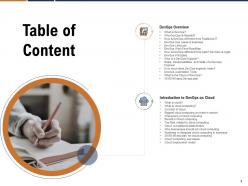
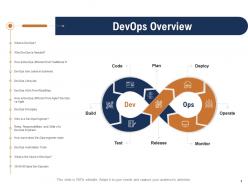
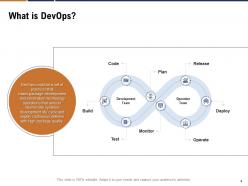
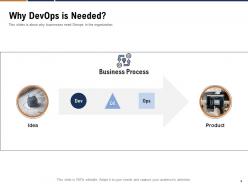
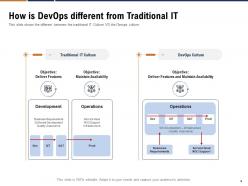
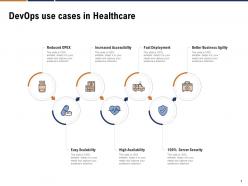
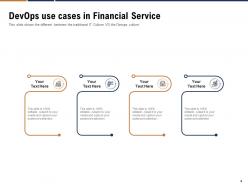
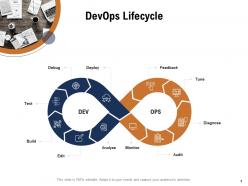
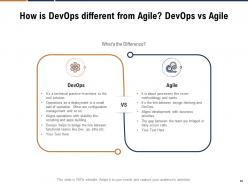
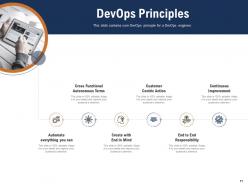
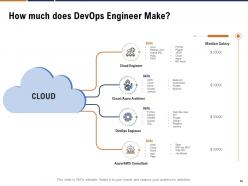
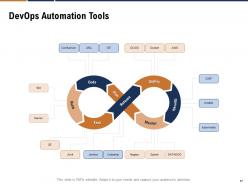
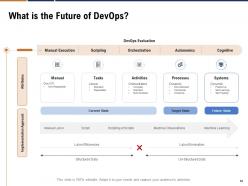
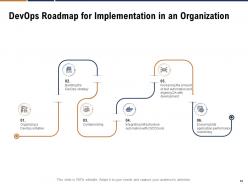
Give a brief overview of DevOps by employing our professionally designed DevOps Cloud Computing Powerpoint Template Complete Deck. This slideshow covers information like the need for DevOp, how it is different from traditional IT, DevOps use cases in business, lifecycle, roadmap, and so on. Take the assistance of the DevOps transformation strategy to showcase the difference between cloud and traditional data centers. You can describe to your audience how DevOps is different from agile by using the content-ready DevOps strategy PPT visuals. The presentation also explains the roles, responsibilities, and skills of DevOps engineers. Automation tools and roadmap for DevOps can be discussed effectively by using this professionally designed PPT slideshow. Describe the characteristics of cloud computing, benefits, top risks related to cloud computing. Cloud Computing PPT use cases and deployment models can be presented effectively with the help of visual attention-grabbing DevOps implementation roadmap PowerPoint slides. The roadmap to integrate cloud computing in business can also be explained using the DevOps implementation strategy PowerPoint slideshow.
People who downloaded this PowerPoint presentation also viewed the following :
Devops cloud computing powerpoint template complete deck with all 45 slides:
Use our DevOps Cloud Computing Powerpoint Template Complete Deck to effectively help you save your valuable time. They are readymade to fit into any presentation structure.




FAQs for Devops cloud computing powerpoint
So basically, traditional IT ops is slow as hell - everything's siloed and takes forever to get approved. DevOps flips that completely. Instead of dev teams throwing code over to ops and hoping for the best, everyone works together from start to finish. Cloud makes it even better because you can spin up resources in minutes instead of waiting weeks for someone to manually configure servers. Honestly once you automate your first deployment pipeline, you'll wonder how you ever did it the old way. The speed difference is insane - I'm talking automated provisioning, CI/CD, infrastructure as code, the whole deal. Just start with one small automation project and you'll see what I mean.
Dude, cloud services basically turbocharge your whole DevOps setup. AWS CodePipeline, Azure DevOps, Google Cloud Build - they handle all the CI/CD stuff so you don't have to mess with infrastructure. Everything's got APIs, which is clutch for scripting deployments and scaling. Honestly, the serverless stuff is where it gets really nice - code just runs when it needs to. I'd probably start with just one tool and build from there. Way better than spending your whole day dealing with server drama when you could be actually building cool features instead.
Honestly, just treat your CI/CD like regular code - version it, review it, the whole deal. Skip Jenkins if you can and go with AWS CodePipeline or Azure DevOps instead. Way less headache managing servers. Get your environments matching production, use cloud vaults for secrets (this one's huge), and make sure everything can scale automatically. Oh, and keep builds stateless in containers so they're consistent everywhere. I'd probably start with just one service first though - don't go crazy trying to pipeline everything at once. Build it up gradually as you figure out what works.
Honestly, the biggest pain points are gonna be figuring out who owns what security-wise between you and your cloud provider. CI/CD pipelines can push buggy code live way faster than any security team can review it - which is both awesome and terrifying lol. Container vulnerabilities are another headache, plus managing secrets across all these distributed services gets messy quick. Different cloud providers have their own compliance quirks too. Oh, and whatever you do, bake security scanning right into your pipelines from the start. Trust me on this one - retrofitting it later is a nightmare you don't want.
Honestly, microservices and DevOps work so well together in the cloud. Each service gets its own deployment pipeline, so teams aren't constantly blocking each other when pushing updates. The cloud handles all the container spinning and infrastructure stuff automatically. When things break - and they definitely will - you're only fixing one service instead of your whole app crashing. I've seen teams move way faster this way. You can scale just the parts that need it based on actual demand. Way better than those old monolithic setups where everything's tangled together.
Look at the DORA metrics first - deployment frequency, lead time, recovery time, and how often deployments fail. Those actually tell you something useful. Cloud costs will destroy your budget if you're not careful, so track spending per deployment and make sure you're not paying for stuff that's just sitting there doing nothing. Honestly, cycle time from commit to production is probably more important than most teams realize. Customer satisfaction scores help too if you can wrangle those numbers. The sweet spot is deploying fast without breaking everything or going broke. Check these weekly and you'll spot your problems pretty quick.
So Docker basically fixes that annoying "works on my machine" thing by bundling your app with everything it needs. Containers start up crazy fast - like seconds instead of minutes. Kubernetes handles the scaling automatically, spinning up more copies when traffic hits. If something breaks? Just roll back instantly. Honestly took me forever to wrap my head around K8s at first, but now I can't imagine deploying without it. Your CI/CD gets so much cleaner since the exact same container runs everywhere. I'd say start with just Docker on one service first - you'll immediately notice how much smoother deployments feel.
Dude, IaC is seriously a lifesaver - instead of clicking through AWS console like an animal, you write code to manage your whole infrastructure. Think Terraform or CloudFormation. Your servers, networks, everything becomes predictable since it's all version controlled. No more "wait, what settings did I use last time?" moments. Plus you can spin environments up and down instantly, which honestly spoiled me. Configuration drift becomes a non-issue too. I'd start simple though - grab one small environment and convert it to code first. Way less overwhelming than trying to do everything at once.
Honestly, start tracking costs from day one or you'll hate yourself later. Auto-tag all your resources by team and project - finance will definitely come asking questions eventually. Infrastructure as code prevents those random surprise bills from config drift. Dev environments running 24/7? That's just burning money. Set up auto-scaling and schedule shutdowns for test stuff. The real game-changer though is putting cost alerts directly in your CI/CD pipeline. Your whole team sees spending as it happens instead of getting blindsided at month-end.
Serverless totally changes how you think about DevOps - suddenly you're not dealing with servers anymore (which is honestly kind of liberating). Your focus shifts to code deployment and monitoring instead of all that infrastructure headache stuff. CI/CD becomes more event-driven, though. And monitoring? Yeah, that gets interesting since you can't just check CPU usage anymore. Testing locally is probably the most annoying part - replicating that environment is a pain. My advice? Start with just one function first. Get used to how deployment works before you go crazy and try to migrate everything at once.
Start with Prometheus + Grafana for infrastructure stuff - they just work together perfectly. If you're on AWS, CloudWatch is solid too. New Relic or Datadog will handle your app performance monitoring. Oh, and you'll need log aggregation - ELK stack is popular but honestly Splunk's easier if budget isn't tight. PagerDuty's great for alerts since it connects to everything. Don't try implementing all this at once though, pick one tool per area first. Trust me, I learned that the hard way last year. Way less stressful than doing a big bang approach.
Honestly, you've gotta build compliance into your CI/CD from the start - trust me on this one. Automated policy checks and security scanning should run with every single deployment. Infrastructure as Code is clutch because everything becomes traceable and repeatable. I've watched teams try adding governance afterward and it's always messy. AWS Config, Azure Policy, or GCP's Security Command Center work great for continuous monitoring. Oh, and document your compliance requirements first. Then automate checks for those specific rules. Way easier than scrambling later.
Honestly, DevOps is a game-changer for getting dev and ops teams to actually work together instead of throwing things over the fence. Your teams start deploying way faster since they're sharing the same monitoring tools and dashboards. Catching bugs early becomes normal when everyone's looking at the same data. The blame game pretty much disappears - which, let me tell you, is huge for morale. You'll have way fewer 2am panic calls about stuff breaking. Productivity goes up because people aren't fighting each other anymore. Just try putting your dev and ops people on one project together first.
Honestly, your cloud provider pretty much dictates everything about your DevOps setup. AWS has CodePipeline, Azure's got DevOps, Google has Cloud Build - they're all different beasts. Some mesh better with tools you're already using, which is clutch if you don't want headaches later. Pricing structures totally change how much you can mess around with auto-scaling too. Oh, and if your team already knows one platform inside out, starting over somewhere else is gonna be painful. I learned that the hard way. Pick whatever matches your current tools and team knowledge.
Skip the boring lectures and get your team actually building stuff in sandbox environments. They'll mess up at first (everybody does), but that's how you learn. Pair your experienced DevOps people with the newbies for mentoring. Cross-functional sessions work great too - helps devs and ops understand each other's pain points. Don't forget the cultural piece alongside Docker and Kubernetes training. Honestly, the mindset shift is harder than the tech. Regular lunch-and-learns keep things moving where people demo their latest wins.
-
Your devops cloud computing slides are so gorgeous and bewitching. I myself was not able to take my eyes off initially.
-
It saves your time and decrease your efforts in half.
-
The Designed Graphic are very professional and classic.
-
Best Representation of topics, really appreciable.
-
Design layout is very impressive.
-
Excellent design and quick turnaround.
-
Innovative and Colorful designs.
-
Very unique, user-friendly presentation interface.
-
Great designs, really helpful.