

Driver diagram plan powerpoint template




Try Before you Buy Download Free Sample Product
 Impress Your
 Audience
 100%
100% Editable
 Save Hours
 of Time


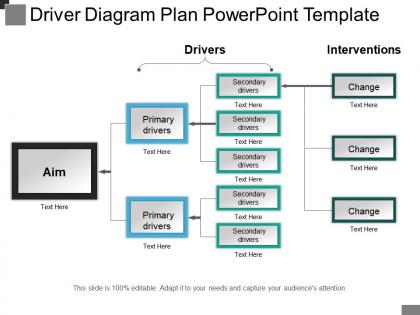
If you are looking to create a presentation on prevalent market drivers which you can use in your projects to give new and glorified direction to your organization, then do it in an illustrative way by picking this impressive driver diagram plan PowerPoint template. Using a combination of high definition graphics and minimalist design, the presenter can make use of market key players map plan to present both an overview and focussed presentation. The economic drivers statistics map plan is specifically designed and crafted to discuss the concept of economic development while considering the market drivers which are in force and demand. This slideshow has been designed for presenting the factors illustratively which are responsible for causing hindrances in growth and development of your organization. The implementation of the PPT slide makes your work easier by removing those factors. The PowerPoint presentation provides you a framework by which you can plan your actions in stipulated time frame. This slide graphic is also useful in marketing presentations and proposals to show specific steps which are useful for your organization in terms of economic development. You can store this PPT Diagram in your record for reuse whenever required and needed. Ensure all hatchets are buried deep with our Driver Diagram Plan Powerpoint Template. Don't allow any fights to erupt.
People who downloaded this PowerPoint presentation also viewed the following :
Driver diagram plan powerpoint template with all 5 slides:
Be delightfully captivating with our Driver Diagram Plan Powerpoint Template. You will be at your charming best.
FAQs for Driver diagram
So driver diagrams have three parts - your main goal sits at the top, then primary drivers in the middle, and secondary drivers at the bottom. It's basically a logic tree that flows downward. The goal is your big target, primary drivers are the major stuff that directly impacts it, and secondary drivers are the actual changes you can make. Honestly, I see people way overthink these things all the time. They're just visual roadmaps when you get down to it. Start with your goal first, then work backwards to figure out what'll actually move the needle. Makes way more sense that way.
So a driver diagram template is basically your project's visual roadmap. Shows how your actual tasks connect to the big goals you're trying to hit. Three levels: main objective at the top, key drivers in the middle, then your specific change ideas at the bottom. Honestly, it's a lifesaver for keeping everyone on the same page - no more confused stakeholders asking "wait, why are we doing this again?" You can see the whole cause-and-effect flow instantly. I always sketch one out before project kickoffs now, saves so much headache later.
So healthcare and manufacturing use these driver diagrams the most - they're always trying to cut costs or boost quality. Logistics, software teams, and financial services love them too. Pretty much anywhere you need to connect big picture goals to actual tasks. Startups have been jumping on this lately, which totally makes sense when you're moving fast but can't afford to lose focus. The whole thing works because you map out cause-and-effect before diving in. Honestly saved my butt on a few messy projects. You should try it next time you're planning something complex.
So driver diagrams are way better at showing cause-and-effect than other planning tools. SWOT analysis just gives you the big picture stuff, but these actually map out what changes you need to hit your goal. Honestly? They're kind of addictive once you get the hang of them. You start with your outcome and work backwards through primary drivers to specific ideas. Balanced scorecards get super abstract - driver diagrams keep things concrete. My friend used one for her team's project last month and said it was a game-changer. Just work backwards from your aim and you'll see what actually matters.
Don't use generic templates - they never fit right anyway. Pick 3-5 main drivers tops, or you'll end up with a confusing mess. Your change ideas need to be stuff you can actually do and measure, not just hoping for the best. Ditch the corporate speak and talk like a normal person. Color-coding helps people see how everything connects without squinting at tiny text. Oh, and update the thing regularly! I've seen too many of these gather dust while teams stumble around wondering why nothing's working. It's supposed to evolve as you figure out what actually moves the needle.
Oh definitely! The Institute for Healthcare Improvement used them for their 100,000 Lives Campaign - saved a crazy number of hospital patients by mapping out stuff like medication safety and infection prevention. Toyota's been doing this forever too, though they probably call it something completely different because that's just how Toyota rolls. Manufacturing companies use them all the time for cutting defects. Healthcare systems can't get enough of them for patient safety projects. Check out IHI's website if you want examples - they've got tons of real case studies with actual numbers you can dig into.
So basically, outcomes are what you want to happen, and drivers are how you actually make it work. Your primary drivers directly push toward that outcome, then secondary drivers back up the primary ones. It's like working backwards from your goal - which honestly makes way more sense than trying to figure it out forwards. The whole thing only works if your team can actually control and track each driver though. Otherwise you're just crossing your fingers and hoping stuff happens. Make sure everything connects in a logical chain, or you'll end up with a pretty diagram that doesn't do anything.
Honestly, just use whatever you already have. PowerPoint or Google Slides work fine - I've seen some really clean driver diagrams made in PowerPoint that blow away the fancy ones. Lucidchart and Miro are nice if you want templates and better collaboration stuff, but don't overthink it. Visio's solid too if your company actually pays for it. The main thing is making sure everyone on your team can jump in and edit. You're gonna be tweaking these constantly anyway. I'd rather start with something basic that everyone knows than waste time learning new software when you could be actually building the thing.
Honestly, get everyone together - either in person or on a call - and build the whole thing from the ground up as a team. Skip having one person draft it first because you'll lose valuable input and people won't feel invested. Begin with defining your main driver together, then tackle the secondary ones and brainstorm changes. Takes way longer than going solo, obviously, but the group perspective is totally worth it. Use something like Google Docs where everyone can jump in and edit live. Oh, and don't forget to actually revisit it regularly based on what you're learning along the way.
Honestly, you can't build a decent driver diagram without data - otherwise you're just making stuff up. Grab your baseline metrics first to see what actually needs fixing. Historical data shows you what's been causing problems too. I've watched so many teams create these gorgeous diagrams that totally bomb because they never looked at the numbers. Quick tip though - don't get stuck waiting for perfect data, just start with what you've got. Focus on which drivers will move the needle most. You can always fill in gaps later, but at least you'll be working with real info instead of hunches.
Honestly? I'd say quarterly is a good baseline, but it really depends on your project. Dynamic stuff that's changing constantly might need monthly check-ins. More stable projects can go 3-6 months easy. The main thing is don't let it collect dust - that's way worse than having no diagram at all. I always set a calendar reminder to review whether my primary drivers still make sense or if I've found new secondary ones. Oh, and pro tip: outdated diagrams will totally mislead your team, so better to toss them than keep bad ones around.
Don't make your aim too vague - you'll never know if you're actually getting anywhere. I see people try to cram everything onto one diagram all the time, and it just becomes a mess. Stick with 3-5 primary drivers that actually matter. Here's something that trips people up: activities aren't drivers. "Hold more meetings" is just busy work, but "improve team communication" could actually move things. Start simple with the vital few factors that really impact your goal. You can always add more detail later once you figure out what's working. Way easier to build up than tear down a complicated mess.
Honestly, driver diagrams work great for agile if you tweak them right. Your primary drivers should match sprint goals or whatever big outcomes you're chasing. Then break those down into user stories as secondary drivers. Change ideas? Those become your backlog items. I've been using these for sprint planning lately and wow, it actually makes things way clearer. Just don't get too rigid about it - you gotta update the thing constantly as priorities shift. Treat it more like a living doc that evolves. Map your next sprint this way and you'll probably see which stuff actually drives user value versus... well, the other nonsense we sometimes build.
Honestly, driver diagrams are a game-changer for talking to stakeholders. You can just point at the visual and show exactly how your project connects to the big goals - no more boring PowerPoint explanations. I've seen so many meetings where people look totally lost about how their work fits in. This fixes that instantly. Plus you'll catch misaligned stuff way faster when everyone's looking at the same map. The visual thing really works - people get it right away instead of sitting there confused. Next time you're presenting to leadership or whoever, try one out. You'll probably wrap up decisions in half the time.
Mix both on your driver diagram - put the hard numbers as your main metrics, then sprinkle in qualitative stuff for context. So like if you're tracking "customer satisfaction," yeah track the score but also grab feedback themes. Honestly, numbers alone are pretty useless without the story behind them. Qualitative insights explain the "why" when your metrics shift. Leadership gets their data fix, but your team actually understands what's happening. Works way better than going all-in on just one type. I learned this the hard way on my last project.
-
Easily Understandable slides.
-
Very well designed and informative templates.