Driver diagram plan framework powerpoint layout
Try Before you Buy Download Free Sample Product
Audience
Editable
of Time
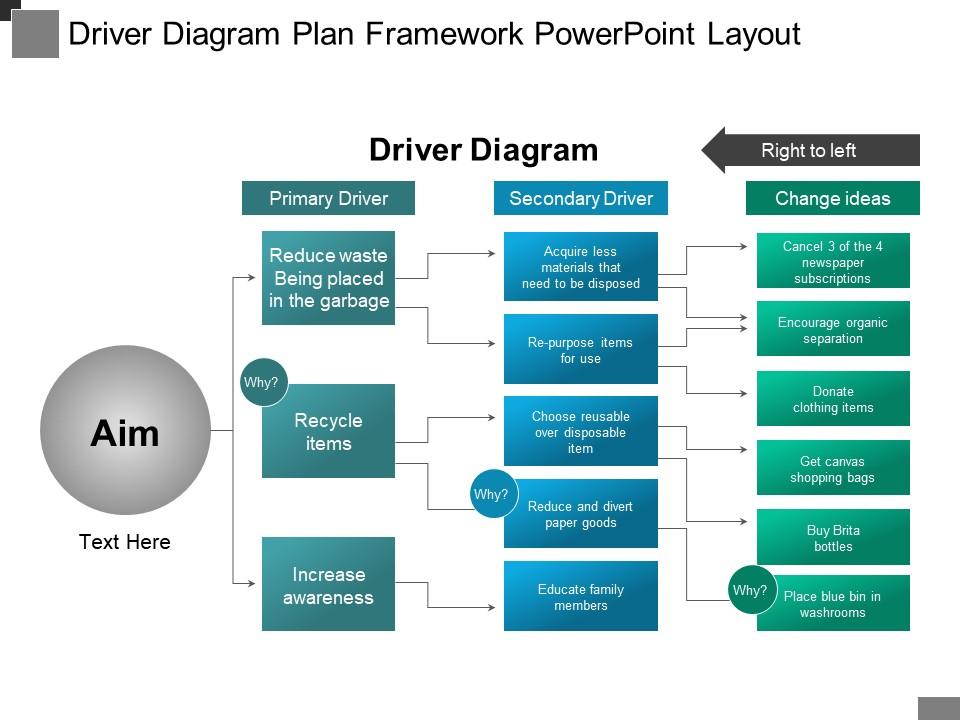
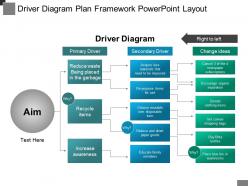
Driver diagram plan framework PowerPoint layout is professional presentation featuring the key aspects of new visionary ideas, primary and secondary drivers which are prevalent in the market. With the help of this business operator blueprint plan model PPT, the user can easily describe the framework of implementing new ideas and market drivers to achieve the set goals. You can put up this market force diagram layout model slideshow if you are going to submit a presentation on the factors also which makes your projects cost efficient and reasonable. This value diver statistics proposal framework PowerPoint slide provides you the layout of the projects which can be executed qualititatively and cost effectively. In short words, this PowerPower template is professionally designed to identify and analyse the fields, wherein you will manage to execute your time consuming tasks or projects successfully, practically and economically and no compromise with the quality. Create a convincing presentation like ours and express your ideas and convey your messages with this visually boosted and convincing PPT slide. Give due importance to cost effectiveness with our Driver Diagram Plan Framework Powerpoint Layout. Explain how to handle expenditure.
People who downloaded this PowerPoint presentation also viewed the following :
Driver diagram plan framework powerpoint layout with all 5 slides:
Handle any event with our Driver Diagram Plan Framework Powerpoint Layout. They are conducive to any activity.
FAQs for Driver diagram plan
So a driver diagram is basically your project's family tree - sounds weird but hear me out. You put your main goal at the top, then map out the big things that need to happen underneath (those are your key drivers). Under those, you list the actual stuff your team will do. It's super helpful because everyone can see how their random daily tasks actually connect to the bigger goal. Like you can draw a line from "fixing this one button" straight up to "boosting customer satisfaction 15%." Honestly, I wish more teams used these - would save so much confusion. Great for project kickoffs too.
So driver diagrams are basically like mapping out what actually makes your project work or crash and burn. Start with your main goal, then figure out what directly affects it. Break those big things down into smaller drivers and specific ideas you can test. Think of it as a family tree but for all the moving parts in your project. Honestly, the visual part is clutch - it shows you what really matters vs. what just *feels* important. I'd build one for whatever you're working on now. You'll probably find some obvious stuff you've been missing.
So it's basically three layers - your main goal sits at the top, then you've got primary drivers (the big strategies), and secondary drivers below those with actual stuff you can do. I always think of it like a tree structure, honestly. Your goal is the "why," primary drivers are your main game plan, and secondary ones are where you get into real changes you can make. Here's the thing though - nail down your goal first before doing anything else. I've seen people jump straight into mapping and end up with something that looks pretty but doesn't actually help. Everything builds from that aim, so get that right and the rest falls into place way easier.
Honestly, driver diagrams are game-changers for getting teams aligned. You know those meetings where everyone's talking about different things? This fixes that. It's basically a visual map showing your goal, what drives success, and the actual changes you'll make. Think GPS but for projects - no more guessing what direction to go. Plus your team can finally see how their work fits the big picture, which makes prioritizing so much simpler. I'd definitely start your next kickoff by building one together. You'll be shocked how much faster decisions start happening.
Think of driver diagrams like reverse-engineering your goal. You take something vague like "better customer satisfaction" and break it down into the actual stuff that matters - response times, product quality, how clearly you communicate. Pretty straightforward concept, honestly. Each piece becomes something you can actually measure and track. Start with your main drivers first, then figure out specific KPIs for each one. That way you're not just guessing what's working. It's way better than setting some fuzzy objective and hoping for the best.
So primary drivers are basically your main focus areas - the big stuff you need to tackle to hit your goal. Secondary drivers get more specific and actionable. They're the "how" behind your primary drivers. Like if your primary driver is "cut patient wait times," then secondary ones might be "fix the scheduling mess" and "get staffing right." It's honestly pretty helpful having this hierarchy because it keeps your improvement work organized. You won't accidentally miss obvious areas when you're planning everything out. Makes the whole process way less overwhelming too.
Honestly, driver diagrams are a game-changer for healthcare improvement projects. They show you how your big goal connects to all the smaller changes you need to make. So like, if you want to cut readmissions by 20%, you'd map out the main factors causing readmissions, then list specific fixes under each one. It's basically your project roadmap. Super useful when you've got a million ideas floating around and need to focus on what'll actually work. I always use them at project kickoffs - helps get everyone on the same page about which changes are gonna make the biggest difference.
Honestly, the biggest mistake is overcomplicating it right off the bat. You'll drown in details and your team won't touch it. Stick to 3-5 primary drivers tops - seriously, resist going crazy with the mapping initially. Also don't make your outcome statement some wishy-washy thing you can't actually track. That's useless. Getting your team involved early is huge too, otherwise they'll just ignore whatever you create. Oh, and start simple! Test it out first, then add layers once you figure out what actually works. I've seen way too many beautiful diagrams that nobody ever looks at again.
Yeah, driver diagrams are super flexible! I'd start with whatever you're actually trying to accomplish, then figure out what's gonna move the needle in your specific situation. Honestly, there's no magic template you have to stick to - might need totally different metrics or timeframes depending on your industry. Sometimes I see people overthink this part. Just make sure you can actually measure each driver and it connects back to your main goal. Keep it simple at first, then tweak as you go and see what really matters.
Honestly, any visual tool works fine for driver diagrams. I use Lucidchart and Miro mostly, but Visio and Draw.io are solid too. Hell, I've made decent ones in PowerPoint when I'm being lazy. Just pick something that lets you connect boxes and drag stuff around easily. Miro's probably my favorite for team stuff since everyone can jump in and mess with it at the same time. But seriously? Don't overthink the software choice. Use whatever you already have sitting on your computer. The actual thinking behind the diagram matters way more than making it look pretty in some fancy tool.
Honestly, you want like 3-5 big picture drivers that actually matter to your main goal. Don't go crazy with detail right away. Break those down into stuff your team can actually do something about and measure - that's the magic zone. I usually stop when I hit the "okay so what's our next move?" moment. That's when you know you've found the actionable level. If your diagram looks like a spider web, you've definitely overdone it. Each thing should connect to something real you can change. And yeah, keep it visual - helps everyone stay on the same page instead of getting lost in analysis paralysis.
Driver diagrams are seriously game-changers for strategic planning. They show you exactly how your big goals connect to day-to-day actions and the metrics that matter. Build one with your key people during planning sessions - it'll help you spot strategy gaps and make sure everyone gets how their work fits the bigger picture. Way more useful than those boring strategy docs that just sit there collecting dust. Once you've got it, use it as your guide for making tough prioritization calls. The cause-and-effect stuff becomes super clear. Honestly makes the whole planning process feel less chaotic.
Once you know what to look for, they're literally everywhere. Hospitals use them all the time for stuff like cutting readmissions - they'll map out better discharge planning, patient education, follow-ups. Manufacturing does the same thing but for quality control. Tech companies too, especially for boosting user engagement. Honestly, retail might be where I've seen the coolest examples - they break down customer satisfaction into training, store layout, inventory stuff. Oh, and don't sleep on looking at what your competitors or similar industries are doing first. Way easier to tweak something that already works than start from scratch.
Driver diagrams basically turn your big messy project into bite-sized pieces you can actually measure. Each part gets its own specific metrics, so you're not just guessing if things are working. Think of it like having a dashboard for your project - honestly way better than flying blind. You'll quickly see which areas are actually moving forward and which ones are stuck. The visual setup makes it pretty obvious where to focus your energy next. Just check in on those numbers regularly and you won't get any nasty surprises later.
So they're pretty similar but used differently. Logic models map your whole theory - inputs, activities, outputs, outcomes in that classic flow. Driver diagrams are way more hands-on for improvement projects. They take your big goal and break it into key drivers plus the actual changes you'll test. Honestly, I think of logic models as your "why" and driver diagrams as your "how." If you're doing improvement work, just start with the driver diagram since it's actually actionable. Logic models are great but can feel too high-level when you need to test stuff.
-
Awesome presentation, really professional and easy to edit.
-
Easily Editable.