


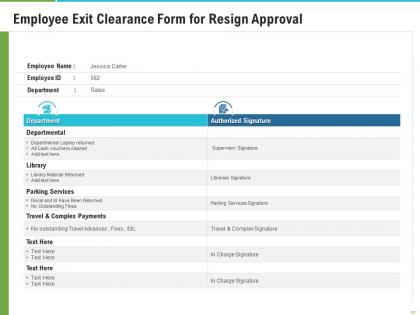
Employee exit clearance form for resign approval




Try Before you Buy Download Free Sample Product
 Impress Your
 Audience
 100%
100% Editable
 Save Hours
 of Time


Our Employee Exit Clearance Form For Resign Approval are topically designed to provide an attractive backdrop to any subject. Use them to look like a presentation pro.
People who downloaded this PowerPoint presentation also viewed the following :
Employee exit clearance form for resign approval with all 2 slides:
Use our Employee Exit Clearance Form For Resign Approval to effectively help you save your valuable time. They are readymade to fit into any presentation structure.
FAQs for Employee exit clearance form
Honestly, make it a checklist or you'll forget something important. Start with the obvious stuff - laptop, badge, keys, all that company property. IT needs to kill their accounts. Cover the money stuff too: final paycheck details, COBRA info, where to send tax docs. The knowledge transfer part is huge - passwords, file locations, project status. I learned that one the hard way when someone left and we couldn't find anything. Make sure their manager signs off that everything's accounted for. Don't forget expense reimbursements and get their forwarding address. Keep a digital copy for HR records because you know someone will ask about it later.
So basically it's your offboarding checklist that keeps everything organized when people leave. Tracks all the important stuff - laptops, keycards, paperwork, getting the right signatures. Without one? You'll be hunting down company property for weeks, trust me. It protects both sides too by documenting everything got handled right. Short sentences work. Longer ones help the flow feel more natural when you're explaining the details. I'd definitely look over whatever form you're using now - probably missing something from a department you forgot about.
Dude, just fill out the stupid form. Trust me on this one. You don't want HR coming after you later about that laptop or whatever else they gave you. Plus it protects you too - like if they try to mess with your final paycheck or benefits stuff. Without that paperwork, things can get messy fast and turn into a whole legal nightmare. I've seen people get screwed over confidentiality agreements they forgot about. It's literally 15 minutes of your life. Do it, keep a copy, and you're golden.
Honestly, going digital with exit clearance is a game changer. No more running around hunting people down for signatures - the system just routes everything automatically to whoever needs to sign off. Your HR data syncs up so you're not typing the same employee info over and over again. Real-time tracking means you actually know where things stand instead of guessing. Companies I know have gone from like 2-3 weeks down to maybe 3-4 days tops. First step? Just digitize those paper forms you're probably still using. That alone will save you so much headache with tracking who's done what.
Oh that thing? It's just a checklist to track company stuff when people leave. You know - laptops, badges, phones, keys, whatever they had. Each department checks off their section once they get their equipment back. Honestly, you'd be shocked how much random stuff people forget about. Like that second monitor someone grabbed for working from home and never mentioned again. The form keeps everyone honest and gives you proof everything came back. Just don't let it disappear into someone's email black hole - actually chase people down!
Keep it super simple - break everything into sections like "IT Stuff," "HR Things," "Manager Approval." Nobody wants to read paragraphs when they're already stressed about leaving, so stick with checkboxes and bullets. Skip the corporate speak that makes people's eyes glaze over. Honestly, test it with real employees first because you'll catch weird confusing parts you didn't notice. The goal? If someone can knock it out in 15 minutes without texting their manager like "wait, what does this even mean," then you're good to go.
Ugh, don't make your exit checklist insanely long - like seriously, 50+ items will make everyone's eyes glaze over. Get IT, HR, facilities, and finance involved when you're designing it, not after. Otherwise you'll miss obvious stuff and have to redo everything later. Keep it comprehensive but streamlined, you know? Also make sure someone's actually responsible for each step with real deadlines. Oh and definitely test it out with a couple fake departures first - I learned that one the hard way. Trust me, involving all the key departments upfront saves so much headache down the road.
Exit interview feedback is honestly a goldmine for fixing those messy clearance forms. People leaving will straight up tell you what sections made no sense, what felt redundant, or what documents they couldn't find anywhere. I've literally seen forms that were like 10 pages long until someone finally listened! Track the complaints that keep coming up - confusing IT return steps, mystery badge drop-off spots, whatever. Then use their suggestions to clean up sections and cut the fluff. Oh, and definitely check your last quarter's feedback first. You'll probably spot patterns you can fix right away.
Okay so for final pay stuff, grab their last day worked and unused PTO balance first. You'll need any expense reimbursements they're owed too. 401k info is key - are they rolling it over or cashing out? (Seriously, cashing out is such a bad move but whatever). COBRA dates matter since people freak about losing health coverage. Document unpaid bonuses or commissions. Oh and don't forget company equipment returns - laptops, phones, all that. Getting this upfront saves payroll from hunting people down later, which is honestly the worst part of my job.
Make one master template with all the basic stuff - IT returns, badge pickup, final pay, you know the drill. Each department can have their own custom sections added on. I've watched companies totally screw this up by letting every department make their own forms from scratch. What a mess to track! Get the department heads involved to figure out what weird stuff they need, but keep the main checklist the same across the board. Digital forms are clutch here - you can turn sections on and off depending on where someone works. HR stays in control but departments still get their random requirements covered.
Honestly, exit forms are pure gold for recruiting. Departing employees spill the real tea about role expectations, team drama, and their actual reasons for bouncing. You'll start seeing patterns that help you write better job descriptions and ask smarter interview questions. Also shows you which managers are basically turnover machines - super helpful when you're deciding where to place new people. The biggest thing though? It reveals when you're overselling roles to candidates. I'd say review the themes every quarter and loop your recruiting team in. Makes for way better hiring decisions.
Oh man, exit processes are such a pain but you gotta nail the basics. First thing - kill all their system accounts and grab back laptops, phones, badges, the works. Then revoke access to shared drives, cloud stuff, and whatever third-party tools they were using. Personal devices with company data? That's always messy honestly. Document what data they could access and make sure confidential files get returned or wiped. I'd create a solid checklist because people always forget something when they're scrambling during someone's last day.
Honestly, just start with completion rates - are people actually finishing these forms or bailing halfway? Turnaround times matter too. But here's the thing: your HR team will give you the real scoop on what's broken. Survey them next week about their biggest headaches. Track patterns in what gets missed or delayed constantly. Also watch for any security incidents or missing equipment - that's usually a dead giveaway your process sucks. Oh, and don't skip getting feedback from departing employees themselves. They're surprisingly honest when they're already out the door.
Just toss them in your HR filing system or whatever document platform you're using - somewhere secure that only HR folks can get into. Keep them around 3-7 years depending on your state's rules (honestly, some places are way pickier about this stuff). If you've got paper forms, definitely scan copies as backup because you know how that goes. Oh, and make a simple log to track where everything is. Trust me, you'll thank yourself later when someone needs to dig up a form from 2019 for some random audit. The forms have personal info so access needs to stay pretty locked down.
Honestly, I'd check those exit forms at least once a year. But here's the thing - whenever you roll out major policy changes, that's when they really get outdated fast. New IT security stuff, benefits updates, property return procedures... it all adds up. Some HR folks I know actually do quarterly reviews because things change so damn much. Your departing employees shouldn't be stumbling through confusing or outdated steps on their way out. Set a calendar reminder right now. Even just 15 minutes every few months scanning through everything will save you so many headaches down the road.
-
Excellent template with unique design.
-
Qualitative and comprehensive slides.
-
Perfect template with attractive color combination.