


End user computing it powerpoint presentation slides




Try Before you Buy Download Free Sample Product
 Impress Your
 Audience
 100%
100% Editable
 Save Hours
 of Time


End-user computing EUC is a term that describes computer systems and platforms assisting non-programmers in developing applications. Here is a readymade, competently designed template on EUC, which is a great tool to talk about the problems faced by companies in end-user computing. It also sheds some light on the implementation of End User Computing to eliminate the issues faced. In this proposal, we have covered the companys current scenario by describing the current situation and problems encountered, explaining the reason for a company to spend in EUC. In addition, the template contains the benefits of EUC to the business, characteristics associated with EUC, and various existing and emerging types of end-user computing. Furthermore, this Virtual Desktop Infrastructure template includes potential EUC risks and the ways to control them. It also talks about the implementation of EUC in the company and the management post-implementation. Moreover, the proposal caters to a training program, a RACI matrix, application of EUC in different sectors, budget planning for EUC implementation, and 30-60-90 days plan for EUC. Lastly, it includes a dashboard for tracking downloads, impacts of EUC on the company, and introduction to end-user computing. Download our 100 percent editable template now.
People who downloaded this PowerPoint presentation also viewed the following :
Content of this Powerpoint Presentation
Slide 1: This slide displays title i.e. 'End User Computing (IT)' and your Company Name.
Slide 2: This slide presents agenda.
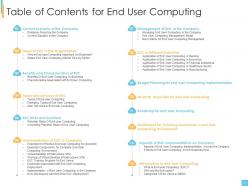
Slide 3: This slide exhibits table of contents.
Slide 4: This slide shows title for two topics that are to be covered next in the template.
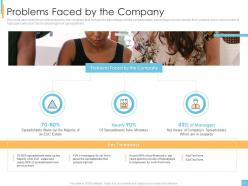
Slide 5: This slide describes the problems faced by the company that include the percentage of total spreadsheets, etc.
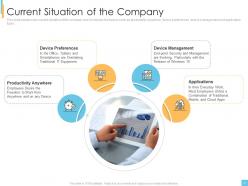
Slide 6: This slide explains the current situation of the company and it includes the factors such as productivity anywhere, device preferences, etc.
Slide 7: This slide depicts title for next two topics to be covered in the template.
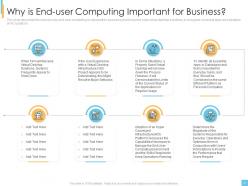
Slide 8: This slide describes the reasons why end-user computing is important for business and it includes slow virtual desktop solutions.
Slide 9: This slide represents the global end user computing market size by sector such as IT and Telecom, banking, etc.
Slide 10: This slide highlights title for next two topics to be covered.
Slide 11: This slide depicts the benefits of the end user computing to business and it includes centralized management, BYOD support, etc.
Slide 12: This slide represents the characteristics associated with EUC based on factors such as cost, schedule, size, control, etc.
Slide 13: This slide illustrates title for next three topics to be covered in the template.
Slide 14: This slide represents the types of end user computing and it includes traditional end user computing, end user control and end user development.
Slide 15: This slide depicts the three emerging types of end user computing such as chat bots, analytics and artificial intelligence.
Slide 16: This slide represents the end user computing services that includes service desk support, messaging & collaboration services, etc.
Slide 17: This slide displays title for next two topics to be covered in the template.
Slide 18: This slide depicts the challenges of end user computing and it includes time sharing, enter virtualization, enter PC, etc.
Slide 19: This slide represents the controlling the potential risks of end user computing by establishing and evaluating company’s end user.
Slide 20: This slide presents title for next eight topics to be covered.
Slide 21: This slide explains the checklist for an effective end user computing environment in the organization.
Slide 22: This slide represents the essential components for complete end-user computing environment.
Slide 23: This slide depicts the meaning of virtual desktop infrastructure (VDI) and how it helps to lower the company expenditure.
Slide 24: This slide represents the working of virtual desktop infrastructure and how connection is established.
Slide 25: This slide depicts the training program for end users in the organization.
Slide 26: This slide represents the expenses associated with end user computing and it includes direct expenses, regulatory requirements, etc.
Slide 27: This slide represents the end user computing use cases and it includes remote offices, compliance, etc.
Slide 28: This slide depicts how workspace will work after EUC deployment in the company and how users will be able to access corporate information.
Slide 29: This slide exhibits title for next three topics to be covered in the template.
Slide 30: This slide represents how we will manage to end user computing and it includes to adopt centralized application deployment, etc.
Slide 31: This slide depicts the end user management model and it is divided into three parts such as organization and individual, context and outcomes.
Slide 32: This slide represents the RACI matrix for end user computing management and it shows the tasks performed by each manager.
Slide 33: This slide shows title for next five topics to be covered.
Slide 34: This slide depicts the application of end user computing in banking sector.
Slide 35: This slide represents the end user computing in insurance world.
Slide 36: This slide explains the use of end user computing in financial institutions.
Slide 37: This slide depicts the application of end user computing in healthcare sector.
Slide 38: This slide explains the use cases of end user computing in manufacturing.
Slide 39: This slide depicts title for next topic to be covered in the template.
Slide 40: This slide explains about the budget for end user computing implementation by covering details of investments.
Slide 41: This slide highlights title for next topic to be covered.
Slide 42: This slide explains the 30-60-90 days plan for end user computing and it shows actions to be performed.
Slide 43: This slide displays title for next topic to be covered.
Slide 44: This slide depicts the roadmap for end user computing and tasks that would be performed at each interval of time.
Slide 45: This slide presents title for next topic to be covered.
Slide 46: This slide represents the dashboard for tracking downloads of apps in end user computing environment.
Slide 47: This slide exhibits title for next two topics to be covered in the template.
Slide 48: This slide represents the impacts of end user computing across the company and it includes mobility, OS migration, etc.
Slide 49: This slide depicts the effects of end user computing on the business post implementation by covering details of workforce productivity, etc.
Slide 50: This slide presents title for additional slides.
Slide 51: This slide represents the meaning of end user computing and how users from anywhere can access apps and data through end user computing.
Slide 52: This slide represents who are the end-users and how they develop applications through EUC applications made by skilled experts in the database.
Slide 53: This slide defines the categories of end users in DBMS such as casual end users, naïve or ignorant end users, etc.
Slide 54: This is the icons slide.
Slide 55: This slide exhibits yearly stacked bar charts for different products. The charts are linked to Excel.
Slide 56: This slide displays yearly clustered column charts for different products. The charts are linked to Excel.
Slide 57: This slide shows about your company, target audience and its client's values.
Slide 58: This slide presents your company's vision, mission and goals.
Slide 59: This slide shows details of team members like name, designation, etc.
Slide 60: This slide exhibits yearly timeline.
Slide 61: This slide depicts posts for past experiences of clients.
Slide 62: This slide showcases financials.
Slide 63: This slide depicts 30-60-90 days plan for projects.
Slide 64: This slide highlights comparison of products based on selects.
Slide 65: This slide displays Venn.
Slide 66: This slide shows roadmap.
Slide 67: This is thank you slide & contains contact details of company like office address, phone no., etc.
End user computing it powerpoint presentation slides with all 67 slides:
Use our End User Computing IT Powerpoint Presentation Slides to effectively help you save your valuable time. They are readymade to fit into any presentation structure.




FAQs for End user computing it
So you'll need device management, security policies, good user experience, and an app delivery plan. Get centralized tools that can handle laptops, phones, all that stuff. Identity and access controls are crucial too. Honestly, user experience matters way more than people think - if your system's a pain to use, everyone's gonna hate it. Different work styles need different approaches, so don't go with some generic solution. Start by figuring out what types of users you actually have and what they need. Build around those specific groups instead of trying to make everyone fit the same mold.
Start with role-based access - only give people what they actually need to do their job. Multi-factor auth everywhere, no exceptions. Your sensitive data needs classification and encryption, both stored and moving around. Honestly, the encryption part isn't optional anymore. Deploy endpoint protection and DLP tools to catch sketchy behavior early. The tricky bit? Don't make security so annoying that people find workarounds. Oh, and audit all those random spreadsheets floating around first - you'll be shocked what's out there in shadow IT apps.
Honestly, mobile computing totally changed how I work. You can literally get stuff done anywhere - commuting, client meetings, even when you're stuck waiting somewhere. Email, video calls, accessing files - it all works pretty smoothly on phones and tablets now. Cloud sync is clutch though, otherwise you'll go crazy trying to find the right version of files. I actually love not being chained to my desk all day. Just don't be an idiot about security - set up proper passwords and encryption before you start working on public wifi everywhere.
Think guardrails, not roadblocks - that's the whole thing. Give people freedom to build stuff but keep some oversight on security and data. Set up approval workflows for sensitive data access. Provide self-service tools and safe sandboxes where they can mess around without breaking anything. Honestly, most companies I've seen either go full control-freak mode or just let chaos reign. Neither works. You need clear policies people actually get, plus regular check-ins. Start with your biggest risks first and build controls around those. It's way easier than trying to fix everything at once.
So first thing - figure out what devices your people actually use day-to-day. VMware Horizon or Citrix are solid picks for VDI, though honestly VMware's been my go-to lately. You'll want some kind of app virtualization so you're not installing everything locally on every machine (what a nightmare that'd be). MDM tools are pretty much mandatory now with everyone's phones and tablets connecting to company stuff. AWS WorkSpaces or Azure Virtual Desktop work great if you need to scale up fast. Oh, and don't forget identity management to tie it all together securely.
Track the obvious stuff first - support tickets and how much time people save doing their jobs. Those are easy numbers to grab. Before you change anything, get a baseline so you actually know if things improved. The fuzzy metrics matter too though - user satisfaction, retention rates, adoption speed. But honestly? Start simple or you'll get bogged down in data hell. Check in quarterly to see how it's going. Once companies nail their EUC approach, most see productivity jump 15-30%. Pretty solid gains if you ask me.
Honestly, security and governance are your biggest headaches. People build cool stuff but never think about data protection - shadow IT spirals fast. Data quality becomes a mess since everyone's creating their own "source of truth." Knowledge walks out the door when your Excel guru quits (happened to us twice). Integration with enterprise systems? Total pain. Oh, and you'll spend way too much time playing data police. Set guidelines early before things get crazy. A center of excellence helps without crushing creativity.
Dude, cloud computing basically flipped everything upside down. Instead of needing beefy computers at every desk, all your apps and files just live on remote servers now. People can work from their laptop, phone, whatever - which honestly saves me so many headaches as an IT guy. Scaling resources happens instantly, and I can push updates to everyone at once instead of going desk to desk like some kind of medieval tech support. Oh, and your electricity bill will thank you too. I'd start by figuring out which desktop apps you could swap for cloud versions first.
So three things really matter here. First, get your VPN setup locked down tight - multi-factor auth is non-negotiable. Second, build out self-service portals so people can reset their own passwords instead of calling you every time. Cloud device management is honestly a lifesaver because you can push updates and fix stuff remotely. Set up automated alerts for the usual problems - catching things before users even notice saves everyone a headache. Oh, and write documentation that doesn't sound like it was written by robots. Clear escalation paths help too, but the monitoring piece is probably what'll make the biggest difference day-to-day.
Honestly, user feedback is like having a cheat sheet for fixing your EUC setup. People will straight-up tell you what's broken - slow logins, apps that crash every five minutes, whatever's driving them crazy. Surveys work, but I've gotten some of my best intel from random hallway conversations. You can't just collect feedback though, you actually have to do something with it. Track the complaints that keep coming up and fix the stuff that's bugging the most people first. It's way better than guessing what's wrong from the IT side.
Dude, low-code platforms are literally making everyone think they're developers now. Your business users won't wait around for IT anymore - they'll just build stuff themselves. It's pretty cool for getting things done faster, but honestly? The security risks are keeping me up at night. You've got data all over the place and people creating apps without any real oversight. IT needs to stop being the "no" department and start setting up some basic rules instead. Oh, and definitely figure out what platforms people are already using behind your back - trust me, they're using something.
Dude, training is make-or-break for EUC rollouts. I've watched companies blow serious cash on tools that nobody uses because they skipped this step. Users either give up completely or create their own messy workarounds that miss the point entirely. Proper training gets people actually confident with the new stuff. Support tickets drop, productivity goes up - you know, the results you're supposed to get. Focus on hands-on practice with workflows your team already does daily. That's what actually sticks, not some generic demo nobody cares about.
Honestly, remote work broke everything open and there's no going back. AI virtual desktops are huge right now, plus zero-trust security (which you probably need anyway since everyone's working from their kitchen table). Hybrid cloud workspaces are the standard now - people just expect things to work seamlessly whether they're on their phone or laptop. Oh, and chatbots are handling way more IT support these days. Progressive web apps are slowly killing traditional desktop software too. You should definitely audit your current setup against this stuff, especially security. Your attack surface is massive now compared to before.
Track login times, app crashes, bandwidth usage - basically monitor everything that could slow people down. Set up dashboards to spot patterns before users start griping. I've seen teams find that just three crappy apps were causing 80% of their headaches, which honestly isn't surprising. The data shows you which applications are total resource hogs and helps figure out if someone needs beefier hardware. Start simple with basic monitoring tools first. You can get fancy with analytics later once you know where the real problems are. Device health metrics are clutch too.
Dude, this is HUGE for EUC apps. Your users aren't tech people - they just want to finish their tasks without headaches. Clunky interfaces? People will straight up ignore your app or find sneaky workarounds that mess up everything. I've watched perfectly good solutions crash and burn because nobody considered how users actually move through their day. Make navigation obvious, keep things visually clear, and honestly? Design for how people really work, not some idealized IT workflow. If they need training just to click around... you've already lost them.
-
Design layout is very impressive.
-
Very unique, user-friendly presentation interface.