

Information Technology Security Powerpoint Presentation Slides




Try Before you Buy Download Free Sample Product
 Impress Your
 Audience
 100%
100% Editable
 Save Hours
 of Time


IT Security protects electronic devices such as computers, servers, mobile gadgets, data, electronic systems, etc., from IT attacks. This PowerPoint presentation illustrates important details about Information Technology security. This IT security PowerPoint presentation will be helpful to throw light on the current scenario of the organization, the requirement of IT security in different sectors, and its work. In addition, computer security PPT contains the critical elements of IT security, IT risk identification and assessment, steps to mitigate those risks, benefits of IT security, and automations role in IT security. Further, this data security presentation comes with a checklist to implement IT security in the organization, a 30-60-90-day plan to manage IT security, and the budget to implement the same. The Information Security deck also showcases a roadmap to monitor IT security and a timeline to implement IT security. Lastly, this electronic information security PPT shows the effects of IT security implementation on the organization and dashboard for threat tracking in Information Technology Security. Customize this 100 Percent editable template now.
People who downloaded this PowerPoint presentation also viewed the following :
Content of this Powerpoint Presentation
Slide 1: This slide introduces Information Technology Security. State Your Company Name and begin.
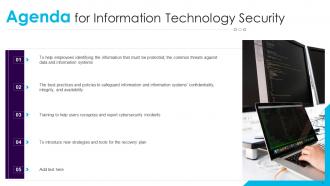
Slide 2: This is an Agenda slide. State your agendas here.
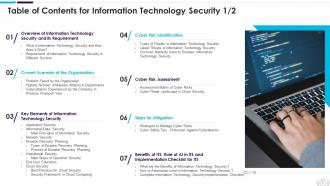
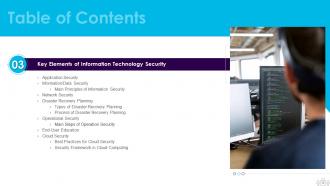
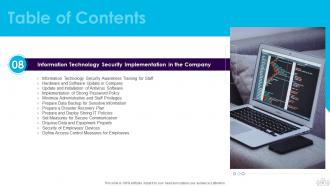
Slide 3: This slide presents Table of Content for the presentation.
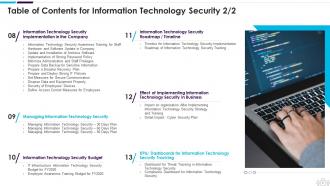
Slide 4: This is another slide continuing Table of Content for the presentation.
Slide 5: This slide highlights title for topics that are to be covered next in the template.
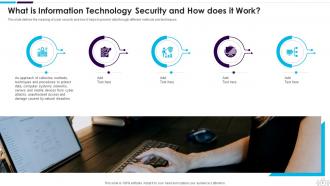
Slide 6: This slide defines the meaning of Cyber security and how it helps to prevent data through different methods and techniques.
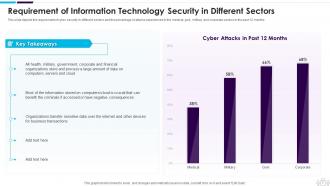
Slide 7: This slide shows Requirement of Cyber Security in Different Sectors.
Slide 8: This slide highlights title for topics that are to be covered next in the template.
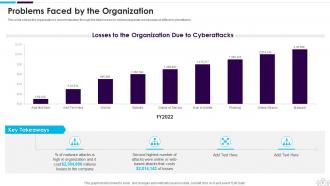
Slide 9: This slide shows the organization's current situation through the total losses experienced because of different cyberattacks.
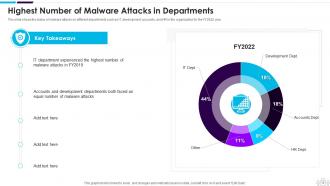
Slide 10: This slide displays Highest Number of Malware Attacks in Departments.
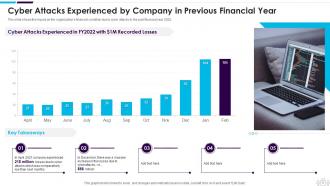
Slide 11: This slide shows Cyber Attacks Experienced by Company in Previous Financial Year.
Slide 12: This slide highlights title for topics that are to be covered next in the template.
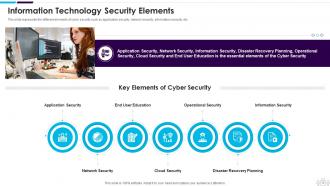
Slide 13: This slide represents the different elements of Cyber security such as application security, network security, information security, etc.
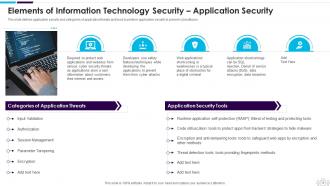
Slide 14: This slide defines application security and categories of application threats and tools to perform application security.
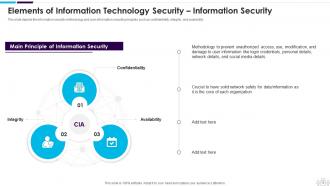
Slide 15: This slide displays Elements of Cyber Security – Information Security.
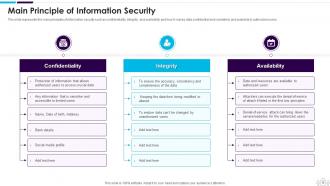
Slide 16: This slide represents the main principles of information security such as confidentiality, integrity, and availability.
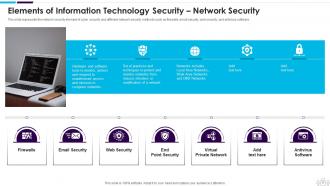
Slide 17: This slide represents the Cyber security element of Network security and different network security methods.
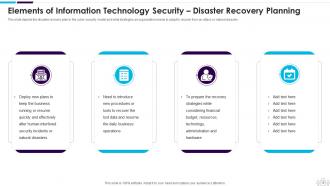
Slide 18: This slide presents Elements of Cyber Security – Disaster Recovery Planning.
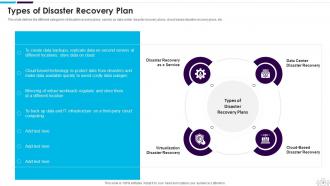
Slide 19: This slide defines the different categories of disaster recovery plans, namely as data center disaster recovery plans, cloud-based disaster recovery plans, etc.
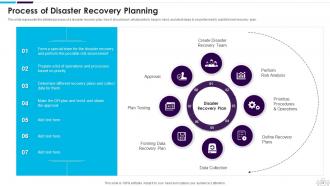
Slide 20: This slide represents the detailed process of a disaster recovery plan, how it should work, what points to keep in mind, etc.
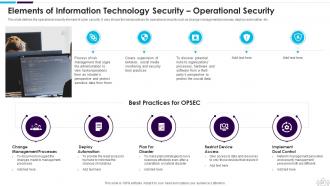
Slide 21: This slide defines the operational security element of Network security.
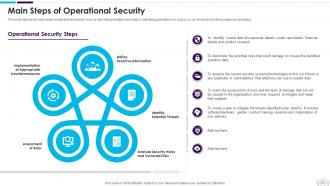
Slide 22: This slide depicts the main steps of operational security, such as describing sensitive information, identifying potential risks, etc.
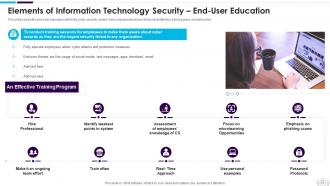
Slide 23: This slide presents the end-user education within the Cyber security model.
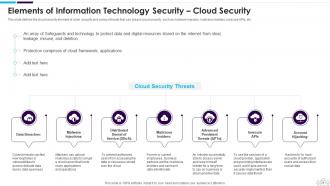
Slide 24: This slide shows Elements of Network Security – Cloud Security.
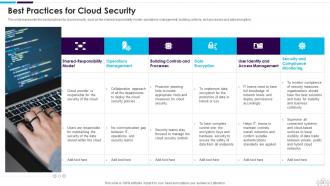
Slide 25: This slide represents the best practices for cloud security, such as the shared responsibility model, operations management, etc.
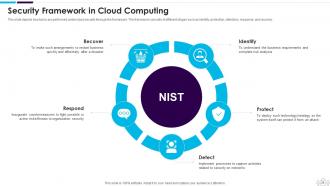
Slide 26: This slide shows Security Framework in Cloud Computing.
Slide 27: This slide highlights title for topics that are to be covered next in the template.
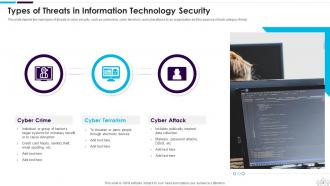
Slide 28: This slide presents the main types of threats in Cyber security, such as cybercrime, cyber terrorism, etc.
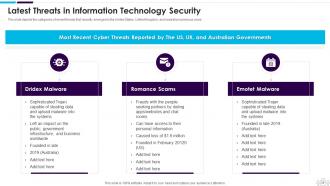
Slide 29: This slide depicts the categories of recent threats that recently emerged in the United States, United Kingdom, etc.
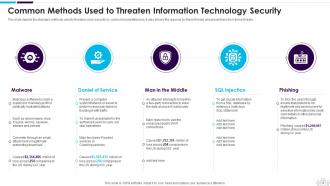
Slide 30: This slide displays Common Methods Used to Threaten Network-Security.
Slide 31: This slide highlights title for topics that are to be covered next in the template.
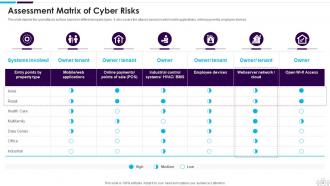
Slide 32: This slide depicts the cyberattacks surface based on different property types.
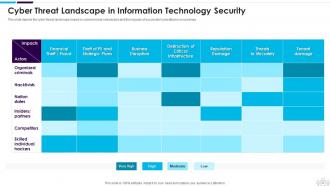
Slide 33: This slide presents Cyber Threat Landscape in Data Security.
Slide 34: This slide highlights title for topics that are to be covered next in the template.
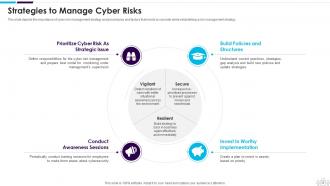
Slide 35: This slide depicts the importance of cyber risk management strategy and procedures.
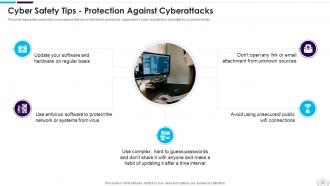
Slide 36: This slide shows Cyber Safety Tips - Protection Against Cyberattacks.
Slide 37: This slide highlights title for topics that are to be covered next in the template.
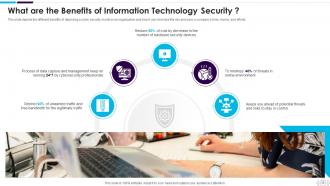
Slide 38: This slide presents the different benefits of deploying a Network security model in an organization.
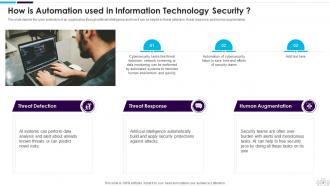
Slide 39: This slide depicts the cyber protection of an organization through artificial intelligence.
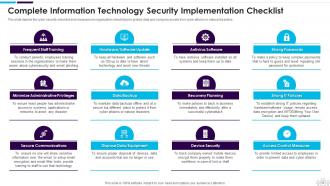
Slide 40: This slide displays Complete Cyber Security Implementation Checklist.
Slide 41: This slide highlights title for topics that are to be covered next in the template.
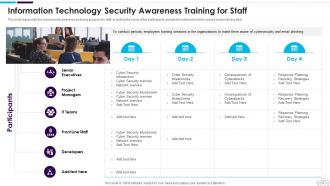
Slide 42: This slide represents the Cyber security awareness training program for staff, including the name of the participants.
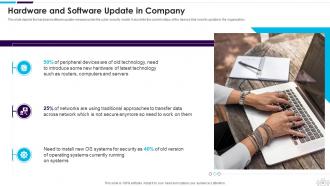
Slide 43: This slide presents Hardware and Software Update in Company.
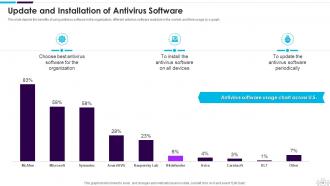
Slide 44: This slide depicts the benefits of using antivirus software in the organization.
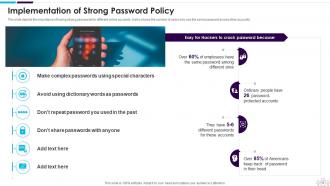
Slide 45: This slide displays the importance of having strong passwords for different online accounts.
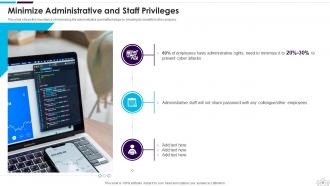
Slide 46: This slide shows the importance of minimizing the administrative and staff privilege by showing its benefits for the company.
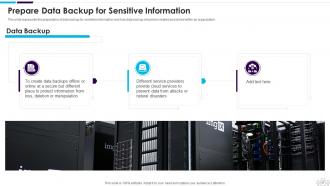
Slide 47: This slide displays Prepare Data Backup for Sensitive Information.
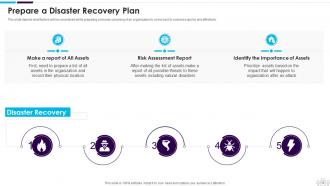
Slide 48: This slide depicts what factors will be considered while preparing a recovery planning of an organization.
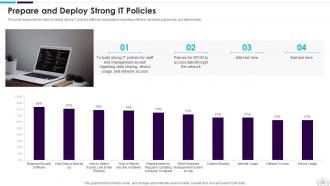
Slide 49: This slide represents the value of having strong IT policies within an organization.
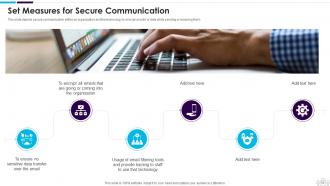
Slide 50: This slide depicts secure communication within an organization and the technology to encrypt emails.
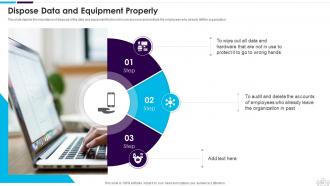
Slide 51: This slide displays the importance of disposal of the data and equipment that is not in use anymore.
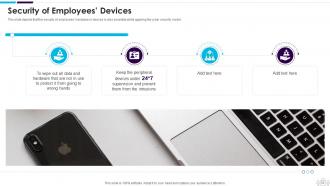
Slide 52: This slide depicts that the security of employees’ hardware or devices is also essential while applying the cyber security model.
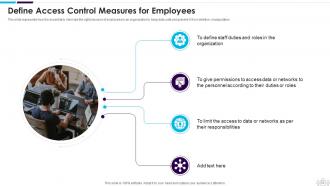
Slide 53: This slide presents Define Access Control Measures for Employees.
Slide 54: This slide highlights title for topics that are to be covered next in the template.
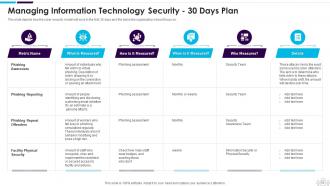
Slide 55: This slide depicts how the Cyber security model will work in the first 30 days and the tasks the organization should focus on.
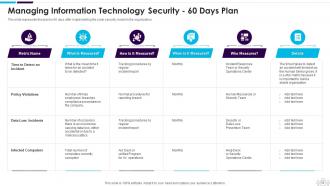
Slide 56: This slide represents the plan for 60 days after implementing the Network security model in the organization.
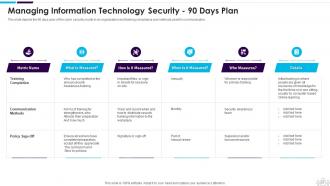
Slide 57: This slide depicts the 90 days plan of the Network security model in an organization and training compliance.
Slide 58: This slide highlights title for topics that are to be covered next in the template.
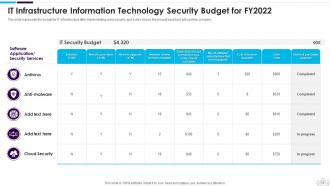
Slide 59: This slide represents the budget for IT infrastructure after implementing data security.
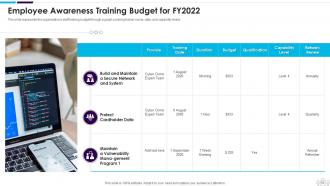
Slide 60: This slide displays the organization's staff training budget through a graph covering trainer name, date, and capability levels.
Slide 61: This slide highlights title for topics that are to be covered next in the template.
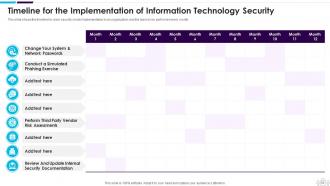
Slide 62: This slide displays Timeline for the Implementation of Network Security.
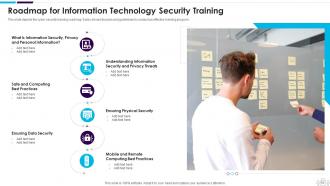
Slide 63: This slide depicts the Cyber security training roadmap.
Slide 64: This slide highlights title for topics that are to be covered next in the template.
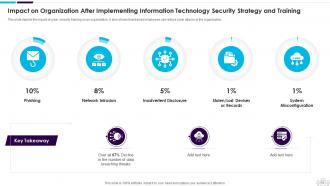
Slide 65: This slide displays Impact on Organization After Implementing Cyber Security Strategy and Training.
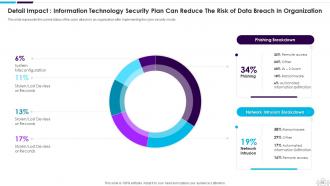
Slide 66: This slide represents the current status of the cyber attacks in an organization after implementing the cyber security model.
Slide 67: This slide highlights title for topics that are to be covered next in the template.
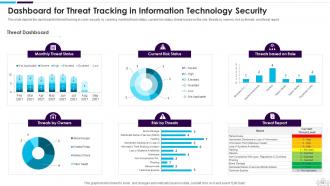
Slide 68: This slide presents Dashboard for Threat Tracking in Network Security.
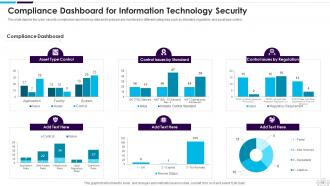
Slide 69: This slide depicts the Cyber security compliance report on how data and hardware are monitored in different categories.
Slide 70: This slide displays Icons for Information Technology Security.
Slide 71: This slide is titled as Additional Slides for moving forward.
Slide 72: This is About Us slide to show company specifications etc.
Slide 73: This is Our Team slide with names and designation.
Slide 74: This is Our Mission slide with related imagery and text.
Slide 75: This slide shows Post It Notes. Post your important notes here.
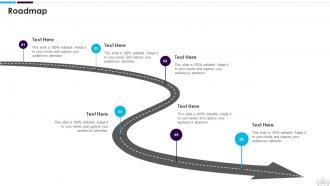
Slide 76: This slide presents Roadmap with additional textboxes.
Slide 77: This slide provides 30 60 90 Days Plan with text boxes.
Slide 78: This slide shows Circular Diagram with additional textboxes.
Slide 79: This is Our Goal slide. State your firm's goals here.
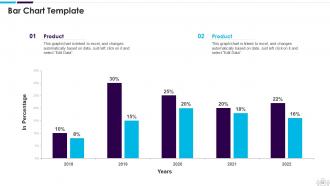
Slide 80: This slide presents Bar chart with two products comparison.
Slide 81: This is a Thank You slide with address, contact numbers and email address.
Information Technology Security Powerpoint Presentation Slides with all 86 slides:
Use our Information Technology Security Powerpoint Presentation Slides to effectively help you save your valuable time. They are readymade to fit into any presentation structure.







FAQs for Information Technology Security
Phishing's still the biggest headache - probably 90% of breaches I see start there. Attackers are getting scary good at mimicking vendors and internal emails, so even smart employees fall for it. Ransomware's another massive problem, especially when they go after your backups first (which is just evil honestly). Don't forget insider threats too - sometimes it's malicious, but usually it's just someone clicking the wrong thing. Oh, and social engineering attacks are everywhere now. Get your team doing regular security training and turn on multi-factor authentication for everything you can. That'll block most of the easy wins for hackers.
Honestly, just hit the free wins first - turn on two-factor auth everywhere and set software to auto-update. Yeah it's boring but blocks most attacks. Your team needs phishing training too since that's how 90% of hackers actually get in (way less dramatic than the movies make it seem). Budget-wise, get a business password manager - like $4 per user monthly. Cloud antivirus is solid too. Set up automated backups because you'll thank yourself later. But real talk? Teaching employees not to click sketchy links is worth more than any fancy security tool you can buy.
Dude, training your people is honestly way more crucial than fancy security software. I know it sounds boring, but hear me out - most breaches happen because someone clicked a sketchy email or used "password123." You could have military-grade firewalls, but if Jim from accounting falls for a phishing scam, you're screwed. Start with those fake phishing tests (kinda mean but they work) and basic awareness stuff. People need to actually understand why these rules exist, not just follow them blindly. Trust me, you'll see a massive difference once your team knows what to look for.
Start with a data audit so you actually know what you're protecting. Then figure out which regulations hit you - GDPR, CCPA, whatever applies. Break it down piece by piece because yeah, it's pretty overwhelming otherwise. Get your access controls sorted, encrypt the sensitive stuff, and set up monitoring. Staff training is huge since people are basically walking security risks (sorry, but true). Document everything - auditors are obsessed with paperwork. Oh, and tackle your riskiest data flows first rather than trying to fix everything at once.
So proactive cybersecurity is like - you're hunting for threats before they hit you. Think pen testing, threat intel, updating policies regularly. Reactive is just scrambling after you've already been breached. Most teams I know spend way too much time in reactive mode because they're constantly dealing with fires. It's exhausting honestly. But here's the thing - proactive stuff actually pays off way better since you're stopping attacks instead of cleaning up the mess afterward. I'd say throw at least 30% of your budget at proactive measures. Trust me, future you will thank you when you're not pulling all-nighters over some security incident.
So MFA is basically extra security layers that make hackers' lives way harder. They'd need your password AND your phone or fingerprint - good luck with that. Think of it like having multiple deadbolts instead of just one crappy lock. Even if some data breach exposes your password, they're still screwed without that second step. Most of these idiots will just move on to someone easier anyway. Definitely turn it on for email and work stuff first - those are the big ones that'll really mess up your day if compromised.
Honestly, AI and machine learning are huge right now for catching threats way faster than before. Zero-trust is becoming the norm too - basically don't trust anything, verify everything. Quantum computing will probably wreck our current encryption in a few years, so companies are already working on quantum-resistant stuff. Oh, and SASE is this thing where your network security all moves to the cloud. My take? Get comfortable with AI security tools now because hunting threats manually is gonna be dead soon. Actually kind of wild how fast this stuff changes.
Look for weird behavior patterns first - that's your best bet. After-hours logins, random file downloads, people suddenly poking around systems they never touch. Super tricky since they already have legit access though. Only give people permissions they actually need for their jobs, nothing extra. Oh and do those quarterly reviews where you check who can access what - sounds boring but catches stuff. The culture thing matters too honestly. People need to feel safe reporting sketchy coworker behavior without getting thrown under the bus later.
Okay so first thing - get a VPN set up ASAP, that's honestly your biggest risk right now. Public WiFi is sketchy even when it looks legit. Keep your work stuff updated and use two-factor authentication everywhere you can. I'd set up a separate workspace at home if possible, makes it easier to switch off mentally too. Always log out when you're done working. Oh and backup everything to the cloud regularly - learned that one the hard way lol. Your devices need to stay locked down with strong passwords obviously.
So basically you're splitting the security work with your cloud provider instead of doing it all yourself. They handle the boring infrastructure stuff - servers, networks, keeping people from literally breaking into data centers. You're still stuck with user permissions, encryption, and configuring everything properly though. Honestly the hardest part is figuring out exactly who does what, because that's where things usually go wrong. I'd probably start by writing down who's responsible for what - sounds nerdy but it'll save you headaches later. Way better than managing your own server room if you ask me.
So zero trust is basically "never trust, always verify" - you check everyone and every device trying to get into your network, even if they're already inside. The old "trust but verify" thing? Yeah, that was always backwards anyway. With everyone working remotely and using cloud stuff, your network perimeter is basically nonexistent now. You can't just assume someone's legit because they're on the corporate network. Start by figuring out what actually needs access to what in your setup, then implement continuous verification with least-privilege access. It's honestly the only way that makes sense anymore.
Start with proper vetting before bringing anyone on - dig into their security certs, audit reports, past incidents. Contract language needs specific SLAs and breach notification deadlines. Most companies totally drop the ball on ongoing monitoring though, which is where things actually go sideways. Regular assessments are non-negotiable. Make vendors report security changes immediately and keep a current inventory of all third-party access. Oh, and treat this as an ongoing relationship, not some one-and-done checklist thing. That mindset shift alone will save you headaches later.
Start with a solid incident response plan - who does what, how to escalate, communication channels. Document your critical stuff and build relationships with forensics experts and legal people before you need them. Your normal systems might go down, so have backup ways to communicate. Oh, and update those contact lists every few months because people change jobs constantly. Run tabletop exercises regularly - I can't stress this enough. You don't want your first drill to be the real thing. Test everything beforehand so you're not scrambling when it actually hits.
Basically these scammers are psychological manipulators who prey on stuff like trust and fear. They'll pretend to be IT support or your boss to get you to hand over passwords or click sketchy links. Pretty clever actually, in a twisted way. What they're doing is exploiting that natural urge to help people or avoid getting yelled at by management. So you end up acting without really thinking it through first. Best defense? Always double-check through a different method - like call them back or walk over to their desk. Don't just trust that urgent email, even if it looks totally legit.
Dude, encryption is basically your safety net if data gets stolen. It scrambles everything so hackers just see gibberish even when they break in. You'll want to encrypt stuff both sitting on servers and moving around - emails, file transfers, whatever. Like putting your data in a safe only you know the combo to. Strong encryption standards are a must, obviously. Customer info and financial stuff should definitely be encrypted. I learned this the hard way at my last job when someone's laptop got stolen, but thankfully everything was encrypted so we dodged a bullet. Even if they grab your files, they're worthless without the key.
-
Excellent Designs.
-
Easily Understandable slides.