


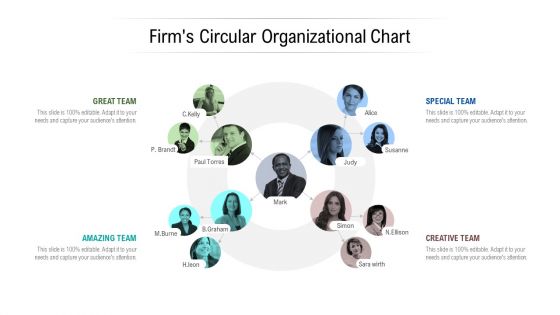
Firms circular organizational chart





Try Before you Buy Download Free Sample Product
 Impress Your
 Audience
 100%
100% Editable
 Save Hours
 of Time


Achieve distinction with our Firms Circular Organizational Chart. Your thoughts will push the envelope.
People who downloaded this PowerPoint presentation also viewed the following :
Firms circular organizational chart with all 6 slides:
Do not just think out of the box. Create new boundaries with our Firms Circular Organizational Chart.
FAQs for Firms
Honestly, circular structure is a game changer for presentations. You start with one idea, then circle back to it at the end - gives people that nice "ah, I see what you did there" moment. Kinda like how good movies work? It keeps you focused while prepping too since you know exactly where you're going. Your points connect better instead of feeling like random thoughts thrown together. Oh and audiences remember it way more than linear stuff. I'm telling you, try it next time you present something big - just pick one theme or story to open and close with.
You know how your audience gets hooked when you start circular? They're waiting to see how you'll loop back to that opening moment. People can't just zone out like they do with regular linear stuff - they're actually wondering how it all fits together. It's like when someone opens with "So I ended up in the ER..." and you're hooked until they explain what happened. Honestly, the payoff hits way harder when everything finally clicks. Next time, try dropping your conclusion right at the start, then walk them through how you got there. Works every time.
Circular structures are perfect for case studies - start with a problem, walk through your solution, then circle back to show the transformation. I love them for storytelling presentations too, you know those satisfying "full circle" moments? Product demos work great this way as well. Begin with user pain points and end by showing how you've solved those exact issues. Just don't make it feel repetitive (honestly, that's where most people mess up). Your ending should add new meaning to where you started - like coming home but seeing everything differently.
Honestly, circular economy stuff is everywhere now. Manufacturing's huge - companies redesign products so they can reuse parts and slash waste costs. Fashion brands have those take-back programs where they turn your old jeans into new ones. Agriculture's been doing it forever though - crop waste becomes compost, feeds the soil, repeat. Tech companies jumped on device refurbishment recently. Construction uses reclaimed materials but that's still pretty niche. Oh, and look at your own industry's waste streams first. There's probably something circular hiding there that nobody's thought of yet.
Honestly, your biggest headache will be people getting totally lost. Most folks expect you to go A→B→C, so when you circle back they're like "wait, didn't we already cover this?" You really have to spell out your structure upfront - maybe even more than feels natural. Then when you loop back, hit them with super clear transitions like "remember that thing about X? Well now that we know Y..." Otherwise they'll think you're just rambling. It's actually harder to pull off than it sounds, but those explicit connections are what make it work.
So for circular presentations, I've found visuals work best when you drop them at those natural breaking points between sections. Icons are honestly your best friend here - they're small, clean, don't mess with the flow. Charts and key images should go where you're transitioning between segments too. Color coding is clutch because you can literally loop those themes back to where you started. The main thing? Don't let your visuals fight the circular structure you've built. I always sketch the flow first (sounds nerdy but whatever), then figure out where visuals actually make sense.
So circular structure is all about the story you tell - that's what pulls people through the whole loop. Start with some scene or moment, then let your narrative dig into it and build throughout your piece. Think of it like... breadcrumbs, but in reverse? You're leading back to where you started. Here's the magic part though - when you land on that opening again, it feels completely different because your audience just went on this entire journey with you. The story totally changes what that first moment means. I'd map out your main story points first, then figure out which opening would pack the biggest punch when you circle back.
So basically, circular structure keeps your pacing smooth because you're hitting these natural rhythm points throughout. You revisit your main theme but go deeper each time - kinda like a spiral staircase where you see familiar stuff from a higher angle. Way better than the traditional build-to-one-big-moment approach, honestly. Your audience gets those "oh I get it now" moments regularly instead of zoning out during boring middle parts. Map out where your key message pops up in each cycle. You'll see how it creates natural breathing room and steady engagement instead of those awkward energy dips.
People think circular structure just means repeating yourself - like you're being redundant or whatever. Not true though! You're actually creating this satisfying loop where your ending adds new depth to your opening. Most folks assume it only works for those fancy TED talks, but honestly? It's perfect for boring business presentations too. When you circle back to your opening point with fresh insight, your audience gets real closure. Next time you're doing a quarterly review, try this: reference that opening challenge again, but show how your data completely flips the whole thing.
Think of it like a spiral staircase - you're hitting similar themes but going deeper each time. Use phrases like "building on this foundation" or "this connects to our next point" to show how everything links together. Don't just assume people will see the connections (honestly, they usually won't). I always end each section with a quick preview of what's coming next so nobody gets lost in the circular stuff. The trick is being super explicit about how each part reinforces the others. Makes the whole thing flow way better than just hoping your audience follows along.
Dude, definitely check out Prezi first - that's literally what it's made for. The whole zooming thing lets you create actual circular paths between your points instead of just going slide by slide. Canva's got some circle-ish templates too if you want something more straightforward. PowerPoint could work but you'd have to mess around with custom animations to make it feel circular (kinda a pain tbh). I'd just try Prezi's free version first and see how it flows with your content. Way easier than fighting with other tools to do something they weren't really designed for.
So this is actually pretty cool - different cultures totally process info differently. Americans and Germans? They want you to cut to the chase immediately or they'll zone out. But if you're presenting to East Asian teams, they prefer when you build up context first, like telling a story that circles around to the main point. Mixed international groups are tricky though. I'd probably lead with key points upfront, then dive into the supporting details after. It's wild how deep these preferences run - like, people genuinely get uncomfortable when you present info in a style that doesn't match what they're used to.
Oh totally! Circular structure is actually perfect for webinars. Map out your main theme first, then create 3-4 sections that loop back to it. Online audiences zone out constantly (guilty as charged), so when you keep circling back to key points, people can jump back in easily. I've watched speakers absolutely nail this approach in virtual settings. Way more engaging than just going A to B to C. Each section reinforces your message naturally, which works great since attention spans are basically nonexistent online anyway.
So I'd definitely build in some quick check-ins at those transition points - polls work really well there. Interactive Q&A and breakout discussions are solid too. Honestly, even just asking for thumbs up/down gives you a decent read on whether people are getting it. Oh, and the "parking lot" method is clutch for organizing questions without killing your flow. If you're doing virtual stuff, tools like mentimeter or chat functions let people give anonymous feedback. Just don't go overboard - maybe test 2-3 different approaches and see what clicks with your crowd.
Sitting in circles totally changes the vibe - nobody's staring up at some authority figure the whole time, you know? People actually start challenging ideas instead of just nodding along. The whole setup feels way more like a conversation than a lecture. I've noticed even the quiet people jump in more because it's less intimidating somehow. Oh, and here's the key part - don't stand outside the circle like you're running things. Jump in and sit with everyone else. Sounds simple but it makes such a difference in getting real discussion going.
No Reviews