Flow chart for incident resolving process by service desk department
Try Before you Buy Download Free Sample Product
Audience
Editable
of Time
Our Flow Chart For Incident Resolving Process By Service Desk Department are topically designed to provide an attractive backdrop to any subject. Use them to look like a presentation pro.
People who downloaded this PowerPoint presentation also viewed the following :
Content of this Powerpoint Presentation
Do you wonder how your corporate help desk is handling your raised tickets or your issues? There is a whole process behind the solutions you get from the expert. A company always wants its employees to work in an efficient manner and its relationship with the customer to flow as smooth as butter. However, whenever someone faces an issue that creates an imbalance in the workflow, you need the help-desk or the support department to come to the rescue.
We all want our problems to get resolved as fast as possible and we hate waiting to get our issues resolved. To have that process of resolving problems seamless, you have to have a flow chart to follow.
Read more about Digital Marketing Strategy Flow Charts
This PPT Template helps you create your own flow chart for the incident-resolving process, or you can use this one. We prepared it for you so that you’ll have a plan to follow and implement to make the process faster and smoother. Now, let’s have a look at the template and understand it better.
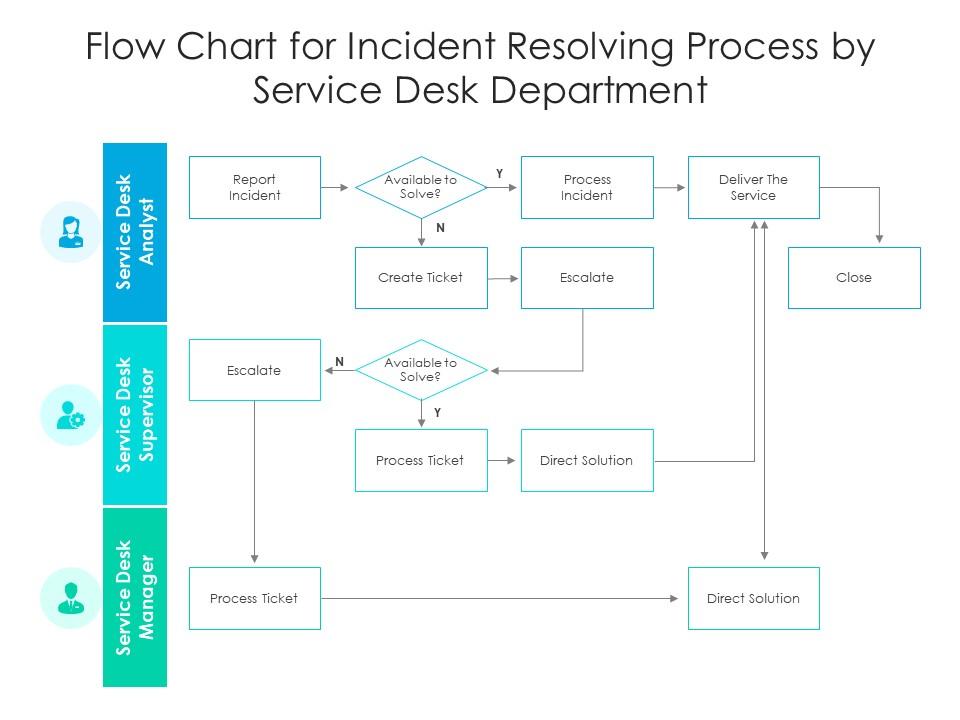
Template 1: Flow chart for incident resolving process by service desk department

If you are setting up a help desk facility for your employees, you have to check out this template. This slide helps you explain the whole process to your team so that they won’t get confused by the necessary steps and are able to follow protocol and resolve issues.
Learn about the Operation Management Flow Chart For Manufacturing Industry from here.
This template explains how the incident resolving process starts with reporting an incident and then moves to steps like making the solution available, processing the incident, delivering the service, etc. A perfectly explained procedure will help you get the work done efficiently.
BE THE RESOLUTION EXPERT
Issues can be raised anytime and anywhere. Your support team will always be on their feet to find the solution and get the workflow back to normal; otherwise, things will fall from their place. To achieve perfection in your process, you have to have a flow chart or a protocol to follow. The above PPT will help you with that. We’ve resolved one issue for you, now it’s your turn to help others.
Read about Cyber Security Incident Response Process Flow Chart Incident Response Strategies Deployment now.
Flow chart for incident resolving process by service desk department with all 2 slides:
Use our Flow Chart For Incident Resolving Process By Service Desk Department to effectively help you save your valuable time. They are readymade to fit into any presentation structure.
FAQs for Flow chart for incident resolving process by
Honestly, start with who's doing what when everything breaks - that's huge. Set up your escalation paths so the right people get pinged fast. Communication channels are obvious but people mess this up constantly. You need solid detection systems because you can't fix invisible problems, right? Post-incident reviews are where you actually learn stuff, not just during the chaos. Oh and have your response procedures written down with templates ready to go. Recovery steps too. Keep it simple though - when people are panicking at 3am, they won't follow some complicated playbook.
So incident management is basically putting out fires - when something breaks, you fix it fast. Problem management is different though, it's more like detective work to figure out why stuff keeps breaking. Like if your site goes down, incident management gets it running again. But problem management? That's when you realize it crashes every Tuesday because of some random batch job someone set up years ago and forgot about. Speed vs. thoroughness, basically. You need incident management to keep things running day-to-day, but without problem management you'll just be stuck firefighting forever. Both are pretty crucial honestly.
Honestly, communication makes or breaks incident response. Set up your channels before anything goes wrong - designate who talks to leadership, where updates go, all that stuff. When shit hits the fan, keep everyone looped in with regular status updates. Even if it's just "still working on it," people need to know you haven't disappeared. I've watched teams completely fall apart because everyone's working in their own bubble. Document everything as you go (future you will thank present you). Oh, and always do a post-mortem after - what went wrong, what worked, the whole deal.
So start with the basics - MTTR and how long it takes to actually fix things. Incident frequency matters too, obviously. But here's the thing, customer satisfaction scores after incidents? Sometimes those tell you way more than all your internal dashboards combined. Track how often stuff escalates when it shouldn't and whether you're seeing the same problems pop up repeatedly (that's a root cause issue). Don't go crazy though - pick maybe 3-4 metrics that actually matter for your situation. Review monthly and you're golden. You can always get fancier later once you've got the fundamentals down.
Honestly, the worst part is always communication falling apart when everything's on fire. People panic instead of sticking to any kind of process, and you're stuck trying to coordinate across like five different tools while your site's completely down - it's a nightmare. Set up clear roles beforehand so nobody's stepping on each other. Those escalation matrices are clutch, especially for 3am incidents when your brain's basically mush. Practice runs are huge too. You want your team moving on autopilot during real outages, not standing around trying to remember what comes next. Get a decent runbook template and actually drill with it regularly.
Dude, automation is a game changer for incident response. It handles all the boring stuff - routing tickets, sending notifications, running basic diagnostics. No more manually waking people up at 2am (seriously, nobody appreciates that). You can create runbooks for recurring issues so your team isn't starting from scratch every single time. The best part? Your people get to actually solve real problems instead of just moving tickets around. Honestly, I'd start small though - just pick one task that drives everyone crazy and automate that first. You'll see the impact pretty quickly.
So for incident tracking, most teams I know use ServiceNow, Jira Service Management, or PagerDuty. ServiceNow's really comprehensive but honestly might be too much if you're just getting started. PagerDuty's amazing for alerts and escalations. Jira works great if you're already using other Atlassian stuff. But here's the thing - I've worked with teams that get by perfectly fine using Freshservice or even Trello for smaller setups. Don't overthink it. Pick whatever your team will actually stick with instead of the shiniest option. Better to start simple and grow into something bigger later.
Post-incident reviews are where you actually learn stuff - make them happen after every big outage. Write down what broke, what worked, and track those action items religiously. Too many teams nail the retrospective part then completely ghost the follow-ups (seriously, check your old Jira boards). Don't just obsess over how fast you fixed things. Look at detection speed, whether people communicated well, if your runbooks were garbage or helpful. Set up regular pattern reviews and assign someone to actually own the improvement backlog. Otherwise you'll keep stepping on the same rake.
First thing - figure out your escalation triggers before chaos hits. Time limits, severity levels, whatever makes sense for your setup. Nobody wants to be googling "who do I call" during a 3am outage (trust me on this one). Document what's happening as you pass things up the chain. Senior people need context, not just "everything's broken." Don't be a hero either - escalate early rather than letting stuff get worse. Keep your contact list current and actually practice this during drills. Sounds boring but you'll thank yourself later when it works smoothly.
Honestly, just build a simple priority matrix based on business impact and how urgent stuff is. Revenue loss and customer-facing problems? Those go first. P1 is for when everything's broken, P2 when things are kinda limping along, P3 for the small annoying stuff. Multiple users affected = higher priority than Bob from accounting can't print his reports (unless Bob happens to be your boss, then all bets are off). Get everyone to agree on these categories beforehand though - you don't want people arguing about priorities when systems are down. Document it so your team actually knows what to do when chaos hits.
Dude, training your team makes such a huge difference when stuff hits the fan. People who know their playbooks cold don't waste time scrambling around wondering who to call first - I've watched incidents drag on way longer than they should've just because of that. Monthly tabletop exercises keep everyone sharp. Your team will spot problems earlier too, before they blow up into real disasters. Plus they'll actually know how to use your monitoring tools instead of panic-clicking everywhere. Honestly, the muscle memory aspect is probably what saves you the most time when every second counts.
You want to track three main things: Mean Time to Detect (MTTD), Mean Time to Respond (MTTR), and Mean Time to Recovery. MTTD is how fast you spot problems, MTTR covers detection to actually starting work on it. Recovery is when stuff's working again. Honestly, most teams I've seen only bother tracking like one of these and wonder why they can't figure out where their process sucks. Get your incident management tool to calculate this automatically - trust me, you don't want to be doing spreadsheet math every month. These three give you the whole story of what's happening during outages.
Honestly, getting other departments involved makes such a huge difference. You'll spot problems way faster when finance can tell you payroll's broken or marketing screams about the portal dying during their big campaign. That context helps you figure out which fires actually matter instead of just scrambling around randomly. Other teams usually know workarounds too, which is clutch. They can handle user communication while you're in the weeds fixing stuff. I'd set up some kind of group chat or whatever and maybe loop key people into your response process. Works way better than flying blind.
Post-incident reviews are honestly a goldmine for improving how you handle future problems. Look, I get it - they sometimes feel like blame sessions. But focus on the systems that broke down, not who messed up. You'll spot patterns in your processes and figure out where your tools let you down. Training gaps become super obvious too. The real trick? Actually document what you're gonna fix and then do it. Otherwise you're just burning time in meetings about stuff that'll happen again next month. Oh, and don't skip the things that worked well - those matter just as much.
Dude, regulations totally control how you handle incidents. GDPR gives you 72 hours to report breaches - no wiggle room there. SOX has its own financial reporting mess to deal with. Healthcare? You're stuck with HIPAA rules. Financial companies juggle like five different requirements at once (honestly sounds exhausting). Here's the thing though - you can't just figure this stuff out when something goes wrong. Map out what regulations hit your industry first. Then build your response plans around those deadlines and requirements. Otherwise you'll be scrambling to check boxes while your incident's still burning.
-
Appreciate the research and its presentable format.
-
Wonderful templates design to use in business meetings.