

Incident and problem management process gantt chart with project progress bar




Try Before you Buy Download Free Sample Product
 Impress Your
 Audience
 100%
100% Editable
 Save Hours
 of Time


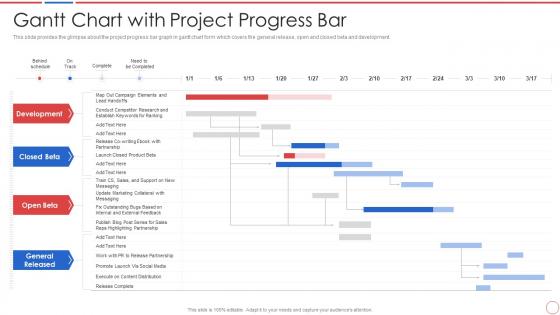
This slide provides the glimpse about the project progress bar graph in gantt chart form which covers the general release, open and closed beta and development.
People who downloaded this PowerPoint presentation also viewed the following :
Incident and problem management process gantt chart with project progress bar with all 6 slides:
Use our Incident And Problem Management Process Gantt Chart With Project Progress Bar to effectively help you save your valuable time. They are readymade to fit into any presentation structure.





FAQs for Incident and problem management process gantt chart with
Honestly, you need a few core things to make this work. Detection and alerting are obvious - gotta know when stuff breaks. Set up clear escalation procedures so people aren't just passing the buck around endlessly. Communication channels matter way more than you'd think - half the chaos comes from people not knowing what's happening. Document everything, even the weird stuff that seems obvious now. Define who does what beforehand because trust me, nobody wants to figure out roles during a crisis. Classify incidents by priority so you're not treating a typo like the server's literally on fire. Post-incident reviews help, though honestly most people skip this part. Start by writing down your current mess of a process, then tackle the worst gaps first.
Honestly, you gotta have a plan ready before stuff hits the fan. Map out who does what when things go sideways - clear roles, escalation steps, all that. Keep everyone's contact info current (learned that one the hard way when our manager's number was like 2 years old). Run through fake scenarios with your team regularly. Those practice runs? Total lifesavers for finding weak spots. Set up your communication channels ahead of time too. Oh, and actually update the plan when you find issues - don't just let it collect dust. Start with whatever disasters are most likely to happen first.
Honestly, communication can make or break your whole incident response. I've seen teams completely fall apart because nobody knew what anyone else was doing. You'll have people duplicating work while leadership sits there clueless. The trick is setting everything up beforehand - dedicated channels, who talks to who, all that stuff. Don't wait until you're in crisis mode to figure it out. Practice it too, even if it feels awkward at first. Trust me, when everything's actually on fire and you're stressed out of your mind, you'll be grateful you did the prep work.
Honestly, the worst part is when everything's on fire and nobody knows who's supposed to do what. Communication falls apart completely. Your monitoring probably sucks too - you're basically flying blind until users start complaining. Oh, and documentation? Either it doesn't exist or it's some 50-page monster nobody will ever read. There's always this brutal tension between fixing things fast vs doing it right. Getting people to actually show up for post-mortems is like pulling teeth - everyone just wants to pretend it didn't happen. Start with clear roles and communication channels though. Makes everything else way less painful.
Templates are lifesavers when chaos hits. You won't be scrambling around trying to figure out who to call or what steps to take - everything's already mapped out. Communication gets way faster too since you're not writing incident updates from zero each time. They keep your team from forgetting the obvious stuff that somehow always gets missed (like that one dependency that breaks everything). Honestly, I'd start with templates for whatever incidents happen most at your company. The rest you can build as you go.
So you'll want to focus on a few core things. MTTR and MTTD are probably your best starting points - basically how fast you catch issues and how fast you fix them. Track incident volume and severity trends too, plus escalation rates. Customer impact stuff is huge - downtime, affected users, all that. Nobody wants their support team getting hammered with angry calls, right? Oh and post-incident reviews - measure if you're actually doing them because they stop the same crap from happening twice. Honestly though, just start with MTTR and MTTD. Those two will show you exactly where you're struggling.
Honestly, it depends so much on your industry. Healthcare and finance? Super rigid with crazy reporting deadlines because regulators are breathing down their necks. Tech companies usually just want to fix things fast and worry about paperwork later. Manufacturing gets really intense about safety stuff - which makes total sense when machinery could literally hurt someone. Retail focuses more on customer impact and reputation damage control. The formality level varies huge too. I'd honestly just look at what similar companies in your space are doing rather than some generic template online.
Write everything down ASAP - trust me, you'll forget the details way faster than you think. Get the timeline, what caused it, who was there, and your exact fix. Screenshots are your best friend here. Be super specific so you (or whoever) can actually follow what went down without playing detective with cryptic notes. I always throw in a "what I learned" bit and what I'd change next time - honestly saves so much headache later. Make yourself a quick template too, otherwise you're reinventing the wheel every incident.
Honestly, automation is a game changer for incident response. You can set it up to handle all the boring stuff - creating tickets, sorting them by severity, sending them to the right teams. No more manual email spam to stakeholders either, which is honestly such a relief. Your people actually get to solve real problems instead of playing ticket shuffleboard all day. The escalation piece is huge too - nothing gets forgotten in some random queue. I'd say start with whatever manual step makes your team want to quit, then build from there. Don't overthink it.
Honestly, technical skills are just the baseline - your people need to know those systems cold. But communication? That's where teams actually fall apart when everything's on fire. Build your core group around whoever stays calm naturally, then drill them hard on your playbooks. Post-mortems are where you actually get better though, not during the chaos. I'd run some fake incidents first - nothing worse than watching people panic through their first real outage. And yeah, managing up to stressed executives while your engineers are debugging? That's its own special skill you'll need.
Honestly, capture everything right after each incident hits - memories fade fast. Write down what broke, what actually worked, and where you screwed up. But here's the thing most teams miss: those post-mortems can't just sit in some Google Drive collecting digital dust. You've got to review them regularly and actually fold that stuff into your training. I'd throw it on the agenda for quarterly meetings so nobody "forgets." Run tabletop exercises based on real lessons you learned. Otherwise you're just repeating the same mistakes over and over.
Honestly, start with a decent ticketing system - ServiceNow or Jira if you're fancy, Zendesk if you want simple. That's where you'll track everything. Get some monitoring tools too like PagerDuty or Datadog because your users finding bugs first is just embarrassing. Slack or Teams for communication during incidents - trust me on this one. Oh, and you'll want Confluence or Notion for documentation and post-mortems. I learned this the hard way but good runbooks save your sanity. Build from there as you grow.
Think of incident management as your crystal ball for business continuity. Every time something breaks, you're getting free intel about your actual weak spots - not the ones you guessed at during planning meetings. Document everything and look for patterns. That data becomes gold when you're building your BCP because now you know what really fails (and how often). Your incident response team? They're basically your disaster response team in training. Honestly, most companies skip this step and then wonder why their recovery plans don't work. Start tracking incidents now - you'll be shocked at what trends pop up.
So you're basically the quarterback during a crisis - coordinating everyone and keeping teams focused on actually fixing stuff. Your job is being that single contact point who assigns tasks and tracks what's happening. Communication between teams? That's on you too. Honestly, it's like herding cats sometimes, but at least they're useful cats! Don't get stuck doing the technical work yourself though. Instead, focus on removing whatever's blocking the tech people so they can do their thing without getting lost in endless meetings. You'll also handle updates to stakeholders and run those post-incident reviews afterward.
Dude, cultural stuff will totally mess with your incident response if you're not ready for it. Some team members won't speak up about problems - either they don't want to go around their boss or they're worried about looking bad. Then you've got super direct communicators mixed with people who beat around the bush when you need info NOW. Time zones make everything worse too, obviously. I learned this the hard way at my last job. Set up escalation rules that work for different communication styles. Train people beforehand so they know what to expect from each other.
-
Great
-
Awesome presentation, really professional and easy to edit.
-
Awesomely designed templates, Easy to understand.