


Flowchart For Employee Automatic Attendance System




Try Before you Buy Download Free Sample Product
 Impress Your
 Audience
 100%
100% Editable
 Save Hours
 of Time


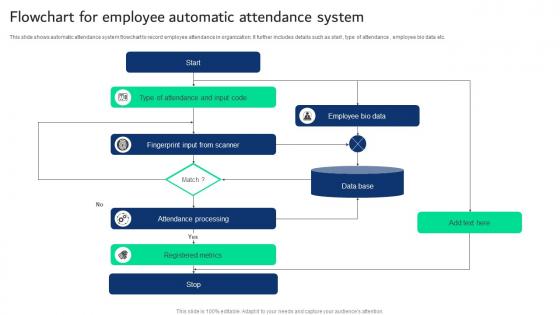
This slide shows automatic attendance system flowchart to record employee attendance in organization. It further includes details such as start , type of attendance , employee bio data etc.
People who downloaded this PowerPoint presentation also viewed the following :
Flowchart For Employee Automatic Attendance System with all 9 slides:
Use our Flowchart For Employee Automatic Attendance System to effectively help you save your valuable time. They are readymade to fit into any presentation structure.








FAQs for Flowchart For Employee
So first, map out the basic stuff - initial absence report and who needs to approve what. Different absence types are huge though, since PTO works totally different than sick days or FMLA. Honestly, unexcused absences are where everything goes sideways, so definitely include those workflows. Don't forget system updates and notifications either. I'd probably throw in a few real-world test cases too - you know how these things always have weird edge cases that nobody thinks about until they happen.
Honestly, attendance flowcharts are game-changers for productivity. You get this clear visual process that cuts out all the confusion - no more managers scratching their heads wondering what to do. Employees know exactly what happens if they're late or call out sick, so fewer arguments and stress all around. The best part? You're not constantly dealing with attendance drama anymore. Managers can spot patterns faster and handle issues before they blow up. I mean, who doesn't love having their processes actually organized for once? Start with whatever attendance situations happen most at your place and build it out from there.
Ugh, where do I even start? Manual timesheets are the worst - so many errors. People constantly forget to clock in or out, which is annoying but understandable. What really gets me though is when managers enforce rules differently. Like, one boss is super strict while another doesn't care at all. Remote work tracking is a whole other mess. Oh, and buddy punching is definitely still a thing - employees covering for each other when someone's running late. You really need automated systems with clear policies that actually get followed. Regular check-ins help too.
Honestly, a good flowchart is a game changer for attendance stuff. No more winging it when someone calls out or shows up late. You get these clear decision points that spell out exactly what to do next - approval needed, write-up time, whatever. Your whole team knows what's coming instead of constantly asking "wait, what happens if I do this?" The best part? You're not accidentally treating people differently for the same issue. I swear I used to waste so much time figuring out the same scenarios over and over. Make one solid template and you're basically set for months.
So I've used all three of these for HR stuff - Lucidchart is honestly my favorite because the templates are solid and it's not confusing to figure out. Microsoft Visio works fine if your company already has it, but ugh, sometimes it's just unnecessarily complicated. Draw.io is free though, which is nice when you're not sure if you'll actually stick with making flowcharts. They all do the real-time collaboration thing. I'd probably start with the free one first, see if you like it. Then maybe upgrade to Lucidchart later if you end up using it a lot.
Honestly, having a flowchart saves you from making it up as you go when someone keeps calling out. You'll know exactly when to have that awkward conversation, when to loop in HR, all that stuff. It protects you legally too since everything's documented the same way for everyone. Your team will see you're being consistent - which matters more than you'd think. The whole thing just removes the guesswork from what's already a weird situation. I'd start by writing down how you currently handle it, then turn that into actual steps with clear decision points.
Dude, visual attendance data is a game changer for HR teams. Instead of drowning in spreadsheets, you can actually see what's happening right away. Late arrivals become obvious. Department absence rates jump out at you. Those seasonal patterns you kept missing? They're suddenly crystal clear. It's honestly like comparing a wall of text to watching a movie - so much easier to process. I'd start small though, maybe just dashboard the biggest attendance headaches first. Quick wins and all that.
Honestly, I'd check it twice a year if possible. Once annually is the bare minimum. Legal stuff changes constantly and you'll find weird gaps once managers start using it for real. I usually sync mine with performance reviews since that's when attendance problems blow up anyway. Get feedback from your HR team and the supervisors actually dealing with this stuff day-to-day - they'll catch issues you missed. Seriously though, set that calendar reminder right now or you'll totally forget. I learned that one the hard way!
Dude, you absolutely need to get your employees' input on this stuff. They're the ones dealing with your attendance policies every single day, so they'll catch problems you'd never think of - weird timelines, confusing rules, penalties that seem totally unfair. Management loves designing these systems without asking anyone who actually uses them (classic mistake). Your team will tell you what's creating headaches and where you need to be more flexible. Plus, people are way more likely to follow rules when they had a say in making them. Just survey them regularly and actually listen to what they're saying.
So automation just takes care of all the boring repetitive stuff in your attendance system. You set up the rules first - like "if someone's late 3 times, ping their manager" - then it runs on autopilot. Late arrivals get flagged automatically, reminders go out without you doing anything, reports generate themselves. Honestly, it's a game changer once you get it running. I'd start with whatever's eating up most of your time manually, then build from there. Way better than checking everything by hand constantly.
So with attendance flowcharts, you're basically mapping out your data collection process - super helpful for spotting patterns in sick days, tardiness, vacation usage, all that stuff. Honestly, once you start tracking absenteeism rates and attendance percentages by team, it gets pretty interesting seeing what emerges. Plus you can figure out if your current policies are actually working or not. Some departments always seem to need more support than others (there's always that one team, right?). I'd start small though - pick maybe 3-4 metrics that actually matter to you and build from there.
Honestly, the flowchart is like having a cheat sheet for handling attendance problems without getting sued. You're basically building a solid paper trail that shows you gave people fair warning and followed the same process for everyone. Labor regulators love seeing consistent documentation - saves you from those nightmare scenarios where someone gets fired and you realize you skipped steps. Makes it way easier for managers to not mess up the process too. I'd definitely walk your team through it beforehand so nobody's scrambling when issues actually come up.
Honestly, you're setting yourself up for chaos without a clear attendance process. Managers will handle the same situation totally differently - one might let it slide, another jumps straight to write-ups. That inconsistency? It pisses employees off and creates legal risks you don't want. People won't know where they stand, which just breeds drama. Short bursts of problems turn into bigger patterns you can't even track properly. Trust me, sketch out your process now. Way better than scrambling when you're dealing with your first real attendance nightmare and have zero roadmap.
Honestly, once your team knows the flowchart it just makes everything way smoother. No more "I had no idea I was supposed to do that" situations, you know? Everyone follows the same steps - who to call, what paperwork to turn in, all that stuff. Your managers will handle things consistently too, which employees actually appreciate more than you'd think. It's basically like giving everyone a GPS instead of letting them get lost. Maybe do a quick team meeting to walk through it? Oh and definitely put it up somewhere people can actually see it - sounds obvious but you'd be surprised how often that gets forgotten.
Definitely do this in a team meeting, not over email where it'll get buried. Walk everyone through it step by step while showing the visual - they need to see how things escalate from warnings to actual consequences. Print copies because people are terrible at saving digital stuff later. Frame it as transparency, not punishment - that's key. Someone will definitely ask weird edge case questions, so budget time for that. Oh, and post it somewhere they can actually find it afterward. Half of them will forget everything you just said within a week anyway.
-
Love how there are no boring templates here! The design is fresh and creative, just the way I like it. Can't wait to edit and use them for my extended projects!
-
Love how there are no boring templates here! The design is fresh and creative, just the way I like it. Can't wait to edit and use them for my extended projects!