

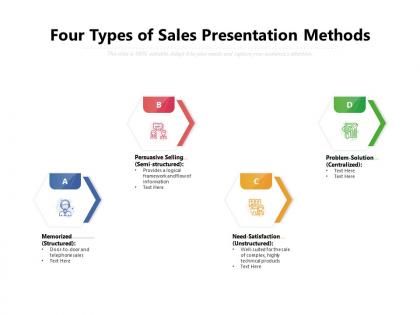
Four types of sales presentation methods




Try Before you Buy Download Free Sample Product
 Impress Your
 Audience
 100%
100% Editable
 Save Hours
 of Time


The PowerPoint Template titled Four Types Of Sales Presentation Methods offers the basic knowledge of the four ways to approach a customer in order to qualify them as a lead. Using this PPT design, you can help your audience understand the differences in these approaches in a reader-friendly way. The four categories, namely memorized(structured), persuasive selling(semi-structured), need-satisfaction(unstructured), and problem-solution(centralized), are presented in a zig-zag fashion to make ample space for the additional details. You can input your critical pointers based on personal experiences or common examples to communicate the working of these three methods. You can retain the original theme or play with colors to suit your brand image. To begin working on this presentation, download this PowerPoint layout today.
People who downloaded this PowerPoint presentation also viewed the following :
Content of this Powerpoint Presentation
Only 28% of sales professionals expect to meet or exceed their annual quota in 2024. On the other hand, even with challenges like global economic uncertainty, 75% of the professionals have faith in their organization's ability to support them in the evolving selling landscape.
These were some insights from the State of Sales report from Salesforce.
It can be concerning when your sales reps continually miss their targets. There could be multiple reasons for this shortcoming, though. For example, there could be a lack of leads, a poor sales process, or a lack of skills and product knowledge.
The good news is that organizations can overcome these challenges with training and support.
Today, sales teams have to deal with information-conscious consumers. Professionals must change their approach and learn and implement different sales presentation methods depending on the audience.
A memorized script may work on a one-to-one basis. However, a need-satisfaction approach would be more suitable when dealing with a group.
Our sales presentation template can help you introduce these methods to your sales team. You can edit the slide to fit your business branding and product range.
If you want to improve your sales business process and empower your team with persuasive techniques, explore our customizable sales presentation and pitching method PPT.
Sales Presentation and its Types
The sales presentation is a step-by-step process of approaching a potential customer and making a successful sale.
The presentation techniques have to be adjusted depending on the buying group, such as a single buyer or small to large groups of people.
Here are the four sales presentation methods our slide covers.
-
Memorized
These presentations follow a predefined structure. They are well-crafted to include the product or service's selling points. The salesperson does most of the talking.
Do you remember door-to-door salespeople who make the same pitch around the neighborhood? They follow a memorized sales presentation method.
The benefit is that the product's integrity is maintained, with descriptions remaining largely consistent. Customer's needs are, however, ignored.
-
Persuasive Selling
This presentation type is structured, but it does not have any script. For example, the sales rep may start by stating the consumer's needs, introducing the product, explaining the benefits, suggesting the next step, and inviting questions.
Its benefit is control over the pitch by the salesmen, but businesses need to train the sales rep in the product. On-the-spot thinking is also needed.
-
Need-Satisfaction
As the name suggests, the sales rep first understands the consumer's needs and introduces a product/service that best fulfills their requirement.
The method is flexible and can be personalized. It can be used to pitch technical and complex products and services.
The communication skills of the sales rep must be on point as the method can involve a lot of back and forth.
-
Problem-Solution
This is a complex presentation method, as the buyer and seller must first uncover the problem. This introduces the need for an additional analysis stage. A solution will be recommended depending on the result of the analysis.
It is a customer-centric approach that takes need-satisfaction to another level.
Closing the sale can be challenging and time-consuming, so the method is best suited for experienced sales professionals.
An effective sales training program can help boost employee engagement and productivity. Here is a uniquely-designed, editable sales training template that can help boost team performance.
Sales Presentation Template
Our editable sales template can be a part of your training module. Let us look at the slide in detail, its design elements, and how you can adapt the template to suit your brand identity.
Template 1: Four Types of Sales Presentation Methods
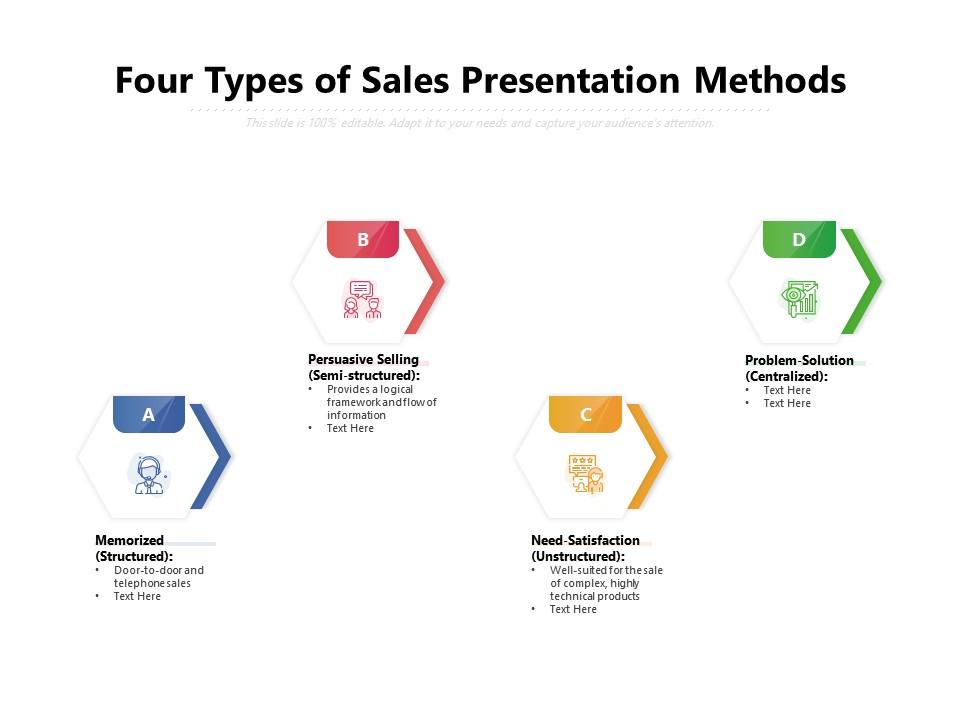
The four sales methods are presented with a zig-zag pattern. The design is clutter-free and allows each of the sales techniques to be represented fully, and with clear pros and cons.
For example, the slide starts with the memorized method, the simplest of the four. You can explain the method and mention examples or guides using bullet points. The slide ends with the problem-solution method, the most complex of the four.
Different colors and icons are used to get the audience to focus on one method at a time. Headings and content are available to help you start drafting the slide.
One of the benefits of downloading the slide is that it is editable and shareable. For example, you can change the font and color to suit your brand's design palette. You can resize icons or choose new ones from our website that best describes your sales approach.
You can present the slide as a standalone or include it in your sales training manual.
UPSKILLING SALES TEAM THE NEED OF THE HOUR
Today, most consumers research products and services and look for online reviews before making a purchase. Your sales team will need upskilling and adapting to changing consumer behavior.
Our sales presentation slide introduces four methods that sales reps can implement to close leads, depending on the buying audience and product. It includes a zig-zag flow, icons, and colors to improve visual engagement. You can customize the slide according to your training needs and brand design.
Are you putting together a presentation for new sales reps to educate them about consumer behavior and the sales journey? Explore our pre-designed, content-rich, and editable sales methods and techniques PowerPoint.
Four types of sales presentation methods with all 2 slides:
Use our Four Types Of Sales Presentation Methods to effectively help you save your valuable time. They are readymade to fit into any presentation structure.
FAQs for Four types of
Start with something that grabs them right away. Figure out what's actually bugging your audience, then show how you solve it. Throw in some testimonials or case studies - people trust that stuff way more than just your word. Ask questions! So many people just ramble about features without checking if it even matters to the person sitting there. Practice how you move between parts so it doesn't feel choppy. And honestly? End with something specific they can do next, not some vague "let's connect soon" nonsense. Structure the whole thing around what they need, not what you're selling.
Dude, stories work so much better than just listing features. People's brains are wired for narratives - they'll actually picture themselves in your client's shoes when you tell a good one. Trust me on this. Plus it builds way more credibility than rattling off benefits. Keep it super tight though, like 30-60 seconds tops. I always start with something like "So I had this client who dealt with the exact same issue..." and you can literally see them lean in. It's honestly kind of crazy how much more engaged they get. Way better than the boring pitch deck approach.
Dude, audience analysis is literally the difference between closing deals and bombing. Research who's gonna be in that room first - CFOs care about money and ROI, IT folks worry about security and whether your thing will actually work. Don't pitch the same way to both, that's amateur hour. Look up their company challenges beforehand, figure out their industry pain points. Then switch up your examples and tone to match what they actually give a damn about. Honestly, half the battle is just not sounding like you're reading from a script everyone else uses.
Interactive demos are your best bet - let people actually play with your stuff. ROI charts work great too since everyone cares about the bottom line. Customer testimonials hit different when you've got real faces and company names, not just generic quotes. Honestly? Death by PowerPoint is still everywhere and it's painful to watch. Nobody wants to read walls of text anymore. Keep things visual and focus on what outcomes they'll get, not just listing features. Oh, and if you can get video testimonials instead of just photos, even better - way more believable.
Start by actually listening to them and don't jump straight into defense mode - that's where most people screw up tbh. Their objections are actually good news because it means they're engaged. Ask follow-up questions since what they're saying on the surface might not be the real issue. Like, they say "it's too expensive" but maybe they mean "I don't see the value yet." Once you get to the heart of it, give them a concrete example or solution. I always double-check they're good with my answer before moving on. Honestly, objections are chances to build trust if you handle them right.
Start with something that grabs them immediately - a crazy statistic, question, or quick story about their exact problem. I always go for something like "What if 73% of companies like yours are bleeding money and don't even know it?" Works every time. Or bring up some industry drama that just happened, mention someone you both know. Whatever route you pick, just practice it until it doesn't sound rehearsed. The whole thing needs to be about their world, not your product (obviously). Oh, and make sure it ties directly back to whatever you're actually solving for them.
Pick your 2-3 biggest differentiators first, then work those into every section. Ditch the generic bullet points - use actual results your clients got instead. Most pitch decks are boring anyway, so this is your chance to be different. Match your case studies to their industry if you can. Oh, and copy how they talk about their problems - like if they say "bandwidth issues" don't say "resource constraints." The whole thing should feel custom-built for them. Takes more work but it's worth it when they're not glazing over during slide 3.
Honestly, less is more with data - stick to 3-5 key stats that actually hit their pain points. Charts beat spreadsheets every time (learned this the hard way). Don't just throw out "30% efficiency boost" and call it a day. What does that actually mean for them? More time? Less costs? That's the gold. Make sure your sources are solid - you'll get called out if they're sketchy. Oh, and weave the numbers into a story instead of just listing them off like some robot. People zone out when you rattle off stats without context.
Dude, body language is honestly huge for client presentations - way more than people think. Stand tall and make eye contact. Use open gestures instead of crossing your arms or slouching around. Clients will sense that uncertainty even if your actual content is great. Oh and try subtly mirroring their posture - sounds weird but it works for building rapport. You should definitely record yourself practicing first though. I was shocked at the random habits I had that were totally killing my vibe during presentations.
Dude, you've gotta make it interactive! Throw in questions, use people's names if you can. Stories work great too - anything they can actually connect with. Switch up your pace every few minutes because honestly, nobody wants to sit through someone droning on forever. Visual aids help but make them actually useful, not just random bullet points. Watch the room though - if people are scrolling their phones, hit them with a quick poll or ask what they think about something. I always keep a couple backup tricks ready just in case things get awkward.
Okay so here's what works: start with their actual problem, not your product. Most people screw this up and dive straight into features - huge mistake. Once you've nailed their pain point, present your solution as the fix. Then (and this is crucial) show proof it actually works. Case studies, testimonials, whatever you've got. I learned this the hard way after bombing a few pitches early on. Keep each part focused and don't ramble between sections. End with something specific like "let's schedule a demo for Thursday" instead of that wishy-washy "we should connect soon" stuff.
Dude, you HAVE to nail that closing - it's literally your last shot. Think movie endings: bomb the finale and nobody cares how good the rest was. Create some urgency, hit your main points again, then give them something concrete to do next. Confidence is key but don't be that pushy salesperson everyone hates. Skip the weak "so... questions?" Instead try "Based on our chat, when do you want to start seeing these results?" Way better than just trailing off. Your closing can honestly make or break the whole thing.
Honestly, tech can completely change your sales game if you use it right. Interactive demos are huge - let people actually mess around with your product instead of just talking at them. I've watched reps save dying deals with simple stuff like live calculators or real-time customization features. Once prospects start playing with scenarios themselves, they're hooked. Video testimonials work great too, plus clickable prototypes and screen sharing for collaboration. The trick is not going overboard with flashy nonsense. Pick tools that actually help tell your story better, you know?
Honestly, the worst thing you can do is make it all about you instead of the customer. Research your audience first - can't stress this enough. Don't cram everything into one presentation either. Reading straight from slides? Total death sentence for engagement. I learned that one the hard way lol. Practice out loud so your timing doesn't suck. Keep slides visual, not text-heavy. Oh, and prep for questions! Getting blindsided makes you look like an amateur. End with a clear call-to-action. Trust me on this stuff.
Dude, you gotta start tracking what happens in your presentations - it's like having cheat codes for sales. I keep a quick doc after each pitch noting which questions always come up, what slides people actually care about, and honestly? Where I totally lost them. Used to just wing it every time... terrible idea. The objections that keep popping up? Address those upfront next time instead of getting blindsided. Different crowds respond to different stories too, so jot down what lands. Then - and this is key - actually look at your notes before the next pitch. Sounds obvious but you'd be surprised how many people skip that part.
No Reviews