


How To Manage Complexity In Multicloud Cost Management Dashboard In Cloud Management




Try Before you Buy Download Free Sample Product
 Impress Your
 Audience
 100%
100% Editable
 Save Hours
 of Time


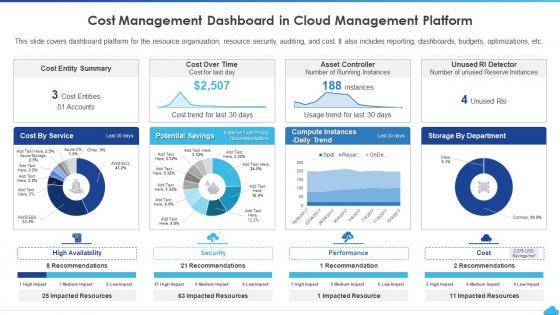
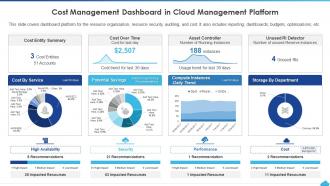
This slide covers dashboard platform for the resource organization, resource security, auditing, and cost. It also includes reporting, dashboards, budgets, optimizations, etc.
People who downloaded this PowerPoint presentation also viewed the following :
How To Manage Complexity In Multicloud Cost Management Dashboard In Cloud Management with all 7 slides:
Use our How To Manage Complexity In Multicloud Cost Management Dashboard In Cloud Management to effectively help you save your valuable time. They are readymade to fit into any presentation structure.





FAQs for How To Manage Complexity In Multicloud Cost Management Dashboard
Ugh, visibility is the worst part honestly. AWS bills completely different from Azure, and don't even get me started on GCP's weird format. You can't compare anything directly - it's like trying to match up grocery receipts from three different countries. Plus you're splitting your usage so no bulk discounts, and now you need separate monitoring for each platform. Resource tagging helps but good luck keeping it consistent everywhere. Oh, and you'll definitely want something like CloudHealth to pull it all together, or at least nail down your tagging strategy from day one before things get messy.
Look at what you're actually spending on each platform first - that's your starting point. Put workloads where they make sense cost-wise, like AWS for heavy compute stuff if their rates are better, Azure for Microsoft integrations, whatever. Yeah it's a total mess tracking everything initially but you'll figure it out. Dashboards are clutch for monitoring spending in real-time on each provider. Adjust your allocations every few months based on what you're seeing. Oh and definitely pad your budget by 10-15% because usage spikes always happen when you least expect them.
For multicloud cost stuff, I'd check out **CloudHealth**, **Flexera**, or **Cloudyn** (Microsoft bought it though). They'll show you spending across AWS, Azure, and GCP all in one place. Each cloud provider has their own tools too - AWS Cost Explorer is decent, same with Azure Cost Management. Google's isn't bad either. But honestly? Just pick one that covers your main clouds and set up some spending alerts. You'll spot the money pits way faster than you think. I probably should've done this months ago at my last job - would've saved us a fortune on forgotten dev instances.
Oof yeah, data transfer costs will absolutely destroy your multicloud budget. Those egress fees hit you every time you move stuff between AWS, Azure, GCP - I've seen teams get slammed with surprise bills in the thousands. The tricky thing is you won't see it coming when you're planning everything out. Try to keep data movement between clouds to a minimum and think about where your data actually lives. Oh and definitely set up cost alerts early - trust me on this one. Otherwise you'll be scrambling to figure out why your bill exploded.
Dude, automation is a lifesaver for multicloud costs. Set up policies to kill unused resources and resize instances based on real usage - saves you from doing boring manual checks. It'll catch spending spikes way before you notice them too. I learned this the hard way after getting hit with a surprise bill last year. Resource scheduling and tagging are where I'd start - seriously, just those two will cut your costs and stress levels big time. Managing multiple clouds manually? Yeah, that's a recipe for disaster.
Track your cost per workload and usage efficiency first - seriously, those forgotten idle instances will murder your budget. Set up dashboards in each provider's native tools to monitor resource utilization and cost trends. Business unit breakdown helps too, plus keep an eye on reserved instance usage. Data transfer between clouds? Yeah, those egress fees are sneaky expensive. Budget alerts are clutch for staying on track. Once you've got the basics down, maybe look into unified platforms, but honestly the native tools work fine for most people starting out.
Think of tagging like labeling your stuff when you move - except it's for cloud resources. You'll want to mark everything by department, project, environment, whatever makes sense for tracking costs. Honestly, multicloud without proper tags is a nightmare. You're basically digging through a pile of random bills trying to figure out what belongs where. Pick maybe 4-5 tags that actually matter to your company and make them required for new resources. AWS, Azure, GCP - doesn't matter which ones you use, just stay consistent. Makes life so much easier when budget time rolls around.
Containers are your best friend here - use Kubernetes so you can move stuff around without rebuilding everything from scratch. Think of it like having one charger that works for all your devices. Go with tools that aren't tied to specific providers: Terraform for infrastructure, and pick monitoring/CI-CD that works everywhere. Don't get locked into weird proprietary database formats either. Oh, and negotiate shorter contracts if you can swing it - gives you more options when renewal time comes around. I'd start by making a list of what you're using that's vendor-specific, then figure out how to replace it.
Dude, get CloudHealth or Flexera - they'll pull data from all your clouds and actually forecast stuff properly. Trust me, I tried doing this with each provider's native tools and wanted to throw my laptop out the window. These platforms look at your AWS, Azure, GCP usage history and predict what you'll spend next month. The real game-changer though? Consistent tagging across everything. Set up tags by department or project first, then pick one centralized tool. Way easier than juggling five different dashboards - learned that one the hard way!
Yeah multicloud scaling is honestly such a pain. Each provider prices things totally differently - AWS has those reserved instance deals, GCP does automatic sustained use discounts, and it's impossible to predict your bill. What works cheap on one platform can cost you big time on another. I'd definitely set up cost alerts that work across all your clouds and get some kind of monitoring tool that shows everything in one place. Also worth mapping out which provider actually makes sense for each type of workload you're running. Trust me, you don't want any surprise bills.
Ugh, multicloud compliance is honestly such a pain. You're juggling different reporting formats from each vendor, plus all their separate data residency rules and audit trails. The worst part? Every cloud provider handles cost allocation differently, so good luck reconciling everything for your compliance team. They'll need visibility across all platforms to track spending patterns and hit those regulatory requirements. My advice - get your tagging policies standardized across everything right from the start. Also grab a centralized cost management tool that can pull all the data together. Trust me, you don't want to be doing this manually during audit season.
Dude, workload placement can totally make or break your multicloud budget. Different providers have crazy different pricing for compute, storage, data transfer - the usual stuff. Put your workloads on the wrong cloud and you'll hate yourself later. I always try to match each workload to whatever cloud does it cheapest - analytics on the provider with dirt-cheap storage, latency-critical apps close to users. Oh and those data egress fees? They're brutal if you're moving stuff between clouds constantly. Start by actually looking at what your workloads are doing usage-wise, then figure out the best home for each one.
Honestly, the worst thing is when you can't see what's happening across all your clouds - everything just becomes this scattered mess. Each provider feels like its own island with separate budgets. Resource sprawl gets crazy fast, you're running duplicate stuff without realizing it, and good luck getting any unified reporting. Oh, and if you don't nail your tagging strategy right from the start? Forget tracking costs by team later - learned that one the hard way. Get yourself a platform that pulls data from everywhere, set up those tags early, and automate budget alerts. One dashboard rules them all.
Definitely go for reserved instances and savings plans - they'll slash your compute costs by 30-70% if you commit to usage levels. AWS has Reserved Instances plus Savings Plans, Azure's got Reserved VM Instances, and GCP does Committed Use Discounts. Honestly, the hardest part is nailing down your forecast across all those clouds. I'd look at 6-12 months of usage patterns first to spot your predictable workloads. Don't go crazy though - start small with commitments instead of betting the farm upfront. Oh, and grab some cost management tools that can suggest reservation strategies across providers. Makes life way easier.
Honestly, start with tagging - it's boring but you'll thank me later. Set up consistent tags across all your cloud stuff: department, project, environment, cost center. That way you can actually see where the money's bleeding out. Oh, and don't forget shared costs for things like networking that everyone uses. I'd focus on your biggest expenses first, then work down from there. Automated reporting is clutch too - saves you from manually pulling numbers every month. Trust me, I've watched teams skip the tagging step and they always regret it when budget season rolls around.
-
Awesomely designed templates, Easy to understand.
-
Innovative and Colorful designs.