


Human Resource Management System Dashboard For Tracking Employee Information Through HRMS




Try Before you Buy Download Free Sample Product
 Impress Your
 Audience
 100%
100% Editable
 Save Hours
 of Time


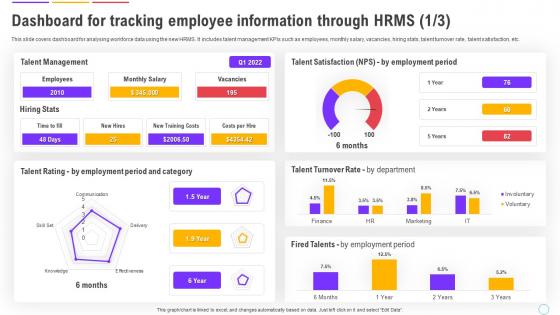
This slide covers dashboard for analysing workforce data using the new HRMS. It includes talent management KPIs such as employees, monthly salary, vacancies, hiring stats, talent turnover rate, talent satisfaction, etc.
People who downloaded this PowerPoint presentation also viewed the following :
Human Resource Management System Dashboard For Tracking Employee Information Through HRMS with all 12 slides:
Use our Human Resource Management System Dashboard For Tracking Employee Information Through HRMS to effectively help you save your valuable time. They are readymade to fit into any presentation structure.








FAQs for Human Resource Management System Dashboard For Tracking Employee
Focus on turnover rates, time-to-hire, and employee engagement first - those three paint the clearest picture. Absenteeism and training completion rates are solid too. Performance review scores can be tricky since managers grade so differently, but the data's still worth tracking. Oh, and don't skip headcount by department or diversity metrics if your leadership actually cares about hitting those targets. Honestly, I'd start with maybe 6 KPIs max. Your dashboard will be useless if it's cluttered with everything under the sun. You can always build from there once you see what actually matters.
Honestly, charts and graphs are game-changers for HR stuff. Your brain just picks up on patterns instantly instead of staring at endless spreadsheet rows. Heat maps work great for performance data, while line charts show trends over time perfectly. Bar charts are solid for basic comparisons. I'd focus on your biggest KPIs first - like you can immediately see turnover spikes or which departments are struggling with engagement. Leadership eats this visual stuff up way more than boring number dumps. Makes those workforce gaps obvious at a glance too.
Look, if your HRMS dashboard sucks to use, people will just avoid it entirely. I mean, who has time to click through five different screens just to check vacation days? Make the common stuff - PTO balances, personal info updates - super obvious and easy to find. Mobile design is huge too since everyone's always on their phone. Honestly, some of these HR systems still look ancient and overcomplicated. Keep your navigation clean, group related things together logically. Focus on what people actually do most often and don't bury those features. Bad UX kills adoption faster than anything else.
Daily updates are your best bet, but real-time is even better for stuff like headcount and attendance. Performance reviews and training completions can probably get away with weekly refreshes. Here's the thing though - nobody's gonna trust your dashboard if the data's constantly stale. I mean, imagine trying to make staffing calls with yesterday's absence numbers. Set up automated feeds when you can, and nail down clear schedules for different data types. Oh, and definitely test your sync process regularly or you'll be scrambling when things break.
Don't cram everything onto one screen - that's the biggest mistake I see. People build these "kitchen sink" dashboards that look cool but nobody actually uses them. Your users just want their PTO balance and maybe team schedules without clicking through a million menus. I've watched demos of dashboards with like 15 different widgets and charts... looks impressive until you realize it takes forever to load and half the stuff is irrelevant. Honestly? Pick 3-4 things people check every day, make it snappy, and actually test with real users first. Way better than building something pretty that sits unused.
So most HRMS platforms let you drag-and-drop widgets around - stuff like recruitment funnels, performance scorecards, attendance tracking. Think about who's actually using it though. Your executives want those big picture metrics while HR managers need the nitty-gritty operational stuff. I'd honestly start by figuring out what each group looks at every day, then build those views first. Don't try cramming everything onto one screen - it gets messy fast. Some systems even do department-specific dashboards which is pretty handy. Way better than overwhelming people with data they don't need.
Tableau and Power BI are your go-to options here - both handle interactive dashboards really well. I'd probably lean toward Power BI if you're using Microsoft stuff already, just makes life easier. Qlik Sense is solid too but honestly feels a bit clunky sometimes. You'll need something like Talend or Informatica on the backend to pull data from all your different HR systems. Oh, and definitely figure out what metrics people actually check daily first - I've seen way too many dashboards cluttered with stuff nobody cares about.
Honestly, mobile access can totally make or break your HRMS with remote teams. Your people need to check schedules, request time off, and grab pay stubs from their phones - that's just how we work now. I've watched teams completely abandon systems that suck on mobile. Nobody's firing up their laptop just to submit a vacation request, you know? Test it on actual phones first though, not just shrinking your browser window (learned that one the hard way). If remote workers can't do basic HR stuff easily from anywhere, they'll just... not do it.
Honestly, you can't mess around with HR data - that stuff's radioactive if it leaks. Role-based access is your first move so Karen from accounting can't see everyone's bonuses. Multi-factor authentication is mandatory, no exceptions. Auto-timeouts are clutch too. Encrypt everything - data sitting around AND when it's moving between systems. Audit logs will save your butt when someone inevitably asks who looked at what. Oh, and run security checks regularly because hackers get creative. Trust me, baking this in from the start beats scrambling to add it later when you're already live.
So you'd basically connect machine learning to your current HR data - performance scores, turnover rates, engagement stuff, recruitment patterns. Historical trends help forecast who might quit, when you'll need to hire, skill gaps coming up. Pretty wild how spot-on these predictions get with solid data. Workday and BambooHR already have this built in, though honestly their interfaces can be clunky. You could also build custom models through Tableau or Power BI if you're feeling ambitious. Just figure out which HR trends would actually help your team first - no point predicting stuff you won't act on.
Honestly, turnover data is where things get super revealing. Look at which departments are bleeding people - sometimes it's obvious, sometimes it'll surprise you. Timing matters too. Are people bailing after their first year? Right before busy season? The fun part is drilling down by manager or how you found these people originally. I swear some hiring sources just produce job-hoppers. You can finally see if those expensive retention programs actually work or if you're just throwing money around. Focus on the biggest problem areas first - don't try to fix everything at once.
Check out the dashboard for tracking engagement stuff - survey scores, turnover, event participation. Honestly the pulse survey thing is pretty solid for real-time feedback. You'll catch problems before they blow up. Weekly reviews with your team are clutch, then actually build action plans from what you're seeing. Oh and definitely segment by department or role - way more useful than looking at everything together. I'd probably focus on which teams seem off and what's actually moving the needle on satisfaction. Data without action is just... data, you know?
Your HRMS dashboard goes from boring reports to actually predicting stuff - like which employees might quit or what training someone needs. The recruiting part is honestly amazing because it screens resumes way faster than doing it manually. AI can also analyze feedback to see how people are really feeling at work. Just watch out for privacy issues and make sure the hiring algorithms aren't biased (that's been a problem lately). I'd start with something simple like auto-generating reports, then add more features once you see what actually helps your team.
Honestly, start with the obvious stuff - what's your admin overhead looking like now vs before? Track hiring speed, time spent on manual data entry, all that tedious work that probably ate up way too many hours. The hard numbers are easier to nail down than the squishy metrics like employee satisfaction (though retention rates definitely matter). Reporting used to be such a pain, so calculate how much time you're saving there too. I'd wait at least 6 months before doing a real comparison - gives you actual data to work with. Oh, and think about what your biggest headaches were before implementing this thing, then try to put dollar signs on those problems.
Honestly, HRMS dashboards are a lifesaver for compliance stuff. Instead of panicking when deadlines hit, you can track everything in real-time - overtime limits, certification renewals, audit trails, all that fun paperwork. The best part? They auto-generate those government reports for OSHA, EEO, whatever agency wants their forms. Everything's already organized and timestamped. You can set alerts for deadlines too, which is clutch because who remembers filing dates? I swear these things have saved my butt more times than I can count. Way better than the old spreadsheet chaos.
-
“One of the best experiences with SlideTeam for my presentation.Everything on time, communication is efficient and price is reasonable. All good in one place.”
-
Best Representation of topics, really appreciable.