


Human Resources Planning Powerpoint Presentation Slides




Try Before you Buy Download Free Sample Product
 Impress Your
 Audience
 100%
100% Editable
 Save Hours
 of Time


Human Resources Planning PowerPoint Presentation Slides are designed for workforce planning and management. Our topic specific human capital strategy PowerPoint complete deck contains content ready slides such as strategic human resource plan framework, assessing the current HR capacity, forecasting HR requirements, skill gap analysis plan, organizational skills program matrix, company’s recruitment strategies, evaluating recruitment strategies, recruitment budget to name a few. Each slide explained in detail. Furthermore, the ready to use human capital planning presentation layout is completely customizable. Enhance your audience knowledge with this well-researched HR plan PPT visuals. HR departments can use it to assess the current capacity and forecasting future needs. Showcase pathways to implement HR strategy using this strategic workforce development plan PPT visuals. You can download the strategic human resource management plan in just a few seconds. Deliver an effective presentation and explain your points more efficiently.
People who downloaded this PowerPoint presentation also viewed the following :
Video for Human Resources Planning Powerpoint Presentation Slides
Content of this Powerpoint Presentation
A business becomes successful when it hires and retains top talent. However, finding a top candidate is not an easy job. Therefore, every company has a dedicated Human Resources department, with the major brief of hiring and retaining employees.
The HR department always looks for the best candidate in the market according to the vacated job profile in their organization. In order to find the best person for the job, they have to prepare multiple presentations regarding salary budget, recruitment expenses, hiring process, and many more. Therefore, SlideTeam has prepared the best HR templates to streamline the hiring process.
Develop full-fledged human resource functions using our PowerPoint frameworks.
Streamlining HR Processes with SlideTeam's Templates
Our PowerPoint Frameworks are for the human resource team and can improve communication and operational efficiency.
They help prepare complex tasks in an easy format, such as staffing plans, training schedules, and performance metrics. HR professionals can convey their message efficiently by using our PowerPoint slides.
Prepare better planning for the human resource department with our powerful PowerPoint Templates.
Customizable Solutions for Diverse Needs
These PowerPoint Slides have the best feature in them, i.e., built-in customization feature. You can mold these slides when conducting annual reviews, making employee development plans, updating company policies, or for any other reason. This customization makes every presentation look professional and resonates specifically with its intended audience.
Do you want to develop a systematic plan for the human resource department? Click here to learn more.
Let’s start!
Template 1: Strategic Human Resource Plan Framework
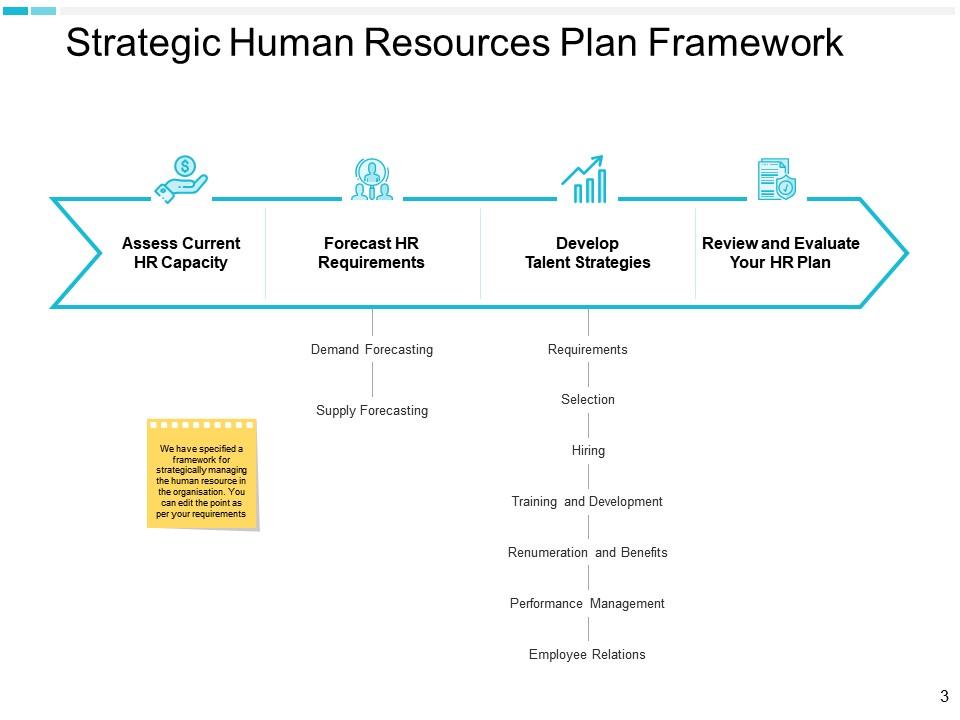
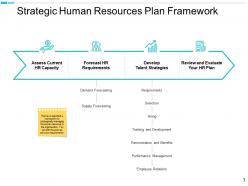
Companies need help aligning their human resources with their strategic business goals. Therefore, explore our PowerPoint Template to help you view HR capacities. You can forecast requirements using demand and supply. Furthermore, you can develop talent strategies, like selection, hiring, training and development, remuneration and benefits, performance management, and employee relations. Finally, HR plans are always open for renewal.
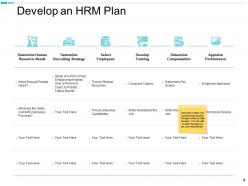
Template 2: Develop an HRM Plan
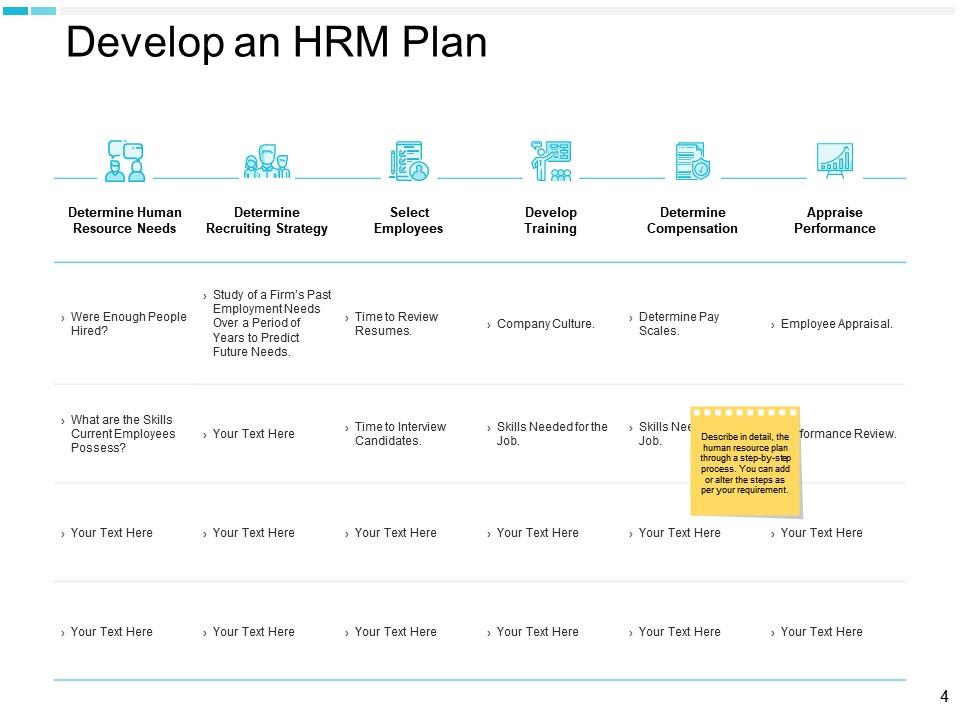
Streamline your HR processes by developing a professional HRM plan with our PowerPoint Framework. It shows each important step of human resource management, starting from determining human resources needs (were enough people hired, what are the skills current employees possess), determining recruiting strategy (study of a firm’s past employment needs over a period of years to predict future needs), select employees (time to review resumes, time to interview candidates), develop training (company culture, skills needed for the job), determine compensation (determine pay scale, skills required for the job), performance appraisal (employee appraisal, performance review).
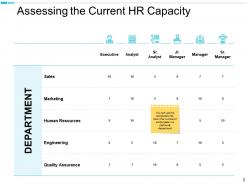
Template 3: Assessing the Current HR Capacity
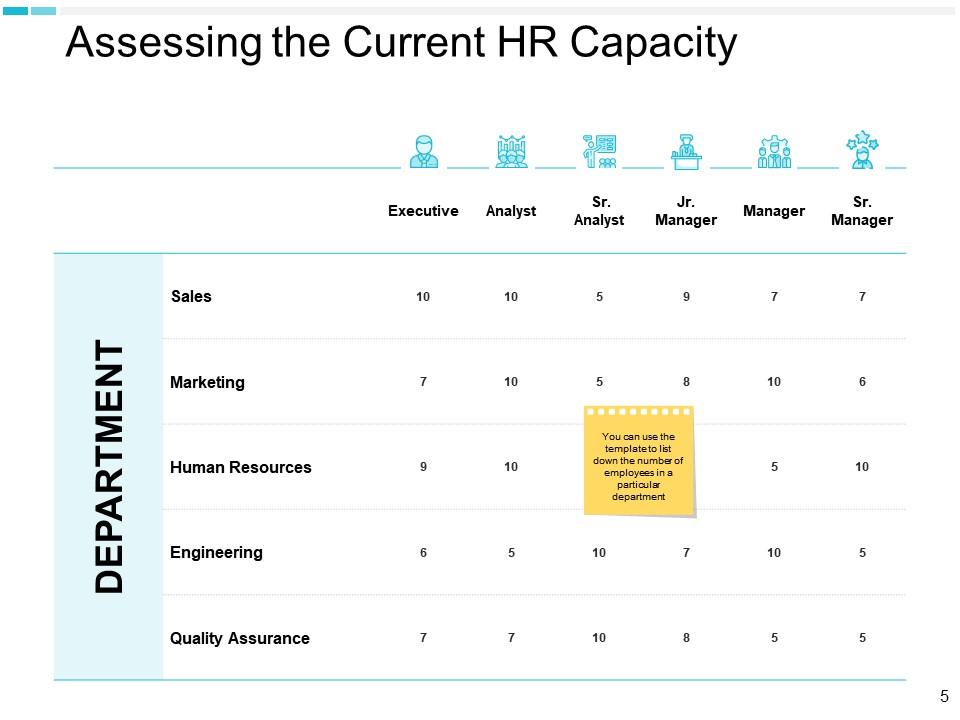
This PowerPoint Template develops a complete HR capacity across departments. Basically, it depicts an overview of employee distribution in your company. This presentation shows departments that are relevant to the business, such as sales, marketing, human resources, engineering, and quality assurance. Besides this, you can also mention the number of employees in each department, such as how many executives, analysts, senior analysts, junior managers, managers, and senior managers are working in a particular department.
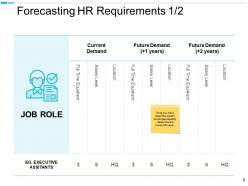
Template 4: Forecasting HR Requirements
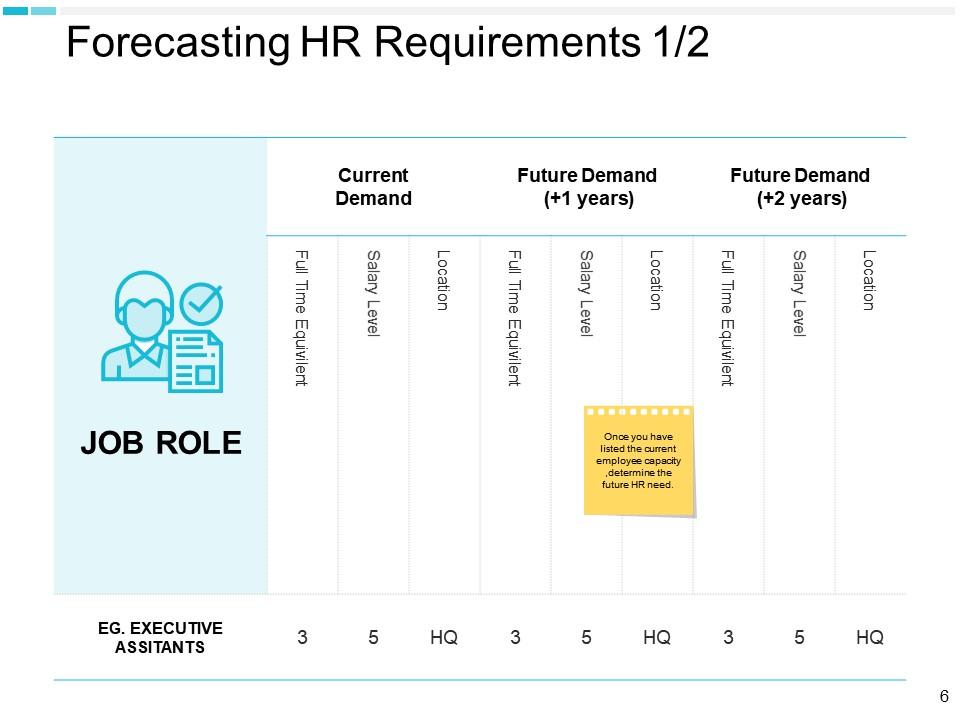
Our PowerPoint Slide is a vital tool for forecasting your organization's future HR needs. It shows the current and projected demand for various job roles over the next two years, with various attributes such as full-time equivalents, salary levels, and location specifics.
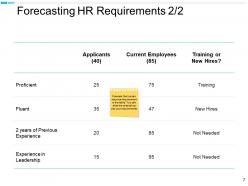
It can help the human resource department make various decisions about certain candidates and job roles. Therefore, using this presentation, the company will remain well-staffed with the right talent at the right time.
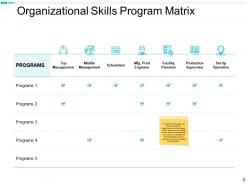
Template 5: Organizational Skills Program Matrix
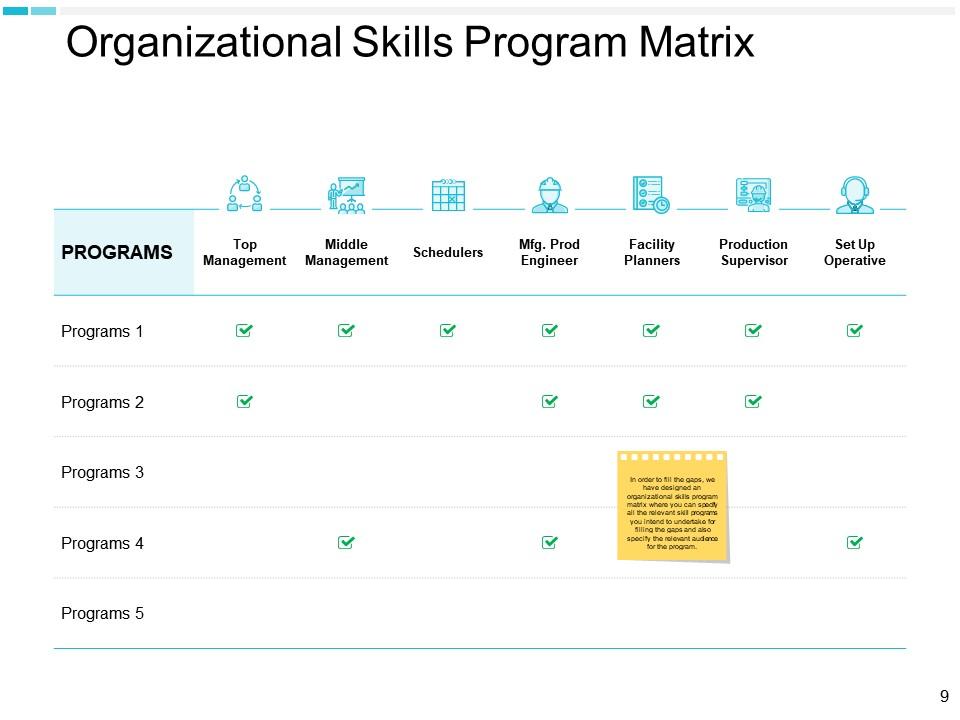
Our PowerPoint Slide shows the complete employee matrix for aligning skills development with specific job roles within your company.
It displays which programs apply to various positions. The job positions are top management, middle management, schedulers, manufacturing production engineers, facility planners, production supervision, and setup operatives.
All employees will be able to enhance the skills pertinent to their roles, promoting efficiency and growth within the organization.
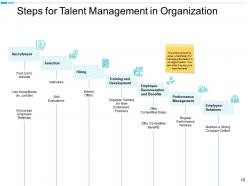
Template 6: Steps for Talent Management in Organization
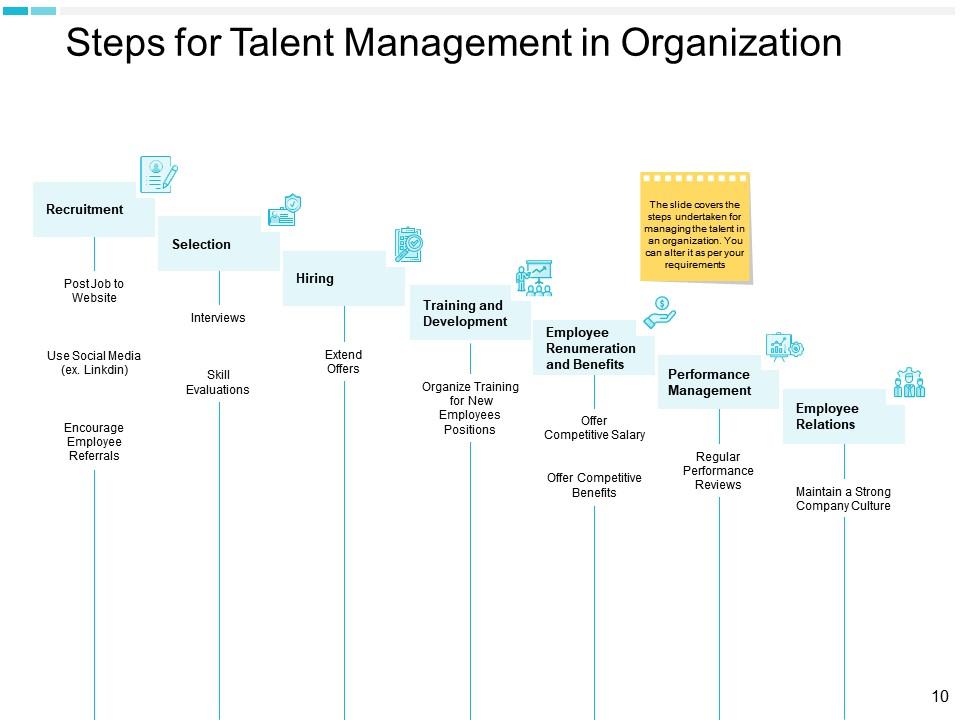
Sort your talent management process with our PowerPoint Template. It shows recruitment (posting jobs to the website, using social media, and encouraging employee referrals), selection (interviews and skill evaluators), hiring (extend offers), training and development (organizing training for new employees’ positions), employee and remuneration and benefits (offer a competitive salary, provide competitive benefits), performance management (regular performance reviews), employee relations (maintain a strong company’s culture).
This tool will help the HR team to build a strong organizational culture and improve employee engagement.
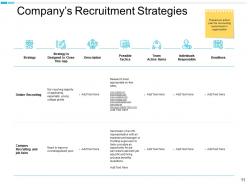
Template 7: Company’s Recruitment Strategies
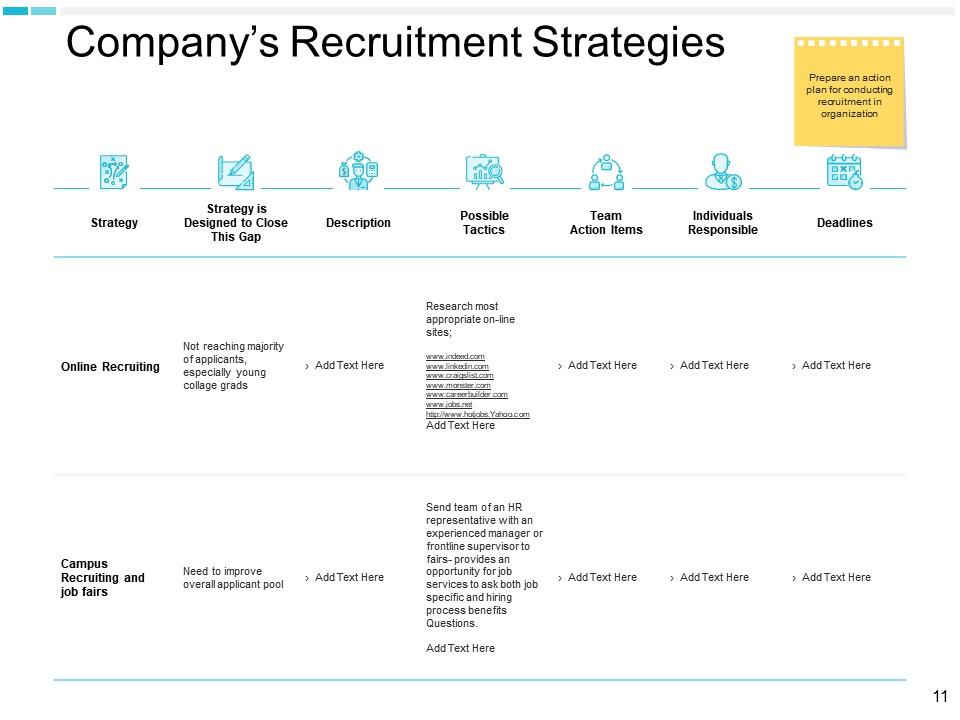
This PowerPoint template is for companies looking to present their recruitment strategies in detail.
The first is the "Strategy" column, where you can identify your company's approach. The "Description" section allows for a brief explanation of the strategy. Then comes the "Possible Tactics" section, in which you can describe specific actions.
Furthermore, there are different columns dedicated to "Team Action Items," "Individuals Responsible," and "Deadlines." It is best-suited for businesses who wants to communicate their plans to their stakeholders.
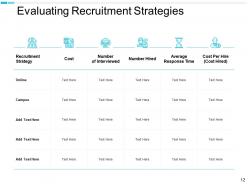
Template 8: Evaluating Recruitment Strategies
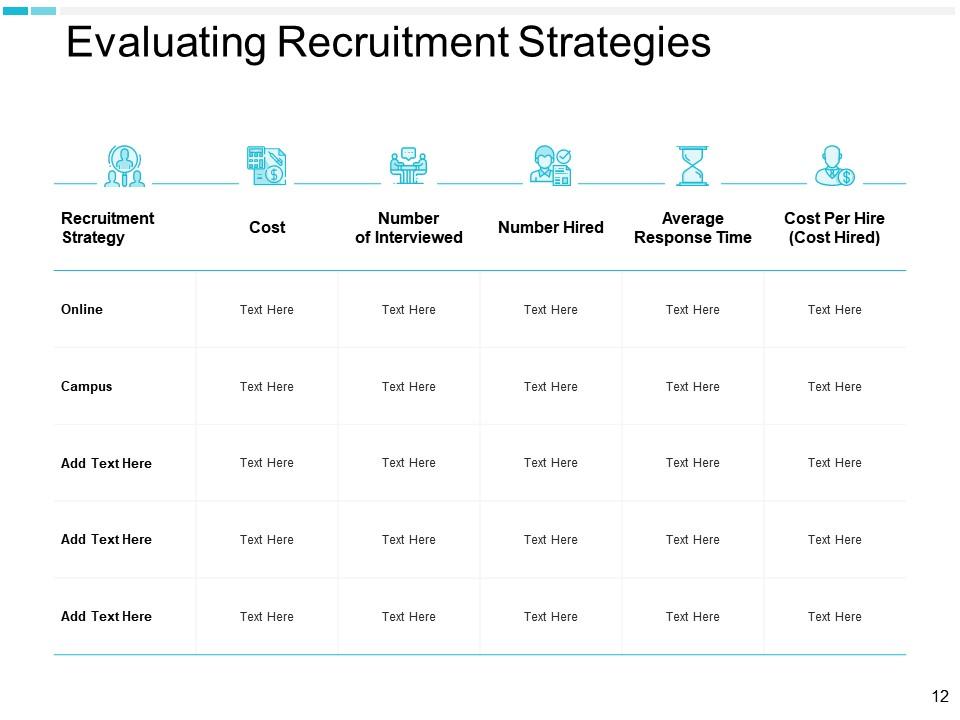
Our PowerPoint template has the power to assist businesses in evaluating and optimizing their recruitment strategies.
Each column is organized to capture important metrics.
The first column is "Recruitment Strategy", which identifies the method. The second column is "Cost" and is dedicated to tracking spending.
Next, the columns are "Number of Interviewed" and "Number Hired," which quantify recruitment effectiveness.
In the second, it is "Average Response Time," which measures efficiency, and "Cost Per Hire" calculates financial impact.
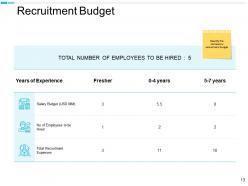
Template 9: Recruitment Budget
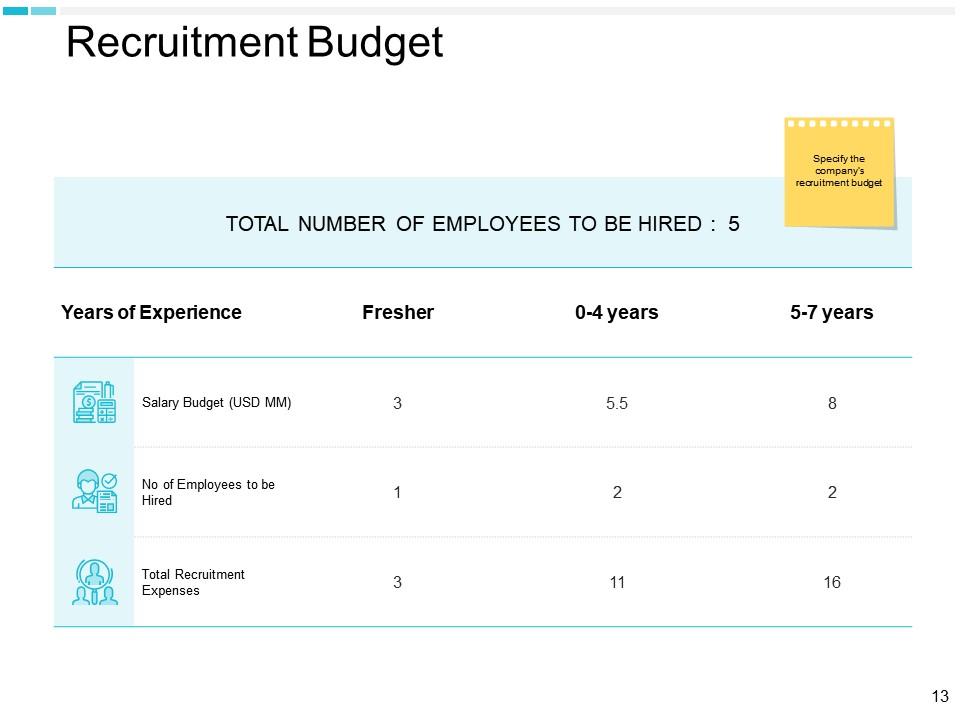
Our PowerPoint Preset provides better budget planning in recruitment.
First, it displays the main objective for the human resource department, i.e., "Total Number of Employees to be Hired."
The template is divided into three sections based on the candidate's years of experience. Furthermore, it includes categories for freshers and experienced candidates, which allows for tailored budget allocation according to experience levels.
Then, you can show a proper salary breakdown under the "Salary Budget." Under "Number of Employees to be Hired," you can communicate about future recruitment.
Finally, what will the total cost be for hiring new talent in the organization under "Total Recruitment Expenses?"
Make Better Recruitment Plans with Our Templates
SlideTeam's PowerPoint Templates help your human resource department build planning for future hiring and costs related to it.
Furthermore, these presentations enhance communication within the organization. They empower HR professionals to develop presentations that convey critical information and strategies.
Human Resources Planning Powerpoint Presentation Slides with all 23 slides:
Use our Human Resources Planning Powerpoint Presentation Slides to effectively help you save your valuable time. They are readymade to fit into any presentation structure.



FAQs for Human Resources Planning
Honestly, most people overcomplicate this. Start with what talent you've got now - skills, performance, all that stuff. Then figure out what you'll actually need based on where the business is headed. Here's where everyone screws up though: they just count heads instead of thinking about actual capabilities. Once you spot the gaps, build your game plan - recruiting, training, moving people around. Oh and make it quarterly, not some annual thing you forget about. Trust me, when your star performer quits randomly, you'll be glad you did the prep work.
Start with figuring out who you have now - headcount, skills, where people are struggling. Business strategy comes next: what projects are coming up, any expansions planned? I'll be honest, predicting the future feels impossible sometimes, but stick to stuff you can actually measure. Retirement dates, busy seasons, concrete growth numbers. Tools like succession planning help map it all out visually. The trick is using real data instead of wild guesses - oh, and definitely do quarterly check-ins or your projections will be way off.
Look, workforce analytics is basically your data-driven approach to HR planning. You can predict turnover rates and spot skill gaps before they bite you in the ass. Way better than just winging it, honestly. Track basic stuff first - turnover rates, time-to-hire metrics. Those will tell you when to start recruiting and where retention might be getting sketchy. It's like having insight into future staffing needs without the guesswork. The dashboards aren't exactly exciting, but they'll make your planning actually strategic instead of reactive.
Look, demographics are gonna mess with your whole staffing game over the next few years. When your older employees retire, you're stuck with massive knowledge gaps - been there, it sucks. Gen Z and millennials? They want flexibility and constant growth opportunities, which honestly makes sense but changes everything. Geographic shifts matter too since your talent pool moves around. I'd start mapping when key people might bail and what skills you'll lose. Compare that against local population data and industry predictions. Sounds boring but you'll thank yourself later when you're not scrambling to fill critical roles.
Honestly, start building relationships before you actually need people - internships and apprenticeships are clutch for this. Cross-train your current team so they can flex into different roles. Employee referrals work way better than most people think, and don't forget about folks who used to work there. Sometimes it's smarter to teach someone internally a new skill than hunt for the "perfect" candidate externally (which doesn't exist anyway). Oh, and actually plan for succession instead of scrambling when someone leaves. Keep talking to good people even when you're not hiring.
Honestly, tech makes HR planning so much easier. HRIS systems beat the hell out of managing a million spreadsheets - you can track skills, performance, turnover patterns, all that stuff. AI's gotten pretty good at predicting hiring needs and spotting who might quit before they do (which is kinda creepy but useful). There's workforce planning software that lets you test different scenarios too. Oh, and the predictive analytics help you see skills gaps coming down the road. I'd say start small though - audit what data you've got and pick one thing to automate first.
Honestly, you've got to start with the big picture stuff - sit down with leadership and figure out where you're actually heading in the next few years. Then work backwards from there to see what roles and skills you'll need. Focus on metrics that actually matter to the business. Revenue per employee is way more useful than just tracking turnover rates, you know? I'd set up quarterly check-ins with department heads too. Business priorities change constantly (learned that the hard way), so your people plan needs to flex with it. Don't just create some document and let it collect dust.
Ugh, labor laws are everywhere in HR - they basically control how you hire, pay people, promotions, all of it. Minimum wage stuff, overtime rules, discrimination laws, family leave... the list goes on forever. Your budget gets hit hard by these regulations, plus they affect job descriptions and how you schedule teams. Honestly, some of the safety requirements can get pretty weird depending on your industry. The trick is keeping up with changes instead of scrambling later when you realize you messed something up. Build compliance into your planning right away - trust me on this one.
Look, succession planning is honestly just smart business - it's your backup plan when key people leave unexpectedly. You identify and develop internal candidates who can step into critical roles instead of scrambling to hire externally later. That outside hiring gets expensive fast, plus you lose all that insider knowledge when someone walks out the door. I've watched companies totally panic when their main leader left with zero replacement ready. What you wanna do is regularly check your org chart for vulnerable spots and start developing your high-potential people now. Way better than being caught off guard later.
Look at your current team first - where are the gaps? Set actual targets for different roles when you're planning ahead (most companies totally blow this off). Build diversity right into your regular headcount stuff, not some side project that gets ignored later. Partner with diverse job boards and schools obviously, but here's the thing - retention matters way more than people think. What's the point of hiring if everyone leaves? Short sentences work. Then longer ones that actually flow naturally when you're explaining the strategy. Don't make it an afterthought - weave it into your normal workforce planning process.
Start with 3-5 core metrics instead of trying to track everything - trust me on this one. Time-to-fill, turnover rates, and internal promotion rates are your bread and butter. Cost-per-hire matters too, but honestly I'd prioritize forecast accuracy above all else. How close were your headcount predictions to what actually happened? That's what really shows if you're doing this right. Employee engagement scores help round things out since they tell you if people actually want to stick around. Skip the vanity metrics though. Focus on what directly connects to your business goals, and mix leading indicators with lagging ones so you're not flying blind.
Honestly, start checking salary surveys and job market reports - that's your baseline. LinkedIn Talent Insights is solid, plus Bureau of Labor Statistics if you're into the official stuff. Track what competitors are doing and watch unemployment rates in your key areas. You don't want to wake up one day realizing developers are suddenly making 20% more and you're stuck wondering why nobody's applying to your jobs. Pick maybe 2-3 metrics that actually matter to your company and review them every quarter. It's way better than guessing what's happening out there.
Honestly, the hardest part is guessing what roles you'll need down the road - crystal ball stuff, you know? Budget cuts will mess with your hiring plans constantly. Finding people with the right skills is brutal right now, like everyone decent already has three job offers. Then you finally hire someone good and boom, competitors swoop in with bigger paychecks. New leadership always wants to flip the whole strategy too. Oh, and trying to make long-term plans when the economy's doing weird things? Forget about it. Build in some wiggle room and have backup plans ready.
Honestly, you've gotta weave engagement metrics into your workforce planning right from the get-go. Check your survey data for turnover red flags - disengaged teams are basically retention disasters waiting to happen. Build that into your hiring forecasts and succession plans. When you're designing new roles or reshuffling teams, think about engagement too. Even the smartest org chart crumbles if everyone's miserable. I'd map engagement scores against your talent pipeline to see what needs fixing first. Oh, and start treating engagement like a crystal ball, not just some annual HR checkbox thing.
Your employer brand is like your company's dating profile - it determines who swipes right on your job postings. Strong brand = people actually want to work there, not just collect a paycheck. Plus it helps with retention, which totally changes your workforce planning numbers. I'd start by checking what employees are saying on Glassdoor (some of it might surprise you). Then make sure your recruiting actually matches that reality instead of some polished BS. Bottom line: if top talent doesn't see you as appealing, good luck filling those future roles you're planning for.
-
Very unique, user-friendly presentation interface.
-
Great experience, I would definitely use your services further.
-
Great experience, I would definitely use your services further.