

Key issues example of ppt




Try Before you Buy Download Free Sample Product
 Impress Your
 Audience
 100%
100% Editable
 Save Hours
 of Time


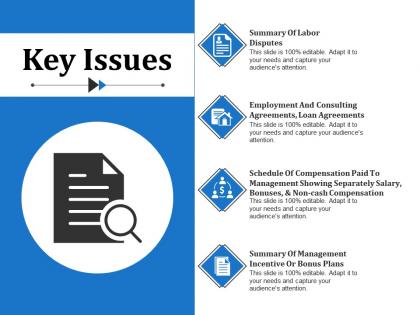
Are you looking for a PPT template to display key challenges your firm is facing in achieving business goals? We are presenting our business oriented key issues example of PPT presentation design template to help you do it efficiently. Use this challenges and solutions PPT template to show the obstacles business is facing. You can represent all critical issues and their solutions together in a well-organized manner. This issue summary template is mainly used by business managers, sales and marketing professionals, audit and testing team in business problem solving presentations. Summary of all problems such as labor disputes, loan agreements, employment and consulting agreements can be shown very well using this issues PowerPoint template. This challenges PowerPoint template is highly useful for risk management, product planning and launch, technology solutions related slideshows. The design layout is amazing as it uses wonderful graphics to represent the key challenges organization is facing. Download this professionally designed issue summary template and design unique slideshows to represent major issues and their solutions. Handle the cliff hanger with our Key Issues Example Of Ppt. Impress folks with your calm demeanor.
People who downloaded this PowerPoint presentation also viewed the following :
Key issues example of ppt with all 5 slides:
Delve upon the jet age with our Key Issues Example Of Ppt. Highlight the importance of increased connectivity.

FAQs for Key issues
Honestly, start with something that grabs people right away - don't just dive into boring intro stuff. Keep it to like 3-4 main points because nobody can remember more than that anyway. Each point should connect to the next one and lead to whatever you want them to do at the end. Practice enough so you're not glued to your notes the whole time. Eye contact matters way more than perfect words. Also, tech always breaks at the worst moment so have a backup plan. Oh, and record yourself once while practicing - you'll cringe but it actually helps you catch the weird stuff you do.
Dude, our brains are just hardwired for stories - we remember them way better than boring stats. Like, would you rather hear "sales went up 40%" or the actual story about that one customer whose problem you totally solved? Stories hit different because they're emotional. Your audience will actually lean forward instead of checking their phones. Oh, and here's what really works - start with something they can relate to, then keep that thread going throughout your whole presentation. Complex stuff suddenly makes sense when there's characters and conflict involved. Trust me on this one.
Dude, slide design literally makes or breaks whether people remember your presentation. I've been in so many meetings where the slides were just... awful. Tiny fonts, cluttered mess everywhere - you know the type. Here's what actually works: tons of white space, fonts you can read from anywhere, and visuals that help instead of distract. One main point per slide max. High contrast colors are your friend. The slides should back you up, not fight for attention. Oh, and that thing where people cram paragraphs onto slides? Don't. Just don't.
Okay so honestly? Timer practice is everything - like actually set a timer and run through it. I always add 10-15% buffer time because stuff ALWAYS takes longer than you think it will. Questions, tech fails, whatever. Practice those transitions between sections too so you're not standing there like "um, so..." Have backup slides you can ditch if time gets tight. Oh and set phone alarms for key points during your talk - super helpful. The goal is knowing your material well enough that you can speed up boring parts or slow down for the good stuff without totally derailing yourself.
Honestly, just stay calm and prep for the obvious questions ahead of time. When someone asks something, repeat it back so everyone can hear - super helpful trick. Don't know the answer? Just say so and offer to get back to them later. Way better than rambling through some made-up response that sounds terrible. If someone's being aggressive, acknowledge what they're saying without getting all defensive about it. Keep responses short and don't let one person hijack the whole thing. Oh, and try the "bridge" method - answer their question quickly, then pivot back to your main points. Works pretty well most of the time.
Dude, you've gotta know who's sitting in those seats before you even start building slides. Executives? Skip the technical stuff and hit them with ROI numbers and big picture strategy. They get bored fast with details. Tech teams are the opposite - they want the nitty gritty data they can actually use. I learned this the hard way after completely whiffing a presentation once. Also, younger crowds usually dig interactive stuff and faster pacing. Older audiences? They want context and background. Just call whoever's organizing and ask "what does this group actually care about?" Saves you every time.
Don't cram a million words on each slide - people will tune out immediately. Use big fonts too, like 24pt minimum. I made the mistake once of using tiny text and half the room couldn't even see it, so embarrassing. Never read directly off your slides either, it's super boring. One main idea per slide works best. Skip the fancy backgrounds and weird color combos that nobody can read. Your slides should back up what you're saying, not BE what you're saying, you know? Oh and definitely test everything on their actual projector first - learned that lesson the hard way when my colors looked completely different.
Stand tall and pull those shoulders back - you'll feel more confident even if you're dying inside. Hand gestures are great for emphasis, just don't go full orchestra conductor on us! Eye contact with different sections keeps people tuned in. Moving around adds energy but skip the caged animal pacing thing. Oh, and match your face to what you're saying - nobody wants to see you grinning while talking about layoffs or whatever serious stuff you're covering. Your body should back up your words, not fight against them.
Oh man, presentation nerves are the worst! Here's what actually helps though - practice way more than feels necessary. Like, embarrassingly more. Do that power pose thing for 2 minutes beforehand too (sounds dumb but it legit works). Show up early so you're not frantically figuring out the clicker situation. Deep breaths obviously help. But honestly? The biggest thing is focusing on your actual message instead of how sweaty you are. Your audience isn't rooting against you - they want to hear what you've got. Pick out a few friendly faces to make eye contact with if you need somewhere safe to look.
Honestly, you gotta ask specific questions if you want decent feedback. Like "what part confused you?" instead of just "thoughts?" - way more helpful. Hit people up right after while it's still fresh, maybe a quick survey or just grab them for 2 minutes. I've noticed people are weirdly more honest when they can type their response instead of saying it to your face. Don't get hung up on one person's opinion though - look for what multiple people are saying. Oh and actually USE their suggestions! People definitely notice when you make changes based on what they told you.
Honestly, just keep it simple and let your data tell the story. Clean bar charts beat those awful 3D things every time - nobody needs that visual chaos. Make sure you actually cite where you got your numbers from, and please check that your data backs up what you're saying. I've sat through way too many presentations where the speaker contradicts their own chart! Round those messy decimals (73% sounds way better than 72.8%). Context matters too - tell people if that 15% growth is amazing or terrible compared to last year. Oh, and definitely practice explaining everything out loud first. You'll sound so much more confident when you're not stumbling through your own slides.
Okay so first thing - open with something that actually grabs people. A crazy stat, weird question, or quick story works great. Just make sure you preview what's coming so they're not lost. Now here's what drives me nuts - DO NOT end with "any questions?" It's so lame and kills all your momentum. Circle back to your main point instead. Give them a solid summary or tell them what to do next. You want them obsessing over your message as they leave, not sitting there confused about whether you're done talking. Oh and practice saying these parts out loud because honestly? They'll make or break your whole thing.
Oh dude, there's so much cool stuff you can try! Mentimeter and Poll Everywhere are amazing for live polls - seriously saves you when people start zoning out. Ditch PowerPoint sometimes and go with Prezi for those swooshy transitions or Canva if you want things to actually look good. Get yourself a wireless presenter too, game changer for moving around. I keep meaning to try Loom for recording stuff, and virtual backgrounds help if you're presenting from your messy room. Just pick one new thing per presentation though - don't go crazy like I did my first time!
Honestly? Cut all the boring stuff out first - people zone out way faster than you'd expect. Pick 3-5 main points max and arrange them so they actually make sense together. Skip the corporate buzzwords (nobody cares about your "synergistic solutions" - ugh). Here's what really helps: try explaining your whole presentation in just one sentence. If you can't do it clearly, that's your first red flag right there. Oh, and definitely run it by someone else beforehand. Have them tell you what they heard - you'll be surprised how different it sounds coming back to you.
Honestly, just stick to three things: be accurate, be transparent, and don't treat people like idiots. Double-check your facts and cite everything - I've seen presentations crash and burn over bad data. If you've got conflicts of interest or your research has gaps, say so upfront. People appreciate honesty way more than you think. Don't cherry-pick stats to make your point either. That's just sleazy. Oh, and skip the emotional manipulation stuff - your audience will see right through it. Basically treat them how you'd want to be treated when you're sitting through someone else's presentation.
-
Content of slide is easy to understand and edit.
-
Awesome presentation, really professional and easy to edit.