

Kpi Dashboard For Tacking Customer Wait Time




Try Before you Buy Download Free Sample Product
 Impress Your
 Audience
 100%
100% Editable
 Save Hours
 of Time


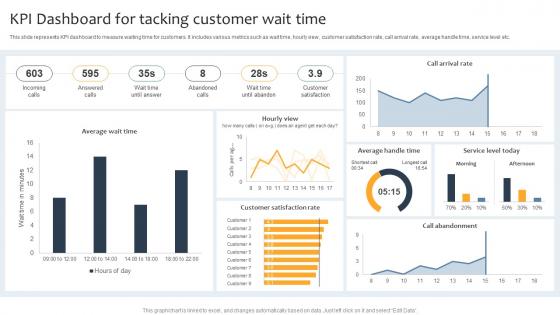
This slide represents KPI dashboard to measure waiting time for customers. It includes various metrics such as wait time, hourly view, customer satisfaction rate, call arrival rate, average handle time, service level etc.
People who downloaded this PowerPoint presentation also viewed the following :
Kpi Dashboard For Tacking Customer Wait Time with all 10 slides:
Use our Kpi Dashboard For Tacking Customer Wait Time to effectively help you save your valuable time. They are readymade to fit into any presentation structure.








FAQs for Kpi Dashboard For Tacking
Effective KPI dashboard components include real-time data visualization, customizable metrics displays, automated alerts and notifications, drill-down capabilities, and mobile accessibility. These elements streamline performance monitoring by enabling instant insights, facilitating quick decision-making, and enhancing operational transparency, with many organizations finding that comprehensive dashboards ultimately deliver improved accountability and competitive advantage across departments.
Businesses can determine relevant KPIs by aligning metrics with strategic objectives, analyzing key business drivers, consulting stakeholders across departments, and reviewing industry benchmarks. Through systematic evaluation of goals like revenue growth, customer retention, or operational efficiency, organizations streamline decision-making processes, enhance performance tracking, and ultimately deliver measurable competitive advantages in increasingly data-driven markets.
Data visualization transforms KPI dashboards by converting complex datasets into intuitive charts, graphs, heatmaps, and gauges that enable instant comprehension and faster decision-making. Through strategic visual elements, organizations streamline performance monitoring, identify trends immediately, and communicate insights across departments more effectively, with many executives finding that well-designed dashboards ultimately enhance strategic alignment and operational responsiveness.
KPI dashboards should be updated based on data frequency and business needs, with real-time updates for operational metrics, daily updates for sales performance, weekly updates for project milestones, and monthly updates for strategic indicators. This balanced approach ensures stakeholders receive timely insights without overwhelming them with unnecessary data refreshes, while many organizations find that automated scheduling enhances decision-making accuracy and operational efficiency.
Common KPI dashboard pitfalls include overloading with excessive metrics, selecting vanity metrics without business relevance, poor visual design that obscures insights, lack of real-time data integration, and missing stakeholder alignment on objectives. These issues prevent effective decision-making by creating confusion rather than clarity, with many organizations finding that focused, actionable dashboards with 5-7 key metrics deliver significantly better strategic outcomes.
Organizations ensure KPI dashboard accuracy through automated data validation, standardized data sources, real-time integration protocols, and regular audit processes. By implementing centralized data governance frameworks, establishing clear data ownership roles, and utilizing automated quality checks, companies like financial institutions and healthcare providers maintain consistent metrics while reducing manual errors, ultimately delivering reliable insights that drive strategic decision-making.
**INPUT**: What tools and software are best suited for building KPI dashboards? **OUTPUT**: Leading KPI dashboard tools include Tableau, Power BI, Google Data Studio, Klipfolio, and Sisense, each offering distinct visualization capabilities and integration features. These platforms streamline data analysis by enabling real-time monitoring, automated reporting, and customizable interfaces, with many organizations finding that strategic tool selection ultimately delivers enhanced operational efficiency and faster decision-making across departments. [Word count: 58 words]
KPI dashboards can be tailored through role-based access controls, customizable metrics hierarchies, departmental filtering options, and stakeholder-specific visualization formats. Executive dashboards emphasize strategic KPIs and trend analysis, while operational managers receive detailed performance metrics and real-time alerts, ultimately enabling each stakeholder to access relevant insights that drive informed decision-making and organizational alignment.
Live dashboards offer real-time data visibility, instant anomaly detection, interactive filtering capabilities, automated updates, and enhanced collaboration features compared to static reports. These advantages enable organizations to respond immediately to changing conditions, streamline decision-making processes, and minimize delays in critical business responses, with many companies finding that live dashboards significantly improve operational efficiency and competitive positioning.
Businesses measure KPI dashboard success through improved decision-making speed, increased data accessibility across teams, reduced time spent on manual reporting, and enhanced operational visibility. Organizations typically track user adoption rates, frequency of dashboard usage, and correlation between dashboard insights and business outcomes, with many finding that successful implementations deliver faster strategic responses and measurable performance improvements within three to six months.
Operational KPI dashboards focus on daily performance metrics, real-time monitoring, and immediate tactical decisions, while strategic dashboards emphasize long-term goals, quarterly trends, and executive-level insights. Operational dashboards help managers streamline day-to-day operations through instant alerts and detailed breakdowns, whereas strategic versions enable leadership teams to track organizational progress and competitive positioning.
KPI dashboards integrate with existing business intelligence systems through APIs, data connectors, and middleware platforms that enable seamless data flow between systems. These integrations allow organizations to consolidate metrics from multiple sources like CRM, ERP, and analytics tools into unified dashboards, ultimately delivering real-time visibility and streamlined decision-making across departments.
Best practices for presenting KPI data to non-technical stakeholders include using visual charts, clear color coding, simplified metrics, contextual comparisons, and executive summaries. These approaches enhance understanding by eliminating technical jargon, highlighting key trends through intuitive dashboards, and focusing on actionable insights, with many organizations finding that storytelling with data ultimately drives better decision-making and strategic alignment.
KPI selection varies significantly across industries based on sector-specific priorities, regulatory requirements, and operational focus areas. Manufacturing emphasizes efficiency metrics like OEE and defect rates, while financial services prioritize risk ratios and compliance indicators, and healthcare focuses on patient outcomes and safety measures, ultimately enabling each sector to drive performance improvements aligned with their strategic objectives.
User experience and design significantly impact KPI dashboard effectiveness by determining data accessibility, visual clarity, and decision-making speed across organizations. Well-designed interfaces with intuitive navigation, responsive layouts, and clear data visualization enable executives and managers to quickly identify trends, spot anomalies, and make informed decisions, ultimately delivering faster strategic responses and enhanced operational efficiency in increasingly data-driven business environments.
-
I have been using SlideTeam for the past six months. Very happy and satisfied!
-
I am extremely pleased with these PPT slides that we used for our event. They were easy to modify and came out great in all aspects!