

Logistics Control Tower For Handling Overall Enabling Smart Shipping And Logistics Through Iot




Try Before you Buy Download Free Sample Product
 Impress Your
 Audience
 100%
100% Editable
 Save Hours
 of Time


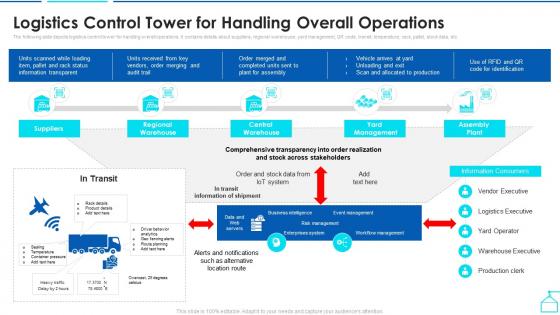
The following slide depicts logistics control tower for handling overall operations. It contains details about suppliers, regional warehouse, yard management, QR code, transit, temperature, rack, pallet, stock data, etc.
People who downloaded this PowerPoint presentation also viewed the following :
Logistics Control Tower For Handling Overall Enabling Smart Shipping And Logistics Through Iot with all 6 slides:
Use our Logistics Control Tower For Handling Overall Enabling Smart Shipping And Logistics Through Iot to effectively help you save your valuable time. They are readymade to fit into any presentation structure.





FAQs for Logistics Control Tower For Handling Overall Enabling Smart Shipping And
Start with dashboards that show you what's happening right now - that's your foundation. Then add automated alerts for when stuff breaks (and trust me, it will). You'll want all your data feeding into one place so your team isn't juggling twelve different systems. Predictive analytics help catch problems early, which honestly saves you so much headache later. Don't forget clear escalation rules - when chaos hits, people need to know exactly who's handling what. Oh, and integrated communication tools are clutch. Build visibility first, then add the fancy automation once everyone's comfortable.
So basically it's like having one master dashboard instead of juggling a million different systems. Your logistics control tower pulls data from warehouses, suppliers, shipping - all that stuff - into one place so you can actually see what's happening. No more tab-switching nightmare, honestly. The cool part is it uses AI to catch problems before they blow up, which beats scrambling to fix disasters later. I'd start by listing out all the random data sources you're currently using - you'll probably be surprised how scattered everything is. Game changer for staying ahead of issues.
Alright, so you'll want to track four main areas. Operational stuff first - on-time delivery, order accuracy, inventory turns. Shows if things are actually working. Then financial metrics: cost per shipment, freight spend variance, working capital stuck in inventory. Customer metrics like cycle time and fill rates keep you grounded on service levels. Risk indicators too - supplier issues, carrier problems, weather stuff. But here's the thing - dashboards can get crazy overwhelming fast. I'd honestly start with maybe 8-10 core metrics that actually move the needle for your business goals. You can always add more later once you've got the basics dialed in.
So honestly, technology can be a game-changer for your control tower. Real-time data integration gives you instant visibility instead of waiting around for manual updates - which is huge. IoT sensors track shipments live, and AI can actually predict disruptions before they hit (though sometimes I wonder if we're getting too dependent on algorithms, but whatever). The predictive analytics stuff is pretty solid. Advanced dashboards let you see everything at once, then dive into specific problems fast. I'd start small though - find your biggest visibility gap and pilot one solution first. Don't try to fix everything at once.
So basically, a logistics control tower pulls all your supply chain data into one place - warehouses, carriers, suppliers, everything. Instead of flying blind, you actually see what's happening in real-time. The dashboard updates constantly and flags problems before they blow up. Pretty clutch for spotting delays or capacity issues early. Plus you get predictive insights about demand spikes coming down the pipeline. Honestly, I'd start by figuring out where your biggest blind spots are first - that's where you'll notice the difference right away in how fast you can make decisions.
So data analytics is like the brain of your whole logistics setup - takes all that messy info from trucks, warehouses, suppliers and actually makes sense of it. Your dashboards will predict delays and optimize routes before stuff hits the fan. Honestly, the pattern recognition is pretty wild compared to what we'd catch manually. Plus you'll get smarter about where to place inventory and which carriers actually perform. Oh, and capacity planning becomes way less of a headache. Start with your KPI dashboards first though - focus on metrics that matter for day-to-day ops.
Think of logistics control towers as your supply chain's mission control center. They pull data from everywhere - shipments, inventory, supplier updates, even weather alerts. Real-time visibility into the whole operation. When something's about to go sideways (delayed truck, supplier drama, whatever), you'll know before your customers do. Pretty clutch for catching problems early. The system flags potential issues using analytics, then you can actually do something about it. Honestly, it beats scrambling after things already went wrong. I'd say start by figuring out where you're most blind right now - that's your biggest win.
Ugh, honestly the data integration part is going to make you want to pull your hair out. You're probably dealing with like 20 different systems that don't play nice together. Getting people to actually USE the thing is another headache - everyone's stuck in their old ways and doesn't want yet another dashboard to babysit. Sure, better visibility sounds amazing until you realize your data is complete trash to begin with. Then you're just staring at garbage more clearly, which... not helpful. I'd honestly start by fixing your messy data sources first, then work on convincing people this won't suck.
So basically everyone gets to see the same real-time data instead of constantly calling each other for updates. Think of it like a shared Google Doc rather than emailing spreadsheets back and forth - way cleaner. You can set up automatic notifications when stuff goes wrong too, which honestly saves so much headache. The dashboard shows inventory, shipments, all that good stuff in one place. I'd probably start small though - pick your most important partners and test it with them first before rolling it out to everyone. Makes the whole supply chain thing way less chaotic.
Honestly, logistics control towers are game-changers for customer service. You get real-time visibility across your whole supply chain, which means spotting problems before customers even know there's an issue. Way better than scrambling to fix things after the fact. Instead of those awkward "let me check and get back to you" calls (ugh), you can actually see what's happening with all your logistics partners. Delays? You'll catch them early. Same with bottlenecks or any other disruptions. The trick is being upfront with customers right away instead of hoping problems solve themselves – which they never do.
Connect your GPS, RFID, sensors, and carrier APIs to one dashboard - that's your control tower right there. The real magic happens with automated alerts that catch delays and route issues before you even notice. Honestly, half the dashboards out there look amazing but don't actually help when shit hits the fan. Start small though. Pick your worst headache first and get those data streams talking to each other. You can always add more later. The goal is having one place where everything makes sense instead of jumping between twelve different systems all day.
First thing - get real-time visibility into everything. Seriously, you can't fix what you can't see. Build dashboards that only show the problems, not every single metric (learned that one the hard way). Set up clear escalation rules so people know exactly who does what when stuff goes sideways. Predictive analytics will save your butt - catch issues early instead of playing whack-a-mole later. Oh, and don't skip change management when you roll this out. Your team has to actually use it or it's worthless. Start small with one region first, then expand.
So basically these control towers give you real-time visibility into everything that's happening. When disruptions hit, you get instant alerts and can quickly reroute shipments or switch suppliers before it becomes a total nightmare. The cool thing is they use AI to actually predict problems before they happen - honestly pretty impressive tech. Most systems keep backup supplier networks ready to go automatically. Oh, and they maintain alternative transport routes too. The whole point is getting all your data flowing into one place so you're not scrambling to piece things together after the fact. Makes reacting way faster.
Honestly, you can't run a control tower without automation - there's just too much data flying around. Your team would go crazy trying to manually track everything and spot problems. The automated systems do the heavy lifting: real-time monitoring, alerts when stuff goes wrong, performance dashboards. Plus they can actually predict issues before they happen, which is pretty cool. I learned this the hard way at my last job - we tried doing it manually at first and it was a nightmare. Set up your automation rules carefully from the start, then your people can focus on actually fixing problems instead of just finding them.
Honestly, you gotta measure both the obvious stuff and the fuzzy benefits. Hard savings are straightforward - freight costs going down, less money tied up in inventory, fewer labor hours. The soft stuff though? That's trickier but equally important. Better customer happiness, fewer stockouts, improved visibility across operations. Get your baseline numbers first, then check quarterly how your cost per shipment and delivery rates improve. Most places I've seen hit 15-25% cost reduction in year one. Oh, and definitely build a simple dashboard with like 3-5 key metrics. Makes it way easier to show your boss the wins without diving into spreadsheet hell.
-
Content of slide is easy to understand and edit.
-
“Slides are formally built and the color theme is also very exciting. This went perfectly with my needs and saved a good amount of time.”