


Mobile application development proposal powerpoint presentation slides




Try Before you Buy Download Free Sample Product
 Impress Your
 Audience
 100%
100% Editable
 Save Hours
 of Time


Mobile applications are becoming the most productive medium for companies to sell premium services. A flexible and user-friendly software design can increase the customer’s engagement time on a company’s application. Therefore, it is important to develop an easy-to-navigate mobile app that will compel its users to buy the products and services. They prove to be the best tool for reaching customers everywhere with ease. Take advantage of this Mobile Application Development Proposal PowerPoint Presentation Slides to pitch your professional services to the audience. Promise high-performance, speedy, and advanced mobile apps to your clients with these proposal slides. This invigorating PPT slide helps you to include a cover letter describing your key deliverables. Elaborate on your project context and objectives in a well-organized format with the help of this software development PPT template. Incorporate this technology development PPT layout to identify the challenges in customer retention and to offer your expert solutions with conviction. Highlight your development process to explain the stages of sitemap, content, wireframes, visual design, execution, launch, branding, and customer feedback with the assistance of this software design PPT visual. Exhibit your tools for branding the app using social media campaigns through this content-ready PPT presentation. Employ this PPT deck to define the expert software technologies that your company uses like IDE, OS, and core data to meet the unique requirements of the clients. Showcase the overall project cost that a client has to invest in for getting an application designed with the help of this mobile software PPT graphic. Share the statement of work and contract to provide a better understanding of the company to your clients. Select this PowerPoint theme to convey your company's vision, mission, goals, and objectives and allure your customers with your experience. Download this invigorating PowerPoint presentation and impress your audience.
People who downloaded this PowerPoint presentation also viewed the following :
Content of this Powerpoint Presentation
Slide 1: This slide introduces Mobile Application Development Proposal. State User assigned and Date Submission.
Slide 2: This slide displays Cover Letter for Mobile Application Development Proposal.
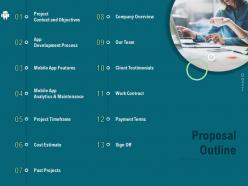
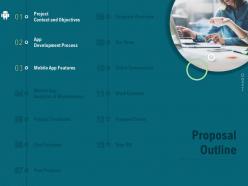
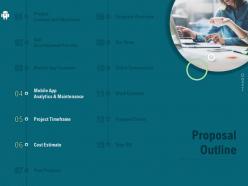
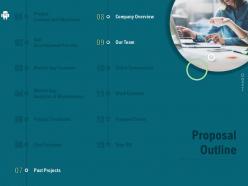
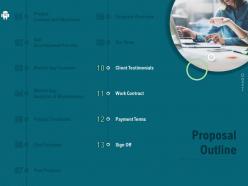
Slide 3: This slide displays Proposal Outline.
Slide 4: This slide depicts Proposal Outline.
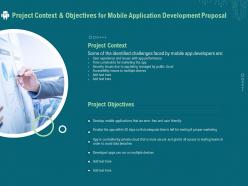
Slide 5: This slide describes Project Context & Objectives for Mobile Application Development Proposal.
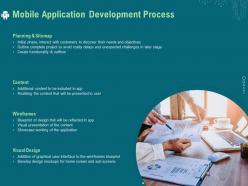
Slide 6: This slide shows Mobile Application Development Process.
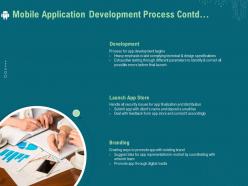
Slide 7: This slide is continued with Mobile Application Development Process.
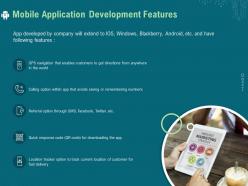
Slide 8: This slide showcases Mobile Application Development Features.
Slide 9: This slide shows Proposal Outline.
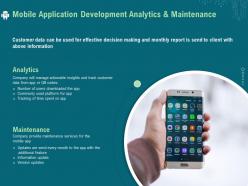
Slide 10: This slide showcases Mobile Application Development Analytics & Maintenance.
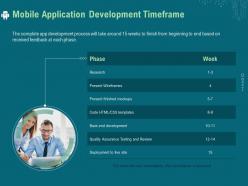
Slide 11: This slide presents Mobile Application Development Timeframe.
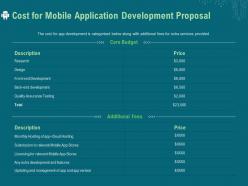
Slide 12: This slide depicts Cost for Mobile Application Development Proposal.
Slide 13: This slide displays Proposal Outline.
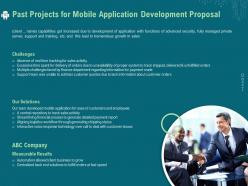
Slide 14: This slide showcases Past Projects for Mobile Application Development Proposal.
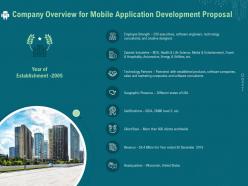
Slide 15: This slide presents Company Overview for Mobile Application Development Proposal
Slide 16: This is Our Team slide with Names and Designations.
Slide 17: This is Our Team slide with Names and Designations.
Slide 18: This slide showcases Proposal Outline.
Slide 19: This slide displays Client Testimonials. Write Client Testimonial Here.
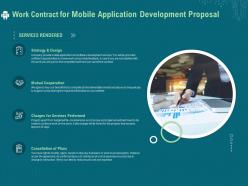
Slide 20: This slide displays Work Contract for Mobile Application Development Proposal.
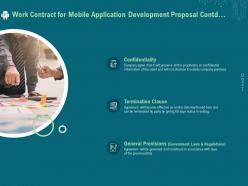
Slide 21: This slide is continued with Work Contract for Mobile Application Development Proposal.
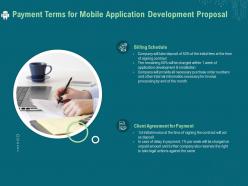
Slide 22: This slide showcases Payment Terms for Mobile Application Development Proposal.
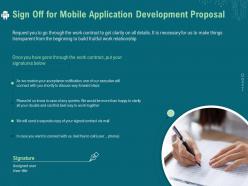
Slide 23: This is Sign Off slide.
Slide 24: This is Contact Us slide with Address, Contact number, Email address.
Slide 25: This is Icons Slide for Mobile Application Development Proposal.
Slide 26: This slide is titled as Additional Slides for moving forward.
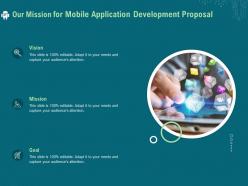
Slide 27: This slide displays Our Mission, Vision and Goal.
Slide 28: This is 30 60 90 Days Plan slide.
Slide 29: This slide shows Timeline process.
Slide 30: This slide showcases Roadmap process.
Mobile application development proposal powerpoint presentation slides with all 30 slides:
Use our Mobile Application Development Proposal Powerpoint Presentation Slides to effectively help you save your valuable time. They are readymade to fit into any presentation structure.
FAQs for Mobile application development proposal
Look, you basically want to fix whatever's driving your users crazy while keeping them hooked. Most apps bomb because they try cramming in every feature imaginable right off the bat - huge mistake. Pick 2-3 things your audience actually needs and nail those first. Think about retention early too, since getting someone back after they bail is brutal. I'd start by mapping out where people get frustrated in their current process, then build around those pain points. Oh, and whatever you do, don't overthink the fancy stuff until you've got the basics locked down.
Honestly, I'd go with both iOS and Android right from the start. Yeah, it's tempting to just do iOS to save money, but you'd be missing out on like 60% of your target market - most of them are on Android. React Native or Flutter lets you share most of the code anyway, so it's not that much extra work. Maybe 3-4 weeks longer than just doing iOS alone. Here's what I'd actually do though: launch the MVP on iOS first, then drop the Android version like 2 weeks later. Best of both worlds.
So you'll definitely want user login, push notifications, and offline sync - that's like the holy trinity of mobile apps these days. Payment stuff too if you're selling anything, obviously. I'd throw in analytics tracking right from launch because you'll be shocked at how differently people use your app than you expect. Maybe social sharing features depending on who you're targeting? But honestly, start with your core stuff first and add the fancy features later. Want to jump on a call sometime and figure out what's actually critical for your specific thing?
So we're hitting three things most other apps totally miss. Offline functionality that actually works - crazy how many still need wifi for everything, right? Then there's AI personalization, but like, it learns how you actually use stuff instead of just asking what you prefer. The micro-interactions are probably my favorite part though - every tap feels smooth and intentional. Most competitors either overcomplicate things or feel janky as hell. You should definitely check out our prototype this week, it'll show you how everything clicks together way better than me explaining it.
Honestly, most apps take about 12-16 weeks start to finish. First couple weeks we're doing discovery and wireframes - kinda boring but necessary. Development eats up the biggest chunk at 6-8 weeks (that's the fun part where everything actually comes together). Then 2-3 weeks of testing because nobody wants a buggy app. Final two weeks? App store stuff and getting ready to launch. Complex features will definitely slow things down. Simple apps move way faster though. We should probably jump on a quick call so I can look at what you're actually building and give you real numbers instead of ballpark estimates.
So we're looking at $75K total - $50K for building it, then $25K for the first year of maintenance stuff. Yeah, it's a chunk of money upfront but honestly, I've watched too many projects crash because people forget about the ongoing costs. Bug fixes, security updates, new iOS versions breaking things - it adds up fast. That 50/30 split is pretty normal from what I've seen. Oh, and definitely get quotes from at least three different developers. Their maintenance packages can be wildly different, so you'll want to see what you're actually getting for your money.
Honestly, you'll want to watch the basics first - daily users, how many people stick around after a week, app store reviews. Downloads look cool but mean nothing if people delete it right away. Session time tells you way more than total installs ever will. Set up your analytics dashboard literally the first week or you'll regret it later. Crash reports and loading speeds matter too - nobody tolerates slow apps anymore. If you're making money somehow, track those conversion rates. The sweet spot is when you see actual engaged users growing consistently, not just that initial download spike.
Honestly, I'd go cross-platform - React Native or Flutter. You'll get like 80-90% code sharing between iOS and Android, which is huge for time and budget. Native's still the best for performance, sure, but most business apps don't need that level of optimization. Unless you're doing something crazy graphics-heavy or AR stuff, cross-platform works great. Hybrid feels pretty dated now - the performance just isn't there anymore. We should probably check your specific features first though, just to make sure cross-platform won't cause any headaches down the road.
Yeah, we've done some digging but could definitely go deeper. Surveyed around 200 people in our target group - 78% were into the main features we're planning. There's three big competitors out there, but honestly? They're all missing that integration piece that makes our whole thing different. Oh, and we did this focus group last month that was really eye-opening about what users actually struggle with. We should probably bump up our sample size though, maybe test some key user flows before we go all-in on building this thing. More data never hurt anyone.
Honestly, I'd start with just one acquisition channel and get really good at it first. ASO is huge - most people sleep on organic discovery. Then hit up social media where your users actually are (not everywhere, just where they hang out). Build a referral program that doesn't feel cheap. For keeping people around - push notifications that aren't annoying spam, some gamification stuff, and onboard people differently based on what they're doing. Oh and track your retention weekly from day one. You'll want to pivot fast if things aren't clicking.
So here's what I'd do - start with a staged rollout thing where you test stuff first, then beta, then full launch. Weekly sprint reviews are clutch so you can catch problems early. Major features? Roll them out to maybe 10% of users first. If it doesn't blow up, then expand from there. The dashboard tracking adoption and feedback is actually pretty sweet - you can see what's working in real time. Oh and definitely do monthly planning sessions with your team, otherwise you'll just be building random stuff nobody wants.
Honestly, you'll need tons of hands-on help those first few weeks. Plan on weekly calls with our devs to go over requirements and review prototypes. Training sessions are a must - we need to understand your business logic, user flows, and whatever systems we're integrating with. API docs are always messier than they seem, trust me. Make sure there's a decision-maker we can ping when we inevitably run into those "okay but what happens if..." scenarios. Slack works great for quick questions between the formal check-ins.
So we'll build it responsive from day one - flexible layouts that adjust to any screen size automatically. Testing on like 10+ devices, from old iPhones to new Android tablets (device fragmentation is honestly such a headache but whatever). Automated tools help us simulate different resolutions too. Quick question though - which devices do your users actually use most? We should hit those hard first instead of spreading ourselves too thin. Makes way more sense to nail the main ones perfectly than half-ass everything, you know?
So we're building everything with end-to-end encryption from the start - way better than trying to add security later. Multi-factor auth and biometric login too. Your data gets AES-256 encryption when stored, and we're following OWASP best practices for coding. Obviously not doing the whole plain-text password thing (can't believe some apps still do that). Regular security audits and pen testing throughout development. Honestly, baking security in from day one is the only way that makes sense. Want me to send over the technical architecture doc? It's got all the detailed specs.
So picture something clean and super intuitive - users shouldn't have to think too hard about where to tap. I'd keep it minimal with clear visual hierarchy, maybe 3 taps max for core tasks. Stick with familiar UI patterns since people hate learning new stuff. Colors need to be accessible (seriously, I've seen some terrible neon combos that hurt my eyes). Micro-interactions are clutch for making it feel polished. Oh and definitely start with wireframes first - trust me, you'll save yourself headaches later when you're not redesigning pretty mockups over and over.
-
Great designs, really helpful.
-
Appreciate the research and its presentable format.