

Mobile training program powerpoint presentation slides




Try Before you Buy Download Free Sample Product
 Impress Your
 Audience
 100%
100% Editable
 Save Hours
 of Time


Mobile Training Program Powerpoint Presentation Slide is ideal for anyone looking for a virtual representation of an impactful mobile training strategy. Factors like project delays or low lead conversions beg the need for an employee training program. This online training PowerPoint theme helps you in presenting a training need assessment. The data visualizations featured in this PPT presentation assist you in showcasing skill gap analysis at individual and department levels. Neatly consolidate the training needs of your organization in a tabular format. Use infographic-style smart phone training PowerPoint templates to elucidate on-the-job, interactive, and classroom-based employee training methods. Illustrate various online training program mediums like a learning management system, video training tools, mobile training tools, and micro-learning platforms. Further elaborate on the implementation details related to an online training program like a plan of action, timeframe, and trainers. Utilize bar graphs to present the program budget and dashboard diagrams for program evaluation. Smash the download icon, and start personalization right away. Our Mobile Training Program Powerpoint Presentation Slides are explicit and effective. They combine clarity and concise expression.
People who downloaded this PowerPoint presentation also viewed the following :
Content of this Powerpoint Presentation
Slide 1: This slide introduces Mobile Training Program. State your Company name and begin.
Slide 2: This slide displays Agenda for Video Training.
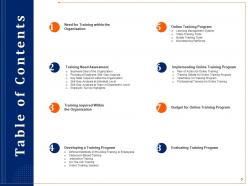
Slide 3: This slide displays Table of Content of the presentation.
Slide 4: This slide displays Table of Content.
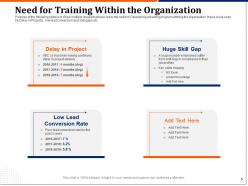
Slide 5: The Purpose of the following slide is to show multiple issues that have led to the need of Developing a training program withing the organization, these issue scan be Delay in Projects,low lead conversion and skill gaps etc.
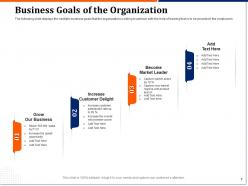
Slide 7: This slide displays the multiple business goals that the organization is willing to achieve with the help of training that is to be provided t the employees.
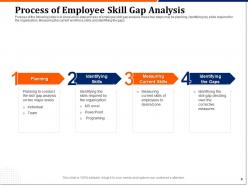
Slide 8: This slide shows a four-step process of employee skill gap analysis, these four steps may be planning, identifying key skills required for the organization, Measuring the current workforce skills and identifying the gaps
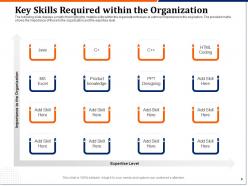
Slide 9: This slide displays a matrix that highlights multiple skills within the organization that are at outmost importance to the origination. The provided matrix shows the importance of these to the organization and the expertise level.
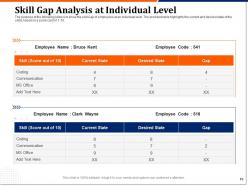
Slide 10: The purpose of the following slide is to show the skill Gap of employees at an individual level. The provided table highlights the current and desired state of the skills based on a score card of 1-10.
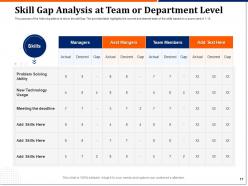
Slide 11: The purpose of the slide is to show the skill Gap The provided table highlights the current and desired state of the skills based on a score card of 1-10.
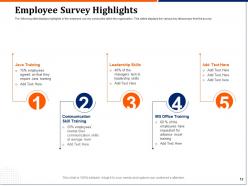
Slide 12: This slide displays highlights of the employee survey conducted within the organization. This slides displays the various key takeaways from the survey.
Slide 13: This slide displays Table of Content of the presentation.
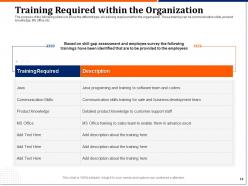
Slide 14: The purpose of this slide is to show the different type sfo training required within the orgaznaition. These training can be communication skills, product knowledge, MS office etc.
Slide 15: This slide displays Table of Content of the presentation.
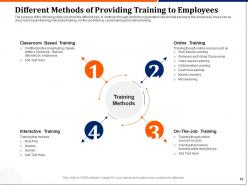
Slide 16: The purpose of the following slide is to show the different type of methods through which the organization can provide training to the employees, these can be classroom based training, interactive training, on-the-job training, social training and online training.
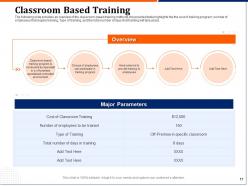
Slide 17: This slide provides an overview of the classroom-based training methods, the provided table highlights the the cost of training program, number of employees that require training, Type of training, and the total number of days that training will take place.
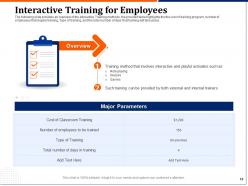
Slide 18: This slide provides an overview of the Interactive Training methods, the provided table highlights the the cost of training program, number of employees that require training, Type of training, and the total number of days that training will take place .
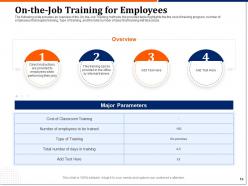
Slide 19: This slide provides an overview of the On-the-Job Training methods, the provided table highlights the the cost of training program, number of employees that require training, Type of training, and the total number of days that training will take place.
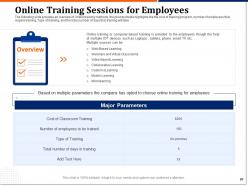
Slide 20: This slide provides an overview of Online training methods, the provided table highlights the the cost of training program, number of employees that require training, Type of training, and the total number of days that training will take place
Slide 21: This slide displays Table of Content.
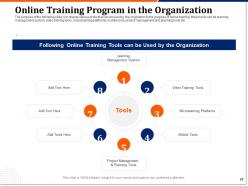
Slide 22: The purpose of this slide is to display various tools that can be used by the origination fo the purpose of online training, these tools can be learning management system, video training tools, microlearning platforms, mobile tools, project management and planning tools etc.
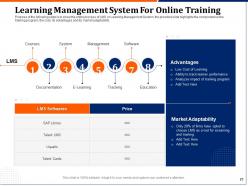
Slide 23: The Purpose of this slide is to show the entire process of LMS or Learning Management System, the provided slide highlights the component so the training program, the cost, its advantages and its market adaptability.
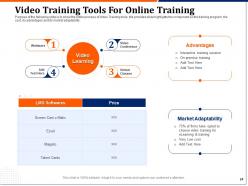
Slide 24: The purpose of this slide is to show the entire process of Video Training tools, the provided slide highlights the component so the training program, the cost, its advantages and its market adaptability.
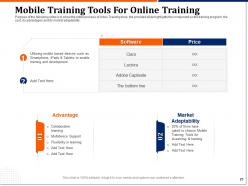
Slide 25: The Purpose of this slide is to show the entire process of Video Training tools, the provided slide highlights the component so the training program, the cost, its advantages and its market adaptability.
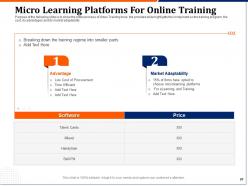
Slide 26: This slide shows the entire process of Video Training tools, the provided slide highlights the component so the training program, the cost, its advantages and its market adaptability.
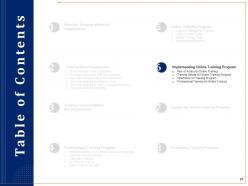
Slide 27: This slide displays Table of Content.
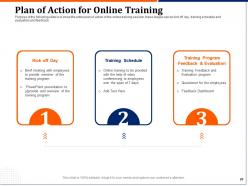
Slide 28: The Purpose of this slide is to show the entire plan of action of the online training session, these stages can be kick off day, training schedule and evaluation and feedback.
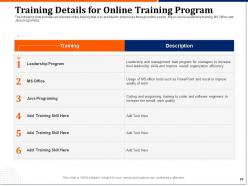
Slide 29: This slide provides an overview of the training that is to provided to employees through online source , these can be leadership training, MS Office and Java programing.
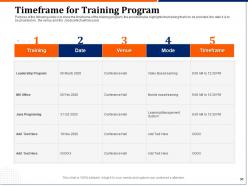
Slide 30: This slide shows the timeframe of the training program, the provided table highlights the training that is to be provided, the date it is to be provided on, the venue and the ,mode which will be used.
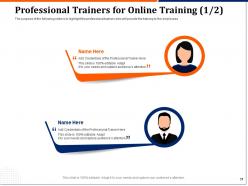
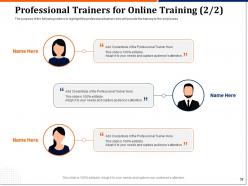
Slide 31: The purpose of the following slide is to highlight the professional trainers who will provide the training to the employees
Slide 32: The purpose of the this slide is to highlight the professional trainers who will provide the training to the employees
Slide 33: This slide displays Table of Content
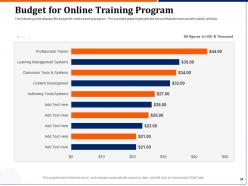
Slide 34: This slide displays the budget for online training program. The provided graph highlights the amount that will each specific activity will take.
Slide 35: This slide displays Table of Content.
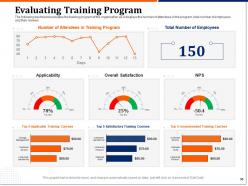
Slide 36: The following dashboard evaluates the training program of the organization as it displays the number of attendees in the program, total number of employees and their reviews
Slide 37: This is Icons Slide for Mobile Training Program.
Slide 38: This slide is titled as Additional Slides for moving forward.
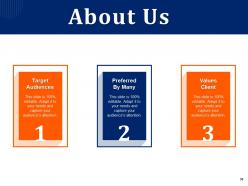
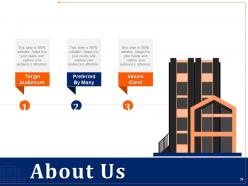
Slide 39: This is About Us slide to showcase Company specifications.
Slide 40: This slide displays Mission, Vision and Goals.
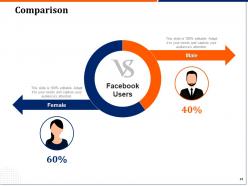
Slide 41: This slide depicts Comparison of Male and Female users.
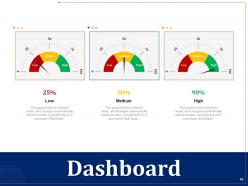
Slide 42: This is Dashboard slide.
Slide 43: This slide is titled as Post It Notes. Post your important notes.
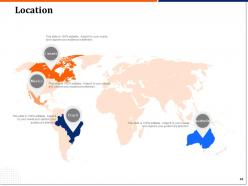
Slide 44: This slide depicts Location.
Slide 45: This is Idea Generation slide to highlight important ideas, and facts.
Slide 46: This is Thank you slide with Contact details.
Mobile training program powerpoint presentation slides with all 46 slides:
Use our Mobile Training Program Powerpoint Presentation Slides to effectively help you save your valuable time. They are readymade to fit into any presentation structure.
FAQs for Mobile training program
Honestly, start with bite-sized chunks - people aren't gonna sit through hour-long modules on their phone. Make sure everything works offline too, because cell service is spotty everywhere apparently. Interactive stuff like quizzes keeps people awake, and progress tracking is clutch so they know they're actually getting somewhere. Discussion boards are cool for the social aspect, just don't force it. Oh, and notifications work but seriously don't spam people or they'll delete your app faster than you can blink. I'd probably audit what content you already have first - see what actually makes sense on mobile before building new stuff.
Honestly, mobile training just works better because people can squeeze it in whenever - like on the train or during lunch breaks. Your employees won't rush through it just to get it done when they're learning on their own time. Those bite-sized lessons are so much easier to absorb than sitting through some endless presentation that puts everyone to sleep. I mean, who has time for hour-long training sessions anymore? The notifications help too since they remind people to keep going. You should try chopping up your current training into maybe 5-10 minute chunks. Completion rates will definitely go up.
Keep everything super short - like 3-5 minute chunks max. Videos should be under 2 minutes because honestly, who's watching a full lecture while waiting for their latte? I've found interactive stuff works way better than just reading - quick quizzes, drag-and-drop, those scenario things. Oh, and definitely make some downloadable checklists they can pull up offline when they're actually doing the job. Start by chopping up whatever content you already have. You'll be shocked how much more people finish when it's not a massive time commitment on their phone.
Honestly, you need to track two things - engagement stuff like completion rates and time spent, plus whether people actually change how they work afterward. The engagement metrics are easy to pull from your platform. But the real value comes from seeing if they're using what they learned back at their jobs. Manager feedback works well for this, or just send out quick surveys. Oh, and definitely test different mobile formats - some work way better than others. Trust me on setting up automated reports though. I spent way too much time manually pulling data every month before I figured that out.
Honestly? Tech issues will drive you crazy - everyone's got different phones and internet that barely works half the time. Getting people to actually engage is rough too since mobile learning just feels like extra homework to most folks. Oh, and creating content that doesn't look terrible on small screens is way harder than you'd think. Progress tracking gets messy when learners are jumping in and out during random coffee breaks. The retention thing is real too - bite-sized learning sounds great but does it actually stick? I'd definitely start with just a few people first to figure out what breaks.
Oh absolutely, demographics are huge for this stuff. Younger people want quick videos and game-like features, but older employees usually prefer detailed text they can go back to. Tech comfort varies wildly too - some people love swiping and interactive stuff, others just want simple tap-to-continue. Don't forget about language needs and cultural differences either. Field workers need everything to work offline (obviously), while office people expect collaboration tools. Honestly, job roles matter more than age sometimes. Just survey your actual users first about their devices and what they prefer before you build anything.
So you'll definitely need an authoring tool - Articulate Rise or Adobe Captivate work great for mobile-responsive stuff. Get an LMS that actually supports mobile delivery too. For videos, Camtasta's solid but honestly? Your phone camera works fine most of the time. If you're doing those short bite-sized lessons, check out microlearning platforms like Axonify. Here's the thing though - test everything on real devices, not just your computer browser. The experience is completely different and you'll catch issues you'd never see otherwise. Oh, and make sure it all looks decent across different screen sizes. That's probably obvious but worth mentioning.
Dude, gamification actually works pretty well for this stuff. Add points and badges when people finish modules - I know it sounds super cheesy but honestly people eat that up. Progress bars are clutch too. Maybe throw in some friendly competition with leaderboards between departments? Learning streaks work great - like hitting lessons 5 days straight gets you something. The trick is making their progress super obvious so they can see they're actually getting somewhere. Virtual rewards for big milestones don't hurt either. I'd start basic with just points and see how it goes first.
Honestly, start by figuring out what each person actually needs - their job, skill level, that sort of thing. Adaptive learning paths are huge because they adjust as people go. Push notifications can work well, just don't spam everyone or they'll turn them off completely (learned that one the hard way). Let people pick their format - some want videos, others prefer quick quizzes or even podcasts while commuting. Microlearning during breaks is perfect too. Track what's working and tweak from there. Don't try to do everything at once though, build it up gradually.
Start with accessibility baked in - don't tack it on later. Screen readers need to work with your content, videos need captions, and offer stuff in different formats. Not everyone's got the newest iPhone either, so test on older devices too. Get feedback from actual employees with different needs (this part's honestly crucial). Multiple languages help if your team speaks different ones. Oh, and make sure it doesn't crash on slow internet - some people are still stuck with terrible connections. Test early with diverse groups and actually listen to what they tell you.
Honestly, mobile training is a game-changer for onboarding. New hires can knock out modules on their commute or during lunch instead of being glued to a desk all day. Breaking it into bite-sized chunks works great for company policies and safety stuff without frying anyone's brain on day one. You can track progress and send reminders too, which is pretty handy. I'd start with the must-know basics first - your new people will actually appreciate not having to sit through marathon training sessions. Way better than the old-school approach if you ask me.
So cloud tech is what makes mobile training actually work - it saves everything and syncs across your devices instantly. Finish a module on your phone? You can jump back in later on your laptop right where you stopped. Really convenient tbh. All the video streaming and quizzes run through the cloud too, which means your phone won't die halfway through a training session (learned that the hard way). The analytics stuff happens automatically in the background. Just make sure whatever platform you pick has decent cloud setup because mobile training is pretty much useless without it.
Yeah, most mobile training stuff can connect to your LMS through APIs or SCORM packages - basically the usual suspects. Check if your LMS already has a mobile app first though, that's way easier than dealing with third-party integrations. Canvas and Moodle are pretty good about this, Blackboard... eh, depends on your version. The setup syncs user data and tracks progress automatically once it's running. Honestly, I'd start with whatever your LMS vendor offers natively before going down the rabbit hole of compatibility issues with external platforms.
Honestly? Short modules work best - like 5-7 minutes tops because people are learning on the bus or whatever. One topic per module, don't try to stuff everything in. Visuals are huge on mobile, and you'll want interactive stuff since small screens need engaging content. I learned this the hard way - throw in quick quizzes to break up text blocks. Design for thumbs obviously, and offline capability is clutch when someone's signal cuts out. Oh, and test on real phones first, not just your computer. Start with your most important content and build from there.
Honestly, just ask people directly - throw in some quick surveys and polls after modules. Watch your dropout rates too, that's where things get boring or confusing. I swear, some of the biggest improvements I've seen came from basic "how was this lesson" feedback. Monthly check-ins work well for reviewing comments and seeing patterns. But here's the thing - you gotta actually act on what people tell you. Someone says a module's too long? Split it up next update. When users see you're listening and making changes, they'll keep helping you out. It's like... why wouldn't they give feedback if they know it matters?
-
Appreciate the research and its presentable format.
-
Innovative and attractive designs.
-
Amazing product with appealing content and design.
-
Use of different colors is good. It's simple and attractive.